Showing posts with label Community SIte. Show all posts

Saturday, December 27, 2014

Post2Beat challenge for Microsoft Forum contributors

If you are a Microsoft Forum contributor, here’s a fun challenge! This is for all those Community Contributors who love to share knowledge with everyone via the Microsoft Forum Posts.

post2beatlogoz

One has to Register for the Post2Beat challenge and maximize Forum Contributions and be a winner.

  • This challenge is open to everyone from India, Nepal and Bangladesh.
  • Microsoft Forums namely MSDN, TechNet, Community, ASP.net and IIS.net are considered for this challenge.
  • Post2Beat is open from Dec 23, 2014 to Jan 22, 2015.
  • One doesn’t have to report about ones Forum points/contribution but just have to register with your Forum Profile. Contributions will be reviewed on the last day of Post2Beat Challenge and winners will be notified via email and also will be announced during South Asia MVP Open Day 2015 (Jan 22-24) at Bangalore.

Please check http://post2beat.sageframe.co/ for registering and other details.

Thursday, November 11, 2010

Get Recognized by Microsoft for your Forum Contribution

MSCCA1

Microsoft is soon coming out with an award program called Microsoft Community Contributor Award for recognizing those who contribute to various Microsoft Technical Forums such as MSDN, TechNet and Answers.

Microsoft is going to recognize those who contribute in such Microsoft Forums in the areas of moderation, content, translation/localization and feedback. The Award is awarded based on previous year’s contribution and the Award last for a year.

Awardees will receive a customized certificate, program logo with the award year, and a complimentary online technical resource.

More information about the Microsoft Community Contributor Award program can be found at http://www.microsoftcommunitycontributor.com

How does Microsoft select recipients of the Microsoft Community Contributor Award? 
More and more technology users are seeking ideas and solutions for enhancing their technology experience through online resources. Microsoft reviews the contributions of participants who offer their time and energy to online technical communities such as Answers, MSDN and TechNet to identify those who make notable contributions for possible recognition as a Microsoft Community Contributor. In addition, Microsoft Community Contributors can be recommended by Microsoft Most Valuable Professionals, who serve as deep technical experts and thought leaders in the community.

For more such FAQs, please check - https://www.microsoftcommunitycontributor.com/faq.aspx

Wednesday, October 20, 2010

Zune Community at Microsoft Answers launched

Microsoft has just launched a new community for Zune at Microsoft Answers. Microsoft Answers is a community-based support site where you can ask and answer questions, or just browse other's answers.

Zuneanswers

With Windows Phone 7 being launched which has the Zune , the Zune Answers has a complete section for it.

Check Zune Answers community site.

Monday, October 18, 2010

Creating multilingual content on Wikipedia using WikiBhasha beta from Microsoft Research

Wikibhashabeta

What is the WikiBhasha beta?

The WikiBhasha beta is a tool that helps a community of users in creating multilingual content on Wikipedia. It enables a contributor to Wikipedia to search/source content from other Wikipedia articles, translate/correct the sourced content, and organize the sourced content and new information to either compose new articles or to enhance existing articles in multilingual Wikipedias. Content created by the contributors are submitted back to the appropriate Wikipedias. The WikiBhasha beta stays on Wikipedia through the entire content creation process, integrating discovery, linguistic and collaborative features transparently, in an intuitive user interface (UI). Contributors have the flexibility on the quantum of content to work on, and on whether to work on existing content or new content.

WikiBhasha beta is a powerful multilingual content creator. It has an easy to use, intuitive user interface, and enables easy and quick translation of articles from English to more than 30 other languages that are supported by Microsoft’s Machine Translation system and Microsoft’s Collaborative Translation Framework.

The WikiBhasha beta is a browser based application that is invoked on Wikipedia articles. It features an intuitive and simple UI layer that stays on the target language Wikipedia for the entire content creation process. This UI layer integrates content discovery, linguistic and collaborative services, focusing the user primarily on content creation in the target Wikipedia. A simple 3-step process guides the user in the content discovery and sourcing from English Wikipedia articles, composing target language Wikipedia article and, finally, publication in target Wikipedia. While a typical session may be to enhance a target language Wikipedia article, new articles may also be created following similar process.


WikiBhasha currently works on Internet Explorer 7.0 & 8.0 on Windows XP, Windows Vista & Windows 7 and Firefox: 3.5 or above on Windows or Linux Fedora 11/12.

Check the video for a quick introduction to WikiBhasha beta -

WikiBhasha Beta from Microsoft Research


Installing WikiBhasha beta as a Bookmarklet -

You can install WikiBhasha beta as a bookmarklet in your browser by following the instructions below:
(By adding WikiBhasha as a bookmarklet, you irrevocably agree to the "Privacy Statement" and "Terms of Use” whereby some startup code goes into the bookmarklet of your browser and Microsoft takes no responsibility for malicious behavior.)

In Internet Explorer
Make sure the Favorites Bar is visible in Internet Explorer. If it is not visible, on the View menu, point to Toolbars and then click Favorites Bar.
1. Right-click WikiBhasha (Beta) link* and click Add to Favorites. (* Please check http://www.wikibhasha.org/wikibhasha/install.htm  for the link)
2. On the Add to Favorites window, in the Create in list, select Favorites Bar.
3. Click Add. The Internet Explorer Favorites Bar now has a new WikiBhasha beta bookmarklet.wikibhashaIEFF

WikiBhasha beta bookmark as seen in Internet Explorer

In Firefox
Make sure the Bookmarks Toolbar is visible in Firefox. If it is not visible, on the View menu, point to Toolbars and then click Bookmarks Toolbar.
1. Right-click on WikiBhasha (Beta) link* and click Bookmark This Link. (* Please check http://www.wikibhasha.org/wikibhasha/install.htm  for the link)
2. On the New Bookmark window, in the Folder list, select Bookmarks Toolbar.
3. Click Save. The Firefox Bookmarks toolbar now has a new WikiBhasha beta bookmark.

wikibhashaIEFF

Installing WikiBhasha beta as a Wikipedia Gadget -

WikiBhasha beta is available as a user script if you already have Wikipedia login credentials. However, note that you need to install the user-gadget in each of the language Wikipedia’s that you may be interested in.

  1. Log in to Wikipedia. (You need to create an account on Wikipedia if you do not already have one.)
  2. In every language Wikipedia that you are interested in:
    • Visit my preferences, and click on the Appearance tab.
    • Edit your default skin file (such as, “Monobook.js” or “Vector.js” file) to add the following:
importScriptURI('http://en.wikipedia.org/w/index.php?title=User:WikiBhasha.MSR/WikiBhasha.js&action=raw&ctype=text/js');


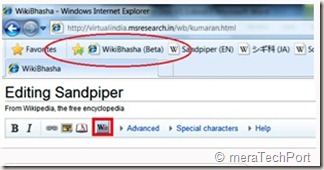
3. Please save your changes and reload your page to see the script added to your profile. You should see WikiBhasha in the left side as a menu item, and on Edit page as a button (as below):


wikibhashawidget1


wikibhashawidget2


Download the WikiBhasha beta User Guide from here.


Take WikiBhasha beta for a test drive by clicking on the install link below.


Install - Click here to install WikiBhasha beta


For FAQs, installation instruction details, user guide, discussion, feedback, suggestions etc please check -


http://www.wikibhasha.org/index.htm


(H/T to Hardik )


EDIT: Also check Enhancing Multilingual Content in Wikipedia


“Wikipedia has become one of the world’s largest and perhaps most powerful information repositories. But it is heavily English-centric.


Making Wikipedia more multilingual inspired a Microsoft Research India team to develop a tool called WikiBhasha, which was launched Oct. 18. WikiBhasha—“Wiki,” signifying its community-oriented approach; “Bhasha,” a Sanskrit word meaning “language”—features a content-creation platform that combines linguistic services, such as machine translation, with a Wikipedia-friendly content editor. Everyday users in countries around the world, as well as language enthusiasts, can use WikiBhasha to adapt English-language Wikipedia articles for local languages. Along the way, they can create new local content to expand the article they have translated.


WikiBhasha users also can create new articles from scratch. And in time, the tool could help convert articles in languages other than English into local languages.”

Tuesday, March 09, 2010

The Answers Windows Live Forums now moved to new look Windows Live Solution Center

Microsoft has moved its Answers Windows Live Forums category to the new look Windows Live Solution Center 

answewlscz

Earlier Windows Live Solution Center (WLSC) provided solutions to only Hotmail related queries but now its offering to all the Windows Live products. (Click on image to enalrge)

WLSC12 Click on image to enalrge


Windows Live Solution Center, a Community for Windows Live products and services where you can find Microsoft Certified Solutions. Post your own questions in the forums, or help others by providing your answers.

And now For Microsoft Answers has communities for Windows, Microsoft Office, and Microsoft Security Essentials.


Sunday, December 20, 2009

Access Microsoft Forums with newsreader using Forums NNTP Bridge

If you are one of those who likes to be participating in various Online Microsoft Forums like MSDN, TechNet, Answers etc then here’s a nice way to interact with Microsoft Forums using NNTP readers connecting them via Microsoft Forums NNTP Bridge from your desktop. If you do not like to connect different Microsoft Forums using web interface then this is the best method where you will have access to hundreds of Microsoft Forums from your NNTP Newsreader. This is very convenient where you can read and write posts offline from your desktop.

This can be done by using Microsoft Forums NNTP Bridge Beta December release which is made available on Connect. Only registered Connect members can get it from here. From the link one can also find out more about the bridge.(Update: direct connect link: https://connect.microsoft.com/site/sitehome.aspx?SiteID=927 )

“The NNTP Bridge Beta is a small client application that exists alongside your newsreader that allows you read/write access to popular Microsoft forums such as the Answers, MSDN and TechNet forums. It’s designed to allow you to download current forum messages into the newsreader of your choice, respond in an offline scenario if you so choose, and upload responses.”

Now let us see how to use our NNTP reader to access Microsoft Forums-

To use the bridge, users need a current forums profile which the Users of Microsoft Forum will already have and ensure you have selected “Use NNTP Bridge” in the forums setting page. So just sign-in into any of the Microsoft Forums, click on My settings-

Forum1

and check the “Use NNTP Bridge” in the settings page.

Forum2

And then click on Submit to save the changes.

Now from the Connect link download the December bits of Microsoft Forums NNTP Bridge beta. Unzip and run setup.exe , Accept the license agreement and follow the instructions to complete the setup.

NNTPbrdg1z

Now once its installed, you’ll find a shortcut under Microsoft Community Tools to run this application. Run it.

NNTPbrdg2a

Click on Start to run the NNTP Bridge.

NNTPbrdg2z

It will prompt you for Windows Live ID Credentials, sign-in with your LiveID with which you used to sign-in to the Microsoft Forums.

NNTPbrdg4z

if you click on settings tab you can see them already filled up.

NNTPbrdg3z

Now once you sign-in, the server is running

NNTPbrdg6z

Minimize it .

Now we will configure our Newsreader. I am using Windows Live Mail for this -

Click on the Newsgroups to open it

NNTPbrdgLM0

Click on ‘Add newsgroup account’ to add a new group and follow the instructions -

NNTPbrdgLM0a

Enter your name , click Next

NNTPbrdgLM2

When it asks for your NNTP server name give 127.0.0.1 and port as 119 if required, click Next

NNTPbrdgLM3

It will start the process of connecting to server

NNTPbrdgLM4

After some time , it will ask you to view the list of available newsgroups, click yes

NNTPbrdgLM5z

It will start downloading all the lists available, this may take some time as it downloads more than 2000 list names of Microsoft Forums in all languages

NNTPbrdgLM6az

So now you can see the complete list of Microsoft Forums available

NNTPbrdgLM7z

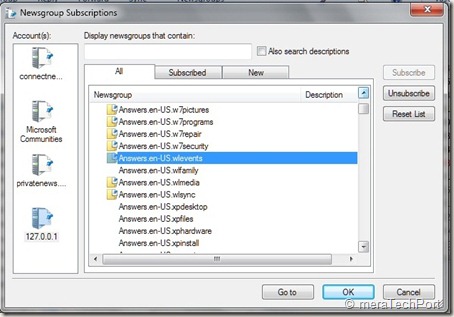
From this you can subscribe to the Forums , you are interested in, from Answers, TechNet, MSDN ….by selecting and subscribing
NNTPbrdgLM8z

Once done you can synchronize, read , post to the Forum .

NNTPbrdgLM10z

That’s all, so whenever you want to access Microsoft Forums using Newsreader , start the NNTP Bridge first.

Some Q & A -

Q: Which NNTP clients does the Microsoft Forums NNTP Bridge Client Beta support?

A: Our priority and effort for support will be the following clients in Windows 7 OS:

Microsoft Outlook Express
Microsoft Windows Mail
Microsoft Windows Live Mail

Q: Which languages are supported in this release of the Microsoft Forums NNTP Bridge Client Beta?

A: The NNTP Bridge Beta supports posting in the same languages supported by the Microsoft forums: English, Spanish, French, German, Italian, Russian, Czech, Japanese, Traditional Chinese, Simplified Chinese, Korean, Portuguese-Brazilian.

Q: Which newsreaders have been specifically tested for use with the Microsoft Forums NNTP Bridge Client Beta?

A: The NNTP Bridge Beta has been designed to work with any newsreader. It’s been specifically tested for use with Outlook Express, Windows Mail, and Windows Live Mail.

Previous users of the bridge should ensure they have done the following when updating to the most current version.

· Uninstall previous beta installations

· After installing the most current update, re subscribe to all of the previously subscribed groups

This December NNTP Bridge Beta Update dramatically improved stability and robustness of the connection. As you know its still work in progress so there may be some issues about which you can provide feedback.

So you should also go through the User guide, FAQ and ReadMe at the Connect site for additional information.

Saturday, October 31, 2009

Windows 7 Launch Party in your City

As you know Windows 7 had a Global Launch on 22nd Oct. and all are too excited about it. Many of you want to know more about this New Operating System. MeraWindows invites you to the Community launch party in your City. Look out for the community party in your city and the dates below and register for the event-

MWz (Click to enlarge)

MWzz

Get the venue for the party in your city and more details at http://launch.merawindows.com

This community event is conducted by merawindows.com

Wednesday, April 15, 2009

Windows 7 Day – Get your Laptops powered by Windows 7 Beta

Golden Opportunity for those who want to try Windows 7 Beta and get their laptops loaded with Windows 7 Beta for Free.  The South Asia MVP Blog has just posted about it:  India’s Own Bootcamp: Windows 7 Day

On Saturday, 18th April 2009, several User Groups in India would host Windows 7 bootcamp event.Windows 7 Day

Windows 7 Beta is attracting a lot of buzz recently, and here is your chance to dive in the same. Attend the one-day workshop to gear up on all the necessary skills to get started on Windows 7 efficiently.

  • Walk in with your laptops and get them powered with Windows 7
  • Participate in the parallel sessions running
  • Even if you are not carrying your laptops, feel free to attend sessions
  • Lot of surprises await you!

Gurgaon (Hosts: Delhi IT Pro): Register here

Mumbai (Hosts: Mumbai IT Pro): Register here

Pune (Hosts: Pune User Group): Register here

Bangalore (Hosts: Bangalore IT Pro): Register here

Chennai (Hosts: Chennai IT Pro)

Siliguri (Hosts WindowsSupport)

Hyderabad (Hosts: Hyderabad Techies)

Registration for the event is free.

Please obtain your own Product Key by visiting: http://www.microsoft.com/windows/windows-7/beta-download.aspx


So Hurry Up, Grab this Chance and Experience what the World is talking About- Windows 7

(Source: India’s Own Bootcamp: Windows 7 Day )

EDIT: I have added few more User Group cities to the above list. Also this Windows 7 Day is getting lots of attention across blog world. Check this post also Windows 7 Day flows across the blog-o-sphere


TwitThis


Monday, April 06, 2009

Windows7 Swag

I am member of Microsoft Connect and do participate in testing various Microsoft products. At present I am involved in testing Windows 7 Beta as one of the main products along with some others at Connect.

So we regularly have lots of Live chats and Live meetings with Microsoft Products Team members. This is the best part, where else can one have the opportunity to interact with these experts who are involved in developing such great products. During such chats we discuss various queries, suggestions and all these are answered by these Products Experts.

Recently during one of such Windows7 Live chats,  I had won a prize for the ‘Best Suggestion’ . From time to time one gets goodies for “Best suggestions’ , ‘Best Question’ etc put up during the Live Chat. So its all fun mixed with Experts talk. And last week I received the Windows7 Swag. They sent a Windows7 USB Aquarium, Bobble Pen and a Notepad. Here’s a screenshot :

IMG_0887z1

Thank You Windows 7 !!!


TwitThis


Tuesday, December 16, 2008

‘Microsoft Answers’- Forum for Mainstream Microsoft Consumer launched

Ans2 Microsoft has launched a web-based support forum Microsoft Answers for the mainstream Microsoft Consumers. Initially it will focus on Windows Vista. It is easy-to-use, accessible online support, as its for Mainstream customers, so these users will find easy to find and search the contents. Microsoft Answers will make it much simpler for users to ask for help and advice in their own words to get answers to those questions in everyday, simple language that these consumers can easily understand. This will help a lot for mainstream consumers such as Home users, an average PC user who just want his query resolved without any technical jargons.

Ans1

Wednesday, August 20, 2008

WindowsLive.com with Community content

Recently WindowsLive.com website has been re-launched with cool new look and lots of great contents . The revamped windowsLive.com was launched on 4th Aug.The site has a better and cleaner look on the lines of Windows.com and Windowsmobile.com. Not only looks but the new site has lots of other contents contributed by the members. So its the community members creating much of the site’s content showing how they are using various Windows Live services. They are sharing their experience, tips, stories, How-Tos about various Live services. Its providing customers a voice. So its a community driven site.

1winlivedotcom

This new blogger community is called the Clubhouse which is integrated within WindowsLive.com. It pulls content directly from community members Windows Live Space. The members post to their Space and tag with the appropriate tags.

3winlivedotcom

The community decides what content goes up on WindowsLive.com as it votes and rates the content created by members and content. So a member gets various Clubhouse badges according to his points.

4winlivedotcom

You can find out more details about how this community was built.Those interested in contributing  can join the Windows Live Clubhouse by requesting the access.

Each member whose content gets pulled from their Windows Live Space for WindowsLive.com,  a special page is created to highlight that person and their contents. I am a Charter member and my posts from my Live Space which was started specifically for this is updated to bring in any new content to Clubhouse.

5winlivedotcom

You can know these bloggers and see what they are posting.

6winlivedotcom

At the new WindowsLive.com people can explore different Windows Live services and applications. There are separate pages for each Windows Live Product highlighting what the product is all about. The site is pleasure to explore with its clean looks. I specially like the touch given to it by hand drawn sketches at various places. Its fun to explore.

7winlivedotcom


2winlivedotcom 

Check out Now the cool new WindowsLive.com and its community driven content providing customers a voice!

Monday, June 09, 2008

Visualize Microsoft online community activity in fun ways

Want to check what’s happening at MSDN and TechNet Community or other Microsoft Technical Communities or at Channel9 Communities in a Fun way? Then you have to check out these cool new Silverlight Apps that visualize online community activity in fun and interesting ways.

You can check them at http://microsoftcommunities.com/

MScommun

Ticker - Lines of thought scroll across the screen like a news wire or stock ticker. Find new ideas and links to cool stuff on MSDN and TechNet.

MSCommun1

Orbs - Orbs represent threads that pop in and jostle for your attention. The movement of the orbs can be hypnotic and gives you insight into activities of Microsoft Technical community.

MSCommun2

Anemone - Media associated with tags gently wave and clamber for your attention. The more media associated with a tag, the longer the mesmerizing tendrils of squares. See how tags are associated when the same media overlaps. Check it out  to see what's floating around the community. Anemone will be coming soon on June11.

MSCommun3

These are Silverlight 2 Beta 2 apps, so download the new beta, to try them out. Thanks John!

Friday, May 30, 2008

Join a new Windows Live user community

WLcr If you love to chat on Windows Live Messenger, use Windows Live Writer to post to your Windows Live Spaces page and post photos from Windows Live Photo Gallery or if you love to talk about various Live services or want to show the world what amazing things you can do with Windows Live then there's just the right community looking for you.

Windows Live is looking for people to share their stories, tips or tricks, or product reviews of Windows Live with others. You can start by taking this quick survey .

Source:Join a new Windows Live user community.

Monday, May 19, 2008

MeraWindows Announces Review Contest

mwrzMeraWindows - Microsoft Windows Community for India has come up with another contest : Review contest, where one has to write a review on Windows Vista SP1, Windows XP SP3 , Internet Explorer Beta1. There are cool prizes to be won. For more details check MeraWindows Review Contest