Showing posts with label Twitter. Show all posts

Thursday, March 20, 2014

Remember your First Tweet? Find & Celebrate with Twitter’s 8th Birthday

Twitter had already provided option to its users to download their Twitter archive. As Twitter celebrates its 8th Birthday, tomorrow on 21st March its taking a look at some of the first Tweets.

Here’s a selection of some memorable first Tweets —

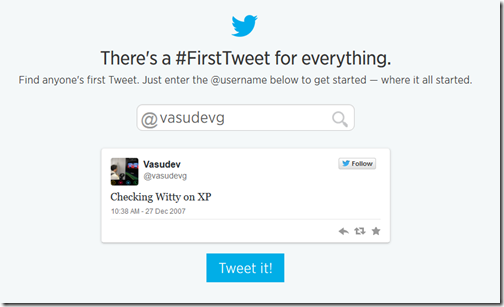
And not only this, you can celebrate your #FirstTweet, too.

“Using this Tweet tool, you can look back to find your very first Tweet — or for that matter, anyone else’s. Just type in your @username, or that of anyone — your best pal, favorite comedian, a star or a president.” And this can be tweeted too.

“Celebrate first Tweets together by using the hashtag #FirstTweet.”

MyFirstTweet

So what are you waiting for, remember your first tweet & tweet it to celebrate Twitter’s Birthday.

(Source)

Wednesday, June 27, 2012

MetroTwit comes to Windows 8 Store

Popular twitter client MetroTwit has now been made available for Windows 8 RP. Its available in Windows 8 Store.

To install this, Open Windows 8 Store and if MetroTwit not shown in New apps, just search by choosing ‘Store’ and it’ll be listed.

Screenshot (63)z

Click on it to open its Install page and click on Install

Screenshot (64)

It’ll start the Install process & you can see at top right the message of Installing… and then Installed message.

Screenshot (65)z

Screenshot (66)z

And you can run it from its tile on the StartScreen

Screenshot (67)

Screenshot (70)

Its still a Preview, so might find some glitches. You can send reviews, feedback from the Windows 8 Store.

Saturday, March 17, 2012

Twitter adds more Indian cities for trend locations and also few more countries

Now Twitter has added more Indian cities for Trend locations. Earlier apart from India as a country and Mumbai as a City were the options. Now it has Ahmadabad, Chennai, Hyderabad, Bangalore Delhi, Mumbai

twitterIndiatrend

Also it has added few countries like Pakistan has been added Check the old Countries list

twtIndOLD

And the new one -

countrieslistnew

Saturday, December 10, 2011

New Twitter provides Enhanced Profile Pages for Brands !

As you know the new version of twitter has been in talks since its release. Twitter has been providing nice features for its regular users. Now its helping Brands to add Brand values via twitter !

Twitter is introducing enhanced profile pages that help marketers create an even more compelling destination on Twitter for their brands.

Twitter is providing the Brands profile page to make an impression with a large header image for displaying their logo, tagline, and any other visuals.

“The Brands can also control the message visitors see when they first come to your profile page by promoting a Tweet to the top of your page’s timeline. This Tweet helps you highlight your most engaging and important content and better connect with your target audience. The Promoted Tweet on your profile page will appear auto-expanded so that visitors to your page can instantly see the photo or video content that you link to from your Tweet.”

This enhanced Profile page and the Promoted Tweet are both free of charge and publicly accessible for the whole world to see.

Here are some examples of various Brands Profile Pages - 

twtbing

twtcola

twtpepsi

twtdell

At present twitter has launched the new Enhanced Profile pages exclusively with 21 advertising partners and select charities and individuals.

@AmericanExpress, @BestBuy, @bing, @chevrolet, @CocaCola, @Dell, @DisneyPixar, @generalelectric, @Heineken, @HP, @intel, @JetBlue, @Kia, @McDonalds, @nikebasketball, @NYSE_Euronext, Paramount Pictures' Mission: Impossible – @GhostProtocol, @pepsi, @Staples, @subwayfreshbuzz, and @VerizonWireless.

The new Enhancement only visible in New version of Twitter. So this is what it meant when it said - Let your brand take flight.

(Source)

Using new #hashtag and @mention buttons of New Twitter

Recently Twitter did a refresh to their Tweet and Follow Buttons and now after the release of the New Twitter they have introduced - #hashtag button and @mention button.

“The new #hashtag button tells your visitors there’s an interesting conversation happening on Twitter, and lets them join in with just one click. The @mention button encourages visitors to Tweet to your account, driving public conversation directly from your website.”

So to get started and configure your own button experiences check out the new Twitter Buttons website.

buttonchoice

Select the Button you want , configure them, copy and paste the generated code

For example I have put a #Hashtag Button

And a @mention button

So its up to you, how and where to put to use these buttons. many new features are being added to the New twitter, So stay tuned !!

Friday, December 09, 2011

Keyboard Shortcuts for the New twitter

The new twitter has been rolling out to all since yesterday. Some new features like Home, Connect, Discover etc have been added. Check the new Keyboard Shortcuts with the earlier ones listed here.

kbscutsnewtwitter

The New twitter will be rolling out to all, in case if you haven’t got the new twitter. You can check up about the New twitter here.

(Source: twitter.com)

Embedding tweet option in the New twitter

Many times in your blog posts, you want to post the tweets screenshot. So instead of Screenshot which are static, how about embedding them in blog post so that the links etc within tweets are clickable. Earlier we had seen Embed tweets in your blog with Blackbird Pie tool from twitter which made use of Blackbird Pie tool from twitter.Also we talked about Blackbird Pie Twitter Plugin for Live Writer in the same post.

Now the New twitter released yesterday provides an option to embed tweet. Let us see how to get the code to embed the tweet.

“The Embedded Tweet feature allows websites to generate copy and paste-able HTML markup to render a Tweet on any third-party website. This markup presents a Tweet in an attractive (and display guidelines compliant) way, and automatically sets up Web Intents so that viewers of the Tweet may retweet, reply, favorite, and follow easily from the rendered view.”

Just click on the ‘Open’ to get the Detail view.

twitterembed

twitterembed1

Click on ‘Details’ to get ‘Embed this tweet’

twitterembed2

Click on ‘Embed this tweet’ to get the code

twitterembed3

The resulting dialog will give you some customization options, as well as embeddable markup which you should copy and paste into the page you wish to embed the Tweet into.

The copy & paste code can be rendered in the various formats-

HTML- Markup which may be copied and pasted directly into an HTML page to render the embedded Tweet.

Shortcodes- A shorthand notation for rendering the embedded Tweet on platforms which support Tweet shortcodes, such as wordpress.com

Link- The URL of the Tweet

So here I’m embedding the code (in the source section of Windows Live Writer) but as can be seen, its not properly rendering though its showing the tweet. (In IE9 its not showing the ‘Follow’ button, ‘Reply’,’Retweet’ and ‘Favorite’ links  and also the DP and its links. While its showing correctly in Firefox)

Those using WordPress blog can try the shortcode method.

More details for developers here.
Thursday, December 08, 2011

Twitter Redesigned ! New version of twitter arrives !!

Twitter is introducing a new version of twitter ! This new design will be both on Twitter.com and mobile phones. TweetDeck is also being updated to make it consistent with this new version.

twtNew

twitternewiconsThe above shown new tabs are being added. The new design will be rolling out in coming weeks. But one can see the new design immediately on mobile.twitter.com, Twitter for iPhone, and Twitter for Android. Twitter for iPad is not yet available.

Twitter says its just the Start, now they have a framework in place which will enable them to quickly build to help users connect with whatever is meaningful to them.

For more detailed info please check http://fly.twitter.com/

TIP: To get access to the new web interface, download the iPhone or Android application and log-in with your account. (Thanks twittermedia for the tip)

New interface seen on iOS device -

newiOStwt1

newiOStwt2

newiOStwt3

(Source: twitter blog)

UPDATE:09/12/2011 – Here are some screenshots of new twitter interface as my account get updated.

twtNew02

twtconnect

twtdiscover1

twtNew3

Follow me on twitter @vasudevg

Tuesday, November 15, 2011

Visualization of 11/11/11 data on Twitter


Last Friday, it was November 11, 2011, 11/11/11 and many of us on twitter had tweeted this rare date occurrence mentioning in some way or the other.

“This clip is a visualization of all the Tweets mentioning 11:11 on 11.11.11. Each “1” is a location that moves with the conversation on Twitter. Their scale varies depending on the volume of Tweets posted from the location they represent. You can see the main wave move from right to left, and then a second one that occurred at 11 p.m. around the world.”

At 11:11:11 on 11/11/11 I too had tweeted about it with a pic.

111111large

(Source:Once in a lifetime)

Sunday, November 13, 2011

Firefox with Twitter

Earlier we had seen Microsoft teaming up with Mozilla to bring Firefox with Bing, there’s Firefox with twitter also. Using this version you can Search for people and topics on Twitter, directly from the Firefox Address Bar using @ and # . Thus it takes directly to the user’s profile page or to a Twitter search result for username, hashtags respectively. Also you can search for any keyword on Twitter through the Search Bar by selecting Twitter in the drop-down.

FFtwt2z

FFtwt1

FFtwt3z

You can get Firefox with Twitter from - http://firefox.twitter.com/

Thursday, November 10, 2011

Activity, @username tabs - New features on twitter

New features of twitter - Activity and @username which have been in news since some time were added to my account today.

actusername

Mentions tab has been replaced by @username. As @username timeline includes your @mentions, it also provides Tweets marked as Favorites, the latest Retweets (of your Tweets), and your new Followers. It also have the choice of showing only the mentions.

usernametab

While the Activity tab provides Favorites, follows, retweets, and more by people you follow. So we can know what our followers are doing with their new follows etc.

acttab1

Some of you might still not be seeing these features as twitter is rolling out these new features starting with a small percentage of users. You can send feedback about these features by sending a Tweet to @feedback with the hashtag #Activity.

Follow me on twitter @vasudevg

Wednesday, September 14, 2011

Twitter Hindi Edition launched on Hindi Day

As was blogged earlier Twitter in Hindi coming soon , today on 14th Sep being Hindi Day (Hindi Diwas), Twitter has launched its Hindi edition. You can access it at

http://twitter.com/?lang=hi

twitHiz

On signing in you get

twitHiz1

(Click on the image to see enlarged ver of image)

twitHiz1

As you can see all the captions etc are in Hindi but one cant tweet in Hindi yet.Might be work in progress. May be in future twitter may add this else one can of course tweet in Hindi using this - Tweet, chat, do Presentations in Hindi and other Indian languages with Microsoft Indic Language Input Tool

twi

UPDATE (15/0911) : Now the twitter has added the newly supported languages at the bottom of Homepage including Hindi

twtHindi

“Today, we’re increasing Twitter’s reach by launching in five new languages. Twitter is now available in Simplified and Traditional Chinese, Hindi, Tagalog and Malay…. Twitter now fully supports 17 languages..”

Friday, September 09, 2011

Twitter in Hindi coming soon

twiTwitter is launching its Hindi service in coming weeks. Apart from Hindi it’ll also launch Filipino, Malay and Simplified and Traditional Chinese language support.

Twitter and Facebook both are very popular in India and starting its Hindi service will surely give a boost to twitter in India. Facebook already supports various Indian languages.

India has been important to twitter as in last year Twitter Local trends included India and Mumbai . Also it has an official twitter India account @twi (though @twi hasn’t tweeted yet about the twitter Hindi Service being launched.)

(Source: One hundred million voices )

Though if you want to tweet in Hindi or other Indian languages, you can do it now - Tweet, chat, do Presentations in Hindi and other Indian languages with Microsoft Indic Language Input Tool

Wednesday, September 07, 2011

Bing and twitter renew real-time search deal announcing it as tweets

Bing and twitter announced about their real-time search deal renewal in a twitter chat today.

Here are tweets between them as it happened in conversation view -

IMG_0193z


Let us see them as separate timeline-

1

2

3

Friday, June 10, 2011

Query Twitter directly in Excel 2010 with Microsoft Analytics for Twitter

Microsoft Analytics for Twitter allows users to search Twitter and get dashboard views on Tweet statistics inside Microsoft® Office Excel 2010.

With this FREE add-in, you can:

  • Perform up to 5 parallel Twitter Searches (limited to 1500 results per query per day).
  • Drive ad-hoc analysis of tweets by day, by hour, by tweeters, by #hashtags and @mentions.
  • Customize your views (using slicers, DAX formulas or reference tables).

exceltwitter3z

Microsoft Analytics for Twitter allows users to query Twitter directly in Microsoft® Office Excel 2010. Utilizing the free PowerPivot Excel Add-in users can perform their own analysis such as who are the top Tweeters, what #hashtags are they using and do they have a positive or negative tweet tone. Sample code, used to create this application, is included as a sample and how-to.

Works only with the latest versions of Microsoft Excel 2010 and requires Microsoft PowerPivot for Excel 2010.


Download Microsoft Analytics for Twitter

Thursday, June 02, 2011

Twitter introduces its photo and video sharing service and a new version of search

Soon you’ll be easily uploading and sharing your photos on Twitter . Twitter will be releasing a feature to upload a photo and attach it to your Tweet right from Twitter.com. Also we can soon be able to easily do this from all of twitter’s official mobile apps. Twitter has partnered with Photobucket for hosting these photos behind the scenes.

tweetpicvid

Apart from that twitter is starting to roll out a completely new version of Twitter search which will not only deliver more relevant Tweets when you search for something or click on a trending topic, but it will also show you related photos and videos, right there on the results page

Check out the official video demoing the same-

Twitter search + Photo, video upload feature


(Source:twitter blog)