Showing posts with label Sysinternals. Show all posts

Friday, July 09, 2010

Ask Mark Russinovich Anything... LIVE! Recorded Video

Check out this video where Charles Torre  of Channel 9 sat down with Mark Russinovich to answer live questions from the Tweetosphere and studio audience.

Recorded live as part of Channel 9 Live at Tech.Ed North America 2010.


ch9Mark


Ch9Live at Tech.Ed NA 2010 - Ask Mark Russinovich Anything... LIVE!


Wednesday, May 19, 2010

RAMMap – A new Sysinternals tool for advanced physical memory usage analysis

Mark Russinovich has come up with a new Sysinternals tool, RAMMap v1.0 . RAMMap is an advanced physical memory usage analysis tool.

Have you ever wondered exactly how Windows is assigning physical memory, how much file data is cached in RAM, or how much RAM is used by the kernel and device drivers? RAMMap makes answering those questions easy. RAMMap is an advanced physical memory usage analysis utility for Windows Vista and higher. It presents usage information in different ways on its several different tabs:

  • Use Counts: usage summary by type and paging list
  • Processes: process working set sizes
  • Priority Summary: prioritized standby list sizes
  • Physical Pages: per-page use for all physical memory
  • Physical Ranges: physical memory addresses
  • File Summary: file data in RAM by file
  • File Details: individual physical pages by file


Use RAMMap to gain understanding of the way Windows manages memory, to analyze application memory usage, or to answer specific questions about how RAM is being allocated. RAMMap’s refresh feature enables you to update the display and it includes support for saving and loading memory snapshots.
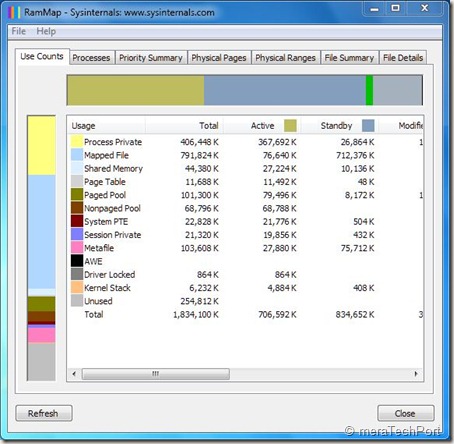
 

RamMap

Download it from here.

You can also run it Live from -

Run RAMMap now from Live.Sysinternals.com

Source : http://technet.microsoft.com/en-us/sysinternals/ff700229.aspx


Thursday, May 29, 2008

Sysinternals Live - Execute Sysinternals Tools directly from the Web

Winsysinternal LOGO Many of you must have used at some point or other various Sysinternals Tools to troubleshoot or diagnose Windows  Systems and applications. It was also made available as a Sysinternals Suite which has the Sysinternals Troubleshooting Utilities rolled into a single Suite of tools.

Now comes the Sysinternals Live - It is service that enables you to execute Sysinternals tools directly from the Web without hunting for and manually downloading them. Simply enter a tool's Sysinternals Live path into Windows Explorer or a command prompt as \\live.sysinternals.com\tools\<toolname> or view the entire Sysinternals Live tools directory in a browser at http://live.sysinternals.com. The beta of Sysinternals Live was announced today.

This will be very useful. As there will not be any more separate downloads and always the latest version will be available.

(Source)