Showing posts with label Outlook 2007. Show all posts

Wednesday, August 20, 2008

Email Prioritizer

This is another cool project from Microsoft Office labs. Email Prioritizer is an add-in for Microsoft Office Outlook 2007 (running on Exchange Server) that helps you manage email overload.It provides a “do not disturb” button that temporarily pauses new email arrival, and it prioritizes email with a 0-3 star rating system to help you focus on the email messages that are most important to you.

EmailPrioritizerSmall

Check here for more details and download. This prototype requires Outlook 2007 running on Exchange Server.

Friday, July 11, 2008

Defrost Microsoft Outlook

Some of the Users of Outlook have experienced freezing or hanging of Outlook 2007 SP1 some times. Danielissimo has released Defrost Outlook on CodePlex to help such cases. Try this out until formal fix is released from Microsoft.

You can also send what makes your outlook hang (messages,ical,vcal,vcard etc) to defrostoutlook at gmail dot com

Download Defrost Outlook from here

(Source:Office Development Projects from CodePlex)

Wednesday, April 23, 2008

New templates for out of office messages

Check out these new templates for out of office messages for Outlook2007.

To use, simply download and save the templates to your Drafts folder in Outlook 2007, and then copy the contents to your Out of Office message whenever you go away. Don't forget to add your own details, and feel free to change the colors and fonts.

Out of office reply (formal)

ooorepl1


Ouf of office reply (informal) - add your own picture, if you like!

ooorepl2


If you are new to this , wants some assistance then see how to use the Out of Office Assistant in Outlook 2007.

Saturday, March 29, 2008

Outlook on Desktop

Check out this cool software outlook on the desktop, Very useful for those who use calendars to organize their daily lives and want it visible in plain sight nearly all the time. So how about placing your Outlook right on the desktop? This program will put the Microsoft Outlook Calendaring system right on your desktop and it stays there all the time in plain sight so you can always see what's upcoming. And it's not just your calendar's view but your actual calendar, that is you get all it's functionality, as direct editing, drag and drop of files etc.

OEondesk1Nrz


OEondesk3rz


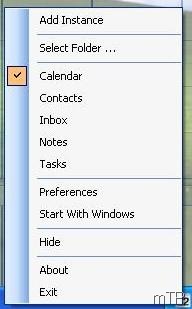
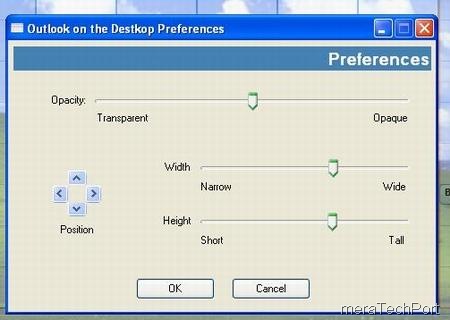
And it has options to adjust its size, opacity and position on the desktop. And also you can switch between calendar, inbox, contacts, tasks and notes views. And you can have multiple instances pinned to desktop. You get a tray Icon showing the day of the month which can be used to configure it.OEondesk2rz

Requirements:

Windows 2000 or higher
Microsoft Outlook 2000 SR-1 or higher
Microsoft .NET Framework 2.0
(The setup program will download and install it for you if you don't have it)


Download it for free from here.

Wednesday, September 12, 2007

OutSync-Sync Facebook Photos with Outlook on Windows Mobile

"OutSync is a free Windows application that syncs photos of your Facebook friends with matching contacts in Microsoft Outlook. It allows you to select which contacts are updated. So you can update all contacts at once or just a few at a time. OutSync is for Windows Mobile users. OutSync is compatible with Windows XP, Vista and Server 2003. It requires Outlook 2003 or 2007. Updated contacts are automatically synced with Windows Mobile devices by Exchange server or ActiveSync. Thus new and fun photos appear during calls and other places where contacts are used."
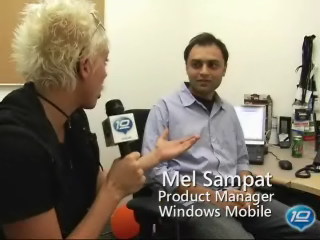
Its written by Mel Sampat of Windows Mobile team.
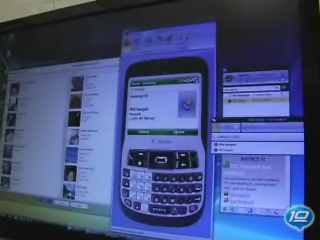
Also check out this cool video "Sync your Facebook contacts with Outlook (and Windows Mobile)" on 10 to find out other feature and demo of OutSync.Setup
Requirements:
Microsoft Outlook 2003 or 2007
.NET Framework v3.0 (required for Windows XP or earlier)

Step by Step
Download and install OutSync.msi.
Launch OutSync from the Start Menu. Initial startup may take 1-2 minutes, please be patient.
Login to Facebook from within OutSync and wait until contacts are matched.
[Optional] Uncheck contacts you don't want to sync.
Press the Sync button to update selected Outlook contacts from Facebook.

Tips and Tricks
Hover your mouse over a contact to view their Facebook status.
Double-click a name in the "Matched Contacts" list to open their Outlook contact card.
Download it from here or from the given link at the top.

Monday, August 27, 2007

Configuring Outlook 2007 using Outlook Connector

You must already be knowing about Office Outlook Connector which came out of beta and was made available for download some days back. I had also posted about it here, from which you can get the download link for downloading it. Outlook Connector help to access and manage your Windows Live Hotmail or Office Live Mail accounts, including e-mail messages and contacts using Outlook 2003 or Outlook 2007.

Sometimes you get stuck while configuring Outlook while using mail accounts with customised domain names which are powered by Windows Live ID. Here is the easy way to access such mail using Outlook Connector.

I will configure a mail account having @vista.aero domain name about which I had posted here.
First download and install the Outlook Connector from the given link from here.
After this has been installed, a menu option 'Outlook Connector' gets added in Outlook 2007From this option , choose 'Add a new Account..." and just fill up the email id and password .That's all, you'll get a message to exit Outlook and restart to make the new account effective. And you can start sending and receiving email easily in outlook 2007 taking advantage of its other options. Check the above given link for what options you can get it for free using outlook Connector.

Wednesday, August 15, 2007

Outlook Connector Final for Windows Live Hotmail released

Microsoft Office Outlook Connector version3, is out of beta with its final ver. released. With Outlook Connector, you can use Outlook 2003 or Outlook 2007 to access and manage your Windows Live Hotmail or Office Live Mail accounts, including e-mail messages and contacts for free! Calendar, tasks and notes can also be accessed and managed in Outlook for accounts with a paid subscription.

Outlook Connector enables you to use your Live Hotmail accounts within Outlook:
  • Read and send your Office Live Mail/Windows Live Hotmail e-mail messages.
  • Manage your Live Mail Contacts.
  • Use advanced options for blocking junk e-mail messages.
  • Manage multiple e-mail accounts in one place.
With a paid subscription, Outlook Connector enables these additional features:
  • Manage, share, and synchronize your Windows Live Calendar in Outlook.
  • Access your Tasks and Notes.
You can download it here.