Showing posts with label Windows Live Hotmail. Show all posts

Friday, January 13, 2012

Hotmail providing Free Hotmail Plus codes to upgrade to Hotmail Plus !

As you know Consumer Electronics Show (CES) 2012 is going on in Vegas (10-13 Jan, 2012) and huge rush of visitors is happening to visit various Exhibitors booths. And the exhibitors are also providing goodies for the visitors at CES. Hotmail is also providing lots of cool prizes for CES visitors. And for those who can not make it to CES, Hotmail is providing 12 month Hotmail Plus codes to upgrade your Hotmail account to Hotmail Plus.  (In short Hotmail Plus provides even more out of Hotmail – Apart from all the cool Free Hotmail features, it provides extras like more storage, no account expiration and no ads in Hotmail or SkyDrive. Hotmail Plus comes for $19.95 / year.)

So Hotmail is providing codes to upgrade your Hotmail account to Hotmail Plus during the CES. So how to get this code?

Just follow https://twitter.com/hotmail Hotmail on twitter as they will be tweeting these codes. Actually it has already started and will continue today also, 13th is the last day at CES.(Pacific time).

HMPluscode

Please note, these are one-time use codes,So if someone activates it before you do, the code will fail for you.The first one to activate it, gets Hotmail Plus.So be alert and keep looking for the tweet on the last day at CES. Here’s a small tip, make sure you are logged into Hotmail account as you enter these codes into page you are taken to provided by the tweet. Smile

HMcodez

And remember these are all one-time use code so whoever enters it first will upgrade to Hotmail Plus else you’ll get this message -

HMcode1z

Get ready and watch for the tweets on the last day 13th of the CES (Pacific Time) as Hotmail Team has promised to provide more codes on the last day also. Try and get lucky to have an Hotmail Plus account for FREE!

Wednesday, October 05, 2011

Hotmail is better than you think.It’s time to give it another look

Hotmail has come a long way over the last decade - with major improvements to speed, spam protection, storage, smartphone availability and security.

Hotmail Listened, Hotmail Learned, Rebuilt the Hotmail from the ground up !

Learn more about just how much the Hotmail has improved at http://aka.ms/Hotmail2011

Tuesday, October 04, 2011

Hotmail App for Android released

The only official Microsoft mobile app for Hotmail that gives you easy access to Hotmail released.

Key features include:
- With push email get messages on your phone without delay
- Synced calendar and contacts
- View your folders in Hotmail, including sub folders
- Send pictures from your phone using Hotmail
- Supports multiple Hotmail accounts
- Send, receive and view attachments

ss-320-1-1

ss-480-2-0

Get it from Android market

Wednesday, March 09, 2011

FAQs: Migrating Live@edu domains from Hotmail to Outlook Live

liveatedu-logo

This document provides answers to frequently asked questions about migrating Live@edu domains from Hotmail to Outlook Live and its benefits.

The contents are -

  • Benefits of migrating a Live@edu domain from Hotmail to Outlook Live
  • What’s migrated from Hotmail to Outlook Live
  • IT administrator experience
  • Student experience
  • Ensuring a successful migration
  • Additional resources and support
  • Walkthrough of the Hotmail to Outlook Live migration process


You can download the document from here .  (.docx format ,size:1.2MB)

You can find more info on Live@edu at  http://www.microsoft.com/liveatedu/free-email-accounts.aspx

Tuesday, March 08, 2011

How to know on which server your Hotmail account resides?

Reading the title, the first thing that comes to mind is, what’s the use of finding out on which server your Hotmail account resides.

Windows Live Hotmail hosts many servers and the user’s mail accounts are spread across these different servers. The Hotmail team updates its users; informing about any server problem or scheduled maintenance mentioning the server name that is currently under maintenance or experiencing temporary problem. So you might want to know if your account is on that server.

Let us see how to find the server name that hosts your account.

Sign-in to your Hotmail account. If you are taken to Windows Live Home Page then Hover your mouse over Inbox option under Hotmail or ‘Go to Inbox’ and at the bottom of the browser in status bar, it’ll show the server URL .

Or if you directly goto Inbox when you sign-in , then Hover your mouse over Inbox and it’ll show the server URL at bottom of the browser in status bar. If it doesn’t show then  hover over any other Folders like ‘New Folder’. All these of course if you can login and not encountering any errors.

So in the Status bar you’ll see the server URL something like -

http://sn144w.snt144.mail.live.com/mail/……………

Here the server name is snt144.

HMserverInbxz

or


HMservername2z


In the above image the server name is snt115.

Also you can check the current Hotmail Server Status on which your account resides by signing in here 

You’ll see this info -

HMserver3rdlinkz

So knowing about the Server name and status will help you in troubleshooting.

(Source: Windows Live Solution Center )

Wednesday, October 06, 2010

Now Hotmail also gets IE9 jumplist

One of the coolest feature of IE9 is the pinned sites. That is, you can launch your favorite web pages from your task bar with a single click, so the web sites are like any other app with jumplist  on your taskbar. Now web sites are taking advantage of this feature and designing their sites to provide links and even player controls.

When IE9 beta was released ,they had demo examples of Hotmail being pinned to taskbar. But at that time Hotmail jumplist  was not available to users. Now it has been updated and Hotmail also has jumplist. As you can see it includes Inbox, Calendars, Contacts, Send email.

HM pinning to IE9-2z


To pin the Hotmail to your taskbar, Sign-in to  Hotmail, click the Hotmail favicon (icon to the left of the web address in the address bar) and drag it to the taskbar.  Do this while in Inbox, sometimes if you are in Hotmail Home Page, it may not work correctly. Once the icon is dragged to taskbar, Right click on it to get the jumplist. Remember if you have saved the password and when you click the icon later, the Hotmail will open . So its upto you to make Hotmail ‘Remember password ‘ or not.

The same thing when I tried with Gmail, got this - 

GM pinning to IE9z

Gmail not yet taking advantage of this cool feature. May be in future it may also provide it.

Also note that once you pin any site/Hotmail to the taskbar and when you open it, the website icon appears at the top of the browser, so you have easy access to the website home page. The Back and forward buttons also gets the color to match the color of the icon. Very cool !

HM pinning to IE9-1z


GM pinning to IE9-1z

If you haven’t yet installed Internet Explorer 9 Beta yet , get it from Internet Explorer 9 Home

EDIT: As at LiveSide , my friend Kip points out that not all are seeing this yet as the feature is rolling out.

EDIT 16/10/10 : The Hotmail updates have been rolled out now, so you can try out this and many other cool features.

Wednesday, September 29, 2010

Thanks for the Windows Live Hotmail Goodies !!

Few days back I received this beautiful Hotmail Kit shaped in the form of Hotmail logo envelope box, full of Hotmail goodies from the Windows Live Hotmail team !


This was provided for the active participation in the Windows Live Meetings, being enthusiastic about Windows Live, blogging, tweeting and spreading the word in the community. A letter of appreciation from the Windows Live Team was also provided along with these Hotmail goodies that highlights the new features of Windows Live Hotmail.

A big Thanks to the Windows Live Team !!!!

If you haven’t yet tried the new features of Windows Live Hotmail, give it a try or if you don’t have an Hotmail account yet, Find out more  and create an account from http://explore.live.com/windows-live-hotmail    I’m sure you’ll like the New Windows Live Hotmail.

Tuesday, August 17, 2010

New Hotmail allows forwarding messages to any other mail account for FREE- Restrictions removed

As many of you have noticed, the recently upgraded Windows Live Hotmail allows you to forward your Inbox message to any other mail account and this is available to all including free regular accounts. Earlier there were restrictions where one could forward the message only to an email address that ends with hotmail.com, msn.com , live.com or is part of Windows Live Custom Domain. And this was available only for paid accounts of Hotmail Plus.

This is what we used to see in the earlier version of regular Hotmail account -

OldHMFwd

(Click to view larger image)


Now with the New Hotmail this restriction is removed. And you get this -

newHMfwdz


To get to this option, sign-in to  your Windows Live Hotmail, Click on options > More options…  NewHMFwd1

and click on ‘Forward mail to another e-mail account’ to get the ‘Forwarding’ Window and type the mail ID to which it has to be forwarded.

NewHMFwd2

So this is great news for all Hotmail users as this option is made available for all.


Tuesday, July 06, 2010

15 Seconds Feature Videos of New Hotmail Wave4

Check out 15 seconds videos of various cool features of the New Hotmail Wave4. 

NewHotmail1

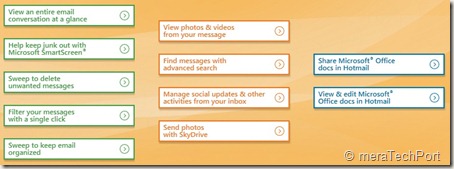
Video shows features such as -

  • Sweep to keep email organized
  • View an entire email conversation at a glance
  • Sweep to delete unwanted messages
  • Filter your messages with a single click
  • Keep junk out with Microsoft SmartScreen
  • View, edit and share Microsoft Office docs in Hotmail
  • View photos and videos from your message
  • Manage social updates and other activities from your Inbox

And many more………………….


NewHotmail2


Check these 15 sec Videos Here


Tuesday, May 25, 2010

Hotmail Wave 4 Vs Gmail – Hotmail allows 10GB of photos and docs per message without stuffing Inbox


HMW4logo

Vs

logo2_thumb[2]

Hotmail Wave 4 has added lots of cool new features, one of them is its attachment size limits. It has made it  very  convenient for attaching large number of images. How large, read it on, you’ll be surprised! 

Suppose you want to email and share lots of pictures. We will compare this scenario in Gmail and then in Hotmail Wave4 -

Gmail has the limit of 25MB so you may have to send multiple mails if you want to send more photos. And when sending so many pictures , you might want to select and remove some of them but its pretty hard to do so in Gmail as it does not have preview.  So all this takes lots of time in Gmail.

And the receiver in Gmail will have the option of basic preview and has to download one at a time.

And if one decides to send it via Buzz, Gmail gives the option of sending upto 1GB of photos in Picasa album but can only share with those contacts.  So this is the story of attaching photos in Gmail .


Now let us look at what can be done with Hotmail wave 4-

Hotmail optimizes the experience with the type of content being sent , such as photos or office docs.

Hotmail wave 4 now has integrated with the Skydrive , so you can send lots and lots of photos, documents or other files in a Single email.

You can send upto 200 files of 50 MB each or 10GB per email can be sent.

Hotmail provides thumbnail previews so one can easily catch a photo you do not want to be included.

It automatically creates a photo album on the Skydrive and sends a link to everyone in the email. So its not filling up everyone’s Inbox.

It works also for documents and other files too. So you can send a Big Power point presentation without any problem.


Here are some of the exclusive screenshots of Hotmail Wave 4 -

HMW4Photos1z


HMW4Photos2z

By default this online Album will be available for 90 days on Skydrive, but you can change the expiration date.

HMW4Photos2z


HMW4Photos3

And all this is demoed in this video, A must watch video -

HVGvdo

Watch the video and decide yourself. I have been using this pre release version of hotmail Wave 4 since some time and more I use it , more I like it.

Now talking of the receiver – The receiver even if he’s on Gmail will get these photos as a great looking preview of photo album which will allow him to view a full screen  slideshow of all the photos or you can download all the original files in a single zipped file.

The received mail seen in Hotmail -

HMW4Photos8z


Even the Gmail user also views it in the neat same format -

HMW4Photos10z


The Slide show the receiver gets, looks stunning with color changing effects -

HMW4Photos11

The best part is the convenience, ease and the beautiful SlideShow.


Friday, May 21, 2010

IM and SMS from the new Hotmail wave 4 integrated chat

HMW4logo
The new Hotmail Wave 4 has fully integrated the Messenger chat into the Inbox making it more efficient. With the new Hotmail you can see your Messenger friend’s status and just click on the name to start a conversation. If you right click on the friend’s name, you can do even more like send a text message to their phone, all this without leaving your Inbox.

HMW4msngr
And if  you have 2 or more conversations going on at once,a new tab gets added to the chat window thus making it easier to keep track of.
HMW4msngr1

 HMW4msngr2
You can also move the chat window anywhere on the screen and can also detach/pop-out -
HMW4msngr5

Hotmail  header  options screenshots -
HMW4msngr3

HMW4msngr4

Check the demo video of the same -
HMvDO


Innovative spam fighting technologies in the New Hotmail wave4

Hotmail's fight against spam has certainly come a long way in the last five years.

SmartScreen is the collective name we use for a cloud-based set of technologies and algorithms that leverage machine learning and artificial intelligence to assign a “spam probability” score to each incoming message. This enables us to filter out over 98% of the spam sent to Hotmail inboxes, blocking 5.5 billion spam messages per day.  Microsoft utilizes SmartScreen across Hotmail, Microsoft Exchange, and Microsoft Forefront, bringing consumers the benefit of business-grade spam protection on Hotmail.”

In the soon to be released Hotmail Wave 4, a number of innovative new spam fighting technologies that will further reduce the amount of spam in Hotmail inbox have been added. Check out this video showing how Hotmail's latest innovations help brings the best spam fighting on the web.


“New spam-fighting innovations include:

  • More advanced IP and content filtering – Hotmail receives over 8 billion messages per day, giving us 8 billion input variables to work with and learn from. Each message we receive further informs SmartScreen’s IP filtering algorithms, making SmartScreen even “smarter.” Because Hotmail is the largest webmail service in the world, it also receives more telemetry on bad IPs than most any other service – either directly or through third parties. This gives our spam filters more opportunity to inform their artificial intelligence than pretty much any other service.
  • Spammer infrastructure detection and destruction – SmartScreen not only blocks spam, it uses “x-ray vision” to see behind the URLs contained in malicious email to the source URLs, which we can then block along with their IPs. This means spammers have to abandon their current infrastructure and pay for new places to hide out. By making it more expensive to continue their business, we are taking away their economic incentive.
  • Time-traveling filters – We can't always identify a new spammer the moment they start sending spam. But once we identify one, we can go back and clean out spam that they’ve already sent to your inbox before you ever see it. We call this a time-traveling filter, because in some sense we are able to go back in time and get rid of the spam even after it's been delivered!
  • Personalized spam filtering – One person’s junk mail is another’s desired piece of mail.  Using artificial intelligence, Hotmail personalizes spam filtering according to the individual preferences of each of the 360+ million customers who use Hotmail, reducing false positives while improving effectiveness at the same time.
  • Tagging – Hotmail tags each message you receive, whether in your inbox or in the Junk folder, to help you understand little bit more about why the message was categorized as it was. For example, if you previously marked messages from a sender as junk, we'll tell you that, or if you use a client email program with Hotmail, we'll tell you when that program has rules that result in moving a particular message to another folder. This gives you more direct control of spam management in your inbox unlike any other service.”

(Source: Inside Windows Live)


The New Hotmail and Messenger in Action Videos - wave4

The New Hotmail (wave4) in action -


The New Messenger in Action -


(Source:http://www.youtube.com/user/TheMicrosoftIndia)


Wednesday, May 19, 2010

View, Share and Edit Office Documents from Hotmail – Cool new feature in Wave4

HMW4logo
The new version of Hotmail has come up with lots of cool features and this one is the coolest feature. The new Hotmail makes it very efficient, easy, convenient to handle Office docs.
As you create a new email, there’s an option provided ‘Office Docs’, click on it to attach any Office Document and send it.
HMDocs1z

HMDocs2z

As one receives an Office document as attachment in the new Hotmail- be it Word, Excel or PowerPoint, one can open and view it online in any popular browser – on a PC or Mac – and even if office is not installed on ones’ PC or if one has an older version. A link will be provided and one has to just open it to view. Thus a seamless integration is provided between Hotmail and the Office Web Apps.
HMDocs4z
And one more thing, if you receive any Office Document, it gets automatically listed under ‘Office docs’ folder in the Quick views.
HMDocs3QuickViewz

You can view Office documents sent to you in the new Hotmail with the same fidelity you’d get if you were viewing it using your Office Application on your PC. This means that if you’re travelling and want to be able to view that PowerPoint presentation or you’re on the road and want to read that Word document, you now get 100 percent full viewing quality even when you’re away from your PC
HMDocs5( Click on picture for enlarged view)


HMDocs5

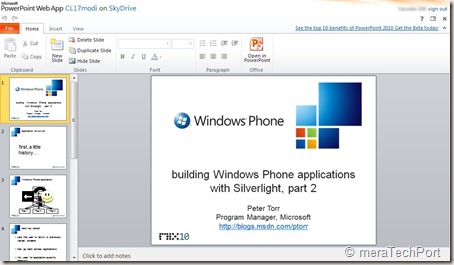
And even you can edit it in browser itself with the Office Web Apps.
HMDocs6


HMDocs6

if you need intensive editing, you can open it in Office application on your PC. When you’re finished, any edits you made to the document on the browser will maintain formatting and any on your PC will be automatically saved back into the cloud where you can then keep the document stored privately or share it with others.
HMDocs7z


Reply with edits to an attachment
Normally, if a friend emailed you a document — like a resume — and asked you to make a few edits, you’d have to spend time downloading, saving, opening, resaving and re-attaching the document. And of course, you would need to make sure your PC had Office installed.
The new Hotmail makes this much easier by letting you edit your friend’s document and reply back — all without leaving Hotmail and even if you don’t have Office installed on your PC.
This makes it one of the coolest feature of the new Hotmail.

Share big attachments
Hotmail users can send up to 200 Office documents of up to 50 MB each — a total of 10 GB — in a single message. The people you send the documents to — regardless of whether they’re on Hotmail, Gmail, Yahoo!
Mail or otherwise — will receive links to where you’ve stored the documents in the cloud (on Windows Live SkyDrive) so that you’re not filling their inboxes. They can click on the links to view the documents in their browsers using the Office Web Apps or download the documents to their local machines — one by one or all together in a single convenient .zip file. And when you send those documents, just like with photos, a private folder is created and only the people that receive
the email will have access.

Work with others
If you’re using the new Hotmail, you can email Office documents to people on other email services (including Gmail and Yahoo! Mail) and they too can view and edit your Office documents in the cloud. Nothing is needed to view, and all they need is a Windows Live ID to edit.

Versioning
And with multiple edited versions of the same document, you can always go back to previous versions thanks to the online file management provided by Windows Live SkyDrive — another key part of transforming Hotmail and Office into a great personal productivity solution.

Collaborative editing in Real time
You can work together on a doc in real time. whatever changes being made by one can be seen instantly so one can work together in real time and stay coordinated using Messenger present within Hotmail
HMDocs8collab

Such features truly makes the new Hotmail, the most efficient email for busy people.
You can view all the above features demoed in this video -
HMvDO