Showing posts with label TechNet. Show all posts

Saturday, December 27, 2014

Post2Beat challenge for Microsoft Forum contributors

If you are a Microsoft Forum contributor, here’s a fun challenge! This is for all those Community Contributors who love to share knowledge with everyone via the Microsoft Forum Posts.

post2beatlogoz

One has to Register for the Post2Beat challenge and maximize Forum Contributions and be a winner.

  • This challenge is open to everyone from India, Nepal and Bangladesh.
  • Microsoft Forums namely MSDN, TechNet, Community, ASP.net and IIS.net are considered for this challenge.
  • Post2Beat is open from Dec 23, 2014 to Jan 22, 2015.
  • One doesn’t have to report about ones Forum points/contribution but just have to register with your Forum Profile. Contributions will be reviewed on the last day of Post2Beat Challenge and winners will be notified via email and also will be announced during South Asia MVP Open Day 2015 (Jan 22-24) at Bangalore.

Please check http://post2beat.sageframe.co/ for registering and other details.

Sunday, August 24, 2014

Akamai DM or Microsoft FTM fails to initiate in IE11 for MSDN, TechNet downloads

Earlier we had seen how to initiate the Akamai Download manager for MSDN, TechNet downloads in our earlier article : Akamai Download Manager fail to start in MSDN / TechNet downloads . Many of the readers were using the method mentioned there. But recently many users starting to find that the method was not working for them. They were using the latest version of Windows with Internet Explorer, that Windows 8.1 Update with IE11.0.11. And when they pressed the Download button of MSDN, TechNet subscriber downloads, nothing happens. So this workaround I have tried on this ver and it works for me! This method is same for using Akamai Download manager or the Microsoft File Transfer manager (FTM)

So here’s the workaround. Open your MSDN, TechNet page in IE11. Press F12 to open Developer tools. Or you can press Tools > F12 Developer Tools. Now from Emulation (Ctrl+8) , change Document Mode to 9 , User Agent String to Internet Explorer 9

IE11F12

Once you do this, your open page will reload. Minimize this Developer tool. Now again login to your required page of MSDN, TechNet download and now when you press ‘Download’ button of your required download from the site, you’ll get the pop up either to install the add-on or a Security pop up window to allow Microsoft FTM. So accordingly click ‘Install’ or press ‘Allow’ . Similar window pops-up for Microsoft FTM. Have noticed that if Akamai doesn’t gets initiated, Microsoft FTM add-on will be asked to install. So Install it and Allow it to open web content

IE11F12Akamai

Now it launches the download manager and you can start your download. Please note that if you want to resume the paused download, you’ll have to emulate again to Internet Explorer 9 as said earlier as we have not persisted with Emulation Settings.

Hope this helps.

Tuesday, September 10, 2013

Akamai Download Manager fail to start in MSDN / TechNet downloads

Some of the MSDN and TechNet subscribers have issues with the Akamai Download manager while downloading subscription files.

What is Akamai Download manager & why do I have to use it?

To help you download large files with reduced chance of interruption, some downloads require the use of the Akamai Download Manager. You can easily pause, resume, and stop the download process. Use the Download Manager for efficient installations, time-saving features, and automatic restarting if the download process is interrupted.

MSDN and TechNet has provided Akamai Download Manager help with answers to various issues. One can refer to it at Akamai Download Manager help

But for me none of these helped as I tried to download the subscription files from MSDN/TechNet. The Akamai Download Manager did not even appeared or offered to install, though it has been installed since long time. Had faced the issue earlier too in Windows 7 & followed similar steps. I’m using Internet Explorer. And now on Windows 8.1 Pro Preview running IE 11 Preview, happened the same. I checked with security settings, still did not help. Then tried these steps which allowed me to download subscription files using Akamai Download Manager on IE.

Open your MSDN subscription page in IE, and from Tools > Click on ‘Compatibility View Settings’ and add Microsoft.com to Compatibility View.

Akamai0

Since you have opened the MSDN page, it’ll list Microsoft.com in ‘Add this website’, add it.

Akamai

Now Refresh the page, and try the subscription download again, now you’ll see the Akamai download Manager message if you had it already installed earlier or will offer to install

Akamai01

And still if the download manager Addon doesn’t start, check if Tools> ActiveX filtering is checked, Uncheck it. Or Turn off from the address bar by clicking on that blue circle (In IE11)

Akamai02

Now you’ll see IE asking for the DLM Addon to run at bottom of screen. Run add-on.

Akamai03

And now the Akamai Download Manager starts with your download,

Akamai05

So give it try and see if it works for you too. Same steps also works with Windows 7 running IE10.

Saturday, December 03, 2011

Create and Save your own Collection of Technical Documents from TechNet Library as PDF

Those using TechNet Library of TechNet must have always wanted to save the docs they wanted in some way. They can save an individual document but a collection of assorted documents they wanted to save is the best thing to happen. Yes, Microsoft has added this feature using ‘Print Multiple Topics Beta’ on TechNet to save the Documents collection either as PDF file or in HTML format.

Print beta

“… a special mode of the TechNet Library that allows you to select articles, group them in a collection that persists across web sessions, and then print them or export them to a file.”

It requires IE8 or above. I’m using Internet Explorer 9 & it works. I can not say about other browsers but should work in the latest ver of others browsers too. Let us see how to do this -

Browse to TechNet Library http://technet.microsoft.com/en-us/library/default.aspx

Sign-in. This is required to Print and persist the Collection you created across sessions.

Click on ‘Lightweight’

TechNetPdf01z

Now goto the topic you want to print. I have chosen Windows 7. And I’ll select many topics from there to add to my Collection.

TechNetPdf02a

Click on ‘Print Multiple Topics’ from the Print icon (dropdown arrow) at top right .

TechNetPdf03z

Click on ‘Start’. A new toolbar will appear in the web page.

TechNetPdf04z

The Toolbar as seen in the webpage. Browse as you normally do, with the toolbar activated.

TechNetPdf05z

Now from the list of topics , you can add the topics you want to the collection-

TechNetPdf07z

Add articles or topics to your collection by any method -

  • Use the toolbar to add pages to your collection as you visit them.
  • Or use right-click on links to add the linked page to the collection.
  • Or add all the topics under a link ("Add This Set of Topics") in the table of contents on the left navigational bar.

And as you add topics,this gets reflected in toolbar Collection.

TechNetPdf07tb

After adding all the topics of your choice, Click on “Collection” in the toolbar. Review and rearrange your collection's content as it makes sense to you and then print or export. You can export to HTML* or PDF. (* If you export to HTML with the intention of accessing the pages offline, make sure you choose "save as Web Archive (.mht)" or "Webpage complete" in your browser when you save the generated document. Note that web browsers work best with small HTML pages, so HTML format is not recommended for large collections. )

TechNetPdf08z

Click on Generate.It’ll start generating -

TechNetPdf09z

And after sometime . it’ll provide a link to download. Right click on it to download.

TechNetPdf09az

That’s all, now you have a single PDF file with all the topics of your choice. Give it a try Now !

Thursday, November 11, 2010

Get Recognized by Microsoft for your Forum Contribution

MSCCA1

Microsoft is soon coming out with an award program called Microsoft Community Contributor Award for recognizing those who contribute to various Microsoft Technical Forums such as MSDN, TechNet and Answers.

Microsoft is going to recognize those who contribute in such Microsoft Forums in the areas of moderation, content, translation/localization and feedback. The Award is awarded based on previous year’s contribution and the Award last for a year.

Awardees will receive a customized certificate, program logo with the award year, and a complimentary online technical resource.

More information about the Microsoft Community Contributor Award program can be found at http://www.microsoftcommunitycontributor.com

How does Microsoft select recipients of the Microsoft Community Contributor Award? 
More and more technology users are seeking ideas and solutions for enhancing their technology experience through online resources. Microsoft reviews the contributions of participants who offer their time and energy to online technical communities such as Answers, MSDN and TechNet to identify those who make notable contributions for possible recognition as a Microsoft Community Contributor. In addition, Microsoft Community Contributors can be recommended by Microsoft Most Valuable Professionals, who serve as deep technical experts and thought leaders in the community.

For more such FAQs, please check - https://www.microsoftcommunitycontributor.com/faq.aspx

Monday, May 17, 2010

MSDN and TechNet Blog Migration begins

The MSDN and TechNet blog migration is on its way. The process of backing up the millions of posts, users, comments, images, files and profiles has begun the journey to the new platform. It started on Sunday May 16th at about 9pm PDST. it's going to be May 24th around 12pm PDST before everything is back online.

Please note that during this period commenting will be turned off.

The Official blog reports -

“As the week goes on, I'll try to provide more insight into just what's happening in the migration, more details on the new features and anything else that might be interesting for folks to know.

This is a big, big migration (and long overdue) so we thank you in advance for your patience and grace as this move takes place!”

(Source:http://blogs.msdn.com/seanjenkin/ )


Thursday, April 22, 2010

Microsoft Office 2010 is now on MSDN, TechNet

MSoffice2010

The wait is over… Office 2010 RTM can now be downloaded from MSDN, TechNet . I’m just starting to download them soon…

off2010PrMSDN

Visio 2010 and Project 2010 are also on MSDN now.


Here are the other availability dates-

Dates

Availability

22nd April Office 2010 will be made available via MSDN download
27th April Office 2010 will be made available to all Volume Licensed Customers who have Software Assurance
1st May This is when all volume license customers who don’t have software assurance can buy Office 2010
June 2010 General availability, this is when Office 2010 will be available to purchase from retail stores like Harvey Norman etc…


Sunday, December 20, 2009

Access Microsoft Forums with newsreader using Forums NNTP Bridge

If you are one of those who likes to be participating in various Online Microsoft Forums like MSDN, TechNet, Answers etc then here’s a nice way to interact with Microsoft Forums using NNTP readers connecting them via Microsoft Forums NNTP Bridge from your desktop. If you do not like to connect different Microsoft Forums using web interface then this is the best method where you will have access to hundreds of Microsoft Forums from your NNTP Newsreader. This is very convenient where you can read and write posts offline from your desktop.

This can be done by using Microsoft Forums NNTP Bridge Beta December release which is made available on Connect. Only registered Connect members can get it from here. From the link one can also find out more about the bridge.(Update: direct connect link: https://connect.microsoft.com/site/sitehome.aspx?SiteID=927 )

“The NNTP Bridge Beta is a small client application that exists alongside your newsreader that allows you read/write access to popular Microsoft forums such as the Answers, MSDN and TechNet forums. It’s designed to allow you to download current forum messages into the newsreader of your choice, respond in an offline scenario if you so choose, and upload responses.”

Now let us see how to use our NNTP reader to access Microsoft Forums-

To use the bridge, users need a current forums profile which the Users of Microsoft Forum will already have and ensure you have selected “Use NNTP Bridge” in the forums setting page. So just sign-in into any of the Microsoft Forums, click on My settings-

Forum1

and check the “Use NNTP Bridge” in the settings page.

Forum2

And then click on Submit to save the changes.

Now from the Connect link download the December bits of Microsoft Forums NNTP Bridge beta. Unzip and run setup.exe , Accept the license agreement and follow the instructions to complete the setup.

NNTPbrdg1z

Now once its installed, you’ll find a shortcut under Microsoft Community Tools to run this application. Run it.

NNTPbrdg2a

Click on Start to run the NNTP Bridge.

NNTPbrdg2z

It will prompt you for Windows Live ID Credentials, sign-in with your LiveID with which you used to sign-in to the Microsoft Forums.

NNTPbrdg4z

if you click on settings tab you can see them already filled up.

NNTPbrdg3z

Now once you sign-in, the server is running

NNTPbrdg6z

Minimize it .

Now we will configure our Newsreader. I am using Windows Live Mail for this -

Click on the Newsgroups to open it

NNTPbrdgLM0

Click on ‘Add newsgroup account’ to add a new group and follow the instructions -

NNTPbrdgLM0a

Enter your name , click Next

NNTPbrdgLM2

When it asks for your NNTP server name give 127.0.0.1 and port as 119 if required, click Next

NNTPbrdgLM3

It will start the process of connecting to server

NNTPbrdgLM4

After some time , it will ask you to view the list of available newsgroups, click yes

NNTPbrdgLM5z

It will start downloading all the lists available, this may take some time as it downloads more than 2000 list names of Microsoft Forums in all languages

NNTPbrdgLM6az

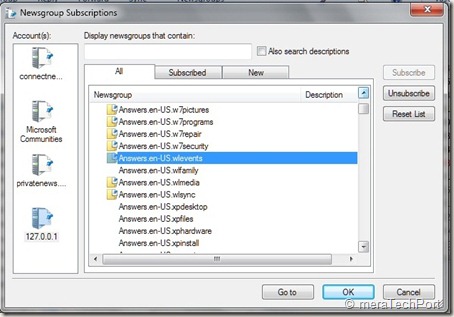
So now you can see the complete list of Microsoft Forums available

NNTPbrdgLM7z

From this you can subscribe to the Forums , you are interested in, from Answers, TechNet, MSDN ….by selecting and subscribing
NNTPbrdgLM8z

Once done you can synchronize, read , post to the Forum .

NNTPbrdgLM10z

That’s all, so whenever you want to access Microsoft Forums using Newsreader , start the NNTP Bridge first.

Some Q & A -

Q: Which NNTP clients does the Microsoft Forums NNTP Bridge Client Beta support?

A: Our priority and effort for support will be the following clients in Windows 7 OS:

Microsoft Outlook Express
Microsoft Windows Mail
Microsoft Windows Live Mail

Q: Which languages are supported in this release of the Microsoft Forums NNTP Bridge Client Beta?

A: The NNTP Bridge Beta supports posting in the same languages supported by the Microsoft forums: English, Spanish, French, German, Italian, Russian, Czech, Japanese, Traditional Chinese, Simplified Chinese, Korean, Portuguese-Brazilian.

Q: Which newsreaders have been specifically tested for use with the Microsoft Forums NNTP Bridge Client Beta?

A: The NNTP Bridge Beta has been designed to work with any newsreader. It’s been specifically tested for use with Outlook Express, Windows Mail, and Windows Live Mail.

Previous users of the bridge should ensure they have done the following when updating to the most current version.

· Uninstall previous beta installations

· After installing the most current update, re subscribe to all of the previously subscribed groups

This December NNTP Bridge Beta Update dramatically improved stability and robustness of the connection. As you know its still work in progress so there may be some issues about which you can provide feedback.

So you should also go through the User guide, FAQ and ReadMe at the Connect site for additional information.

Friday, September 12, 2008

Virtual TechDays is back

Microsoft brings Virtual TechDays again (17th-19th Sept. ‘08). Join Virtual TechDays and discover how Microsoft can help you get more out of life. Join this Online Event.

During the event, the Technical Experts from Microsoft will deliver 40+ free, in-depth sessions on latest Microsoft technologies that help you boost your productivity. Get set to access these online interactive sessions and provide instant feedback.

vtd1

vtd2

Be there at Virtual TechDays and learn about:

vtd3

Participate and win cool prizes too.

For more details click here.

Monday, June 09, 2008

Visualize Microsoft online community activity in fun ways

Want to check what’s happening at MSDN and TechNet Community or other Microsoft Technical Communities or at Channel9 Communities in a Fun way? Then you have to check out these cool new Silverlight Apps that visualize online community activity in fun and interesting ways.

You can check them at http://microsoftcommunities.com/

MScommun

Ticker - Lines of thought scroll across the screen like a news wire or stock ticker. Find new ideas and links to cool stuff on MSDN and TechNet.

MSCommun1

Orbs - Orbs represent threads that pop in and jostle for your attention. The movement of the orbs can be hypnotic and gives you insight into activities of Microsoft Technical community.

MSCommun2

Anemone - Media associated with tags gently wave and clamber for your attention. The more media associated with a tag, the longer the mesmerizing tendrils of squares. See how tags are associated when the same media overlaps. Check it out  to see what's floating around the community. Anemone will be coming soon on June11.

MSCommun3

These are Silverlight 2 Beta 2 apps, so download the new beta, to try them out. Thanks John!

Saturday, February 16, 2008

New versions of Microsoft Community Platform Forums released

Brand new forums platform for the Microsoft community have been released.

Forums Development Lead, Sam Jarawan says
"This code base was completely rewritten from scratch with a new Web 2.0 User Experience."

Here are the links:

http://forums.msdn.microsoft.com

http://forums.technet.microsoft.com

http://forums.community.microsoft.com

This is a replacement to current forums system found at http://forums.microsoft.com/msdn The old forums will be migrated over within the next couple of months.

He further adds : "I’ve prepared a 15 minute overview video to showcase some of the new features it offers:"

http://xpstream.winisp.net/samjarawan/msdn%20forums%20overview.wmv

What is Forums 3.0 ?

The Forums 3.0 release of the new online forums application is a completely new code base, designed and built from the ground up. This release boasts many enhancements over other online forums applications.

Community Features

· Online Avatars: Users can now include a little more personality in their online forums participation by including an avatar of their choice.

· Recently Online: A continually update list of who has recently been online and participating in the forums. It helps to understand "who's currently online".

· Filtering By Users: Users can scope down the list of contributors to a particular thread by simply selecting the user filter bar. This is especially useful for users who know "who" they are looking for and want to see contributions from trusted sources.

· User Recognition and Affiliation: A medals recognition system rewards users for their participation. This can help users understand whether the source of a post is from a novice or someone who has invested a lot more time and effort in continual online forums participation.

· User Based Tagging: Users can apply tags to threads which help other users find content the community find relevant to a particular term. Users can select multiple tags, every one, applying a more targeted query to refine the pool of threads.

· Browse Users: Do you want to know who is contributing the most in the forums? Do you want to see their actual threads by a couple of clicks. Well, this can be done by simply browsing the user list, reviewing any user's recognition status or last participation date and clicking "view threads".

Discoverability Enhancements

· Enhanced Filters: A powerful set of filter options allow for finding threads of various types, states and properties. Are you a moderator looking to help people that have posted questions with no replies that include code snippets? This is now possible! Better yet, these filters can also be subscribed to as RSS!

· Tag Browsing: Users at any level of the forums application (brand, forum or thread) can find threads by tag. These tags are not

· Top Level Filter Entry Points: Users that always like to start off at the top level of the forums list can now quick link into the unanswered or answered threads in the forum of their choice. This saves what used to be three or more clicks, anchoring the user into a context pre set for them.

· Search Result Filters: When search results come back and seem overwhelming users can select a filter for various thread states and properties. Users can choose to select only answers, only questions or any of these threads that may contain code.

Cool New Features

· Dynamic Posting, Quoting and Paging: Tired of post backs? Well posting, quoting posts and paging in a thread are now all client site events. Users can decide to post and then change their mind without post backs. Users can post replies or quotes to thread without having to wait for the server to reload the page. Users can page around in a large thread without having to wait for the server to answer back. These features reward the users by making the application feel snappy, dynamic and friendly.

· Inline Posting: New posting of questions or replies keeps you on the same page which you can still scroll and see the contents of as well as page through the threads or posts while creating your message. This allows you to “Multi-Quote” when replying to a thread. This makes it easy to respond to several posts in a single post.

· Thread Preview: This allows users to view the first 20 posts of a thread in line without needing to commit to a post back or page navigation. Users can preview threads and then decide to dive in and participate.

· Real Time Updates: Every page updates with new activity. Home pages update to show changes in recently online users, forum pages continually update to show recently updated threads and new posts pop up dynamically to users viewing threads.

· Code Formatting and Spellchecking: Users have the ability to include code and format it to the specific code language. C++ users want their code to look like C++ code. People adding XML want it to look like XML. This is now possible with the latest editor. Users can also spell check their posts if they so choose.

· Proposed Answers: Any user can now more actively participate in helping other users by selecting "Proposed Answer" in any question thread. This should help others that have the true authority to validate the answers, Moderators and Question Askers, find questions that may be very close to being resolved.
(Source: sjarawan's WebLog)