Showing posts with label Windows XP. Show all posts

Tuesday, July 03, 2012

Microsoft Offers Upgrade to Windows 8 Pro for $39.99

Microsoft will be starting a great offer where one can Upgrade to Windows 8 Pro for $39.99 . “Starting at general availability, if your PC is running Windows XP, Windows Vista, or Windows 7 you will qualify to download an upgrade to Windows 8 Pro for just $39.99 in 131 markets“ . In fact you can format & do a clean install too via this Upgrade!

And then if you want you can also install Windows Media Center for free through the “add features” option within Windows 8 Pro after your upgrade.

Microsoft has simplified the upgrade experience by providing the Windows 8 upgrade assistant which will walk you through step-by-step from purchase, download to installation. You have to purchase it via Windows.com . The upgrade experience in Windows 8 will be a breeze, will be faster, a single upgrade path, and compatibility from prior versions of Windows. Provides the flexibility to download and control how you upgrade.

Microsoft in its Windows TeamBlog  blog post has provided the screenshots of basic steps involved -

The upgrade assistant will first check your PC if its ready for Windows 8 then will provide a detailed compatibility report providing anything you may want to address before or after the upgrade with outline actions to take.

upgrd1

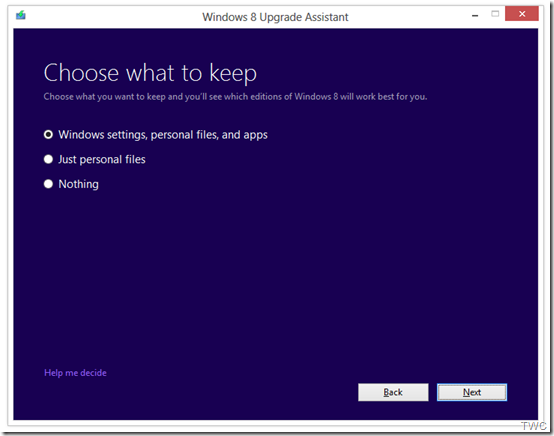
It will also inform you of any application or device compatibility issues. It will ask you what you want to keep from your current Windows installation. You will be able to upgrade from any consumer edition of Windows 7 to Windows 8 Pro.

Current Operating System

What you can keep

Windows 7

Windows settings, personal files, and apps

Windows Vista

Windows settings and personal files

Windows XP

Only personal files                             TWC

And if you want to start fresh, you can choose to bring nothing along. Or if you prefer to format your hard drive as part of your upgrade experience, you can do so as long as you boot from media and then format your hard drive from within the setup experience for installing Windows 8, not prior to it. And to add one more things for those running Windows 8 Release Preview -

“people can move from the Windows 8 Release Preview to Windows 8 Pro using the Windows 8 Upgrade Assistant and will only have the options to migrate their personal files or keep nothing at all when upgrading. People moving from the Windows 8 Release Preview will need to make sure you have an underlying license for either Windows XP, Windows Vista or Windows 7.”
upgrd2

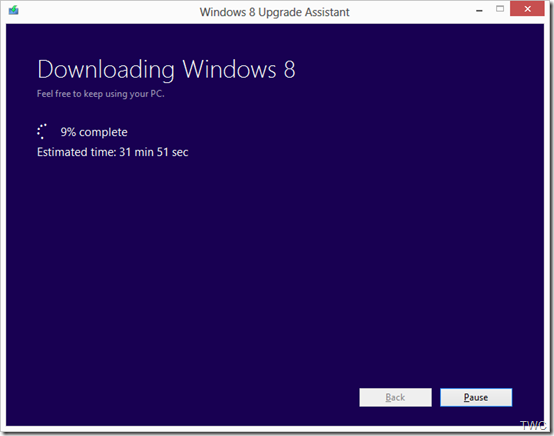
Once the Upgrade is purchased, the download begins.The Upgrade Assistant has built-in Download Manager that allows you to pause and continue your download at any time as well as a check to ensure your download completes successfully.
upgrd3

Once the download is finished, you can choose to proceed with the upgrade (“Install now”) or install later either from your desktop or by creating your own media.

upgrd4

If you choose to create your own media, you will be able to create your own bootable USB or .ISO file which can be burned onto a DVD for upgrade and backup purposes. You also have the option of purchasing a backup DVD for $15 plus shipping and handling.

upgrd5

Also a packaged DVD version of the upgrade to Windows 8 Pro will be available for $69.99 during this promotion in shops at a local stores but as said earlier online upgrade will be available in 131 markets and in 37 languages.

This upgrade will not be applicable if you are building your own PC or installing Windows 8 on a Virtual machine or a separate partition. For such scenarios there will be Windows 8 and Windows 8 Pro System Builder Products available for purchase.

This upgrade promotion for Windows 8 Pro both online and at retail will be starting at General Availability and  runs through January 31st, 2013.

As we can see Microsoft has started to share various install information so we can guess RTM is nearby and I guess Windows 8 might RTM soon in July-Aug while GA will be in Sep. Its just a guess, lets wait & see.

Wednesday, February 08, 2012

Remove Start Button from Windows 7

There have been reports that in the soon to be released version of Windows 8 ‘Consumer Preview’, there will not be any Start button. Microsoft has removed it. Unless this ver is released one cant confirm this. And we have to wait & see what’s offered instead at that place.

Anyway, if you want to just remove Start button from your Windows 7, Vista or XP, there’s a small utility which removes it. Its called Start Killer from Tordex Software. Start Killer removes the Start button from your taskbar providing additional space on taskbar. Start Killer is free to use.

startkiller1

Once you run this tool, the Start button is gone and when you exit it, the Start button reappears.

Once the Start button is removed, you can open Start Menu from Ctrl+ESC or WinKey. Start Killer places its icon on System Tray, you can exit it from there. There’s an option to remove this icon also from System Tray. In that case you can access its settings from CTRL+ALT+SHIFT+F12

Start Killer works on Windows XP/Vista/Windows 7 and it supports both 32 and 64 bit systems.

You can download it from http://www.tordex.com/startkiller/index.html

Thursday, April 01, 2010

Why Internet Explorer 9 will not run on Windows XP ?

As you know Internet Explorer9 Platform Preview for developers was announced and released during the MIX10. Also you might be knowing that its built from the ground up and it will not support Windows XP and will run on OS as Windows Vista onwards.

Many are asking why no support for Windows XP. But people forget that ever popular XP has been there since 2001. So its not as modern and modern browsers requires modern OS.

As the IE9 FAQ says :

Q.   Does Platform Preview run on Windows XP?
A.   No. Internet Explorer 9’s GPU-powered graphics take advantage of new technologies available in Windows 7 and back-ported only to Windows Vista. These technologies depend on advancements in the display driver model introduced first in Windows Vista.

Now hear it from the horse’s mouth- Dean Hachamovitch, General Manager of the Internet Explorer team answers all IE9 related queries at “Channel 9 Live at MIX10: Dean Hachamovitch on IE9”

The below video excerpt just shows the IE9 and Windows XP query ,


For the full video, where Dean along with Giorgio Sardo, Technical Evangelist for Internet Explorer (the guy who built the cool IE9 platform demo app showcasing the power of HTML5 running on a GPU) answers IE9 queries, please check - Channel 9 Live at MIX10: Dean Hachamovitch on IE9


Thursday, March 04, 2010

Official twitter channel for MS customer service to answer your Windows queries

Wintweet There are many ways in which you can get your Queries regarding Windows answered. Be it Forums, Newsgroups, via MVPs, blogs, Microsoft Support etc… But one of the easiest way for those who are online is via twitter. Yes, Microsoft Windows has an official twitter account to help you get answers to all your Windows queries. 


Twitter account says - “Official Twitter account for Microsoft Customer Service; tweeting M-F from 7:30 AM to 5:30 PM PST to help you find answers to your Windows questions!”

This was started for Support for Windows 7. But since yesterday, its going to Support Windows XP and Vista. That’s great ! And I can tell, you get prompt and quick answers , that’s my experience !


twitWinhlp


Sunday, February 14, 2010

Bing4Free – Bing images wallpaper Download and Changer

There are number of methods to use beautiful images from Bing as desktop backgrounds. Some of them I had mentioned earlier in this post - Bing Homepage image Tips .

Bing4Free is another bing.com Image Downloader which makes it very easy to get the Bing images and set them as Wallpaper. But it does more than that with its various options. You can schedule it to download wallpaper from Bing.com daily or even hourly. The application also act as wallpaper changer

Its available at http://bing4free.codeplex.com/

bing4free1z


bing4free3z

Here are some of the features of Bing4Free Version 1.0 (Beta) -

>> You can download wallpaper from United States, China, Japan, Germany, United Kingdom, Australia, Canada and New Zealand (you can extend it by manually adding new country locale in config file)

>> Supports automatic change of wallpaper (you can schedule or disable it)

>> You can manually change selected wallpaper by right-click on the wallpaper thumbnail

bing4free4z

For more details, source code and the app please check  http://bing4free.codeplex.com/ 

Btw Bing is working on an option to set automatically, Bing images as desktop backgrounds.


Tuesday, December 22, 2009

XP style Network Activity Indicator for Windows 7

I always felt that there should have been a Network Activity Indicator in Windows 7 just like it was in Windows XP where one could detect if there’s any network activity going on just by looking at the flashing icon in the System tray. I thought that was useful as one could detect if any unwanted network activity going on or to find if one is connected to net and could get a rough idea of the network. But this was replaced with static network activity indicator for Windows 7 and many of us beta testers had requested Windows 7 team for the same, but it was not provided, don’t know why – may be some said , it was kind of distraction, or to make it light.

Now Windows 7 users can have Old Windows XP style of Network Activity Indicator. IT samples has provided this free app- http://itsamples.com/network-activity-indicator.html 

Network Activity Indicator displays the old 'two monitors' icon in Windows 7 that flashed blue to show network activity on the System Tray. It works with 64-bit Windows 7 ed. as well as 32-bit (x86).

network-activity-indicator

Downloads

version: 1.1   download   (58KB, revised December 12, 2009)

version: 1.0   download   (57KB, revised November 19, 2009)    source code  (C++)

Thanks to EdBott for the tweeting about it.

Thursday, August 06, 2009

Windows 7 Upgrade Chart

Here’s a chart which provides at a glance view of which current version of Windows can be upgraded to which version of Windows 7. This chart was provided by Microsoft when asked by Walt Mossberg. Thanks Microsoft , thanks Walt !

Please note that, only the green box saying ‘In-place Upgrade’ will upgrade keeping all your files,settings, programs as it is been in the current Windows version.

windows7-upgrade-chart (click on the chart to get a bigger view for more details)

While the blue box of ‘Custom Install’ (clean Install) gives you the option to either completely replace your current OS or install Windows 7 on specific drive or partition you select. You can also do a custom install if you do not have any OS or if you want to do a dual/multiboot on your system.

Windows Easy Transfer and Windows 7 Upgrade advisor are useful tools that can assist the upgrade. For more details about these tools, one can check http://windows.microsoft.com/upgrade

Users of Windows XP can also check this- Step-By-Step: How To "Upgrade" from Windows XP to Windows 7 by Scott Hanselman. Where Windows XP users can migrate using these steps to Windows 7.

Wednesday, August 06, 2008

Go Green, Get Edison – PC Energy Management tool for FREE

Microsoft, Climate Savers Computing Initiative and Verdiem have made available Edison- PC energy management
tool as a Free download. Edison was developed by Verdiem, a company that has helped enterprises the world over reduce energy waste from IT devices. Now Verdiem is bringing Edison into your home—at no cost whatsoever. Download Edison and start saving energy today!

Download Edison, an easy-to-use energy-monitoring application, absolutely free.

Download size: 28MB

I am trying it now.

(Thanks //Steve)

Friday, June 20, 2008

Windows Search 4.0

search4 Few days back the final ver. of Windows Search 4.0 was released. You can use this search engine to index a program's content and to obtain instant results when you search in a particular program. It helps you find and preview documents, e-mail messages, music files, photos, and other items on the computer. Recently Live Mesh has updated so that Index for Desktop Search works with Live Mesh folders. You should install the Windows Search 4.0 as there are lots of improvements included, they are :

Support for indexing encrypted documents of local file systems
•    Reduced affect on Microsoft Exchange when you index e-mail in online mode, and there is no local cache (.ost)
•    Support for indexing online delegate mailboxes
•    Support for client-to-client remote query to shared indexed locations
•    Improved indexing performance
•    Faster previewer updates for Windows XP
•    Per-user Group Policy settings
•    Windows software updates for Watson errors
•    Support for the new enterprise Group Policy objects.

The Windows Search 4.0 installation process automatically upgrades Windows Desktop Search (WDS) 2.6 and later versions of WDS. If you are running a version of WDS that is earlier than WDS 2.6, use the Add or Remove Programs tool to remove the earlier version before you install Windows Search 4.0.

For more details and downloading Windows Search 4.0 for various versions of Windows, please check http://support.microsoft.com/kb/940157

Windows Search 4.0 for Windows Vista x64 Edition (KB940157)

Tuesday, May 27, 2008

Windows XP SP3 feature by feature compared to Windows Vista SP1

Microsoft has released a white paper which compares feature and capabilities of Windows XP SP3 with Windows Vista SP1. Using this comparison, customers can adjust their expectations for the security, management, deployment, mobility, and productivity of either operating system. For each feature or capability section compares key Windows Vista advancements against Windows XP.

Its a white paper which clearly shows how Windows Vista is superior to Windows XP with those compared features. So this document will be a good help in deciding for those who were waiting to switch to Vista from XP. This document makes a good read where features are compared in a tabular format with key differences shown.

XPSP3VVistaSp1

You can download the document here. Its available in pdf format (737 KB ) or in xps format (580 KB) file.

Friday, May 16, 2008

How Standard Windows XP was customized to run on OLPC’s XO laptop types?

MSOLPCPR_sm You must have come across today's announcement where Microsoft and One Laptop per Child (OLPC) announced an agreement that will make the Microsoft Windows operating system available on OLPC’s low-cost XO laptops. Microsoft and OLPC are committed to working with governments and nongovernmental organizations to ensure the success of these pilot programs. That's a very positive move.The availability of Windows, in addition to Linux, on the XO laptop will allow customers to have an expanded choice of operating environments that best fit their requirements.

That's good move but more surprising is it will run Windows XP without cutting features and functionality to work on the flash-based storage with less than 2GB of storage. That's great work ! It is the same Windows XP which runs on ultra low cost laptop PCs.

"We had to write multiple custom drivers and a BIOS to get Windows to boot from an SD card in order to do the Windows port to the XO. This is the initial implementation customers will be able purchase when the product RTMs and will be a "Windows only" XO that Nicholas Negroponte himself has described as running "really fast." " said JamesU in his related blog Post Look! Windows on the OLPC XO!

If you want to check out how and what Microsoft did to run Standard Windows XP on such a Flash based Ultra Low Cost PCs then check this Channel 9 video which I had come across earlier last month:

Mark Light and Bohdan Raciborski: Windows XP on Flash-Based Ultra Low Cost PCs

1xpolpc 2xpolpc Where they discuss the challenges and opportunities with flash-based storage and getting Windows XP and Office 2003 up and running—surprisingly quickly—on this new class of devices. They were able to install Windows XP and Office 2003 together taking only 1.2 GB on such PCs. And it boots very fast and runs very well and loads applications very well.

The adaptation of standard Windows for the XO laptop means that hundreds of thousands of third-party applications and devices available for Windows will now be compatible with the XO laptop, extending the power and advantages of the full Windows ecosystem to XO laptop users.

Microsoft also released design guidelines to help hardware manufacturers enable a quality Windows experience for this emerging class of low cost computing machines that will help to democratize personal computing by providing a powerful and full version Windows-powered device for low income markets. It describes various design consideration with features such as Page File, crash dump file, hibernation file were disabled etc. Check out all the details by downloading the guidelines document. Download the pdf document of Design guidelines.

Wednesday, April 30, 2008

Windows XP Service Pack 3 via Windows Update Delayed

Microsoft has decided to delay Windows XP SP3 RTW that is it will delay the release of Windows XP SP3 to Windows Update and the Microsoft Download Center as planned on April 29.

This is what the release manager Chris Keroack announced :

"In the last few days, we have uncovered a compatibility issue between Microsoft Dynamics Retail Management System (RMS) and both Windows XP SP3 and Windows Vista Service Pack 1 (SP1). In order to make sure customers have the best possible experience, we have decided to delay releasing Windows XP Service Pack 3 (SP3) to the web.

To help protect customers, we plan to put filtering in place shortly to prevent Windows Update from offering both service packs to systems running Microsoft Dynamics RMS.  Once filtering is in place, we expect to release Windows XP SP3 to the web.

We are also testing a fix, and will make it available once that process is complete.  Once they have installed the fix, Microsoft Dynamics RMS customers should be able to run both service packs.

Until then, we advise Microsoft Dynamics RMS customers to not install either service pack.  Microsoft Dynamics RMS customers running Windows XP SP3 or Windows Vista SP1 should contact Microsoft Customer Support Services for additional information."

(Source:TechNet Forum)

No new dates have been announced.

Also, Some people have downloaded it from direct link to the executable of XP SP3 available on the net. A Microsoft spokeswoman said the company is advising users against doing this. The official response:

“Customers should not download Microsoft software from links posted on non-Microsoft websites, when those links point directly to the executable as is the case here. Customers should always download from a page on Microsoft.com that provides all relevant download details, installation instructions, and release notes. In this particular case, it’s possible that some 3rd party websites are linking to the Windows XP SP3 software that we have published for MSDN and TechNet subscribers. Since we cannot confirm the source of every link that 3rd parties provide, out recommendation is that customers wait until we’ve published Windows XP SP3 to Windows Update and the Download Center.”

(Source:Mary Jo Foley Blog)

While XP SP3 is available on MSDN/TechNet. Windows XP SP3 now available on MSDN, TechNet

Tuesday, April 29, 2008

Windows Vista One Year Vulnerability Report

This paper analyzes the vulnerability disclosures and security updates for the first year of Windows Vista and looks at it in the context of its predecessor, Windows XP, along with other modern workstation operating systems Red Hat, Ubuntu and Apple products. The author is Jeff Jones, Security Security Director at Microsoft.

Here are some of the highlights:

Side-by-Side Patch Event Histogram for Windows Vista and Windows XP

image

Summary Table for Windows Vista and Windows XP

image

That was comparison with Windows XP, now comes Windows Vista Vs Other Operating Systems

Side-by-Side Comparison of First Year Vulnerabilities for Windows Vista and Other OS Products

image

Patch Event Histogram for Windows Vista and Other Industry OSes

image

Summary Table for All Products Analyzed

image

To get the complete report , to see how the analysis was done, methodology and to check out the FAQ sections with questions like , "You work for Microsoft, so why should we believe anything you say? " and many more , check this download link.

Thursday, April 24, 2008

Windows XP SP3 RTM Screenshots

After downloading the ISO image from TechNet/MSDN, I burnt the XP SP3 CD. After just running the CD it'll come up with the XP SP3 Installation Welcome Screen.

Check out some of the screenshots obtained during the Installation of Windows XP SP3. I already had XP SP3 RC2 refresh, I did not remove it, just installed the RTM. If you are having any earlier Beta version of SP3, first uninstall it then install the RTM. I could finish the installation within ~12 min. Then I had to restart to finish the installation. There was no problem and everything was smooth.

SP3RTM1r

SP3RTM2r

SP3RTM3r

SP3RTM4r

SP3RTM6r

SP3RTM7r

The only thing I noticed during installation was, in the 2nd Screen, there was a link saying : "What to know before installing Service Pack 3", which when clicked opened up a FAQ page about Installing Service Pack2.

SP3RTM2z

There's in fact another file READMESP.HTM in the CD which has all relevant information.So the link must point to this file. I am sure it'll be corrected soon.

So the installation of XP SP3 was finished without any problem and the system is running smoothly.Any problem will be  reported if encountered.

Tuesday, April 22, 2008

Windows XP Service Pack 3 Release schedule

The announcement of Windows XP SP3 Released to manufacturing was put on the TechNet Forum by Chris Keroack, Release Manager of XP SP3. The announcement goes like this:

Today we are happy to announce that Windows XP Service Pack 3 (SP3) has released to manufacturing (RTM). Windows XP SP3 bits are now working their way through our manufacturing channels to be available to OEM and Enterprise customers.

We are also in the final stages of preparing for release to the web (i.e. you!) on April 29th, via Windows Update and the Microsoft Download Center. Online documentation for Windows XP SP3, such as Microsoft Knowledge Base articles and the Microsoft TechNet Windows XP TechCenter, will be updated then. For customers who use Windows XP at home, Windows XP SP3 Automatic Update distribution for users at home will begin in early summer.

Thanks to everyone here who installed the public betas – you not only gave us detailed feedback but also helped each other out with timely troubleshooting. Through the beta program we found several important issues and were able to confirm some essential fixes. We couldn’t have done this without you.

We will still be monitoring this forum during the next few weeks in case you have more feedback about the release of Windows XP SP3.

On behalf of myself, Shashank Bansal and Windows Serviceability, many thanks.

Chris Keroack
Release Manager, Windows XP Service Pack 3
Windows Serviceability

So one can get this on April 29th.

While BLAKE, had come across a post from Nick MacKechnie, Microsoft Senior Technical Account Manager in New Zealand which posted the complete XP SP3 Release schedules, but was later taken off.
Apr-21 = RTM (Release to Manufacturing)
Apr-21 = OEM Channel
Apr-29 = Windows Update
Apr-29 = Download Center
May-02 = MSDN/Technet Download
May-19 = Windows XP SP3 Fulfillment Media
Jun-01 = Volume Customers via Download
Jun-10 = Automatic Updates
Thanks Blake!

UPDATE :23rd Apr.
Windows XP SP3 available on MSDN and TechNet now. Check this post Windows XP SP3 now available on MSDN, TechNet

Tuesday, January 15, 2008

Windows Internet Explorer 7 to be distributed via WSUS on Feb. 12, 2008

IERz As per the this KB Article 946202, On February 12, 2008 Microsoft will release the Windows Internet Explorer 7 Installation and Availability update to Windows Server Update Services (WSUS) marked as an Update Rollup package. Windows Internet Explorer 7 Installation and Availability Update is a complete installation package that will upgrade machines running Internet Explorer 6 to Windows Internet Explorer 7.

So this may require administrator action to manage the rollout. So be prepared.

Knowledge Base article 940767 contains more information on the Windows Internet Explorer 7 Installation and Availability Update

If you want to install Windows Internet Explorer 7 using WSUS today, you can import this package from the Microsoft Update catalog site by following the instructions in the section titled "Deploying Windows Internet Explorer 7 using WSUS."
If you have configured WSUS to "auto-approve" Update Rollup packages (this is not the default configuration), Windows Internet Explorer 7 will be automatically approved for installation after February 12, 2008 and consequently, you may want to take the actions below to manage how and when this update is installed. You will need to take action if:

•You use WSUS 3.0 to manage updates in your organization.

•You have Windows XP Service Pack 2 (SP2)-based computers or Windows Server 2003 Service Pack 1 (SP1)-based computers that have Internet Explorer 6 installed.

•You do not want to upgrade Internet Explorer 6 machines to Windows Internet Explorer 7 at this time.

•You have configured WSUS to auto-approve Update Rollups for installation.

Note This does not apply to Windows Vista because Windows Internet Explorer 7 is a component of Windows Vista.

Please check the KB 946202 for :

Postponing the Windows Internet Explorer 7 Deployment

Action to Take Before February 12, 2008

Actions to Take After February 12, 2008

Wednesday, December 19, 2007

Windows XP SP3 RC available

Windowslogoxp Microsoft has released Windows XP SP3 RC ver. 3264 on its download center and its available for anyone. It can be downloaded from:

Standalone Update Package for Windows® XP Service Pack 3 Release Candidate

Also check this release Notes KB 936929 and Windows XP Service Pack 3 Whitepaper

Also you can post your queries and feedback on Windows XP Service Pack 3 Feedback Forum on Microsoft TechNet

NOTE: This pre-release software is provided for testing purposes only. Microsoft does not recommend installing this software on primary or mission critical systems. While the SP3 update is available for anyone, Its reminded  that it is pre-release software, and is time-limited, and is intended for IT professionals, developers, and other technically-inclined individuals that are comfortable using pre-release software.

I have installed XP SP3 v.3244 on my Home System from Connect which was available since last month, its working fine without any problem. It also gives an option in the Add/remove programs to remove XP SP3 RC.

Saturday, December 08, 2007

Windows Service Pack Blocker Tool Kit

Now, as a Blocking Tool is released for those organizations, that would like to temporarily prevent installation of Service Packs updates through Windows Update, we can assume these Service Packs are very near to be launched.
This tool can be used with:
  • Windows Server 2003 Service Pack 2 (valid through March, 2008)
  • Windows XP Service Pack 3 (valid for 12 months following general availability)
  • Windows Vista Service Pack 1 (valid for 12 months following general availability)
This toolkit contains three components. All of them function primarily to set or clear a specific registry key that is used to detect and block download of Service Packs from Windows Update. You only need to use the component which best serves your organization’s computer management infrastructure.
  • A Microsoft-signed executable
  • A script
  • An ADM template
  1. The executable creates a registry key on the computer on which it is run that blocks or unblocks (depending on the command-line option used) the delivery of a Service Pack to that computer through Windows Update. The key used is HKLM\Software\Policies\Microsoft\Windows\WindowsUpdate.

    When the '/B' command line option is used, the key value name 'DoNotAllowSP' is created and its value set to 1. This value blocks delivery of a Service Pack to the computer through Automatic Update or Windows Update.

    When the '/U' command line option is used, the previously created registry value that temporarily blocked the delivery of a Service Pack to the computer through Automatic Update or Windows Update is removed. If the value does not exist on the computer on which it is run, no action is taken.

  2. The script does the same thing as the executable, but allows you to specify the remote machine name on which to block or unblock delivery of Service Packs.
  3. Note that the executable and script have been tested only as a command-line tool and not in conjunction with other systems management tools or remote execution mechanisms.

  4. The ADM template allows administrators to import group policy settings to block or unblock delivery of Service Packs into their Group Policy environment. Administrators can then use Group Policy to centrally execute the action across systems in their environment.

Please note that this toolkit will not prevent the installation of the service pack from CD/DVD, or from the stand-alone download package. This simply prevents the service pack from being delivered over Windows Update.

Download from here.

Wednesday, December 05, 2007

Windows XP Service Pack 3 white paper

Microsoft has released a white paper on Windows XP SP3, which can be downloaded from the Microsoft download center.
Windows XP Service Pack 3 Overview

Although at present XP SP3 is in RC1 stage and is available only at Connect and was also recently made available to TechNet/MSDN subscribers, this white paper has been released. This will be very useful for those who wants to deploy this service pack.

This white paper summarizes what's new in this service pack.

I have installed SP3 RC1 and haven't faced any problem.

Wednesday, August 01, 2007

Secure Windows using your face

How about securing your Windows using your face ?

You must have already been using Finger printing logins which have been included in many Notebooks as secure login feature. So how about facial recognition login?

Check out BananaSecurity

All you need is the software and a webcam. BananaScreen is fun and easy solution to lock and unlock your computer using only your face. It locks when you move away from it, and, when you return, BananaScreen unlocks the PC in less time than it would take you to enter a password.

With a simple webcam, facial features are captured to build a statistical representation of the face. No picture is stored on your harddrive (or anywhere else) but only your face model (binary format). You have to create your face model first to use it. At present supports Windows XP and Windows2000. May or may not work with Vista.

Its still under beta.

So those having webcam can try it out, just for fun!