Showing posts with label Zune. Show all posts

Wednesday, October 12, 2011

Hear it from Microsoft– End of Zune devices

Since few days, there were lots and lots of confusion of whether Zune devices have been stopped officially or not.First this-

Zune HD removed mistakenly from its website

then this -

Zune player killed ! This time its official ! 

then this -

Zune HD is Alive!! Another Apology for the Error from Zune

After that I stopped writing about that. Today I was watching Ping- Episode 120 and there the Microsoft Representatives , the show presenters clearly mentioned that the Zune devices were killed referring to the news item. So there were no denials. But the Zune services continues. And indeed one can have all the Zune features on their Windows Mango Phones.

Check the video for yourself –

(Source:meraTechPort)

Wednesday, October 05, 2011

Zune HD is Alive!! Another Apology for the Error from Zune

What’s going on? After removing the Zune HD devices from Zune.net page (Zune HD removed mistakenly from its website ) then it was clarified that it was a mistake . Later within hours people found this at Zune site

http://www.zune.net/en-US/support/zuneplayers/supportzuneplayers.htm

“………..We recently announced that, going forward, Windows Phone will be the focus of our mobile music and video strategy, and that we will no longer be producing Zune players. So what does this mean for……………..”

(Zune player killed ! This time its official !)

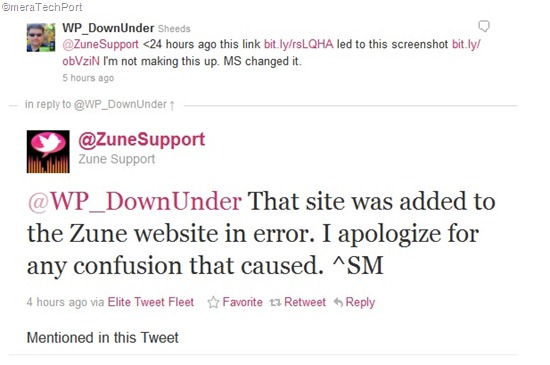
Which again has been said as another Error by Zune Support.

https://twitter.com/#!/ZuneSupport/status/121354760883421184

Zuneclarifies

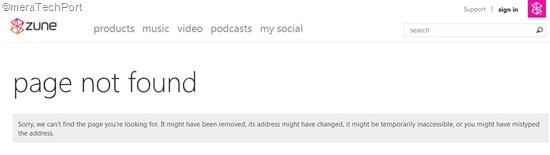
And yes http://www.zune.net/en-US/support/zuneplayers/supportzuneplayers.htm  gives ‘Page Not Found’ .

pagenotfound

So why this utter confusion? All this is causing damage to its own reputation. I hope all such things are avoided in future.Anyway Zune HD continues to Live on. Indeed it’s a fine product along with the wonderful Zune Software and services but has to be retired gracefully with the arrival of Windows Mango Phone.

(HT to @WithinRafael )

Tuesday, October 04, 2011

Zune player killed ! This time its official !

Just couple of hours back,  I had blogged about Zune HD removed mistakenly from its website . Though Microsoft said it was an error and again put the Zune devices back on the website, but this page says otherwise - 

http://www.zune.net/en-US/support/zuneplayers/supportzuneplayers.htm *

NoZune

Here’s the enlarged view - NoZunez

It says – “………..We recently announced that, going forward, Windows Phone will be the focus of our mobile music and video strategy, and that we will no longer be producing Zune players. So what does this mean for……………..”

Still there’s no official announcement but this page couldn’t escape from the sharp eyes of the readers.

Anyway The Windows Mango phones have arrived and I’m sure that will take over the Zune. I hope the sale and support of Zune HD will still continue for some more time. May be the production might have already stopped.

*UPDATE 5th Oct 2011 : If you try to access that link it now says – Page Not Found. So this was another Error from Zune for which Zune has apologized. So the Zune is NOT Dead. ! Its all these Errors causing confusion. See the complete blog post -

Zune HD is Alive!! Another Apology for the Error from Zune

Zune HD removed mistakenly from its website

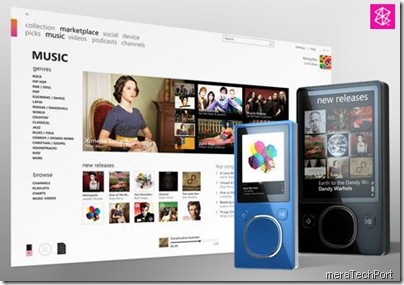
While updating the Zune website Zune.net , Microsoft omitted the Zune HD device. This mistake triggered the sharp observers to provide obituaries to Zune HD. The twitter world, the net were abuzz with the news of Zune HD being killed. Anyway we may actually see this happen sometime in future with the arrival of Windows ‘Mango‘ Phones. Microsoft realizing this clarified it to be a mistake and updated their site adding the Zune HD devices back again quickly.

I did save the earlier page without the Zune HD, here are the 2 pages.

Zune1

Zune2

Tuesday, May 17, 2011

Sync media files between Mac and WP7,Zune HD with Windows Phone 7 Connector beta for Mac

Windows Phone 7 Connector for Mac is a simple, easy-to-use program for Macs that you can use to:

  • Sync music, movies, TV shows, and podcasts from your existing Apple iTunes library to your Windows Phone or Zune HD*
  • Sync pictures and videos from your existing Apple iPhoto library to your Windows Phone or Zune HD
  • Retrieve pictures and videos taken on your Windows Phone and automatically import them into your existing iPhoto library
  • Browse and preview media items stored on your Windows Phone or Zune HD
  • Download and install operating system updates for your Windows Phone

GetOpenContent

This software is not part of the Zune experience. In order to enjoy the Zune experience on Mac, you will need to install a Windows OS (XP or higher). Zune delivers music and video entertainment across Windows Phone 7, Xbox Live and Windows PC’s.

*Only unprotected (non-DRM) media files can be synced between your Mac and your Windows Phone or Zune HD.

The Windows Phone 7 Connector for Mac 1.0 is now available via the Mac App Store

For more details go here.

Wednesday, October 20, 2010

Zune Community at Microsoft Answers launched

Microsoft has just launched a new community for Zune at Microsoft Answers. Microsoft Answers is a community-based support site where you can ask and answer questions, or just browse other's answers.

Zuneanswers

With Windows Phone 7 being launched which has the Zune , the Zune Answers has a complete section for it.

Check Zune Answers community site.

Tuesday, October 19, 2010

International availability of Zune by location chart – Includes India also

zune

The following table displays the availability of Zune by location.

Countries outside the United States and Canada have limited versions of Zune.net.
zuneind

Just a few days back Zune software was updated to ver 4.7. And now this chart as it shows Zune software being introduced worldwide though with limited versions of Zune.net. But one has to get the Zune HD device from US or Canada. So I think this worldwide availability is being targeted for Soon to be available Windows Phone 7 devices which integrates Zune .

This KB article reviewed on October 11, 2010

For more info please check - http://support.microsoft.com/kb/952586?sd=zune

(via @NirmalTV)

EDIT: Also check India specific Zune.net site

http://www.zune.net/hi-IN/

zuneHi

Sunday, August 15, 2010

In-wall USB Chargers, FM Scanners

Your Zune or your iPod needs charging and you have misplaced your charger and just for this you have to start your desktop or laptop. Imagine  how convenient it’ll be if you have In-wall USB chargers in your home/office just like any other wall power socket. But its difficult to get in-wall Chargers here in India. Else you might have to prepare wall USB Chargers with DIY kits. But no more Now !

I was pleasantly surprised when I saw a tweet from atul chitnis providing a link to in-wall USB chargers from Philips India. With good quality finish, so convenient to add them along with your regular power sockets. Such products should be well advertised, many of us do not know even if such products could be availed in India. I haven’t seen any reviews of them being published in Indian PC magazines. Thanks Atul !

What’s more, Philips India has even a in-wall FM scanner also in its product range for your kitchen or bathroom.

Here’s a direct link to Philips India catalogue for its range of Lifestyle Modular Switches. ( It’s a PDF file , size ~2MB)


USBchargercat


FMScannercat


Here are some of the snaps of the actual products, In-wall USB Chargers and FM Scanner and back of the package boxes showing their price and part no. , courtesy Atul Chitnis.


142849161usb sockets


back of the package


142849684


Back of the FM radio package


The In-wall USB Charger costs Rs. 450 (nearly $9) while FM scanner costs Rs 750 (nearly $15).

So go on and check them from Philips India dealer and hope they know about these products.


Thursday, January 01, 2009

Advisory: 30gb Zune issues -- official update

There have been reports of Zune30 freezing. There’s no need of concern as this issue will remedy itself over the next 24 hours as the time flips to January 1st. And its isolated ONLY to Zune 30 GB device. This happened due to a bug in the internal clock driver causing the 30GB device to improperly handle the last day of a leap year.The Zune service and all Zune flash models, Zune 80, 120 are UNAFFECTED.

Here’s the Complete Official update about the same from the Zune team:

Early this morning we were alerted by our customers that there was a widespread issue affecting our 2006 model Zune 30GB devices (a large number of which are still actively being used).  The technical team jumped on the problem immediately and isolated the issue: a bug in the internal clock driver related to the way the device handles a leap year. 

The issue should be resolved over the next 24 hours as the time change moves to January 1, 2009.   We expect the internal clock on the Zune 30GB devices will automatically reset tomorrow (noon, GMT). By tomorrow you should allow the battery to fully run out of power before the unit can restart successfully then simply ensure that your device is recharged, then turn it back on.  If you’re a Zune Pass subscriber, you may need to sync your device with your PC to refresh the rights to the subscription content you have downloaded to your device. 

Customers can continue to stay informed via the support page on zune.net (zune.net/support).

We know this has been a big inconvenience to our customers and we are sorry for that, and want to thank them for their patience. 

Q:  Why is this issue isolated to the Zune 30 device?

It is a bug in a driver for a part that is only used in the Zune 30 device.

Q:  What fixes or patches are you putting in place to resolve this situation? 

This situation should remedy itself over the next 24 hours as the time flips to January 1st.

Q:  What’s the timeline on a fix?

The issue Zune 30GB customers are experiencing today will self resolve as time changes to January 1.

Q:  Why did this occur at precisely 12:01 a.m. on December 31, 2008? 

There is a bug in the internal clock driver causing the 30GB device to improperly handle the last day of a leap year.

Q:  What is Zune doing to fix this issue? 

The issue should resolve itself.

Q:  Are you sure that this won’t happen to all 80, 120 or other flash devices? 

This issue is related to a part that is only used in Zune 30 devices.

Q:  How many 30GB Zune devices are affected? How many Zune 30GB devices were sold? 

All 30GB devices are potentially affected.

Q:  Will you update the firmware before the next leap year (2012)?

Yes.

(Source: Zune Insider)

Monday, October 06, 2008

The 10 Most Overrated Products Vs Underrated Products

I came across this interesting slide show from PCWorld (msn tech & gadgets) about  the 10 Most Overrated Products against Underrated ones.  Check this out.

ZuneVipod Apple iPod 3G (© Apple); Microsoft Zune (© Microsoft)


Some of them featured are:

Apple iPhone 3G (© Apple); Sidekick 2008 (© T-Mobile)

Apple iTunes 8.0 (© Apple); Slacker.com (© Slacker)

Apple iPod 3G (© Apple); Microsoft Zune (© Microsoft)

Adobe Photoshop CS4 (© Adobe); Paint.net (© MIT License)

Windows XP (© Microsoft Corp) ;Windows Vista (© Microsoft Corp)

and many more ……………see the link for other comparison.

As you can see many Apple products getting listed in Overhyped products. Indeed its marketing hype that adds them. They are good but other products in their category are also good which may not have got that extra marketing push. For ex. Zune and the Zune Software are less hyped but I think are better. Another is Paint.NET, which many do not know about its potential. Being free does not mean it is not good. It can very well do many basic image editing tasks. Follow the above link for detailed read.

Tuesday, September 16, 2008

What’s new in Zune 3.0 software release?

zune3

Zune 3.0 has been released just now and can be downloaded from here.

There has been lots of new features added with Zune 3.0, let us see what are they :

Device Features :

New capacities
16GB and 120GB devices have been added to the lineup, both with a glossy black front and a black metal back.

Buy from FM
Hear a song you like while listening to the radio on your Zune? Your device will identify it, and download it the next time you sync.

<a href="http://video.msn.com/?mkt=en-US&amp;playlist=videoByUuids:uuids:52118a97-e764-4c4f-aa9e-bae2bc47ee57&amp;showPlaylist=true&amp;from=msnvideo" target="_new" title="Zune Fall update: buy from FM">Video: Zune Fall update: buy from FM</a>

Browse Zune Marketplace wirelessly
Download music directly to your Zune: at home, at a cafĂ©… wherever there's a wireless hotspot.

Zune has partnered with high-speed Internet access provider Wayport to let customers wirelessly shop Zune Marketplace on their player at more than 9,800 McDonald's restaurants across the U.S.

<a href="http://video.msn.com/?mkt=en-US&amp;playlist=videoByUuids:uuids:e9706b7e-c32e-46a4-92ea-7cb8c73746c7&amp;showPlaylist=true&amp;from=msnvideo" target="_new" title="Zune Fall 2008 Wireless Features">Video: Zune Fall 2008 Wireless Features</a>

New Zune Originals
Even more designs for you to personalize your Zune.

Zune Channels
Combining the best features of podcasts and playlists, subscribe to channels by Billboard, The FADER, and radio stations like KROQ and KEXP.

<a href="http://video.msn.com/?mkt=en-US&amp;playlist=videoByUuids:uuids:af9604b2-195e-4b69-afb7-6f5cd17749c1&amp;showPlaylist=true&amp;from=msnvideo" target="_new" title="Zune Fall Update: Channels">Video: Zune Fall Update: Channels</a>

Games
You can now play games on your Zune! Devices come preloaded with Texas hold 'em and Hexic.

Audiobooks
One of our most-requested features is here: audiobooks on your Zune, from Audible.com and OverDrive.

Clock
You'll never again wonder what time it is.

Read more about Zune players in User's Guide.


Software Features :

Mixview, Just for You, and Now Playing
Dynamic representations of your collection, as well as artist and song recommendations based on what you and other members of the Social are listening to.

<a href="http://video.msn.com/?mkt=en-US&amp;playlist=videoByUuids:uuids:1dadcc7c-bbed-4e5c-a36a-b6bc44728ed1&amp;showPlaylist=true&amp;from=msnvideo" target="_new" title="Zune Software Features - Zune Fall 2008">Video: Zune Software Features - Zune Fall 2008</a>

Rich search functionality
Zune software will offer you suggestions as you type, helping you find the name of an artist or band even if you don't know the correct spelling.

Social in the software
Set your favorite tracks, update your profile, change your status, and search for other Social members — all from within the software.

Read more about Zune software in User's Guide.


Social Features :

Windows Live Messenger integration
See your Windows Live Messenger contacts in the Social, and invite them to join with a click of the mouse.

New reputation badges
Get recognized for being a top reviewer or top forum poster.

E-mail notifications
Get a weekly digest of your friends' activities and real-time notifications of new messages and comments.

More play data
In addition to number of total plays, now see how many times a track has been added as a favorite or sent to a friend.

Read more about the Social in User's Guide.

I will soon be downloading and trying it.

You can also download the Zune 3.0 from Microsoft Download Center: Zune Client software, version 3.0

(Source:Zune.net , Windows Vista Blog)

Zune is Music, Music is Life – I like this Ad very much

Few months back I had come across a Post on Long Zheng’s Blog about an unofficial Zune Ad. (Zune spec spot “Music is life”). Now with Zune 3.0 releasing today , I remembered that ad again and posting it here.The speculative ad was made by Stewart Hendler. Its just superb!

Its about a boy walking down the street listening to  his Zune, when he come across a dead sparrow lying upside down. He then places the Zune earphone to bird’s heart. And the heart starts to beat again, as the Sparrow springs to life and flies away. This was the best part of the video. You must check this ad, Hope Microsoft adopts this Zune Ad.

zunelife

How they shot the scene with the dead bird?

Stewart Hendler, DGA replies:

“We found a bird that was already trained to lie on its back (only in LA, right?) and it was handled on set by two wranglers. There was a piece of mono-filament line attached to it's leg so it couldn't fly away (which we'll paint out eventually).

We also had a matching, taxidermied bird with an air bladder in it's stomach to simulate the first breath.”

You must check this Ad ! Give the credit to the well trained Sparrow also.

(Thanks to avatarxone for YouTube link.)

Monday, May 12, 2008

How to deploy an XNA game to your Zune

Recently XNA Game Studio 3.0 CTP has been released as I had posted earlier about it that using this version you can develop games for Zune. And many of you must have already downloaded it and trying to develop games for your Zune. But many of you may not know or might not have yet coded the games for your Zune. So not to worry, now there are many games being made available on net developed by enthusiasts and developers. So you can get those games and can deploy it to your Zune. But how to do it?

Here's a nice step by step video by Microsoft Academic Developer Evangelist Dan Waters where he demos what is required and how to deploy an XNA game to your Zune. Also check out a pong like game he provides for download which you can deploy it on our Zune. Thanks Dan !


Video: XNA on the Zune: A Brief How-To

Downloads:

Source code for Pong like game.Source Code (zip, 83 KB)
The above shown Video (wmv, 35.6 MB)

(source:XNA Games on the Zune - A Brief "How To")

Please remember XNA game Studio is a CTP version and should not be deployed on your production machine. Try at your own risk and enjoy developing, deploying and playing games on your Zune!

Wednesday, May 07, 2008

Microsoft XNA Game Studio 3.0 CTP released

xnasmall Microsoft XNA Game Studio 3.0 CTP is out today, you can get it from here. With this version you can develop games for Zune.

Microsoft Visual C# 2008 Express Edition or Microsoft Visual Studio 2008 Standard Edition or higher is required to install and run the XNA Game Studio 3.0 CTP. This current CTP does not enable Xbox 360 game development.  Only Windows and Zune are supported in this CTP.It will be supported in the final release version.This CTP doesn't work in 64 bit yet.

Check the download link for more details related to hardware requirement. Check http://creators.xna.com/ for samples, tutorials , screencasts to get started. Give it a try, try creating a game for your Zune.

Check the XNA Team Blog for the latest info.

Friday, February 29, 2008

Voting is open for 2008 Webware 100 Awards

Check out this year's nominations in CNET Webware 100 awards for the top 100 coolest online apps! To be nominated is a great accomplishment. We can make a Webware 100 winner by voting for it.

Many of Microsoft products have been nominated in various category, some of them are:

In the audio category- Zune Marketplace

In the Browsing category- Internet Explorer, Silverlight, Windows Live Home

In the communication category- Windows Live Messenger, Windows Live Hotmail

In the Productivity category - Office Live Workspace

In the Publishing and photography category - Popfly

In the Search & Reference category - Microsoft Virtual Earth, Live Search

And there are many more. So if it happens to be your favorites, just click on the above links to vote.

Voting will run until March 31. Winners will be announced on April 21.

Create and Play games on your Zune

Yes, soon you will be able to play games on your Zune. XNA Group announced that XNA, a toolset that Microsoft provides to developers, will now include development for Zune. This will be possible on the new XNA Game Studio 3.0 which will be made available later this year. What's more, you write a game using the XNA Game Studio  and deploy it to all three platforms that XNA Game Studio 3.0 will support: the XBox 360, PC, and the Zune. So now you can enjoy games on the go on your Zune, but it'll lack the 3D graphics to drive high-end games like you can play on the XBox 360.

XNA and Xbox Live teams now have Community Games. It'll be made by community, for community and it'll be published for everyone to play. Get the Game Studio 2 from http://creators.xna.com and start building games for your XBox which can be shared on XBox Live and downloaded for FREE!

Now coming to gaming on Zune, the games will be supported on entire family of Zune media devices that is to say will work on both generations of Zune and you have support multi-player also which will make it more interesting. So just wait for the XNA Game Studio 3 to arrive, available later this year.

For the official FAQ, check  XNA Creators Club. For those of you wondering what XNA is, here's a two part video from Channel 9 (part 1 | part 2).

Can also checkout this recent video of a winner at a  XNA contest game creator, and talk with few XNA people on Channel 9, (GDC08: James Silva, XNA, XBOX Arcade, Zune Gaming, Renegade Dishwasher Samurai Angst and Revenge) which has all the answers to questions like,

what does XNA stand for?

What does XNA encompass from a platform perspective?

What does the recent XBox Live Arcade announcement mean?

Also get to see a demo of a game written using the XNA framework running on a Zune. Here are some pictures from that video of playing games on Zune.

ZuneGame1R  ZuneGame2

ZuneGame3 ZuneGame4

Tuesday, January 15, 2008

Zune, iPod, PSP and other formats at Channel 8, 9,10 and Edge

What I am posting is not new, it has been there for some time. Those who know about Channel8, Channel 10 and TechNet Edge know about it. I am talking of various download formats available at these sites. I am a regular at these sites and these are among my most favorite sites.
It all Started with Channel9, when it was the only site to provide such technical videos, even now its a great site providing the latest Microsoft technolgy related videos, Technical interviews with Microsoft greats talking about the latest technology and demoing it.
Channel 9 provides these videos/downloads in wmv format- High and Low res., wma and MP3 format.
And Channels like Channel10, Channel8 and TechNet Edge goes a step further and provides these videos/downloads in -

-iPod Fomat Video (MP4)
-MP3 Audio
-PSP Format Video (MP4)
-Windows Media Audio (WMA)
-Windows Media Video (WMV)
-Windows Media Video High Quality (WMV)
-Zune Format
That's great!
Watching these Crystal clear, crisp videos on Zune is a different experience, Try it. Watch it on your iPod or Zune and PSP. I am sure you will enjoy it.
Not only format wise, but content wise also they are providing the best. I almost daily visit these sites to know what's new. I have a large collection of these videos.
Teams, Well done !!

I think they are the only channels providing download content in such wide variety of formats.
Apart from that, these sites have gone Silverlight recently which makes them equally visually appealing. And one can easily embed these videos in their blogs , sites if one want to share or put it on their blog.

Earlier there were MSDN and .NET shows providing such videos where they used to provide the Transcript also, of any interviews carried out. So if such Transcript - just the text is also provided with Channel9 interview videos , that will also be very helpful. So one can just read these transcript text and can know what the interview is all about, reading the complete transcript where some people may not have provision to download large size videos due to bandwidth restriction. And by the way these transcripts can also be converted as e-books to be read on your Zune. (Read E-books on your Zune)

If one hasn't checked these sites, one should do it now.

Wednesday, January 09, 2008

Read Bill Gates' 2008 CES keynote on your Zune

Many of you must have already watched Live the Bill Gates Keynote at 2008 International Consumer Electronics Show.

If not then, you can Watch the keynote here. (1 hr.) . But if you don't have time to watch an hour long video then you can watch the Keynote Highlights here. (5 min 47 sec)

But if you don't want to watch but just want to Read the Complete Transcript of the Keynote at your own pace on your Zune to find out what are the cool stuff he talked about, then here it is;
I have converted the regular Transcript of the Keynote into Zune compatible E-book which can be downloaded and Sync with your Zune.
This can be downloaded from the Skydrive link given below,


Download the Zip file (~4.6MB) to your PC, Unzip it and copy the folder into your Picture Directory which you use with Zune to Sync your pictures and Sync it. That's all, now you can read the complete Transcript on your Zune, listening to your favorite music. (Make sure Shuffle is off for pictures)


(You can also check Read E-books on your Zune for how it was done)

Wednesday, December 26, 2007

How to Recalibrate your Zune Battery

zunelogo2 My Zune 4GB was having bit of glitch, not on the performance front, its doing superb. But the glitch was, the battery icon in Zune, which was not accurately representing the battery charge. It used to show full charge after charging and used to show up to half level when used and level used to stuck at that level even after further use. And from that level, when the battery was discharged, the next level shown was low battery. So to rectify this, one has to Recalibrate the battery.The battery icon may not accurately represent the battery charge that is available until battery has been fully charged and then discharged one time after you update the device. To properly cycle the battery, follow these steps:

- Update your Zune with the latest Zune device firmware available. At present the latest version is Version 2.3 (1145). For this, from the Zune software installed on your comp. click > Settings > Software > General > Check for updates. Connect your Zune with USB Sync cable, open the Zune software while the Zune device is still connected to your computer, the Zune software searches the Internet for the latest version of the firmware. If a newer version of the Zune firmware is available, a message to update your device appears. You can also manually check for new device updates by clicking Settings > device > Device Update.
NOTE: Do not move or disconnect the Zune device until the update is complete. The update may take several minutes. During this time, the Zune device may restart several times.

- Now we will come to the calibration part. With the battery at a half-full charge or less, connect the Zune device to a power source and fully charge it until you get the green battery icon. ( batfull) . Now disconnect it from power source.

- Go to the default screen > settings > display > backlight > and select 'always on'. Now from the display option only select brightness > and set it to 'high'.

- Come back to default screen by holding back button. Select music, shuffle all.

- Keep your Zune aside. Once the Zune device turns off; which will take some time, press the play\pause button to check whether your Zune turns again or not. If the Zune turns back on, wait until it turns off again, and then press the play/pause button. Repeat this step until the Zune device no longer turns on.

- When the Zune no longer turns on, connect it to a power source and Change the display settings back to your preferred choices, defaults are backlight >15sec. and brightness > medium

- Fully charge the device until the battery icon appears green ( batfull).

So in this way you can recalibrate your battery. After recalibrating, my Zune battery icon accurately represent the battery charge available.

(Based on : KB article ID927710)

Monday, December 24, 2007

Zune FM Radio Tip

zunelogo2 This is a tip for those who are not able to tune to some of the FM stations in their region. This will be useful for those region outside of North America or where Zune is still not available, like here in Bangalore, India,  I have a Zune and enjoying Zune.


zuneeuro I have tuned and set all the FM stations available, nearly a dozen of them in my region and set them as presets. But some of the stations are not properly tuned as some of the stations available here, end with even number, like 104.0 and 107.2 MHz. So these do not get tuned as the default setting in Zune is for North America region, where, normally all stations end with odd numbers and in the Zune also they are available in the range of 87.5 MHz - 107.9 MHz in the steps of 0.2 MHz, so when you seek, stations ending with even numbers, are not properly tuned.

So how to tune such stations? Just go to Zune settings > radio > europe ,

Set it to europe region.

Now for Europe region, its available in the range of 87.5 MHz - 108 MHz in the steps of 0.1 MHz. Now all of your stations, whether ending up with odd or even are available.So seek them with seek :on or manually seek them with seek:off and store them as presets. Enjoy !