Showing posts with label Windows Live Photo Gallery. Show all posts

Tuesday, December 14, 2010

Windows Live Plug-ins site launched !

The plug-ins are one of the most useful additions to various Windows Live products. These enhances the usefulness immensely. Now a new , neat , clean  site has been created featuring these plug-ins.

http://plugins.live.com/ 


Wlplug-inssite

For various Windows Live App , it provides many plug-ins arranged category wise, tag cloud and languages which can be arranged in various ways making it very easy.Wlplug-inssite1


Check out the various plug-ins  from http://plugins.live.com/


It also provides information for Plug-in Submission Process, so that if you are a developer , you can submit your plug-ins.

Saturday, September 25, 2010

"Evil Tina"– video from Windows Live Double Rainbow makers

Watch Evil Tina - The second video from Lanman Brothers – who brought the Windows Live Double Rainbow video.

Don't mess with Evil Tina. Automatically turn your videos, photos, and music into a great movie by using AutoMovie.

Evil Tina–Windows Live Movie Maker


“There’s more to Windows Live Movie Maker than meets the eye. Let’s take AutoMovie for example. AutoMovie is a feature that allows the user to make a polished movie in seconds. In 3 clicks or less, you add your pictures/movies, select a theme, add a song and you’re ready to share with family and friends. “

Read more about the video here: The Wedding Video…

Get Windows Live Movie Maker here:
http://explore.live.com/windows-live-movie-maker

btw if you haven’t watched the Windows Live Double Rainbow video, its here :

Double Rainbow

Thursday, August 19, 2010

[FIX] ‘No Internet Connection…’ Error during installation of Windows Live Essentials Beta Refresh

Yesterday an update to Windows Live Essentials 2011 beta was released. And while installing some faced problem where they were getting the error message “No Internet Connection…” and the installation failed even though they were connected to net. It was happening even using the Full offline installer.

Soon Windows Live Team swung into action and said -

“The problem you're running into is that the Windows Live Installer not only installs the language you selected, but also tries to install the Windows Live language resources that match your OS language (this avoids language switching problems later when using Windows Live client applications).  Unfortunately, the Windows Live Beta Refresh only ships in nine languages (much more coming for the final release) and when the installer tries to find these additional language resources, they are unavailable and hence the error you are seeing.  This error will occur in both the online web-version (wlsetup-web.exe) and the off-line version (wlsetup-all.exe). 

This will not be a problem in the final release as all languages will be available, but we're investigating workarounds such as temporarily changing your OS language settings and will post info here once a workaround has been confirmed to be effective.”

So one has to temporarily change their OS language to English and install.


Today they have fixed it and they have posted this -


“A fix for the "no internet connection" error you encountered has been released.  Please retry and reply if you continue to see errors in your installation experience.

Root cause is that we added functionality to the Windows Live Installer to also install language resources matching the Windows OS language and mistakenly included references to languages that are not available until the final Windows Live release.  Users installing on an OS language other than one of the nine languages released for Windows Live would have encountered this failure (English is just another language and not a unique cause of this error). 

We apologize for the negative experience and inconvenience and appreciate you using Windows Live and for providing feedback.  From this, we are updating our release tools to detect and avoid this problem in the future and investigating changing our error messages to be more helpful.”


Wednesday, August 18, 2010

What’s new in Windows Live Essentials 2011 beta refresh

Microsoft released an update to  Windows Live Essentials 2011 beta .  Its being called as Windows Live Essentials 2011 beta refresh, some are also calling it as Beta2. Acting on the beta feedback and usage of millions of users, the Live team has come up with many improvements across Messenger, Photo Gallery, Movie Maker, Writer, Mail, and Family Safety.

Let us check some of the many improvements -

Messenger -

A quicker Messenger - The time it takes to sign in, and to refresh contacts and social feeds, as well as animation speed, are all faster than in previous versions of Messenger.

More efficient video chat - Messenger video chat uses 30% fewer CPU resources by offloading work to the GPU.

Facebook chat in Messenger – Messenger now connects Messenger’s ~300 million customers (who are already connected to Yahoo! Messenger and Office Communicator) to Facebook’s ~500 million customers with Facebook chat . With the new Facebook chat integration, one can chat with all the Facebook friends.

msngrFB2z


WLMfb4z


WLMfb7z

Also check step by step article on enabling Facebook Chat feature– “How to chat with your Facebook friends from Windows Live Messenger


Movie Maker-

Flickr video publishing - You can now publish videos directly from Movie Maker or Photo Gallery to Flickr too. Also notice the new logo for the SkyDrive.

WLEnew

Larger movie uploads - Movie Maker will upload higher resolution movies to SkyDrive (480x640 vs. the previous 320x480).

WLEnew1

Higher bit-rate movies - Movie Maker now supports higher quality (bit-rate) content.

Snapshot - With the new Snapshot feature in Movie Maker, you can select a single frame from a video as it appears in the preview window and add it to your movie. This allows you to quickly grab an image that you want to keep or perhaps use for your movie’s intro or closing.

WLEnew2


Mail -

Better handling of Gmail – Mail now automatically handles Gmail’s spam and trash folders properly.

Photo Album improvements- Faster Photo albums uploads. Better indication as to where you can add additional photos to your album.  Live Mail also has some UI to set of a Photo Album expires after 90 days or not.

WLEnew11

WLEnew12


Family Safety -

Faster web filtering - Family Safety web filtering is 35% faster than in the previous version.

Photo Gallery -

Better facial recognition - Photo Gallery facial recognition is improved significantly and works more quickly.

Quick previews and improved tree view - Added preview capabilities to the “Find” tab in the ribbon. So before you apply a filter (date, rating, people tags), you can hover over one of those filters and see the results instantly.

 

WLEnew4


WLEnew5


WLEnew6


Writer -

Better spell-checking -

Writer has significantly improved the quality of its spell-checking.

Better integration with Office -

Writer is much better at retaining all formatting when you copy and paste from Word and other Microsoft Office programs. With Office there is a lot of CSS on the clipboard that will not be needed in the blog post.  If it was pasted it would really bloat the post.  Now Writer has a good compromise of pasting what you need to keep the formatting.  Bullets/numbering, heading styles, etc. all should paste better when copying from Office into Writer.

Jumplists -

Now Live Writer has jumplists on Windows 7.  Right click on the application icon in the task bar and you will see jump list entries for recent drafts and recent posts.

WLEnew7


Open Drafts and Open recent Posts on the application menu-

WLEnew8

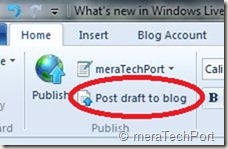
Post draft to blog button on the ribbon-

As many of the Writer users requested this feature, the Writer provides it. As the users said they post a draft to their blog and then directly go to the web to actually publish the post from there. So now they can do this easily.
WLEnew9


Much better theme detection -

As WordPress has changed over the years Writer has not kept up with the theme changes.  Live Writer is back on par and can accurately detect all current themes from WordPress including their new WP 3.0 theme Twenty Ten.  The theme detection changes are not exclusively for WordPress.  Writer will now work a lot better with the new custom Blogger themes also and should work better for really any blog server you use.  WYSIWYG is much better in Blogger now.Though Writer still cannot detect themes for blogs marked as private on servers such as WordPress.

Also has theme related options on ribbon.

WLEnew10


Updated spelling dictionaries-

It now have the same ones that are included with Office 2010.  Live Writer will have updates for all languages that it is released in.  It also has an updated autocorrect list that matches the English list in Office 2010.

Photo Album improvements- Faster uploads of Photo Albums.

More keyboard shortcuts-

There are more keyboard shortcuts which should soon appear as help topic on the web.


So, overall there’s an improvement in the quality of the software and over 75% of reported bugs have been fixed. As I have started using it, I can feel the improvements. One of them being the Face detection in Photo Gallery which has improved a lot, all of the products load faster, nice splash screen animation etc. And the improvements are an ongoing process and Essentials keeps improving, looking into users feedback.

And apart from English, Spanish, French, Dutch, Portuguese, Japanese, and Simplified Chinese, you can also now get the beta in Russian or German. So get the Windows Live Essentials 2011 beta refresh today and give it a try. Windows Live Essentials beta refresh requires Windows 7 or Windows Vista.

(Source: Inside Windows Live, Aaron's Live Writer Blog )


Thursday, May 13, 2010

New Version of Windows Live Wave 3 available – Minor updates

Yesterday I got this tweet from Windows Live Writer Team -

New version of Wave 3 Windows Live Writer. No new features but higher quality. Upgrade today!Wed May 12 07:30:54 via web

Windows Live Writer
WLWriter


And so decided to upgrade it, but when I tried from within Windows Live Writer, Help > Check for updates , It said ‘You are running the latest ver…”

So I went to http://download.live.com/  and from there upgraded Windows Live Wave 3 . It not only upgraded the Writer but all Windows Live Apps - Messenger, Movie Maker, Mail , Photo Gallery, Writer.

Before the upgrade I had this version -

WLWriterWwave3Befupdt


And after upgrading -

WLWriterWwave3AFTupdt


So the Windows Live Writer, Messenger, Mail, Movie Maker, Photo Gallery all upgraded to Build 14.0.8117.416 And as the tweet said – No new features but higher quality.

I think this is for all the Apps and not only for Writer as I haven’t noticed any new features in other apps also.

UPDATE: (13May2010, 6:50AM) : And here’s the official word about this update- Minor update to Essentials released today

Today we released an optional update for Wave 3 of the Windows Live Essentials suite in all 48 languages. This is a minor release that updates Windows Live Messenger, Mail, Family Safety, and Sync. You can install it from http://download.live.com, or through Microsoft Update as an optional update. While this is our last planned update for Wave 3, we will continue to support this release for the foreseeable future as it will be the last version that supports Windows XP.

This is a minor release with a small set of targeted bug fixes and minor changes. Even though most users will not run into the issues we addressed, we felt they were important to fix. This update also contains a small set of changes to ensure that Essentials supports new advances coming in Wave 4.

Rest assured, we’re continuing to work hard on Wave 4 and are in the final stretches. This update is a first and important step in that direction.


Wednesday, May 12, 2010

[FIX] - Automatically diagnose and repair Windows Live Photo Gallery Problems with Microsoft FixIt

Have you been having problems with Windows Live Photo Gallery?  Problems previewing photos?  Issues with the slide show?  Unable to use the album download function?  Does the application freeze?  Do you get choppy images transitions when viewing images using the slide show screen saver?

A new automated FixIt solution from Microsoft automatically diagnoses the problems mentioned above, as well as others, and the automatically fixes them for you!

What it fixes...

  • System performance is slow when viewing a multipage TIFF file
  • Can’t preview pictures in Windows Photo Gallery
  • Windows Photo Gallery print picture preview color is reversed
  • Pictures not showing when starting a slide show in Windows Photo Gallery for Windows Vista
  • Windows Live Photo Gallery album download no longer works after upgrade from Vista to Windows 7
  • Windows Live Photo Gallery stops responding or will not start
  • Image in Windows Photo Gallery is yellow on a Windows Vista-based computer
  • Photos screensaver not working
  • Choppy image transitions when viewing images using the Slide Show screensaver


MSFixItWLPG

Just go to

http://support.microsoft.com/gp/windows_photo_and_slideshow_diag 

and Click the ‘Run now’ button to launch the file….

Details at -  http://support.microsoft.com/gp/windows_photo_and_slideshow_diag

(Source: Windows Live Photo Gallery Problems )


Thursday, March 11, 2010

New Image Composite Editor (ICE) from Microsoft Research does amazing things

For the TechFest 2010, Microsoft Research  is releasing a new version of ICE (please note it links to the MSR ICE site , which at present is having the older ver. of ICE) . The new ver is not yet made public, but soon it will be.

EDIT (190310) :The new ver of ICE is now available, Please check - http://research.microsoft.com/en-us/um/redmond/groups/ivm/ice/

Also check - ICE Is Now Synthy

Pl.note some features described in this post are because of plug-ins which may not be yet available.

ICEStructuredPanos 


newice1

“Image Composite Editor (ICE) with Multi-Image Fusion.  In the current version of ICE, it provides advanced features for panoramic stitching such as choosing the stitch’s orientation, custom projection, and selecting a 360 stitch’s mid-point, and this tool also integrates nicely as a plug-in into Windows Live Photo Gallery. Here we’ll show you some of the upcoming new features in ICE such as:

  • Structured Panoramas
  • Stitching Panoramas from Video
  • Sharp Panoramas from Blurry Videos
  • Creating Photographs from Videos
  • Multi-Image Denoising and Sharpening using Lucky Imaging ”

In the demo as we see the new ver. of Image Composite Editor (ICE) does amazing things. You’ll have to see the demo video to understand.

Friday, October 10, 2008

Get photographed with your clone using Windows Live Photo Gallery

You all must have used ‘Create Panoramic photo…’ option in Windows Live Photo Gallery for creating stunning panoramas of sceneries or city’s skyline etc. People normally use this option to create a landscape prepared by stitching 2 or more photos. This option has been one of my favorite features and have been using since the start of Photo Gallery.

Today I will tell you to make use of this option in a different way, for something different.

How about using this option for creating a clone? Yes, you can do it. You can get photographed with your clone. Or you can take your friend’s photo with his/ her clone. Let us see how it can be done.

Take a normal photo featuring a person , as shown below.  It’s a normal photo, btw he’s my cousin Akhilesh sitting on the ground playing veena, a musical instrument.

1Akhil

Now take another photo of the same person in a different position as if he’s talking or looking at his earlier photographed position. make sure he is standing in a somewhat farther place in line with the earlier position and portion of this photograph is overlapped with the earlier taken photograph. Please check the next photo to understand this.

2Akhil

As you can see in both the above photographs the door portion is getting overlapped. This is necessary for working of ‘ Creating Panoramic photo..’ option as it stitches the photographs together. Also note in the second photograph the person is gesturing as if he is talking to person in first photo. This makes it more natural.

Now open these photographs in Windows Live Photo Gallery and select these 2 photographs. You can drag the mouse around these 2 photographs keeping pressed the left mouse button to select these together. Or you can select one by clicking the mouse over one and keeping the ctrl key select the other one , so that both gets selected.

Now keeping these photograph selected click on Make > Create panoramic photo….

panclone 

Rest will be taken care by the software and you will see both the photographs getting stitched together into single one as shown below. You  can use the crop option to trim the photograph from above and below, if needed.

1and2st

As you can see Windows Live Photo Gallery has done a perfect job stitching the 2 photographs. And the person seems to be talking with his clone. So how was the trick ? Hope you liked it. I thoroughly enjoyed it and my cousin Akhilesh too.

You can make use of more than 2 photographs but remember to overlap each photograph and you will get a perfect photograph with your clone. May be, it may require a little bit of practice and imagination. Also you can wear different dresses for different photographs making it more authentic. Its total Fun, try it out now!! 

So what are you waiting for, get the latest ver. of Windows Live Photo Gallery beta from download.live.com  and try other new features also.

Tuesday, October 07, 2008

People tagging and other new features in Photo Gallery Beta

Windows Live Photo Gallery Wave3 Beta was released  few days back along with other Windows Live apps. Let us see what are the new features in this new version of Photo Gallery.

New user interface : If you have been using Windows Live Photo Gallery earlier, the first change you’ll notice is the User Interface. Toolbar is more cleaner and some buttons like rotate, delete are at bottom right. Overall now it gets a Simpler look. You can adjust the Navigation Pane (located on left side) or completely close it by dragging the  separator near the vertical scroll bar. If all folders etc. in the Navigation Pane are collapsed then you’ll not get the vertical scroll bar, So just move the mouse around the navigation pane to view the separator which can be adjusted to alter size of Navigation pane or double clicked to completely close the Navigation pane.

WLPGUI3z Also you can close the Info pane (situated on top right) by clicking the ‘Close button’  or the ‘Info’ button situated on the toolbar. Now to get back the Info pane, you can click the ‘Info’ button again. I have seen many people confused in getting back the Info pane when closed using ‘Close’ button.

And in the Info Pane you can adjust the Information section (situated on bottom right) by adjusting the separator or you can collapse it completely by clicking on the blue arrow which gets visible when mouse is moved over that separator.

So what I am trying to say is, you can get the complete area occupied by display area of your photos by closing these panes. WLPGUI5

People tagging : This is the feature, I like most. Whenever in a photo , people’s faces are there , Photo Gallery detects the face and puts a square around it so that you can tag that person by entering the name of that person or if you are signed in to Photo Gallery then you will also be provided with your WL Messenger and WL Mail Contact list in the form of drop down appearing next to person’s face.

wlpgwave3b4zFor me this is the best feature, as once you have people tagged all  your photos, you can get pictures listed according to person. And while viewing the photo, when you pass mouse over a face, it will display the name of the person.

Best thing is, these people tags are saved into the photo. So if you copy these photos to another Computer , these tags remain with the photos.

I hope to see this feature improve more as it recognizes  the faces every time when its facing straight, but it misses when the faces are looking sideways. In such cases you have to manually recognize and tag them by clicking on ‘Add People tag’.

More options for Fixing your photos : Already there were great fixing options provided in the earlier version. Now some more options have been added. Sometimes your photos are not straight and are tilted because of wrongly holding the camera. So for such photos there’s a ‘Straighten photo’ option provided. This is also very useful addition.

WLPGw3bStrgt Also there’s a new option of giving your Photos ‘Black and White effects’ so that you can give an antique look to your photos.

WLPGw3bStrgtZ

Check the Photos shared by your friends : As I said, when you are signed in to Photo Gallery, it also lists  persons from your contact list. So when you click on these persons, you can view the photos shared by them right in the Photo Gallery.

WLPGw3-2az

Share metadata you want to share : When you share your photos, you can restrict what metadata you want to show by using the File > Options > Publish.

wlpgw3Pub  

Make a Movie : Now you also have the option of making a movie of your photos and clips. (This option available only in Windows Vista, not in Windows XP). As you know Windows Live has released WL Movie Maker (only for Vista)  also as a part of Windows Live Wave3 Beta Suite.

wlpgw3bmmz

New SDK for Publishing plug-ins :  Developers now have a framework to develop publishing plug-ins for Windows Live Photo Gallery. This will allow Community to build plug-ins for any sharing service. The new SDK will let developers create plug-ins for users, which when installed, will appear right on the Publish menu. You can check for the plug-ins available and new ones added by clicking on ‘Add a plug-in…’ option.

wlpgw3bplgin 

As you can see I have installed ‘Publish on Picasa Web Albums’ plug-in which is available in the Publish option.

Integration with Photosynth, AutoCollage, Pro Photo Tools and other software : The new Photo Gallery provides integration with PhotoSynth, AutoCollage 2008, Pro Photo Tools, Image Composite Editor (ICE) and other Photo related software. You’ll get these programs in the Extras Menu after you install them . So the Extras menu provides the entry point for these programs. Though this may not be the best integration , I am sure it will improve.

wlpgw3b2x

(btw if you haven’t tried these tools , you must try them.All are Free tools from Microsoft)

These are the new features in the Windows Live Photo Gallery Wave 3 Beta. I am enjoying these new features. I am sure Windows Live Photo Gallery will continue to improve and you can see more new features being added and much improved in the future version.  If you haven’t yet tried it , do it now . Get it from download.live.com. And if you want any other feature or you don’t like a particular feature , you can send feedback, this option is also built into the Photo gallery ‘Help’ menu.

Wednesday, October 01, 2008

Picasa Web Publisher plug-in for Windows Live Photo Gallery Wave3

Windows Live Photo Gallery Wave3 Beta has support for adding publishing support for 3rd party sharing services. So one can install available plug-ins and start publishing from Photo Gallery. So now such a plug-in to publish your photos to your Picasa Web account is available for Photo Gallery. This is created by  Mark Steeves.

Get it from http://picasapublisher.nfshost.com/ . Read all the instruction for this plug-in here.

So this will add an option in the Photo Gallery

WLPGW3pins Add a plug-in option will also take you to List of available plug-ins.

As said these plug-ins only work with the new wave3 beta versions of Photo Gallery and Movie Maker, available here .

Tuesday, September 23, 2008

Have you tried the Windows Live Wave3 beta?

Couple of days back the new Windows Live Beta was released. I installed it as soon as they were released. The new Windows Live Beta Suite has:

  • Windows Live Messenger beta
  • Windows Live Mail beta
  • Windows Live Photo Gallery beta
  • Windows Live Movie Maker beta (Only for Vista)
  • Windows Live Writer beta
  • Windows Live Family Safety

Windows Live Movie Maker Beta is a new addition.You can install all or choose the Live product whichever you want.

The new Windows Live Wave 3 Beta includes significant updates with lots of great new features. I have installed it and exploring various new features. Being the Windows Live Beta Tester, I am also submitting feedbacks and bugs. Till now I haven’t come across any major issues and all are working fine. I had  no problem installing them. I tried the installation by upgrading the Live products which I already had on my Windows XP. I also installed them by removing my earlier version of Live products on my Windows Vista. And the installation was smooth in both the cases without any problem.

If you haven’t yet installed them, then just get it now from http://download.live.com


2z

I will posting about various new features of different Live products in my subsequent posts.

Monday, January 28, 2008

31 Microsoft Technologies demos in 40 minutes

Check out this cool compilation of 31 Microsoft Technologies in 40 minutes by Nigel Parker where he demonstrates these Technologies explaining them in simple words. Its presented in an interactive interface where you can jump from one demo to other.

Also there's a download link to download the video, if you want to (can also download it from here. ) (227 MB)

These are the technologies covered in the demo, put here with their links and timeline:

1. Microsoft Research Group Shot (00:20)
2. Sea Dragon (TED Video) (01:31)
3. Photosynth (02:45)
4. Microsoft Research HD View (Auckland, Wellington) (04:04)
5. Virtual Earth (Live Labs on the Map) (05:35)
6. Bill Buxton's Presentation from Expression around the Clock (07:27)
7. Microsoft Surface (09:40)
8. Silverlight 1.1 Alpha Surface Demonstration (Video Support) (10:17)
9. French Silverlight 1.0 Application (Script#) (10:48)
10. Tablet Features in WPF - Inking Over Video Sample, Ink Support Silverlight 1.0, Silverlight Ink SDK Sample (11:17)
11. Silverlight 1.0 Inking Search Sample (11:45)
12. Live Image Search (filters) (12:20)
13. Tafiti Search Visualization (13:05)
14. GPS location based interactive community (Where is Frank?) (14:09)
15. Silverlight 1.1 Alpha Invaders - Code (14:48)
16. Contoso Bicycle Club - Windows Live Quick Applications (16:03)
17. Live Messenger Integration Demo - Details (17:07)
18. http://backgroundmotion.com - Code/ Source Code (20:00)
19. Microsoft Popfly (22:21)
20. Windows Live Photo Gallery (26:16)
21. Windows Home Server (26:55)
22. LCI Intégrale (28:30)
23. Livestation (29:28)
24. WebGuide (30:03)
25. hsn.tv (31:25)
26. thirteen23 :: denounce (32:04)
27. How About It? (32:47)
28. the-hub.tv (33:53)
29. Glenn Conner Interview - Amazon Demo Silverlight 1.1 Alpha (34:30)
30. Building a 3D WPF Gesture Application - Code (35:24)
31. Building a Video Player in 8 mins with Silverlight 1.0 (36:42)

Sit back and enjoy the video.

UPDATE: As I found out and Nigel has also posted about it now, that when you go to the Microsoft Research Group Shot site and tries to download it, you'll get 'specified file not found ' message. This is because as Nigel points out "The Group Shot Beta period has expired. We are currently considering several options to bring Group Shot back. Please stay tuned to this site for information on future releases." (link).

Saturday, January 05, 2008

Microsoft's Photography Resources

Microsoft provides great resources for those interested in Photography. It has site dedicated to Professional Photography, Microsoft Professional Photography
where you can find lots and lots of Photography resources,

Gallery where you can see the amazing images which recognizes photographers and digital imaging industry leaders who use a Microsoft Windows-based digital workflow.
Lots of interesting articles such as -The Ultimate Setup: How Sports Illustrated photographers and crew members set up cameras, strobe lights, laptops, and servers...


A download center dedicated to Photography, where you can find lots of tools such as
Microsoft Pro Photo Shoot: Include photo shoot and equipment details in your Microsoft Office Outlook appointments.
SyncToy v2.0 Beta : Copy, move, rename, and delete files between folders and computers.
Microsoft Photo Info : Microsoft Photo Info enables easy editing of "metadata" for digital photographs from inside Windows Explorer.
Download codecs : Find codecs that will enable you to handle RAW image files with your Windows-based operating system.
and many more.....

And there's a Support section for solving various problems or issues faced.

The Microsoft Professional Photography site also provides various links , such as
Microsoft Pro Photo Blog which provides the latest aggregated links related to photography.

And there's link to Travels to the Edge with Art Wolfe :an intimate and upbeat series that offers unique insights on nature, cultures, environmental issues, and the new realm of digital photography.


Apart from the Microsoft Professional Photography Site, there's a site
Digital Photography with Windows XP

which also provides lots of articles which may interest beginners, amateurs also. It has a Digital Photography How-to center, which provides articles such as:
Take great pictures
Manage and back up your photos
Enhance and fix
And lots more, you have to explore through the treasure.

There's a 'Community and Support' also where you can Connect with other photography enthusiasts in the Photos Newsgroup. And there's Quick answers to popular questions,
Activity center focusing on fun, creativity photography projects.

So you should check the site to get all these cool things.

Next we come to a nice Windows Live Photos and Video Blog

from Windows Live Digital Memories Experience Team, which gives nice tips such as on Windows Live Photo Gallery.

If you haven't installed this , you should try it out. It comes with Windows Vista, but the new version has come out of beta and has lots of cool facilities to handle, manage and share all your digital photographs and videos. It also can be installed on Windows XP. Its one of the coolest Windows Live Services/app. about which I have posted earlier, right from its beta phase describing its features.

Sunday, November 04, 2007

Windows Vista and itasveer


Few days back, I had posted about non-availability of online photo printing service in India with regard to Windows Live Spaces and HP snapfish (Windows Live Spaces and HP Snapfish India),
for which one of the readers nishant commented about the itasveer which has partnered with Vista for photo prints in India.
Yes, i do remember about this and thought of posting about it. Its not a new service, just after the launch of Windows Vista, this was announced :
"itasveer.com is the only Indian photo printing service which has partnered with Microsoft for the ‘Online Print Wizard’ module in Windows Vista. So, if you’re running Windows Vista on your PC, you are a step closer to itasveer. You can now choose the photographs you want to print from your ‘Photo Gallery’ and just press the ‘Order Prints’ button, we’ll take you through rest of the process."
Just goto the print option of Windows Live Photo Gallery, which comes with Vista as default or get its newer beta version, then from the 'Print' option , press order Prints... and the itasveer will be listed as a printing company. That's the only one being listed for India at present. For the location of US, so many companies are listed. Maybe in future , more companies will be added for India region. If its not being listed for you, make sure you have set your location as India to see itasveer in the list, Set the location as India from Control Panel > Regional and Language Settings.

For the India location, only provider being listed is itasveer.

While for the US location, you can see a long list of providers.
