Showing posts with label Windows Live SkyDrive. Show all posts

Tuesday, December 20, 2011

Skydrive for iPhone and Windows Phone

Recently there were lots of updates to SkyDrive which now uses the latest HTML5 technology making it very fast and very much improved file management. Now Microsoft has come up with SkyDrive app for Windows Phone and iPhone. Since sometime, Microsoft has been providing very good apps for iOS and Android based devices also apart from for Windows Phone.

SkyDrive for iPhone: SkyDrive from Microsoft is the place to store your files so you can access them from virtually any device. With SkyDrive for the iPhone, you can now easily access, manage and share files on the go. You can also upload photos or videos from your iPhone to SkyDrive.

Features:

  • Access all of your SkyDrive content including files shared with you
  • View recently used documents
  • Upload photos or videos from your phone
  • Share a link to any file using email
  • Create folders. Delete files or folders

Available now in the App Store: http://bit.ly/v1JLYR

SkyDriveip3

SkyDriveip2

SkyDrive for Windows Phone

SkyDriveWP

SkyDrive for Windows Phone is available in the Marketplace now: http://bit.ly/w2xMQW

The SkyDrive app for Windows Phone allows you to browse and manage your SkyDrive on the go.

(Source : Inside Windows Live )

Wednesday, June 22, 2011

SkyDrive changelog

SkyDrive

Yesterday Microsoft released a new version of SkyDrive (New Windows Live SkyDrive : Features and Review ) built using HTML5 for the modern web.

For those who are interested in the nitty gritty, here’s the changelog as provided by the SkyDrive team -

SkyDrive ver 16.0 (Build 1648.0617)

Site -

  • New layout, look and feel and site architecture
  • SSL enabled on all authenticated pages
  • Clean URLs (Removed most of the junk from the URLs)
  • SkyDrive can now be pinned to your Windows 7 taskbar with jumplists (IE9)
  • Header now says SkyDrive
  • What’s new feed for docs and photos removed
  • Upload file size limit now 100 MB
  • Moved to edge-to-edge layout to take advantage of larger screens
  • Reduced size of Header to give more room to your content
  • New mobile views for all Photos / Docs experiences

Photos -

  • Brand new Photos experience
  • HTML 5 Videos playback
  • Thumbnails generated for H.264 video
  • CSS3 Transitions for albums and 1-up view
  • Photo album thumbnails now “pulse”
  • Thumbnails generated for all photo sizes (previously limited to 5000px)
  • Support for aspect ratio thumbnails (including panorama)

Docs -

  • Icons for PDFs filetypes
  • Recent document includes more items
  • Open in Office Client from SkyDrive now gives you the option to install Office 2010 trial using Click-to-Run technology
  • Performance improvements to the Office Web Apps in IE9
  • Details view now supports touch

Groups -

  • SkyDrive Groups now appear in the left nav giving you one click access to Group Content

Wednesday, May 19, 2010

View, Share and Edit Office Documents from Hotmail – Cool new feature in Wave4

HMW4logo
The new version of Hotmail has come up with lots of cool features and this one is the coolest feature. The new Hotmail makes it very efficient, easy, convenient to handle Office docs.
As you create a new email, there’s an option provided ‘Office Docs’, click on it to attach any Office Document and send it.
HMDocs1z

HMDocs2z

As one receives an Office document as attachment in the new Hotmail- be it Word, Excel or PowerPoint, one can open and view it online in any popular browser – on a PC or Mac – and even if office is not installed on ones’ PC or if one has an older version. A link will be provided and one has to just open it to view. Thus a seamless integration is provided between Hotmail and the Office Web Apps.
HMDocs4z
And one more thing, if you receive any Office Document, it gets automatically listed under ‘Office docs’ folder in the Quick views.
HMDocs3QuickViewz

You can view Office documents sent to you in the new Hotmail with the same fidelity you’d get if you were viewing it using your Office Application on your PC. This means that if you’re travelling and want to be able to view that PowerPoint presentation or you’re on the road and want to read that Word document, you now get 100 percent full viewing quality even when you’re away from your PC
HMDocs5( Click on picture for enlarged view)


HMDocs5

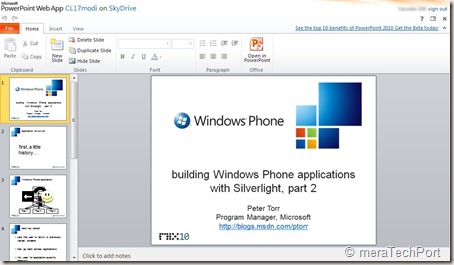
And even you can edit it in browser itself with the Office Web Apps.
HMDocs6


HMDocs6

if you need intensive editing, you can open it in Office application on your PC. When you’re finished, any edits you made to the document on the browser will maintain formatting and any on your PC will be automatically saved back into the cloud where you can then keep the document stored privately or share it with others.
HMDocs7z


Reply with edits to an attachment
Normally, if a friend emailed you a document — like a resume — and asked you to make a few edits, you’d have to spend time downloading, saving, opening, resaving and re-attaching the document. And of course, you would need to make sure your PC had Office installed.
The new Hotmail makes this much easier by letting you edit your friend’s document and reply back — all without leaving Hotmail and even if you don’t have Office installed on your PC.
This makes it one of the coolest feature of the new Hotmail.

Share big attachments
Hotmail users can send up to 200 Office documents of up to 50 MB each — a total of 10 GB — in a single message. The people you send the documents to — regardless of whether they’re on Hotmail, Gmail, Yahoo!
Mail or otherwise — will receive links to where you’ve stored the documents in the cloud (on Windows Live SkyDrive) so that you’re not filling their inboxes. They can click on the links to view the documents in their browsers using the Office Web Apps or download the documents to their local machines — one by one or all together in a single convenient .zip file. And when you send those documents, just like with photos, a private folder is created and only the people that receive
the email will have access.

Work with others
If you’re using the new Hotmail, you can email Office documents to people on other email services (including Gmail and Yahoo! Mail) and they too can view and edit your Office documents in the cloud. Nothing is needed to view, and all they need is a Windows Live ID to edit.

Versioning
And with multiple edited versions of the same document, you can always go back to previous versions thanks to the online file management provided by Windows Live SkyDrive — another key part of transforming Hotmail and Office into a great personal productivity solution.

Collaborative editing in Real time
You can work together on a doc in real time. whatever changes being made by one can be seen instantly so one can work together in real time and stay coordinated using Messenger present within Hotmail
HMDocs8collab

Such features truly makes the new Hotmail, the most efficient email for busy people.
You can view all the above features demoed in this video -
HMvDO


Thursday, November 26, 2009

How to access Office Web Apps ?

Office Web Apps makes it so easy to create, edit and share your documents online and many of you must have already tried earlier. But there were many who didn’t had access and couldn’t try it. Now everyone can access Office Web Apps. As MS Office 2010 beta is publically  available , anyone can try office Web apps as well.

For this first download and install MS Office 2010 beta . If you haven’t tried this you should, to see various improvements to MS Office with lots of new features.

Now create a Word, Excel or PowerPoint document and save it to SkyDrive from File > Share > Save to SkyDrive, a Free 25GB  storage service on Windows Live to store your docs.

getoffwebapps1z

It will ask you to sign-in with your Windows Live ID

getoffwebapps2z

So select a folder in SkyDrive, click on ‘Save As’ type a name of your doc and save. Now your doc is save in SkyDrive.

getoffwebapps3z

Now Click File > close.

Now from your IE browser goto http://skydrive.live.com and sign-in with your Windows Live ID. Select the folder where you had saved your doc. Click on the filename and select View.

getoffwebapps4z

So when you click on View, you will be prompted to read and accept the terms of use to Join the preview program of Microsoft Office Web Apps Technical Preview /Beta. Click on Accept.

getoffwebapps5z

Now you can access Office Web Apps and can create, share, edit  your docs online though in limited way as its still in beta.

getoffwebapps7z 

getoffwebapps8z

(Click on Images to enlarge)

So try it out now, Office Web Apps has made so easy to create your Word, Excel, PowerPoint and OneNote Online.

Thursday, August 06, 2009

Windows Live SkyDrive Team Blog is moving

WLSD Yes, the SkyDrive team blog is moving and it’s the correct move. Like we are now having all Windows related official blog at one place http://windowsteamblog.com/blogs/ , hope to see similar move for all Windows Live related products. And now Windows Live SkyDrive Team blog which earlier had a separate blog at http://skydriveteam.spaces.live.com/  will be integrated with Window Live Team blog http://windowslivewire.spaces.live.com/default.aspx . So from now on look for all SkyDrive related posts here only. Its nice, one doesn’t have to keep track of different blogs.

And they have started with new post : a post celebrating one billion photos uploaded to Windows Live Photos. Great !

Microsoft is streamlining its Windows Live services, like recently it announced that Windows Live Events will be closing and one can use the Calendar service to do what Events did. 

(Source:Our blog is moving!)

Friday, May 23, 2008

Windows Live SkyDrive Updated

Windows Live SkyDrive Team has released few updates today:

SkyDrive has been made available in 24 additional locations, Bulgaria, Costa Rica, Croatia, the Czech Republic, Estonia, Germany, Greece, Hungary, Ireland, Latvia, Lithuania, the Philippines, Poland, Romania, Russia, Singapore, Slovakia, Slovenia, Thailand, Ukraine, Venezuela, Serbia, Indonesia, and Malaysia have been added. This brings the grand total to 62 countries and regions!

You can leave comments on any file in SkyDrive and see all of the recent comments people have left for you.

Now you can add captions and descriptions to your files and photos.

When you click on any file, you can speed through all the files in the folder. Its being called Browsing Widget.

Photo previews have been made bigger.

Some other features like Details view and Photo Thumbnails view have been provided and more bugs have been fixed.

Its nice that still the SkyDrive team is bringing improvements. I hope many more suggestions will be looked into.

Thursday, February 21, 2008

Windows Live SkyDrive out of beta, capacity increased to 5GB

This is great news!! Windows Live SkyDrive has increased its online storage to 5 GB. Earlier it was 1 GB.
And the Beta tag is removed. Hope to see the SkyDrive soon available in wider regions. At present being available in US, UK and India.


There's no official word about other improvements.
I noticed it while checking my account after reading a post from PeterVan Dam at Microsoft Newsgroup. Thanks !

Thanks to SkyDrive Team for increasing the capacity. They have heard the user's request to increase the capacity.

UPDATE : Just now SkyDrive Team has officially announced .

Welcome to the bigger, better, faster SkyDrive!

We know it's been mighty quiet on the SkyDrive blog, but we’ve been hard at work on a new version that we’re proud to announce today!
You've made two things clear since our first release: You want more space; and you want SkyDrive where you are. Today we're giving you both. You now have five times the space you had before — that’s 5GB of free online storage for your favorite documents, pictures, and other files.

SkyDrive is also available now in 38 countries/regions. In addition to Great Britain, India, and the U.S., we’re live in Argentina, Australia, Austria, Belgium, Bolivia, Brazil, Canada, Chile, Colombia, Denmark, the Dominican Republic, Ecuador, El Salvador, Finland, France, Guatemala, Honduras, Italy, Japan, Mexico, the Netherlands, New Zealand, Nicaragua, Norway, Panama, Paraguay, Peru, Puerto Rico, Portugal, South Korea, Spain, Sweden, Switzerland, Taiwan, and Turkey.

This release also includes bug fixes and improvements to make the site even faster and more reliable. We’re proud of this release — so proud, in fact, that we’re officially removing the Beta tag!

Friday, October 12, 2007

Windows Live SkyDrive storage doubled and other updates

* Windows Live SkyDrive storage has been doubled to 1GB.
Other updates to SkyDrive are:

* Now you will be notified via RSS feed when someone adds a file to a specific folder, you have to subscribe to an RSS feed, by going to the public folder that you’re interested in, and click on the orange RSS Feed icon.* Earlier it was difficult to share with those who are not on the Contacts, address book. So one has to goto Hotmail or Messenger in order to add someone to our address books. But now one can add from SkyDrive itself.* Also, now you can share with non Live IDs. In the past, only Live ID contacts would appear in your contact list. Now, you can share with any e-mail address.
The owner of the non Live ID e-mail address will receive an e-mail with instructions on how to access the shared folder.So like a Live ID mail address, he will also receive the mail and when he clicks on the link , he'll get the invitation to accept where he has to use Windows Live ID to sign in or create one , if he doesn't have.
* Next update is, about name of the person who has uploaded the file, which will be displayed, so we will able to know this.
All these improvements are welcome as they are all based on users feedbacks. Now what the users wanted are implemented by SkyDrive Team. Thanks !
(Updates to Windows Live SkyDrive!)

Friday, August 10, 2007

Windows Live Folders becomes Windows Live SkyDrive

Hot off the press : Windows Live Folders beta becomes Windows Live SkyDrive beta. And its a next release with improvements based on feedback and suggestions. And I am one of its beta tester :)

An upgraded look and feel
— new sleeker interface.
"Also on SkyDrive" — easily get back to the SkyDrives you’ve recently visited.
Thumbnail images - A feature requested by many. But I think a little bit bigger thumbnail would be convenient.
Drag and drop your files - Drag and drop right onto SkyDrive. Multiple selection of files and just drag them, very Convenient.
While uploading , now you get a progress bar instead of bouncing ball game. Nice !
Obtained after installing ActiveX control in IE.
Embed your stuff anywhere — with just a few clicks, post your files and folders anywhere you can post html.

And above all SkyDrive introduced in two additional regions: UK and India.

Note for existing beta users: if you’ve sent or posted links using Windows Live Folders, you will need to update your links due to changes in URLs with this release.
So Hurry up, go sign up today!

Also check for the new, team blog site: http://skydriveteam.spaces.live.com.
