Showing posts with label iPhone. Show all posts

Saturday, September 08, 2018

Send SMS from your PC, stay connected with Your Phone app

Now you don’t need to search your phone to send SMS / text messages. Let it be in your pocket, in bag, on your desk or in your purse. Your Phone app gives you instant access to your most recent photos and texts from your Android phone. Your Phone app now allows to text your friends, group message and all this using your PC keyboard.
Your Phone app allows you to view, send, and receive the SMS from your Android, on your computer.

As mentioned earlier, one can type with a keyboard for sending messages. And on pen-capable devices, one can use digital pen to ink a message and see your ink gets converted to text and send. Or one can try using just your voice to dictate a message (US English only at this time) . Press Winkey + H to start dictation. On a touch keyboard, select the microphone button.
You must link your Android phone to your computer through Your Phone app. You will receive an app from Microsoft, which you must download to your mobile phone and follow the setup prompts. Android 7.0+ are compatible with Your Phone app. For iPhone users, Your Phone app helps you to link your phone to your PC.
Requirement:
  • A mobile phone running Android 7.0 (Nougat) or later
  • A PC running Windows 10 April 2018 Update (Version 1803) or later
Check this for all the FAQs on Your Phone.

Wednesday, September 17, 2014

Microsoft Universal Mobile keyboard- switch between iPad, Android and Windows devices

Microsoft has introduced Universal Mobile keyboard for your tablets and Smartphones. And you can be on any OS, be it your iPad, iPhone, Android device or your Windows tablet, you can easily switch between them with a flick of a switch! Pair with up to 3 devices with different operating systems and easily switch between them.

“The compact and light weight design of the Universal Mobile Keyboard was built with portability in mind with its protective cover and built-in stand that holds your tablet or smartphone. Just flip the cover open to power-up and make a Bluetooth connection, then set your device into the integrated stand—you'll be typing in seconds. Shutting down is just as fast. Simply close the cover to turn off the keyboard—it's that easy. The rechargeable battery provides up to 6 months of usage on a single charge. But if you're ever low on power when you're heading out, don't worry—just do a 10 minute quick charge and you'll have plenty of power for a full day's work. “

There is no dedicated Windows specific key but dedicated keys for Android and a CMD for Apple users. So people can use shortcuts found in respective OS. umk4

umkUMK1zumk2z

umk3z

Check the demo video:

Microsoft Universal Mobile Keyboard
For more details please check here.

Tuesday, December 20, 2011

Skydrive for iPhone and Windows Phone

Recently there were lots of updates to SkyDrive which now uses the latest HTML5 technology making it very fast and very much improved file management. Now Microsoft has come up with SkyDrive app for Windows Phone and iPhone. Since sometime, Microsoft has been providing very good apps for iOS and Android based devices also apart from for Windows Phone.

SkyDrive for iPhone: SkyDrive from Microsoft is the place to store your files so you can access them from virtually any device. With SkyDrive for the iPhone, you can now easily access, manage and share files on the go. You can also upload photos or videos from your iPhone to SkyDrive.

Features:

  • Access all of your SkyDrive content including files shared with you
  • View recently used documents
  • Upload photos or videos from your phone
  • Share a link to any file using email
  • Create folders. Delete files or folders

Available now in the App Store: http://bit.ly/v1JLYR

SkyDriveip3

SkyDriveip2

SkyDrive for Windows Phone

SkyDriveWP

SkyDrive for Windows Phone is available in the Marketplace now: http://bit.ly/w2xMQW

The SkyDrive app for Windows Phone allows you to browse and manage your SkyDrive on the go.

(Source : Inside Windows Live )

Monday, December 12, 2011

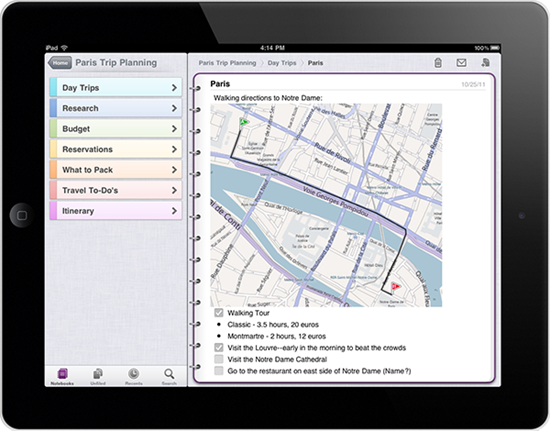
Microsoft OneNote for iPad now available

Today morning I noticed the Update available on iOS device and it was Microsoft OneNote. But the one thing struck me was it said – Microsoft OneNote for iPad is now available. (Pl check the Update below )

onenoteios 

Since I’m not an iPad user I haven’t checked it on iPad and didn’t knew it was not available for iPad earlier. So just head over to iTunes App Store & get OneNote for iPhone. Its FREE!**

In the iTunes stores requirement description also include to support iPad -

onenoteipadz

UPDATE : Just now I received a tweet from an iPad user Tim P  which said-

“I can't find the iPad version despite all the updates on the iPod version. They may have jumped the gun. Chances are apple approved the iPod version before the iPad. Microsoft tried to time it, but it can't be timed.”

So as of now, its not yet available on iPad. But keep checking , it might soon be updated.

Also I just added a ? to the Post Heading

UPDATE : After a bit of confusion, OneNote for iPad is available Now ! iPad users, please confirm !
3113.on_onenote_13_ipad2

4403.onip_logo_appstore

OneNote 1.3 works on the following iOS devices:
Apple iPhone 3GS
Apple iPhone 4
Apple iPhone 4S
Apple iPad
Apple iPad 2

What’s new in this version-  OneNote for iOS builds on previous releases with the following new features in version 1.3:

Support for iPad and iPad 2
Localization into several new languages and markets
Tabbed user interface
Quick note creation in the Unfiled Notes section
Table rendering
Improved Windows Live sign-in experience
Option to sync notebooks only over a Wi-Fi connection
Integrated upgrade option

** OneNote 1.3 is free to download and use for up to 500 notes (the total of newly or previously created notes). To track your usage, tap the Settings button in the app and then tap the Upgrade button.

When you've reached the limit, you can upgrade OneNote 1.3 as follows:
$4.99 for unlimited use on your iPhone
$14.99 for unlimited use on your iPad
If you choose not to upgrade to the unlimited version, you can still view, sync, and delete any of your existing notes even after you've reached the 500 notes limit. However, you will no longer be able to edit your notes or create new ones on your iPhone or iPad. For pricing outside of the United States, please visit the iTunes App Store in your region

Starting today, OneNote for iOS available worldwide in the following markets:

Argentina, Australia, Austria, Belgium, Bolivia, Brazil, Canada, Chile, China, Colombia, Costa Rica, Cyprus, Czech Republic, Denmark, Dominican Republic, Ecuador, El Salvador, Finland, France, Germany, Greece, Guatemala, Honduras, Hong Kong, Hungary, India, Indonesia, Ireland, Italy, Jamaica, Japan, Korea, Luxembourg, Malaysia, Mexico, Netherlands, New Zealand, Nicaragua, Niger, Norway, Panama, Paraguay, Peru, Philippines, Poland, Portugal, Puerto Rico, Russia, Singapore, South Africa, Spain, Sweden, Switzerland, Trinidad and Tobago, Turkey, United Kingdom, United States, Uruguay, and Venezuela.

More details at (Source)

Thursday, May 05, 2011

Windows Phone 7 Guide for iPhone Apps Developers

wp7ios

If you are an iPhone applications developer and interested in building your applications for Windows Phone 7, this guide is for you.

The guide will cover what you need to know to add Windows Phone 7 development to your skill set, while leveraging what you have already learned building iPhone applications.

wp7iosguide

The chapters include -

Chapter 1: Windows Phone 7 Platform introduced to iPhone application developers

Chapter 2: User Interface Guidelines

Chapter 3: Developer and designer tools introduced to iPhone application developers

Chapter 4: C# programming introduced to Objective-C programmers

Chapter 5: Image Format Considerations in migration of iPhone applications to Windows Phone 7

Chapter 6: Application Lifecycle Differences Between Windows Phone 7 and the iPhone

Chapter 7: iPhone to Windows Phone 7 Application Preference Migration

Chapter 8: Introduction to Windows Phone 7 Notifications for iPhone Developers


Apart from this if you want something to be included , please contact here for more chapters to be included.

You can download the guide (Chapters 1-8) from here – DOCX (3.83 MB) – PDF  (2.86 MB)

For more details  about the chapters please check here.

Tuesday, March 08, 2011

Bing teams with Angry Birds– First videos

The mobile gaming phenomenon that is Angry Birds just got better. Bing is teaming with Angry Birds. Bing is now the official decision engine of Angry Birds.

Starting today, you can watch as the pigs scheme creative ways to get their hooves on the treasured eggs via a 4-part animated video series sponsored by Bing.

Need help finding golden eggs or tips to complete a level? Bing and decide: http://binged.it/fyxmiO.

Check out the first videos below and visit the Bing YouTube channel to follow the next installments.


Sunday, August 15, 2010

In-wall USB Chargers, FM Scanners

Your Zune or your iPod needs charging and you have misplaced your charger and just for this you have to start your desktop or laptop. Imagine  how convenient it’ll be if you have In-wall USB chargers in your home/office just like any other wall power socket. But its difficult to get in-wall Chargers here in India. Else you might have to prepare wall USB Chargers with DIY kits. But no more Now !

I was pleasantly surprised when I saw a tweet from atul chitnis providing a link to in-wall USB chargers from Philips India. With good quality finish, so convenient to add them along with your regular power sockets. Such products should be well advertised, many of us do not know even if such products could be availed in India. I haven’t seen any reviews of them being published in Indian PC magazines. Thanks Atul !

What’s more, Philips India has even a in-wall FM scanner also in its product range for your kitchen or bathroom.

Here’s a direct link to Philips India catalogue for its range of Lifestyle Modular Switches. ( It’s a PDF file , size ~2MB)


USBchargercat


FMScannercat


Here are some of the snaps of the actual products, In-wall USB Chargers and FM Scanner and back of the package boxes showing their price and part no. , courtesy Atul Chitnis.


142849161usb sockets


back of the package


142849684


Back of the FM radio package


The In-wall USB Charger costs Rs. 450 (nearly $9) while FM scanner costs Rs 750 (nearly $15).

So go on and check them from Philips India dealer and hope they know about these products.


Thursday, March 25, 2010

No need to hide iPhones…..just shake it !

Some days ago there were talks on the net about Microsoft Employees hiding their iPhones when some senior executives are within their sight. Don’t know how authentic were these as there’s no ban on using Apple products by Microsofties. Apple Macs are common with the Microsoft group that makes Mac version of Office. Also Microsoft has released Bing App for iPhone and earlier Seadragon for iPhone was released. And Microsoft also released its first app Tag Reader for Google based Android.

Anyway, check out this fun video- what to do with your iPhones to turn them to Windows Phone… Just Shake it!

 (This video excerpt is taken from Channel9 video: Pete at MIX10: Your Favorite Things at MIX )


Leaving aside all this fun stuff, looking at various demos of Windows Phone 7 Series devices, the iPhones and others are already looking outdated.I’m sure Windows Phone 7 Series will bring a complete change to how we use mobile. People will talk about the Start button of Windows Phone as they now talk and are familiar with the Start button of Windows OS. The UI is great, beautiful, natural , easy to use. Once it arrives , Windows Phone 7 will be the preferred choice !!


Thursday, March 04, 2010

Microsoft Tag Reader for Google Android released

Microsoft has released its first Android App - Microsoft Tag Reader for Google Android . It is now available for download directly from the Android Market on your Android phone by searching for ‘Microsoft Tag’.

TagAnd

Its nice to see Microsoft releasing an App for Android –a Google’s platform.

“…It’s important to give more people access to Tag because there’s huge demand for reliable mobile barcoding – businesses and consumers are eager to find creative ways to use their phone and hyperlink the real world. We want to make this easier, so over the next few months we’re making changes to our website — such as including many more ways to learn about and experience Tag and get inspired by how others are using Tag today — to help better meet the needs of our Tag community….”

Earlier Microsoft had released an iPhone App-  Seadragon mobile which was made available on iPhone App Store.


Sunday, December 06, 2009

Find your iPhone App using Bing

Bing is offering a feature where you can search for iPhone Apps in style with Bing’s visual search interface.Just go to http://www.bing.com/?setmkt=en-US . You will have to use Bing of United States as this Visual Search is not available for all countries. And click on the Visual Search from Explore. There you will find ‘Top iPhone apps’ under ‘Online Media >>’

Else you can directly click on this link - Top iPhone Apps  It may offer you to change to United States if you are not. And you will get this 3D-like grid of images of various Apps. Try it, its so nice to see those thumbnails getting arranged  in this way-

bingVSiph2

And after this you can even narrow your search by Category, Price, Top Publishers which in turn has lots of options within.

bingVSiph4z


bingVSiph5z


bingVSiph6z

Also you can Sort them by various categories -

bingiphoneApp1z

As you can see, this is such a nice way of navigating through thousands of available apps. iPhone users are even finding it to be much better than using Apple’s own iTunes.

Sunday, December 14, 2008

Browse giga-pixel images smoothly on your iPhone with Seadragon mobile

logo_color_seadragon_90 Seadragon Mobile brings the same smooth image browsing you get on the PC to the mobile platform. Browse a giga-pixel image on your iphone or hundreds of images at full resolution, that too smoothly. Seadragon from Microsoft Live Labs is designed to provide next-generation visual experiences, regardless of the size of the screen, size of the file or speed of your network.

Create your own content with the Deep Zoom Composer or PhotoZoom and view it on your phone.  Or just look at the sample content. You can also browse Photosynth collections (yours or anybody else's) with just a flick and a pinch.

Get it FREE from iPhone App Store.

iphone_dl

FEATURES:
- View thousands of images over the air
- Quickly view massive gigapixel images
- Explore Photosynth collections in 2D, including your own
- Add your own PhotoZoom / Deep Zoom Composer content
- Subscribe to Deep Zoom RSS feeds
Released as a tech preview, Seadragon Mobile is designed to show off the 'what if?' of mobile user experiences. Expect more cool stuff from Live Labs in the future at http://livelabs.com.

seamob1

Check for more details and demo video at http://livelabs.com/blog/seadragon-goes-mobile/

Seadragon Mobile - Microsoft beating Apple at its own game

EDIT: Also check this video First Look: Seadragon Mobile  from Channel10, where Ben Vanik,creator of this project demos it.