Showing posts with label books. Show all posts

Sunday, April 26, 2020

E-Book: Essential guide to working from home

 In the present times of COVID-19, many are working from home. For some, it may be easy to adjust to this new working from home. But if one is accustomed since long time to working in a traditional office environment, then some adjustments is required. There are many ways to set yourself up for success wherever you choose to do your job. One can have some guidance regarding the same.  For this, Microsoft has released a Free E-book "Essential Guide to working from home". This book provides tips and resources to help you set up your workspace,  stay connected, and manage your time and well-being.
With this guide, learn more about setting up a secure and productive workspace, keeping a daily routine, fixing common Wi-Fi and printer issues, and even ways to keep the kids entertained.

Table of contents:

 Its a small 14 page guide and covers topics like Setting up of Workplace, which includes the physical workplace and virtual workplace.
 In virtual workplace, it covers Working in Cloud with tools like OneDrive, OneNote and other tools. It teaches you about backing up your documents and data in cloud or external drive.
It also covers how to Sync your phone to your computer.
It gives tips on how to scan written notes and physical documents using Office Lens app.
It provides links to many interesting tips.

One can download this free E-book from Microsoft Essential guide to working from home. (PDF doc size 3.22MB)

Saturday, December 21, 2019

[E-book] - Cloud Migration & Modernization

Get ready to help your customers move to the cloud with the Cloud Migration playbook. This Microsoft practice development playbook is provided free from Microsoft.
You can learn about:
  • Strategies for building your cloud business, including which workloads to target, how to value your services, and how to build your tech team.
  • In-depth technical details on how to plan and perform a workload or application migration to Microsoft Azure.
  • Best practices and real-world guidance sourced from dozens of Microsoft partners who are either delivering or preparing to deliver cloud services.

This playbook is intended for the business and technical leadership for new and existing Microsoft
partners focused on migrating workloads to Microsoft Azure or modernizing legacy applications
to the cloud.
 

Objectives: The goal of this playbook is to help you accelerate or optimize your Azure-focused practice by teaching you the ins-and-outs of migrating workloads or modernizing applications and hosting them in Microsoft Azure.
For the business side, this playbook provides an understanding of the strategies you can take to build a migration or modernization practice, including which workloads to focus on, how to price your services, and how to build your technical team. For the technical side, this playbook provides detailed
guidance on how to plan and execute the migration of an existing workload or application to Azure, including advice on different approaches and the tools you may find useful, and technical details
on best practices with infrastructure migrations. Application modernization,optimization, and management are discussed, as are Azure best practices and advice on how to build unique IP
to make your migration practice more successful.

This playbook is part of a series of guidance written by Microsoft Partner Opsgility, in conjunction with the Microsoft One Commercial Partner group and 12 other successful Azure partners that have volunteered their time to provide input and best practices to share with the rest of the partner community.

Complete and submit the form to download the book from here. (PDF size 9.83 MB)

Tuesday, April 05, 2016

Microsoft Press free ebook : Creating Mobile Apps with Xamarin.Forms

The third and final version of the Microsoft Press ebook -

Creating Mobile Apps with Xamarin.Forms: Cross-platform C# programming for iOS, Android, and Windows by the legendary author Charles Petzold is now available for download.

Ebook-Xamarin

Download PDF  (~56 MB PDF)

EPUB and MOBI versions will be made available in the future.

This is the third version of the ebook about writing applications with Xamarin.Forms, the mobile development platform for iOS, Android, and Windows unveiled by Xamarin in May 2014. (The first two versions of this book were Preview Editions.) The two previous versions of this book were called Preview Editions because they were not complete. At 1200 pages, this is the first edition that can claim to be complete, even though several topics are not included and Xamarin.Forms continues to be progressively enhanced with no sign of slowing down.

This book is for C# programmers who want to write applications using a single code base that targets the three most popular mobile platforms: iOS, Android, and Windows, encompassing the Universal Windows Platform and Windows Phone.
Xamarin.Forms also has applicability for those programmers who eventually want to use C# and the Xamarin.iOS and Xamarin.Android libraries to target the native application programming interfaces (APIs) of these platforms. Xamarin.Forms can be a big help in getting programmers started with these platforms or in constructing a prototype or proof-of-concept application.
This book assumes that you know C# and are familiar with the use of the .NET Framework.

(Source)

Wednesday, May 27, 2015

Free e-Book: Introducing Windows 10 for IT Professionals, Preview edition

Introducing Windows 10 for IT Professionals, Preview edition is available as a free ebook download in various formats. Author is the well known journalist and Windows expert Ed Bott. The book is published by Microsoft Press.
As you know Windows 10 is still a work in progress, so the book is. The book offers a snapshot of the Windows 10 Technical Preview as of April 2015.

You can download the book in different formats from here:

(Source)

Tuesday, July 08, 2014

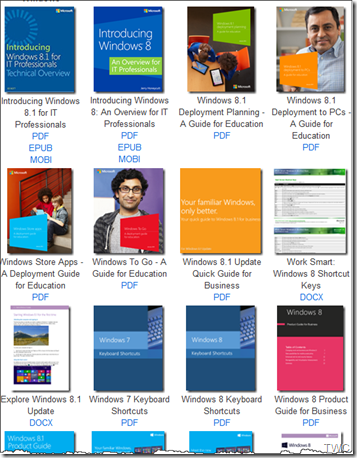
Free Microsoft eBooks largest collection, lots of new books added now

Microsoft has been providing Free e-books from time to time on wide range of topics. It includes books for developers, IT Pros or consumers.  These books have been blogged about at their respective subject blogs or on Microsoft Press blog which also informs about the new books whether free or otherwise.

If you didn’t knew, Eric Ligman, Microsoft Senior Sales Excellence Manager has been compiling links to Free Microsoft e-books since few years. And he updates them regularly. In these years he had posted about nearly 150 FREE Microsoft eBooks. In his latest post he now compiles and shared a post with over 130 more FREE eBooks, Step-By-Steps, Resource Guides, etc. And in this new post he also includes links to the free eBooks he had shared in the past. This makes it one of the largest collection of Free e-books from Microsoft.

He has put them all neatly categorized as Windows, Office, Dynamics, Power Shell, System Center, Lync, Azure, Others…

ebooks01

Many Books on programming, Windows 7 etc… from the past year

 ebooks02


Here’s the link to the Free Microsoft e-books treasure: Largest collection of FREE Microsoft eBooks ever, including: Windows 8.1, Windows 8….

If you don’t want to miss any of the Free resources Eric posts, then one can get this Windows Phone app Apart from books this also includes lots of other Microsoft resource feeds. Or one can scan this to get the app Scanapp

Hope you’ll find your book of your interest, so just start downloading them , many of the books are provided in multiple formats, so get the format you want them in. Thanks Eric for this nice compilation!

Tuesday, October 22, 2013

Windows 8.1 Product Guide

The Windows 8.1 Product Guide from Microsoft gives you an in-depth tour through the many new and improved features in Windows 8.1 and Windows RT 8.1.

Win81Prodguide

Designed to provide a realistic sense of how the new Windows fits the way you live, this guide describes what you get with Windows 8.1: the great selection of built-in apps, the powerful set of cloud-based services and entertainment, and better ways to connect and find and discover, along with the exciting Windows Store app marketplace, and the many ways you can personalize your experience to sync with your life. It also includes a glossary of touch-based gestures and walks you through popular usage scenarios so you can see how Windows helps you have more fun and get more done.

Win81Prodguide2

The guide is in PDF and file size is 10.2 MB, you can download it from here.

Tuesday, October 15, 2013

Free E-Book: Introducing Windows 8.1 for IT Professionals

Microsoft Press today announced the availability of Introducing Windows 8.1 for IT Professionals by Ed Bott and is available as a free download

Windows81EdBott

Ed Bott, the author of the book in the Introduction -

Although I’ve written in-depth guides to Windows in the past, this book is not one of those. Nor do I pretend to offer much in the way of opinions or review. Only you can decide whether and how and when to incorporate Windows 8.1 into your enterprise, based on your own organizational requirements.

My goal in this book is to help you on that upgrade path by presenting the facts and features about Windows 8.1 as clearly as I can. If you’ve been living in an environment built around a previous version of Windows, you have a lot to absorb in the transition to Windows 8.1. I’ve tried to lay out those facts in as neutral a fashion as possible, starting with an overview of the operating system, explaining the many changes to the user experience, and diving deep into deployment and management tools where it’s necessary.

By design, this book focuses on things that are new, with a special emphasis on topics of interest to IT pros. So you might find fewer tips and tricks about the new user experience than your users want but more about management, deployment, and security—which ultimately is what matters to the long-term well-being of the company you work for.

At present the book can be downloaded as a PDF (size: 9.3MB)

Download PDF
here

Download Mobi (for Kindle)
coming soon

Download ePub
coming soon

(Source)

Tuesday, October 01, 2013

Introducing Windows Azure - New FREE E-book from Microsoft Press

Today Microsoft Press is releasing a new book about Windows Azure for IT PRO.

Introducing Windows Azure For IT Professionals – By Mitch Tulloch with the Windows Azure Team

“This is a great resource for IT PRO that needs to get basic understanding of Windows Azure or needs to get more information about some of the Azure capabilities from the IaaS perspective.”

IntroWindowsAzure

You can download the book from here  (Size 8 MB in PDF)

(Source)

Monday, December 17, 2012

[Book] Windows 8 for Tablets - Plain and Simple

With the release of Windows 8, you have lots of Windows 8 tablets running Windows 8 in the  market. And with tablets comes the cool Touch interface, a new way to interact with Windows. Though you had touch based devices for earlier versions of Windows too but Windows 8 has been specially made for touch devices. Its fluid interface makes it very intuitive, easy and fun to use.

But for some people who are completely new to Windows or to those Windows users who are not sure how to do everything with their new Windows 8 based Tablets, this new book deals with that everything. Yes some users will have a bit of learning curve with Windows 8 but once they know, they’ll enjoy it and appreciate its cool new fluid interface.

The book is -

Windows® 8 for Tablets Plain & Simple By Simon May 

Publisher: Microsoft Press

lrg win8P&S

With this book, one can learn and enjoy the Windows 8 touch experience on your new tablet. One will learn and use the new Start screen to find everything one needs as some Windows users may need some learning curve for this Start Screen being new.

The Book is full color easy guide. One can start from any page and jump right into the topic and get the answer they need.  Its full of screenshots that makes it very easy to follow for everyone, even if one doesn’t have the tablet yet.

One can spend time with Tablets learning, exploring by themselves what Windows 8 is. But having this book will guide and cut down the time by providing the quickest and easiest way to do that. And the book also does cover what you can do with keyboard and mouse too.

The Book has covered chapters starting from

Exploring your Tablet, Interacting, Customizing with Windows 8, Connecting to Wifi, internet Bluetooth, Windows Defender, Safety, Family Safety. Apart from these there are separate Chapter on Apps,Mail, Social Networks, Music and Video, Cloud Storage with SkyDrive, Photo app.

Next you have chapters on How to keep files organized, Connecting your Tablet to TV and Display Devices, Printers. Then a chapter on fixing Common problems. And you have Glossary which also includes Touch Gestures Reference.

Overall a very handy book full of screenshots, easy to understand language,handy tips and Try This Exercises to apply what you have learnt. Must have book for beginners and also those who wants to quickly master the new Windows 8 interface on a touch device.

A must have book for those who are new to Touch interface and think they require some help in learning this new UI of Windows. I’ll rate this book at 4.5/5  The Book is available for purchase at http://shop.oreilly.com/product/0790145367709.do from where you can also download the Free Sampler.

Friday, September 21, 2012

Free E-book - Introducing Windows Server 2012 (RTM Edition) from Microsoft Press

Introducing Windows Server 2012 (RTM Edition) from Microsoft Press by Mitch Tulloch with The Windows Server Team has been updated now for the RTM edition. This very popular Microsoft Press book is free to download.

IntroWS2002RTM

A key feature of this book is the inclusion of sidebars written by members of the Windows Server team, Microsoft Support engineers, Microsoft Consulting Services staff, and others who work at Microsoft. These sidebars provide an insider’s perspective that includes both “under-the-hood” information concerning how features work, and strategies, tips, and best practices from experts who have been working with the platform during product development.

You can download a free copy of the ebook in various formats -

PDF - Introducing Windows Server 2012 RTM Edition - PDF ebook (17.7MB)

EPUB – Introducing Windows Server 2012 RTM Edition – ePub format (25MB)

MOBI – Introducing Windows Server 2012 RTM Edition – MOBI format (for Kindle) (50.6 MB)

If you want a hard copy of the book, it can be purchased from O’Reilly for $14.99

(Source: Microsoft Press Blog)

Monday, April 30, 2012

Free eBook: Security and Privacy for Microsoft Office 2010 Users from Microsoft Press

lrg

Microsoft Press is offering Security and Privacy for Microsoft Office 2010 Users by Mitch Tulloch as a Free e-book in various formats. While the Print Ed is priced at $9.99 and can be obtained from http://shop.oreilly.com/product/0790145356925.do

Take control—and put the built-in security and privacy features in Microsoft Office to work! Whether downloading documents, publishing a presentation, or collaborating online—this guide offers concise, how-to guidance and best practices to help protect your documents and your ideas.

  • Get practical, proactive guidance for using the security and privacy management features in Office 2010 and Office 365
  • Walk through everyday scenarios, and discover everyday techniques that help you take charge
  • Understand common risks and learn best practices you can apply right away

Here’s the Table of Contents of the Book -

  • Chapter 1 : Why Should I Care?
    Hey, It’s Not My Responsibility!
    What’s My Role in This?
    Summary
  • Chapter 2 : Alice Downloads a Document
    Working with Protected View
    Understanding Trust
    Summary
  • Chapter 3 : Bob Prepares a Policy
    Understanding Document Properties
    Working with Document Inspector
    Working with Digital Signatures
    What About Office 365?
    Summary
  • Chapter 4 : Carol Collaborates on Some Content
    Encrypting a Document
    Restricting Editing
    Summary
  • Appendix : Learn More
    General Resources on Office 2010 Security and Privacy
    Protected View
    Trusted Documents
    Trusted Locations
    Document Properties
    Document Inspector
    Digital Signatures
    Encrypt with Password
    Restrict Editing
    Resources on Office Web Apps and Office 365

You can download this free eBook in three formats from the Microsoft Download Center: PDF, .mobi, and ePub.

Friday, February 17, 2012

[Book] Building the Perfect PC by By Robert Thompson, Barbara Thompson from O’Reilly

If you’re contemplating to build your own PC, be it any kind – This is the Book for You!

Building the Perfect PC, 3rd Edition by Robert Bruce Thompson, Barbara Fritchman Thompson from O’Reilly is the book for all who are thinking of building their own PC or those who just want to know what goes inside the PC. Actually Building a PC now a days is not only for Geeks but with this book any one interested can build.

Bldg PerfectPC

This book will surely help to select the best components as per your need and assemble them into a working PC. And I’m sure the joy you get when you switch on your own built PC.

The book covers each chapter very well starting from the Fundamentals, Chapter1 covers -Why Build a PC?, Things to know before you start, Things you need to have and Troubleshooting – the main fear every first time builder has, if it doesn’t start, then what? Thus this book Troubleshooting provides confidence in the first time builder.

Chapter2 covers Choosing and Buying the Component in detail. Every component in detail with finer points and buying guides.

After this comes various chapters on Building of different kinds of PCs. Each chapter (Chapter3 to Chapter 8) covering a type of PC, be it a Budget PC, A Mainstream System, An Extreme System, A media center system,Appliance/Nettop system, Home Server.

All these are covered in-depth. Each dedicated chapter is with lots of details and screenshots.

pgscreenshot

Surely this Book is for everyone interested in Building a PC themselves and also for those who just wants to know the insides of a PC. And building a PC yourself will not only saves costs but also its custom made as per your exact requirement and better quality. Surely recommended even for those with no experience and experienced, everyone will find this book very interesting.

You can get this book from http://shop.oreilly.com/product/0636920010197.do

Sunday, January 29, 2012

ABBYY FineReader 11- Fast and Accurate OCR, Now simplifies e-book creation too !

ABBYY11

“Optical Character Recognition (OCR) is a technology that enables conversion of images, received from scanner or digital camera, and PDFs to editable and searchable text documents ready for editing, quoting, search, and archiving.”

ABBYY FineReader 11 OCR software with lots of cool features creates editable, searchable files and e-books from scans, PDFs and digital photographs.This version takes the productivity to a new level with a significant enhancement in OCR performance, including a new black-and-white mode that increases document processing speed. This also supports creation of electronic books in the most popular formats. 

Some of the new features of ABBYY FineReader 11 are -

OCR Speed Boost and Powerful Productivity tools - ABBYY FineReader 11 delivers an overall increase of processing speed. FineReader 11 performance can be further boosted by its dedicated processing modes:

  • Black & White Processing Mode – Normally for documents as newspaper, books etc where color is not needed, this mode results upto 45 percent faster processing with high accuracy.
  • Enhanced Fast Processing Mode - Provides up to 70 percent faster recognition as compared to the default processing mode. This option is perfectly suited for projects where speed is critical, such as creating searchable PDF archives.

Creation of e-books made simpler-

One of the new features I liked was creation of e-books made simpler and support for popular formats like ePub. You even have an option to send the converted text directly to the user’s Amazon Kindle account.

ABBYY11-01

ABBYY11-03

More accurate – Speed is not the only criteria, even with speed enhancements, FineReader 11 provides more accurate reconstruction of the document’s original formatting, including table of contents, headers and footers and other attributes commonly found in multipage documents. The new version delivers significant improvements in the detection of vertical headers, as well as margin notes, diagrams, tables, and styles, minimizing the effort typically required for manual correction.

In addition to Microsoft Word documents, ABBYY FineReader 11 now accurately re-creates headers, footers, page numbering and table of contents across all pages in resulting OpenOffice.org Writer (ODT) files. When saving to PDF, the application intelligently identifies and reproduces the document’s content outline bookmarks with live links for better navigating and reading.

ABBYY11-02

ABBYY FineReader 11 offers an improved, flexible user interface that helps users achieve faster results when working with documents:

  • Document Splitting : When split, documents can be processed simultaneously in separate FineReader windows for better quality of the results
  • New Style Editor : Allows users to view, change or merge the text styles across an entire document
  • Enhanced Image Editor :
  • Intuitive PDF Conversion Options : Provides 3 pre-defined modes for PDF saving — Maximum Quality, Compact Size and Balanced

So these were the some of the highlights of the new features in ABBYY FineReader11 Professional Ed. I have been using it since some time and I’m happy with its speed and accuracy.

There’s also ABBYY FineReader 11 Corporate Edition which also has been enhanced and provides-

  •   Enhanced Hot Folder and Scheduling -

“Performing automated batch processing from “watched” folders (mailbox, local or network folders) the application can now flexibly schedule document conversion routines initiating the processes with pre-defined intervals (every minute, day, week or month).”

  • Removal of Sensitive Information -

Allows users to blackout and remove sensitive information in supported output documents. Confidential information can be removed and replaced with blackout bar

  • ABBYY Business Card Reader -

A time-saving application that allows users of ABBYY FineReader 11 Corporate Edition to quickly and accurately convert scanned business cards and save the extracted data in vCard format or directly to Microsoft Outlook contacts.

These are some of the well thought out enhancements to the Corporate Ed.

ABBYY Fine Reader also installs another very useful tool ABBYY Screenshot Reader. They had some promotional offer to get this Screenshot Reader for Free, about which I had posted earlier, the offer is still on there to grab.

For more information and to try ABBYY FineReader 11, Please check - http://finereader.abbyy.com/

Thursday, December 15, 2011

Start Here! Fundamentals of Microsoft .NET Programming

StartHerelrg

As the title suggests ‘Start Here! Microsoft .NET programming is from the ‘Start Here!’ series from Microsoft Press written by Rod Stephens. This book is for those who are starting their .NET programming journey and for those even with no prior programming experience. Be it any .NET programming language it provides the basics.

If you are a beginner without any prior programming experience or even without a Computer, you can start reading this book. It’ll provide a understanding of what computers and programs in general and .NET concepts in particular.It teaches you programming concepts with clear explanations.If you want to learn any .NET programming language and , you can read this book first. In fact this book is provided as a free Companion ebook with Start Here! series for Visual basic and Visual C#.

It covers various Chapters Starting from the Concepts of Computer hardware then goes on to explain Multiprocessing, Programming Environment, Windows Program Concepts, Controls, variables, operators. Then it covers the Concepts of Object Oriented Programming, Data Storage and .NET Libraries.

So it’s that kind of book for those who wants to clear the concepts without even having a Computer. Once this is done then one can take the next step of learning a .NET language and practice it on a computer.

More details here

Buy the book from here or here

Friday, November 04, 2011

Amazon introduces Kindle Owners' Lending Library

Amazon has introduced Kindle Owners' Lending Library http://t.co/wdWsjT7K where Kindle owners can now choose from thousands of books to borrow for free as frequently as a book a month, with no due dates. But the catch is, its only for Amazon Prime members. So in one shot, Amazon is promoting Prime and Kindle. Amazon prime costs $79/year. You can get a Free one month trial from the above link.

How to borrow from Kindle Owners’ Lending Library-

From the Kindle stores, click on See All

screen_shot-31766

Kindle owners Lending Library books will be marked with ‘Prime’ badge

screen_shot-31767

Click on Borrow for Free with Prime.

screen_shot-31768

Wednesday, September 14, 2011

Download – Windows 8 Guide and FactSheet

As you know yesterday Windows 8 Developer Preview was released at BUILD and is also available for download.

Windows 8 Guide – Windows Developer Preview

Win8devprevGuide

Check out this Free ~40 pages booklet covering a bit of basics in what’s new , something for developers about Windows Runtime and app model. Fundamentals, devices and security and a bit on Windows 8 for business.

Download the book from here -  Download PDF    Download XPS

(Source )

Microsoft Windows 8 Developer Preview Fact Sheet September 2011

Also a factsheet has been released by Microsoft.

Download this Word file (.docx) from here and learn more about Windows 8 .

Download link .

(Source: TheWindowsClub)

Friday, June 10, 2011

Free E-book - Windows Phone 7 Guide for Android Application Developers

If you have been developing Android applications and are interested in building your applications for Windows Phone 7, this guide is for you. This guide will help Android developers to easily learn Windows Phone and port their app to Microsoft’s phone platform.

AndroidWP7


This guide includes chapters -

  • Chapter 1: Introducing Windows Phone 7 Platform to Android Application Developers
  • Chapter 2: User Interface Guidelines
  • Chapter 3: The Developer and Designer Tools
  • Chapter 4: C# programming
  • Chapter 5: A Comparison of Application Life Cycles in Windows Phone 7 and Android
  • Chapter 6: Storing Data and Preferences
  • Chapter 7: XML Parsing in Windows Phone 7 and Android


Download Chapters 1-7 (~4Mb):  DOCXPDF


In addition, use the  Android to Windows Phone API mapping tool to find your way around when you discover the Windows Phone platform.

Source

Also check -Leveraging your Android development expertise to build Windows Phone applications

If you are an iPhone App developer - Earlier I had also posted Windows Phone 7 Guide for iPhone Apps Developers

Friday, May 06, 2011

FREE E-Book: Windows 7 Power Users Guide

Windows 7 Power Users Guide E-book is now completely FREE! The author of the book MVP Mike Halsey just announced it. He is also the author of Very Popular book Troubleshooting Windows 7 Inside Out from Microsoft Press.

This 180 pages Windows 7 Power User Guide has 16 chapters covers right from installation , configuring Windows 7 and many step-by-step tutorials on various tasks. The book is in full color and provides lots of screenshots.

W7PUG-Cover-free-small

From the author of Troubleshooting Windows 7 Inside Out from Microsoft Press…  A book for people who use Windows 7 at home or at work and know it can do more for them, but who don’t know how. The Windows 7 Power Users Guide contains helpful how-to’s, full colour pictures and quick tips to guide you through everything from using the Start Menu and Taskbar to backing up your documents and identifying and fixing problems

You can download the book from online book store or directly from author’s website here.

Thursday, May 05, 2011

Windows Phone 7 Guide for iPhone Apps Developers

wp7ios

If you are an iPhone applications developer and interested in building your applications for Windows Phone 7, this guide is for you.

The guide will cover what you need to know to add Windows Phone 7 development to your skill set, while leveraging what you have already learned building iPhone applications.

wp7iosguide

The chapters include -

Chapter 1: Windows Phone 7 Platform introduced to iPhone application developers

Chapter 2: User Interface Guidelines

Chapter 3: Developer and designer tools introduced to iPhone application developers

Chapter 4: C# programming introduced to Objective-C programmers

Chapter 5: Image Format Considerations in migration of iPhone applications to Windows Phone 7

Chapter 6: Application Lifecycle Differences Between Windows Phone 7 and the iPhone

Chapter 7: iPhone to Windows Phone 7 Application Preference Migration

Chapter 8: Introduction to Windows Phone 7 Notifications for iPhone Developers


Apart from this if you want something to be included , please contact here for more chapters to be included.

You can download the guide (Chapters 1-8) from here – DOCX (3.83 MB) – PDF  (2.86 MB)

For more details  about the chapters please check here.

Sunday, October 31, 2010

Free ebook from Microsoft Press: Programming Windows Phone 7 by Charles Petzold

Earlier I had blogged about Free Preview Chapters - Programming Windows Phone 7 Series (dated Mar16, 2010) and Free ebook: Programming Windows Phone 7 (Special Excerpt 2) by Charles Petzold (dated Aug2 , 2010) .

WP7charlesPetzold

Now the book is ready ! 24 chapters, about 1,000 pages ! Congratulations and thanks to Charles !

This book is a gift from the Windows Phone 7 team at Microsoft to the programming community. The book provides the basics of writing applications for Windows Phone 7 using the C# programming language with the Silverlight and XNA 2D frameworks.


You can download a PDF here (38.6 MB).

And you can download the ebook’s sample code here (5.03 MB).

(UPDATE 03/11/2010 : Now the Book is  available on Microsoft Download Center with reduced download size – 12.5MB)

Yes, Programming Windows Phone 7 is truly a free download, but for those readers who still love paper—this book will also be available (for sale) divided into two fully-indexed print editions: Microsoft Silverlight Programming for Windows Phone 7 and Microsoft XNA Framework Programming for Windows Phone 7, ready for order in December 2010.

Part I   The Basics

1   Hello, Windows Phone 7

2   Getting Oriented

3   An Introduction to Touch

4   Bitmaps, Also Known as Textures

5   Sensors and Services

6   Issues in Application Architecture

Part II Silverlight

7   XAML Power and Limitations

8   Elements and Properties

9   The Intricacies of Layout

10   The App Bar and Controls

11   Dependency Properties

12   Data Bindings

13   Vector Graphics

14   Raster Graphics

15   Animations

16   The Two Templates

17   Items Controls

18   Pivot and Panorama

Part III   XNA

19   Principles of Movement

20   Textures and Sprites

21   Dynamic Textures

22   From Gestures to Transforms

23   Touch and Play

24   Tilt and Play

For the Full detailed Table of Contents and other details , please check the source.

For other such Free Ebook offerings , please check here.