Showing posts with label Channel 9. Show all posts

Tuesday, November 12, 2013

SkyDrive on Xbox One – First look

Jeff Henshaw, Principal GPM,Xbox takes us to a quick first look at how SkyDrive works on Xbox One.

SkyDrive on Xbox One provides a seamless way to enjoy your photos and videos, or those shared with you, on the big screen. The app also takes advantage of exclusive Xbox One features: You can open photo albums from channels in the OneGuide, play music alongside your slide show with Xbox Music, and control the whole app with gestures and voice, courtesy of Kinect.


By default your Xbox One will display the photos and videos from your SkyDrive account. You can then set your photos or photos shared by friends to drive slideshows or show up as a custom channel in OneGuide, the program guide on your Xbox One (Source)

Thursday, January 31, 2013

Fly your AR.Drone 2.0 with Windows Store App

Recently I came across this post on flying AR.Drone 2.0 using Windows Store App. Those who are into coding can check for more details at the source.

drone02

The Parrot AR.Drone 2.0 is an awesome device packed with cool features. The drone contains two cameras, one pointed forward that streams live video, and one pointed downwards (for all your surveillance needs). Its got four powerful engines that make it fast and maneuverable. The drone’s firmware keeps it stable and level while stationary or performing maneuvers, handling a huge burden for the user. It’s a fun device to write code for, and even more fun to pilot when you’re done!

There are few projects that have created AR.Drone APIs that can be used for Windows 8 Desktop Apps. While in this post it shows how to fly the Drone using Windows Store App as the author Peter Dwersteg has built his own API compatible with WinRT.

drone01

Check out the Source- Channel 9 for the demo video and for more details. For any query on this, please contact the authors - Clint Rutkas, Peter Dwersteg

Tuesday, March 13, 2012

Boxing Bots: Kinect-Driven Pneumatic Boxing Robots

At the SXSW Interactive Opening Party hosted by Frog Design and Microsoft, the Coding4Fun team has unveiled their latest invention, BoxingBots!

You're controlling a 6-foot tall metal robot that's trying to punch out your opponent's 6-foot tall machine. It's Real Steel in real time.

BoxingBots combines Kinect's motion sensing technology with pneumatic robots in a 6-foot square ring. Two players face off to try to knock each other's blocks off.

Check out the video to see these massive robots in action -

Check more details and screenshots here: http://channel9.msdn.com/coding4fun/projects/boxingbots

Tuesday, November 15, 2011

Play Kinectimals on Windows Phone, transfer it via Tag and continue playing on Xbox

Play with your Kinectimals cub on your Windows Phone, so allowing you to travel around with the cub in your pocket with you. But the coolest thing about this new Windows Phone game is the cross platform interaction with the Xbox 360. After playing Kinectimals on your Windows Phone, you can transfer that animal into Xbox 360. And continue playing on XBox360. There’s an option within the game that when selected displays a QR code. Pop this code in-front of the Xbox 360 Kinect and it will register your animal, transferring it to your Xbox 360 in an instant.

Kmal1

Kmal2

Check it out to see how it all works on your Windows Phone

(Source:Channel9)

Tuesday, November 08, 2011

Spotify Demo - Music Subscription Service coming to Windows Phone !

Hugely popular Music Subscription service Spotify coming to Windows Phone. Spotify gives you on-demand access to millions of songs. Spotify service which costs $9.99 a month, also lets you share your music on Facebook, Twitter, and Windows Messenger—and do some other cool things on Windows Phone:

  • Browse and play your friends' Spotify top tracks, artists, and playlists
  • Pin your playlists as Live Tiles to your Start screen for fast access
  • Play music in the background while running other apps or when your phone is locked
  • Pause, play, or change tracks when your phone is locked
  • Stream over WiFi or 2.5/3G - all your existing playlists are available
  • Offline playlists - play your music without an internet connection
  • On-the-fly sync - every track you add to a playlist appears on mobile and computer
  • What’s New view
  • Receive music from friends via the inbox
  • Starred tracks - tag all your favourites into a special list

Here is the Demo of Spotify on Windows Phone -

(Source: Channel9)

To get Spotify on your Windows Phone 7, just head over to the Marketplace.

UPDATE: Seems Spotify app is only in the US marketplace at present but will be available soon at other places too, so keep checking

You can signup for the first in line when it launches in your country – here

Spotifyz

Sunday, October 30, 2011

Kinect to Kill - Halloween Special from Channel 9 team


The channel 9 team is again at its spookiest best. Its ‘famous’ Halloween videos brought every year has come up this year again with a Halloween video with brilliant performance from its team. Warning: Those with weak hearts can skip this video.

It's that time of year again...when the ghost and the goblins come knocking at your door. This year we invite you to watch a story about frirendships, love, horror and of course- a crazy serial killer! Enjoy!

Starring : Dan Fernandez, Laura Foy , Paul Mestemaker, Tina, Golnaz Alibeigi (Please add those who I might not have recognized and not have included in this.)

Wednesday, October 05, 2011

Office 2010 Getting Started Screensaver

Set this screensaver to give you tips to help get you up to speed on using Office 2010. Offers links to more detailed articles and videos when you return to your desktop.

Training on new software takes forever, right? Not necessarily. In this Office Show, one desperately overworked trainee learns how the Office 2010 Screensaver can get him up to speed on Office in just a couple of minutes a day. Plus, rescue a perfectly good big-screen monitor. Get the Office 2010 Screens saver HERE

Supported Operating Systems: Windows 7, Download size 70.0 MB , Requires Windows 7 validation

Sunday, September 18, 2011

Microsoft Robotics Developer Studio 4 Beta released. Supports Kinect extensively ! Download for FREE Now!!


The robotics group announced the release of the Microsoft Robotics Developer Studio 4 Beta.

rds4beta

Stathis Papaefstathiou, General Manager, Microsoft Robotics announced it today -

“It's inspiring to see the tremendous excitement with Microsoft Kinect within the robotics space signaling the energy and potential opportunities that exist in essentially transforming robots to low-cost mainstream consumer devices. This beta release is one of our early steps towards realizing our long term strategy of accelerating the consumer robotics industry. “

A Look At Robotics Developer Studio 4 Beta


This release has extensive support for the Kinect sensor hardware through the Kinect for Windows SDK allowing developers to create Kinect-enabled robots

28990-MFor the first time we define a Kinect-based hardware reference platform that can help in the delivery of an affordable and capable robot that will be able to support technologies and scenarios for the consumer audience. Most everyone can build a robot using this specification, and we are working with robotic hardware vendors that will make kits and preassembled units available. The first such kit is called EDDIE and it is available from Parallax for pre-order now. EDDIE is intended to be a turnkey solution for using RDS with this platform and our aspiration is that there will be development and sharing of technology for this hardware platform. In addition, we made sure that there is an accurate representation of a robot that is based on the hardware platform in our simulation environment. You can start developing your applications in the simulator before you decide to buy and run them on a physical robot.

The second additional feature in RDS 4 is the availability of Kinect services that support the Kinect for Windows SDK.This unlocks a whole new world around Human Robot Interaction (HRI) with the use of skeleton tracking and speech. But we are also making available the raw sensor stream for your use in building additional capabilities such as navigation algorithms.

In RDS 4 we make available for the first time the CCR programming model in Silverlight.

Please visit  Microsoft Robotics Developer Studio Web site for more details.

Friday, September 16, 2011

[video] Windows 8 running on ARM processor


Windows 8 running on a Qualcomm SnapDragon reference device that uses an ARM processor. This is another example of the types of machines that will be running Windows 8.

(Source: channel 9)

Wednesday, September 14, 2011

Unboxing Samsung Windows 8 Developer Preview PC given at BUILD ! Video, specifications and screenshots

build_logoAt BUILD yesterday one heard loud cheers from the attendees when during the demo of Windows 8 on Samsung Tablet, it was announced there were 5000 of them in the warehouse to be given to all the BUILD attendees! Mike Angiulo, Corporate Vice President of Hardware & PC Ecosystem gave a detailed first look at unboxing this device

Here’s the Specification of the Samsung Windows Developer Preview PC . Its one of the slides shown at BUILD. As you can see it’s a full fledged PC Spec ready to be used for development. So a Tablet running Visual Studio. Very very impressive Specs -

samsungbld2

Check out the unboxing video -

Source : Channel 9

Here are some screenshots of the same-

As it has UEFI booting it boots blazingly fast
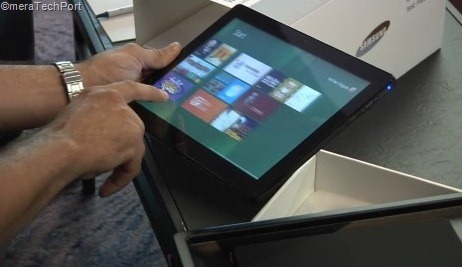
samsung1

It’s a developer PC, It also has a Home button to go back to Start. The Box also has a Pen , its not just Pen but a electromagnetic Digitizer. So its like a Tablet PC, later u can see it being transformed to Desktop
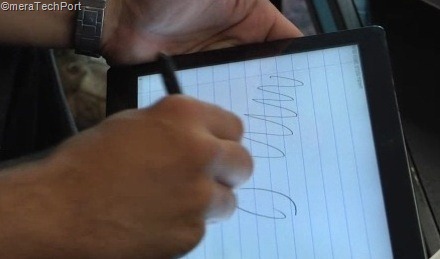
samsung2

And something at BUILD that was not shown. This Tablet PC can be converted to Full form factor Desktop PC. So the Samsung also provided Bluetooth Keyboard

samsung5

and a slick dock base integrated with HDMI, USB, ethernet ports.samsung5a

And a compact powersupply for ease of carrying around

samsung6

The Sensors in are Accelerometer, gyro, magnetometer and also NFC antenna on backsamsungbld1

Since its a setup for Developers it comes preloaded with Visual Studio 11 Express , Expression Blend and many Metro Style apps and of course the 64 bit Windows 8 Developer Preview.

With such features and formfactor who would not like to get their hands on it?

Thursday, June 16, 2011

Kinect SDK to be made available today ?

It has been sometime when Kinect for Windows SDK beta was announced to be coming later this spring. Now Channel9 has made an announcement to join for a Special Channel 9 Live Kinect Event.

kinectsdkch9

The Channel 9 team will be broadcasting live from the Channel 9 studios for a special Kinect focused event on June 16th 2011 from 9:30AM PST.

Just head to http://channel9.msdn.com/live for a live and interactive broadcast .

As you watch live, submit your questions via Twitter with the #Ch9Live hashtag and it’ll be answered in real time.

So will there be the announcement of availability of SDK today or any time soon, so check out the LIVE broadcast.

(Source: Channel9 )

the Kinect for Windows SDK is a programming toolkit that will enable researchers and enthusiasts easy access to the capabilities offered by the Microsoft Kinect device connected to computers running Windows 7.

For more info on Kinect for Windows SDK beta please check here.

Tuesday, November 30, 2010

Why there’s no Network Activity Indicator in Windows 7 ?

If you have moved from Windows XP to Windows 7 , you might be wondering why there’s no Network Activity Indicator in Windows 7. Here’s the answer – check this small ‘But Why’ video explaining the same.

ButWhynwindicator

No Network Activity Indicator in Windows 7: But Why?


If you are missing this feature in Windows 7 and want it to see in Windows 7, there’s a utility for it, created by Igor Tolmachev.

networkactind

Network Activity Indicator for Windows 7 - displays the old 'two monitors' icon in Windows 7 that flashed blue to show network activity on the System Tray.

Earlier when it was released as XP Style indicator, I had also blogged about it. XP style Network Activity Indicator for Windows 7

Unlike the original Windows XP utility (that has individual indicators for each interface), this program indicates outgoing and incoming network packets on all available interfaces.

network-activity-indicator

You can get it from http://www.itsamples.com/network-activity-indicator.html   This utility is released as freeware.

Tuesday, November 16, 2010

Hot Apps– New Show on WP7 Apps

Here comes the eagerly awaited, 1st episode of Hot Apps. A show from channel9 presented by Laura Foy which will feature 5 of the hottest apps each week for the Windows Phone 7 .  The first episode features -

  • Photos
  • Productivity
  • Movies
  • Music
  • FREE FUN!


HotApps


HotApps1

Check the show at Channel9

Friday, October 01, 2010

Windows Live Essentials 2011 suite - A quick tour

Windows Live Essentials 2011 (formerly Wave 4) has RTW-ed (Released To the Web).

Windows Live Essentials 2011 for Windows 7 and Windows Vista is now available for download! (Releasing in 48 languages over the next few hours, so if your language is not yet available, it will be very soon.)

WLEss2011


The 2011 suite includes a tonne of new features including


Facebook Chat integration within Messenger
Bing Maps integration and improved geo-tagging support in Photo Gallery
Upload video direct to Flickr
Messenger video chat uses 30% fewer CPU resources by offloading work to the GPU
Higher bit-rate movies in Movie Maker
Better spell-checking and Office intergration with Writer
Improved Gmail support

In this video Bryan Saftler gives us a quick tour of the Essentials 2011 suite.

WLEss2011ch9


For more details Inside Windows Live

Look for more blog post here in future on individual apps from Windows Live Essentials 2011 Suite.

The tech behind Kinect: Major subsystems, RGB camera, Depth Sensor

Watch this video to know about some of the technology behind the Kinect such as -

  • Three major subsystems in the sensor (Optical, Audio, Motor)
  • Optical consists of depth projector and sensor
  • RGB Camera
  • Depth Sensor
  • Motor Subsystem
  • Audio Subsystem


kinect

(Source )

Tuesday, September 14, 2010

Microsoft’s New LifeCam Studio with 1080p HD widescreen sensor

09-13lifecamstudio_front_sm


Microsoft today set a new standard in webcams with LifeCam Studio, featuring sharp high-definition (HD) video with a true 1080p sensor. It’s the perfect complement to Windows Live Messenger 2011, which will offer HD video calling in a 16:9 widescreen format.

  • Superior sharpness and image quality in video calls.
  • great video in virtually any lighting condition
  • A 360-degree view range -no need to pick up an entire laptop and turn it around
  • tripod thread - perfect for recording long video captures from different angles
  • elongated hood to stop harsh light from hitting the sensor and washing out colors
  • TrueColor Technology
  • ClearFrame Technology

For more details please check  -

 LifeCam Studio – the closest to being there 

Microsoft Unveils New LifeCam With Stunning 1080p HD Sensor: Closest Thing to Being There in Person 


Also check the demo of the same  where Daniel from the hardware group walks us through some of the other new features.

First Look at Lifecam Studio

lifecamstch9


Also this Life style video to illustrate LifeCam Studio features.

Get Microsoft Silverlight

The LifeCam Studio will be available in October retailing for $99.95.

Friday, July 09, 2010

Ask Mark Russinovich Anything... LIVE! Recorded Video

Check out this video where Charles Torre  of Channel 9 sat down with Mark Russinovich to answer live questions from the Tweetosphere and studio audience.

Recorded live as part of Channel 9 Live at Tech.Ed North America 2010.


ch9Mark


Ch9Live at Tech.Ed NA 2010 - Ask Mark Russinovich Anything... LIVE!


Tuesday, April 27, 2010

Why Windows is called Windows ?

ButWhy

We use Windows and Word everyday but do you know why they are named so ? Word and Windows were named in 1983. Word was scheduled to be named Multitool Word.

Windows was codenamed ‘Interface Manager’ and other suggestion was Microsoft Desktop .

To know about this interesting story of how the name Word and Windows were reached, check out this latest episode of ‘But Why'?’ Its a small video -

WhyWindows

Video link - Windows is named Windows : But Why?


Thursday, April 01, 2010

Why Internet Explorer 9 will not run on Windows XP ?

As you know Internet Explorer9 Platform Preview for developers was announced and released during the MIX10. Also you might be knowing that its built from the ground up and it will not support Windows XP and will run on OS as Windows Vista onwards.

Many are asking why no support for Windows XP. But people forget that ever popular XP has been there since 2001. So its not as modern and modern browsers requires modern OS.

As the IE9 FAQ says :

Q.   Does Platform Preview run on Windows XP?
A.   No. Internet Explorer 9’s GPU-powered graphics take advantage of new technologies available in Windows 7 and back-ported only to Windows Vista. These technologies depend on advancements in the display driver model introduced first in Windows Vista.

Now hear it from the horse’s mouth- Dean Hachamovitch, General Manager of the Internet Explorer team answers all IE9 related queries at “Channel 9 Live at MIX10: Dean Hachamovitch on IE9”

The below video excerpt just shows the IE9 and Windows XP query ,


For the full video, where Dean along with Giorgio Sardo, Technical Evangelist for Internet Explorer (the guy who built the cool IE9 platform demo app showcasing the power of HTML5 running on a GPU) answers IE9 queries, please check - Channel 9 Live at MIX10: Dean Hachamovitch on IE9


Friday, March 26, 2010

Some fascinating stats about MIX10

MIX10logo

As you know MIX10 , a 3 days event for web designers and developers took place from March 15-17th, 2010 at Las Vegas. This is one of the biggest events by Microsoft held every year. Here are some very interesting statistics related to MIX10.

Some Network related Stats–

  • 200Mb of bandwidth was reserved for the entire show. After the announcement of various tools availability on Windows Phone 7 on day1 Keynote, the whole bandwidth quota almost got slammed. So the bandwidth was upped to 300Mb
  • 4000 unique users on Wireless during the show. These were the individual users on their laptops on various wireless access points. This does not include data about people on phones.
  • Top wireless user downloads (tracking by ones IP address) : downloaded 5 GB of contents , next were 3.04 GB and 2.71 GB
  • Length of the networking cables at the show – 3.76 miles


Some stats on Content and sessions-

Top 10 sessions- 

  • The Tale of JavaScript. I Mean ECMAScript by Douglas Crockford 
  • Introducing the Silverlight Rough Cut Editor by Jason Suess
  • An Hour With Bill Buxton by Bill Buxton
  • The Elephant in the Room by Nishant Kothary

For rest of the list check the source video .

  • And all these sessions are uploaded within 24hrs in various formats for download, if you have missed the session, you can download them. At the time of this video 40GB of session video have been uploaded and soon will cross 60GB.

Some stats on attendees and speakers -

  • 1/3 rd of attendees were from outside of US
  • 1/4 th of attendees attended the workshop
  • MIX10 was the biggest MIX ever
  • More external speakers than any other MIX-  43% were from Outside of Microsoft


 Some stats on MIX10 related tweets and online viewers

  • So far 24093 tweets related to MIX10
  • During day 1 keynote, over 8000 tweets, 3 top trending topics on twitter were related to MIX10
  • 46000 viewers watched the keynote Live, 42000 on day2

Press-

  • 350 articles over 2 days in major publications


Some other tidbits on consumptions during MIX10-

  • 96 liters of Hand sanitizer
  • 25 cases of trash liners
  • 15 cases of paper hand towels
  • 30 cases of 2-ply toilet paper
  • 5 cases of soap

Food -

  • 5000 Redbulls
  • 1770 Gallons of coffee (this does not include Starbucks)
  • 1000 loaves of regular bread
  • 7,200 rolls
  • 3,000 Artisan loaves of bread
  • 9,120 bottles of juice
  • 5 cases of foam melon soap

For more details, watch this source video -

mix10stats http://channel9.msdn.com/posts/LauraFoy/Countdown-to-MIX10-From-the-Road/

This video was recorded on day3 while MIX10 was still going on.

Browse more than 400 MIX10 photos on Flickr.

(source: MIX10 Wrap Up)