Showing posts with label Windows 8. Show all posts

Wednesday, June 26, 2013

Few things to note before upgrading to Windows 8.1 Preview

Everyone is excited and waiting for Windows 8.1 Preview release later today. Windows 8.1 Preview will be released at Microsoft's BUILD developer conference. Officially some information about the new features coming in 8.1 has been revealed.

Continuing the Windows 8 vision with Windows 8.1

What's New in Windows 8.1

Windows 8.1 Preview is coming soon

Jensen Harris from the Windows Team shows some highlights of what to expect in Windows 8.1 coming later this year as a free update for Windows 8 customers. First Look at Windows 8.1

And some more information gets trickled out from the just concluded TechEd North America 2013. (June 3 - 6, 2013). This post and images are result of the information gathered from some of the sessions of TechEd North America 2013.

So before installing Windows 8.1 Preview, here are few things to be noted -

  • On June 26,  timed with the start of Microsoft's BUILD developer conference, preview of Windows 8.1 (was codenamed Blue) will be released as a free update to Windows 8 . Windows 8.1 RTM will be released later this year.
  • If you are running Windows 8 Pro or RT and want to update it to Windows 8.1 Preview  available later today, you can do it directly via Windows 8 Store. The process for updating it to Preview is first you have to install an optional update. You’ll not see the Install Optional update option in the modern update settings in PC settings but have to look in desktop Control Panel Windows update.  This update will get served up when you go to http://preview.windows.com  and click download.
  • From there you install the update to enable the Store Update experience. And then you can see the new item there in Store and install the Windows 8.1 from Store

Windows 8.1Update

  • So taking its time, it’ll upgrade to 8.1 Preview
  • Please note there wont be complete upgrade path from 8.1 Preview to 8.1 RTM when its available later this year. So when you install RTM later this year, it’ll preserve the data and user accounts But any apps present on the device has to be Re-installed. So if it’s a Production unit , think before installing Preview on it.
  • Even if you use reset, refresh to rollback your PC to 8.0 then want to upgrade to RTM later on, here also you’ll have to re-install the apps.
  • But this is better than when Windows 8 Preview was made available and when RTM came out, people were asked to just Reinstall the OS. There was no migration of data, accounts then.
  • If without installing 8.1 Preview, you want to go straight to Windows 8.1 RTM from Windows 8, then all apps, data and accounts will be preserved.
  • May be later on we may get Windows 8.1 preview as an ISO. Images of 8.1 might be very close to Windows 8. This is still Preview, so size may vary. But expanded size of 8.1 will be less than 8. So 8.1 might end up taking less disk space than Windows 8 because of more aggressive cleaning up. It’ll also not leave behind Windows.old folder. So Microsoft has optimized the update process to use much less disk space.

Win781

  • May be you should have 4-6GB of free disk space to in-place upgrade the OS from 8 to 8.1

As Windows 8.1 Preview is still an ongoing thing, there could be some changes before its public preview. So these are some basic points to note before upgrading to 8.1 . As it gets released, we will get more info.

UPDATE 27/06/2013 : After the Windows 8.1 Preview Release , this FAQ too was released, Read it before installing Windows 8.1 Preview Windows 8.1 Preview: FAQ

Tuesday, May 21, 2013

Sneak peek into Windows with Leap Motion

Imagine if you could do things on your computer just like you do them in real life. If natural movements replaced all those clicks and taps and drags and drops. Imagine if technology finally figured out people, instead of the other way around. That’s the Leap Motion Controller.

Do almost anything without touching anything

leapmotion

leapmotion1

Check how Leap Motion technology works seamlessly and easily with Windows. Whatever is possible in Windows 8 and Windows 7 can be done, even multi touch inputs, all this without actually touching.

“With Leap Motion technology, Windows OS is natural, easy, and fun to use. You'll navigate your desktop, browse the web, flip through photos, and do everything you do everyday in extraordinary ways —all with the wave of a hand or lift of a finger.”

More details and Pre-order from https://www.leapmotion.com/product

Friday, January 25, 2013

SkyDrive app gets Live Tiles feature

Yes, we have been seeing that SkyDrive is getting continuously improved as new features being added regularly. SkyDrive team listens to user’s feedback and implements them too. And the latest addition in this list is SkyDrive app getting Live Tiles feature. So your SkyDrive app on Windows 8 Start Screen will keep you up-to-date displaying the recent additions to your SkyDrive with its Live Tile. SkyDrive Team announced about this today.

From today the SkyDrive app from Windows Store will start showing the notifications thus updating its Live Tile whenever you add new files to SkyDrive, whether the files are added directly to it or via other apps. So the SkyDrive Live Tile, not only be used to launch it but from now on will show you what’s going on with its at-a-glance view dynamically. It’ll show you relevant details of the new files added.

SkyDriveLiveTile01

For example, if you have added a document, you’ll see the document’s name, when it was added, and what folder it’s in.

SkyDriveLiveTile02

If you have added photos, it’ll provide a nice view of these photos as can be seen above. And like other Live Tiles, now the SkyDrive tile too comes alive being dynamic and enhances your Windows 8 Start Screen. So you make the SkyDrive Tile larger if its set to show ‘smaller’ view.

And if by any chance, you do not want it to be a Live Tile, there’s always the option to ‘Turn Live Tile Off’ . Just right click on the Tile to get this option and click on 'Turn Live Tile off' from the app bar.

SkyDriveLiveTile03

This new feature has already started rolling out and will be rolling out throughout the day and if you don’t see this on your SkyDrive tile yet, you’ll get it soon. I checked my SkyDrive and it already got this feature.

Thursday, January 10, 2013

[video] How simple is Windows 8?

How simple is Windows 8? Just watch the video for the answer.. From Microsoft Portugal:

The video says it all! Enjoy super smooth Windows 8 on a touch device!

Sunday, November 04, 2012

Spot the International Space Station from your Home

As you know NASA’s International Space Station (ISS) is an orbiting Laboratory that combines the scientific and engineering talent of 16 nations to maintain the largest human outpost in Space. Its is the largest object built outside the planet Earth.

661521main_isslive_466

The International Space Station (ISS) is a unique spacecraft in low-Earth orbit. It is the largest and longest inhabited object ever to orbit the Earth. There has been uninterrupted human presence on the space station since 2000. The ISS is an amazing feat of technology that allows humans to explore, live in, and perform science in space.

The present ISS crew is commanded by Indian-American astronaut Sunita Williams.

493575main_110212_466

Did you know you can see the International Space Station from your house with your bare eyes? As the third brightest object in the sky, after the sun and moon, the space station is easy to see if you know where and when to look for it.

To celebrate the 12th anniversary of crews living and working aboard the station, its starting a new service-NASA’s Spot the Station service. This service sends you an email or text message a few hours before the space station passes over your house. The space station looks like a fast-moving plane in the sky, though one with people living and working aboard it more than 200 miles above the ground. It is best viewed on clear nights.

Sign up for the alerts at http://spotthestation.nasa.gov/

Spot the Station is available worldwide to anyone with an email account or SMS-enabled phone. Several times a week, Mission Control at NASA’s Johnson Space Center in Houston, TX, determines sighting opportunities for 4,600 locations worldwide. If your specific city or town isn’t listed, pick one that is fairly close to you. The space station is visible for a long distance around each of the listed locations.

This service will only notify you of “good” sighting opportunities - that is, sightings that are high enough in the sky (40 degrees or more) and last long enough to give you the best view of the orbiting laboratory.

(Image credit and source: NASA )

Also, do you know Windows 8 Store has a some NASA related Apps too, here’s a screenshot of one of them-

NASAWin8app

Thursday, October 25, 2012

Limited time offer - Get Windows 8 Media Center Pack for free for your Windows 8 Pro

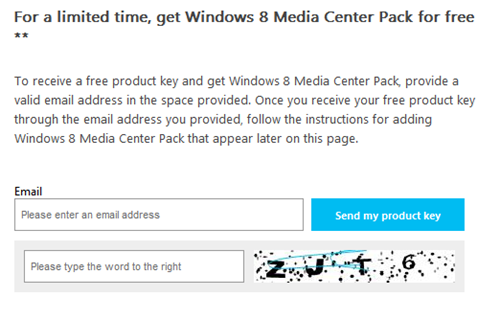
Earlier while running Windows 8 Release Preview, Microsoft had provided Windows 8 Media Center Pack for showing how to features. Windows 7 came with Media Center but in Windows 8 , it doesn’t come pre-installed but has to be purchased separately. Now that Windows 8 has been released, Microsoft is offering a Limited period offer to get Windows 8 Media Center Pack for Free, if you are running Windows 8 Pro. By adding Windows 8 Media Center Pack, you can watch and record live TV with Windows Media Center. (Additional hardware may be required to watch and record live TV). For this you will have to provide a valid email address, to which Microsoft will send the free product key to get Windows 8 Media Center Pack.

Win8ProPack

Once you receive the Free Product Key via your mail address, just follow the instructions. Also please note the terms & conditions.

  • This is a limited period offer and is valid from October 26, 2012, until January 31, 2013
  • Its limited to five licenses per customer per promotion.
  • If you purchase a new PC with Windows 8 preinstalled and you later upgrade that PC with Windows 8 Pro Pack, Windows 8 Media Center Pack, a volume license edition, or a retail edition, you will no longer be able to install apps that are provided exclusively from your PC manufacturer through the Windows Store.
  • Offer limited to one product key per email address.
  • Offer applicable to Windows 8 Pro only
  • Your product key must be activated no later than January 31, 2013.

For more details on terms & conditions , please check here.

Once you receive the Free Product key, just follow the instructions to install this pack.

mailID

You should provide your email address to Microsoft here, which also provides the instruction for adding Windows 8 Media Center pack .

So if you are interested in getting Windows 8 Media Center pack for Free, get it now!

Tuesday, October 23, 2012

Bill Gates on Surface, Windows 8 and Windows Phone 8

With just days left for the launch of the Windows lineup – Windows 8, Surface and Windows Phone 8, Steve Clayton talks to Microsoft co-founder and chairman Bill Gates.

“Check out his thoughts on everything from natural user interfaces to the color of his new Surface RT tablet”

Source : Windows Phone Blog

Monday, October 15, 2012

[video] Windows 8 is Coming Soon Advertising Campaign Starts!

Here’s a preview of Microsoft’s advertising campaign on Windows 8!

Windows 8 is coming: 10.26.2012. 

Friday, October 12, 2012

Microsoft unveils Windows 8 Pro Eco-friendly Packaging

Windows 8 Pro will come in 5 vibrant illustrations packaging! Microsoft today unveiled it to the world and one can reserve copy of Windows 8 Pro and Pre-order Windows 8 PCs today! Reserve a packaged DVD of the upgrade to Windows 8 Pro for $69.99 USD ERP* (U.S.) at select retailers.

If you want to wait until October 26th you will be able to upgrade online via Windows.com using the Windows 8 Upgrade Assistant for just $39.99 USD ERP*. Online upgrade to Windows 8 Pro is supported for 140 countries worldwide, with 37 languages, and 23 supported currencies!

If you purchase (or have purchased) an eligible Windows 7 PC anytime between June 2, 2012 and January 31, 2013 you will be able to purchase an upgrade to Windows 8 Pro for only $14.99 USD ERP** (U.S.) which will be redeemable starting October 26th. For more details on the Windows Upgrade Offer, see this blog post.

Now talking of the colorful packaging, which is paper based materials and has made an 80% reduction in greenhouse gas emissions and fossil fuel consumption. And the packaging weight is reduced by 41%. I think this is as compared to their earlier Windows version packaging.

Here are the 5 vibrant illustrations Boxarts of Windows 8 Pro-

Windows8ProBoxes_1Windows8ProBoxes_2Windows8ProBoxes_3Windows8ProBoxes_4Windows8ProBoxes_5

Microsoft has not provided any reason for 5 different Boxarts for one product, though!

They look so vibrant and colorful !

*Offers limited to five upgrade licenses per customer. To install Windows 8 Pro, customers must be running Windows XP SP3, Windows Vista, or Windows 7.

For more details please check Source

Thursday, August 30, 2012

ASUS Vivo Tab RT and ASUS Vivo Tab - Hands On

ASUS Vivo Tab RT (TF600) -

ASUS presents a quick run-through of the brand new ASUS Vivo Tab RT (TF600), running Windows RT. Being one of the lightest & thinnest 10.1" tablets in the market, it's powered by the NVIDIA® Tegra® 3 Quad-core CPU, making it incredibly smooth and responsive. The newly designed, optional mobile dock provides extended battery life, keyboard, touchpad and additional connectivity via a USB port -- you can even connect game controllers! The ASUS Vivo Tab RT also comes with MS Office 2013 preinstalled, making it the ideal tablet for all around use.


ASUS Vivo Tab (TF810) -

Get a first-hand glimpse at the brand new ASUS Vivo Tab (TF810), running Windows 8. Incredibly thin & light, it features the next generation Intel® Atom™ CPU and is the perfect tablet for work & play while on the go. The stylish 11.6" tablet comes bundled with a Wacom® digitizer stylus while the x86 platform ensures compatibility that allows it to run virtually any Windows software.
The optional, re-designed mobile dock not only adds a full keyboard, touchpad and two USB ports, it also extends battery life and charges the ASUS Vivo Tab.

Thursday, July 19, 2012

Mark your Calendars! Windows 8 to be available on October 26th

We knew that Windows 8 is on track and will Release to Manufacturing (RTM) in first week of August and will reach general availability (GA) by the end of October! But the GA date was not known.

And the GA date has been just announced. We have a specific date ! Mark your Calendars… Save the date…

Its 26th Oct 2012 !

Windows-8GA

Steven Sinofsky announced at Microsoft’s annual sales meeting that customers will be able to get Windows 8 – whether in upgrade fashion or on a new PC – starting on October 26th.

(Source: WindowsTeamBlog)

Tuesday, July 10, 2012

Hands-on-labs, presentations, samples - Windows 8 Release Preview Edition

CaptureNow the Hands-on-labs, presentations, samples and resources from the Windows 8 camps for the Release Preview Edition is available. You can download if rom here -

Windows 8 Camp in a Box, Release Preview Edition

This download includes the hands-on-labs, presentations, samples and resources from the Windows 8 camps. The Windows 8 camps are free training events for developers ramping up on Metro style app development.

Tuesday, July 03, 2012

Microsoft Offers Upgrade to Windows 8 Pro for $39.99

Microsoft will be starting a great offer where one can Upgrade to Windows 8 Pro for $39.99 . “Starting at general availability, if your PC is running Windows XP, Windows Vista, or Windows 7 you will qualify to download an upgrade to Windows 8 Pro for just $39.99 in 131 markets“ . In fact you can format & do a clean install too via this Upgrade!

And then if you want you can also install Windows Media Center for free through the “add features” option within Windows 8 Pro after your upgrade.

Microsoft has simplified the upgrade experience by providing the Windows 8 upgrade assistant which will walk you through step-by-step from purchase, download to installation. You have to purchase it via Windows.com . The upgrade experience in Windows 8 will be a breeze, will be faster, a single upgrade path, and compatibility from prior versions of Windows. Provides the flexibility to download and control how you upgrade.

Microsoft in its Windows TeamBlog  blog post has provided the screenshots of basic steps involved -

The upgrade assistant will first check your PC if its ready for Windows 8 then will provide a detailed compatibility report providing anything you may want to address before or after the upgrade with outline actions to take.

upgrd1

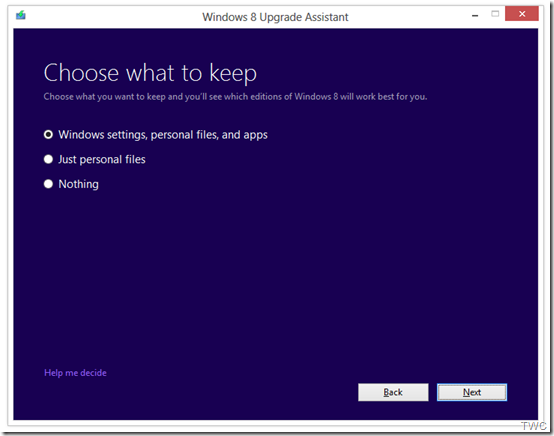
It will also inform you of any application or device compatibility issues. It will ask you what you want to keep from your current Windows installation. You will be able to upgrade from any consumer edition of Windows 7 to Windows 8 Pro.

Current Operating System

What you can keep

Windows 7

Windows settings, personal files, and apps

Windows Vista

Windows settings and personal files

Windows XP

Only personal files                             TWC

And if you want to start fresh, you can choose to bring nothing along. Or if you prefer to format your hard drive as part of your upgrade experience, you can do so as long as you boot from media and then format your hard drive from within the setup experience for installing Windows 8, not prior to it. And to add one more things for those running Windows 8 Release Preview -

“people can move from the Windows 8 Release Preview to Windows 8 Pro using the Windows 8 Upgrade Assistant and will only have the options to migrate their personal files or keep nothing at all when upgrading. People moving from the Windows 8 Release Preview will need to make sure you have an underlying license for either Windows XP, Windows Vista or Windows 7.”

upgrd2

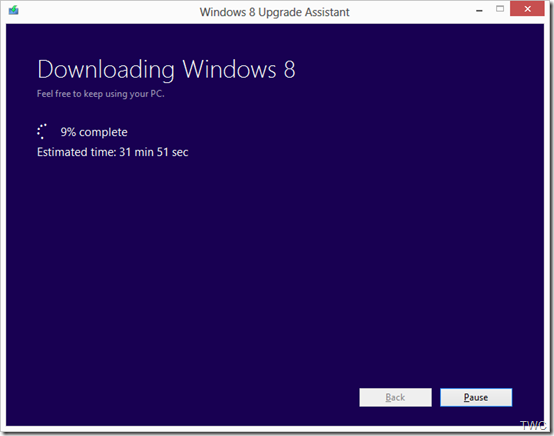
Once the Upgrade is purchased, the download begins.The Upgrade Assistant has built-in Download Manager that allows you to pause and continue your download at any time as well as a check to ensure your download completes successfully.

upgrd3

Once the download is finished, you can choose to proceed with the upgrade (“Install now”) or install later either from your desktop or by creating your own media.

upgrd4

If you choose to create your own media, you will be able to create your own bootable USB or .ISO file which can be burned onto a DVD for upgrade and backup purposes. You also have the option of purchasing a backup DVD for $15 plus shipping and handling.

upgrd5

Also a packaged DVD version of the upgrade to Windows 8 Pro will be available for $69.99 during this promotion in shops at a local stores but as said earlier online upgrade will be available in 131 markets and in 37 languages.

This upgrade will not be applicable if you are building your own PC or installing Windows 8 on a Virtual machine or a separate partition. For such scenarios there will be Windows 8 and Windows 8 Pro System Builder Products available for purchase.

This upgrade promotion for Windows 8 Pro both online and at retail will be starting at General Availability and  runs through January 31st, 2013.

As we can see Microsoft has started to share various install information so we can guess RTM is nearby and I guess Windows 8 might RTM soon in July-Aug while GA will be in Sep. Its just a guess, lets wait & see.

Monday, July 02, 2012

Windows Store support for Windows 8 CP ends today–2nd July 2012

Windows Store support for Windows 8 Consumer Preview ends on July 2nd, 2012.

Starting on July 2, if you are using Windows 8 Consumer Preview and open Windows Store, you will receive the message:

This version of Windows is no longer supported by Windows Store.  Get the newest version of Windows.

So what it means if you are a Windows 8 Consumer Preview User ?

“Users of Windows 8 Consumer Preview can keep and continue to use the apps they’ve acquired from Store – there is no expiration date on the apps.  However, you cannot reinstall those apps on Consumer Preview nor can you obtain new apps for Consumer Preview through Windows Store on or after July 2.

In order to continue to use Windows Store to install or update apps, install the newest version of Windows 8 at the link provided.

Please note that when you install Windows 8 Release Preview, you will lose any apps you may have acquired during Consumer Preview.  After installing the Release Preview, you can reinstall your apps from Windows Store, provided the app is available for Release Preview.”

(Source:Microsoft Answers)

You can get the Windows 8 Release Preview from http://windows.microsoft.com/en-US/windows-8/download

Wednesday, June 27, 2012

MetroTwit comes to Windows 8 Store

Popular twitter client MetroTwit has now been made available for Windows 8 RP. Its available in Windows 8 Store.

To install this, Open Windows 8 Store and if MetroTwit not shown in New apps, just search by choosing ‘Store’ and it’ll be listed.

Screenshot (63)z

Click on it to open its Install page and click on Install

Screenshot (64)

It’ll start the Install process & you can see at top right the message of Installing… and then Installed message.

Screenshot (65)z

Screenshot (66)z

And you can run it from its tile on the StartScreen

Screenshot (67)

Screenshot (70)

Its still a Preview, so might find some glitches. You can send reviews, feedback from the Windows 8 Store.

Thursday, March 08, 2012

[FIX] DVD Drive not shown in Windows 8 CP

Win8Logo
Many of the users of Windows 8 Beta that is the Consumer Preview are reporting that their DVD drive is not being shown. I too had this problem. I could install Windows 8 CP, could boot from DVD but after install of Windows 8 CP, the drive is not shown when a disc is put.
Some of them also reported that if you boot with Windows 8 bootable DVD in drive and ignore the boot from DVD message, then the DVD drive is shown, but for other discs its not. Anyway a Solution , A registry patch has been provided by Microsoft Employee Atishay. And it solves the problem.
1. Run Command prompt in Admin mode. For this type cmd in metro UI & press ctrl+shift+enter  to get the cmd Window.
OR in Desktop , just move the cursor to bottom left and right click to get access to various System management tools and from their choose Command Prompt (Admin)
2. In the Command Prompt Window just type & enter
reg.exe add "HKLM\System\CurrentControlSet\Services\atapi\Controller0" /f /v EnumDevice1 /t REG_DWORD /d 0x00000001
And reboot. Now insert a disc to test.The drive will be shown.
(NOTE: Create a Restore Point before trying....just in case if anything goes wrong, you can return to the earlier restore point)

Wednesday, February 29, 2012

Windows 8 Consumer Preview Product Guide for Business

Everyone is eager for the release of Windows 8 Consumer Preview , to be released later today at MWC 2012. Here’s Windows 8 CP Product guide for Business.

Download a guide to the new and improved features in Windows 8 including AppLocker, BitLocker, Windows To Go, measured boot, and Client Hyper-V.

Win8CPProdGBusiness

The Windows 8 Consumer Preview Product Guide for Business provides a detailed look at the many new and improved features in Windows 8. The guide is designed as an accurate source of information that can help businesses understand how Windows 8 enables users to be ready and productive practically anywhere, allows for a personalized user experience, and provides IT with more secure, easy-to-manage intelligent infrastructure.

Download it from here . (PDF file , Size 555 KB)

Also keep an eye on these sites to go Live when the Consumer Preview is released -

Windows 8 Consumer Preview Site›

Windows 8 Resources for IT Professionals›

Have you checked the Windows 8 Consumer Preview Special Bing Homepage ?

Wednesday, February 08, 2012

Remove Start Button from Windows 7

There have been reports that in the soon to be released version of Windows 8 ‘Consumer Preview’, there will not be any Start button. Microsoft has removed it. Unless this ver is released one cant confirm this. And we have to wait & see what’s offered instead at that place.

Anyway, if you want to just remove Start button from your Windows 7, Vista or XP, there’s a small utility which removes it. Its called Start Killer from Tordex Software. Start Killer removes the Start button from your taskbar providing additional space on taskbar. Start Killer is free to use.

startkiller1

Once you run this tool, the Start button is gone and when you exit it, the Start button reappears.

Once the Start button is removed, you can open Start Menu from Ctrl+ESC or WinKey. Start Killer places its icon on System Tray, you can exit it from there. There’s an option to remove this icon also from System Tray. In that case you can access its settings from CTRL+ALT+SHIFT+F12

Start Killer works on Windows XP/Vista/Windows 7 and it supports both 32 and 64 bit systems.

You can download it from http://www.tordex.com/startkiller/index.html

Saturday, February 04, 2012

Windows 8 Consumer Preview Special Bing Homepage

We have been hearing about the next version of Windows 8 release after Developer Preview (DP) to be called as Consumer Preview (CP) and this might be released soon in this month only. So the beta will be called as Consumer Preview and its almost confirmed with today’s teaser of a special Bing Home page video!

A special Bing Homepage under preparation is providing some pointers on this (HT to The Verge & LiveSide)

win8bettafishz

It mentions ‘Consumer Preview’ at 2 places. One in one of the Hotspots and other at bottom ‘See What’s new – Windows 8 Consumer Preview’ . But as of now none of the links work.

Just visit http://www.bing.com/?win8start=1 to have a look at the Windows 8 Consumer Preview Special Bing Home Page. And see how the Betta fish comes alive & swims across the screen. If you remember, similar betta fish used to be on the Windows 7 beta ver also.

Wednesday, November 30, 2011

New IE 10 Preview available exclusively for Windows 8

The Internet Explorer Platform Preview has been updated for Windows 8 Developer Preview.And this is only for Windows 8 DP. This IE10 preview adds even more support for HTML5 technologies, enabling richer Web applications with significantly improved performance.

One can download it from http://ie.microsoft.com/testdrive/Info/Downloads/Default.html

This is not an update to the Platform Preview of IE 10 on Windows 7 which is still at platform preview 2 (PP2). While the one released for Windows 8 is PP4.

IE10PP4

IE10’s hardware acceleration of technologies like SVG, CSS3 transforms and animations delivers faster rendering than other browsers. For the demo and more details of its highlights, please check the IE team’s blog post.

If you install this new IE10, you must test drive it at http://ie.microsoft.com/testdrive/