Showing posts with label Apple. Show all posts

Sunday, April 19, 2015

OneDrive now supports Apple Watch

OneDrive is the free online storage from Microsoft ,  its for storing all your files and you can get to them from your iOS device, computer (PC or Mac) and any other devices you use.

And now with the latest update of OneDrive app for iOS, it supports Apple Watch too. It says:

‘If you have a new Apple Watch, you can enjoy your OneDrive photos right from your wrist!’

OneDriveAppleWatch

So Microsoft is ensuring that OneDrive will be there from the day Apple Watch will be seen on wrists of its user.

Seems the feature that would be available on Apple Watch will be to browse all the photos on OneDrive right from your wrist.

Anyway, one should appreciate Microsoft for providing the OneDrive update for Apple Watch right from the day one its made available.

You can get the OneDrive for iOS from iTunes . Can also check some more improvements in the new Version 5.3

Wednesday, September 17, 2014

Microsoft Universal Mobile keyboard- switch between iPad, Android and Windows devices

Microsoft has introduced Universal Mobile keyboard for your tablets and Smartphones. And you can be on any OS, be it your iPad, iPhone, Android device or your Windows tablet, you can easily switch between them with a flick of a switch! Pair with up to 3 devices with different operating systems and easily switch between them.

“The compact and light weight design of the Universal Mobile Keyboard was built with portability in mind with its protective cover and built-in stand that holds your tablet or smartphone. Just flip the cover open to power-up and make a Bluetooth connection, then set your device into the integrated stand—you'll be typing in seconds. Shutting down is just as fast. Simply close the cover to turn off the keyboard—it's that easy. The rechargeable battery provides up to 6 months of usage on a single charge. But if you're ever low on power when you're heading out, don't worry—just do a 10 minute quick charge and you'll have plenty of power for a full day's work. “

There is no dedicated Windows specific key but dedicated keys for Android and a CMD for Apple users. So people can use shortcuts found in respective OS. umk4

umkUMK1zumk2z

umk3z

Check the demo video:

Microsoft Universal Mobile Keyboard
For more details please check here.

Tuesday, December 20, 2011

Skydrive for iPhone and Windows Phone

Recently there were lots of updates to SkyDrive which now uses the latest HTML5 technology making it very fast and very much improved file management. Now Microsoft has come up with SkyDrive app for Windows Phone and iPhone. Since sometime, Microsoft has been providing very good apps for iOS and Android based devices also apart from for Windows Phone.

SkyDrive for iPhone: SkyDrive from Microsoft is the place to store your files so you can access them from virtually any device. With SkyDrive for the iPhone, you can now easily access, manage and share files on the go. You can also upload photos or videos from your iPhone to SkyDrive.

Features:

  • Access all of your SkyDrive content including files shared with you
  • View recently used documents
  • Upload photos or videos from your phone
  • Share a link to any file using email
  • Create folders. Delete files or folders

Available now in the App Store: http://bit.ly/v1JLYR

SkyDriveip3

SkyDriveip2

SkyDrive for Windows Phone

SkyDriveWP

SkyDrive for Windows Phone is available in the Marketplace now: http://bit.ly/w2xMQW

The SkyDrive app for Windows Phone allows you to browse and manage your SkyDrive on the go.

(Source : Inside Windows Live )

Thursday, December 15, 2011

Gmail App for iOS updated

Gmail has updated its controversial Gmail App for iOS. These are the updates -

gmailapp1 

You can set a custom signature for your mobile messages and a vacation responder, both available through the gear icon at the top of the menu view.

gmailapp2

gmailapp3

Also you can now open up a canvas and scribble a message that will be attached to your email. iPad users can give it a try.

scribbles

Another update is about change of the notification sound that it’s easier to distinguish when you've received an email.BUT I haven’t heard any Sound Notifications when a new mail arrives. Checked in General Settings also still the problem persists. Gmail Please look into it.

UPDATE 16/12/11 : Since morning I can hear the ‘Ding’ when a new Mail arrives. Seems it has been corrected.

Monday, December 12, 2011

Microsoft OneNote for iPad now available

Today morning I noticed the Update available on iOS device and it was Microsoft OneNote. But the one thing struck me was it said – Microsoft OneNote for iPad is now available. (Pl check the Update below )

onenoteios 

Since I’m not an iPad user I haven’t checked it on iPad and didn’t knew it was not available for iPad earlier. So just head over to iTunes App Store & get OneNote for iPhone. Its FREE!**

In the iTunes stores requirement description also include to support iPad -

onenoteipadz

UPDATE : Just now I received a tweet from an iPad user Tim P  which said-

“I can't find the iPad version despite all the updates on the iPod version. They may have jumped the gun. Chances are apple approved the iPod version before the iPad. Microsoft tried to time it, but it can't be timed.”

So as of now, its not yet available on iPad. But keep checking , it might soon be updated.

Also I just added a ? to the Post Heading

UPDATE : After a bit of confusion, OneNote for iPad is available Now ! iPad users, please confirm !
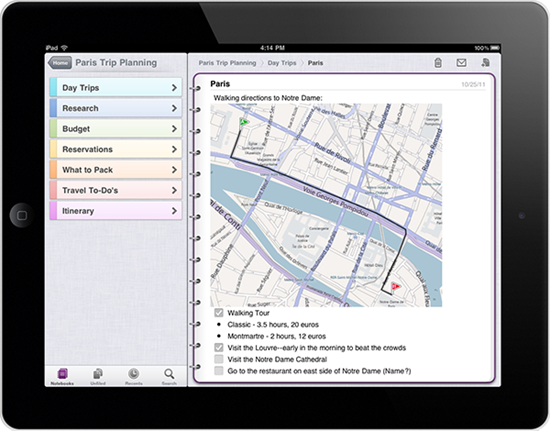
3113.on_onenote_13_ipad2

4403.onip_logo_appstore

OneNote 1.3 works on the following iOS devices:
Apple iPhone 3GS
Apple iPhone 4
Apple iPhone 4S
Apple iPad
Apple iPad 2

What’s new in this version-  OneNote for iOS builds on previous releases with the following new features in version 1.3:

Support for iPad and iPad 2
Localization into several new languages and markets
Tabbed user interface
Quick note creation in the Unfiled Notes section
Table rendering
Improved Windows Live sign-in experience
Option to sync notebooks only over a Wi-Fi connection
Integrated upgrade option

** OneNote 1.3 is free to download and use for up to 500 notes (the total of newly or previously created notes). To track your usage, tap the Settings button in the app and then tap the Upgrade button.

When you've reached the limit, you can upgrade OneNote 1.3 as follows:
$4.99 for unlimited use on your iPhone
$14.99 for unlimited use on your iPad
If you choose not to upgrade to the unlimited version, you can still view, sync, and delete any of your existing notes even after you've reached the 500 notes limit. However, you will no longer be able to edit your notes or create new ones on your iPhone or iPad. For pricing outside of the United States, please visit the iTunes App Store in your region

Starting today, OneNote for iOS available worldwide in the following markets:

Argentina, Australia, Austria, Belgium, Bolivia, Brazil, Canada, Chile, China, Colombia, Costa Rica, Cyprus, Czech Republic, Denmark, Dominican Republic, Ecuador, El Salvador, Finland, France, Germany, Greece, Guatemala, Honduras, Hong Kong, Hungary, India, Indonesia, Ireland, Italy, Jamaica, Japan, Korea, Luxembourg, Malaysia, Mexico, Netherlands, New Zealand, Nicaragua, Niger, Norway, Panama, Paraguay, Peru, Philippines, Poland, Portugal, Puerto Rico, Russia, Singapore, South Africa, Spain, Sweden, Switzerland, Trinidad and Tobago, Turkey, United Kingdom, United States, Uruguay, and Venezuela.

More details at (Source)

Saturday, December 10, 2011

Publish your blog as a magazine in Google Currents

As you know Google Currents was recently introduced– A Flipboard Style Reader for  Android and iOS devices.

“Gather your RSS and media feeds, YouTube channel, social stream, and more into a mobile magazine edition beautifully presented on tablets and smartphones.“

So how about publishing your blog in magazine format which can be read using Google Currents. And this can be read offline also. If you have signed into Google Currents, you can check in Google Reader under Library listing.If its showing your Blog there or you can subscribe to your Blogs RSS feed in Google Reader and then add to Google Currents.

GCurrent1

GCurrent2

Once added,it’ll create the magazine edition and it’ll be in Library, ready for reading.

GCurrent3

GCurrent4

If you want to add any site but don’t know the feed URL, just search and when listed add them. Like here I have searched for TheWindowsClub Blog feed

GCurrent5

GCurrent6

One can configure to enhance the magazine by going to https://www.google.com/producer/  (works only in Chrome Browser ) where one can add a splash screen, icons,add sections,change the layouts for Android, iPhone, Tablets, iPads etc to customize accordingly.

GCurrent7

Friday, December 09, 2011

Google introduces Currents - Flipboard style Reader

GoogCurrentGoogle has just introduced Currents.

“Google Currents delivers beautiful magazine-like editions to your tablet and smartphone for high speed offline reading.”

Recently Flipboard was released for iPhones and now Google launches Current which can be said similar to Flipboard.

Few screenshots-

current1current2

current3

Its available for iOS And Android.

For more details and download , check http://www.google.com/producer/currents

Thursday, November 17, 2011

Gmail app for iOS available again

Couple of weeks back Google had introduced Gmail app for iOS and has to be recalled immediately after it was found to be buggy.Google says sorry for the mess - pulls Gmail app for iOS within hours

Now it has has been made available in the stores again. It says “We’ve fixed the bug and notifications are now working”

To try out the Gmail app today, install it from App Store on any iOS 4+ device. Those who already have the Gmail app released Nov 2 must uninstall or log out of the old app prior to installing the new app.

I had the earlier app installed , Now I have uninstalled it and now I ‘m not able to install the new App. It just hangs saying ‘Waiting…’ . It may be affecting the other apps also which are to be updated or installed from App stores as its not connecting to App stores. Having bad experience. So be careful while trying out this app.

UPDATE: Later I could install the Gmail app and its working fine. With all its bugs fixed and no error message box popping, there’s no change in interface as compared to withdrawn app. The error I mentioned while installing the new app was due to some Routing issue with the ISP and was not related to the app.

Thursday, November 03, 2011

Google says sorry for the mess - pulls Gmail app for iOS within hours

A big hype was created even before the Gmail iOS app was released and people were discussing about it. And when it was made available at Apple store yesterday and after using it , everyone was disappointed.

gmailapp

The app had a bug with notification and as soon as you launch it,you get the bug notification , how can Google have missed this? The net was buzzing all over discussing it.

IMG_0376

Even the interface was not liked by its users.

IMG_0369

IMG_0371z

And later Google apologized for it and pulled it from App stores.

gmailappsorrytweetz

Google reputation has surely taken a beating for creating such a mess of its app. Hope it comes up with a better app soon. Now Hotmail though not an app but provides a separate option for configuring its mail in iOS5 http://www.thewindowsclub.com/ios-5-upgrade-separate-hotmail-option making it very easy to setup Hotmail on iOS devices.

Thursday, October 06, 2011

Steve Jobs 1955-2011

Very sad for all and technology World. Steve Jobs – Founder of Apple has passed away.

t_heroz

t_title

If you would like to share your thoughts, memories, and condolences, please email rememberingsteve@apple.com

(Source: http://www.apple.com/stevejobs/ )

President Obama: "Michelle and I are saddened to learn of the passing of Steve Jobs."  http://t.co/eGcYghq5

Bill Gates: “I’m truly saddened to learn of Steve Jobs’ death. Melinda and I extend our sincere condolences to his family and friends, and to everyone Steve has touched through his work………….”     http://www.thegatesnotes.com/Personal/Steve-Jobs

Mark Zuckerberg :  “Steve, thank you for being a mentor and a friend. Thanks for showing that what you build can change the world. I will miss you.”

Steve Jobs will be remembered for "the inspiration he brought to the world" - Meg Whitman, HP CEO  http://t.co/N9PNdSwl

Statement from Microsoft CEO Steve Ballmer-  “I want to express my deepest condolences at the passing of Steve Jobs, one of the founders of our industry and a true visionary. My heart goes out to his family, everyone at Apple and everyone who has been touched by his work.”

http://www.microsoft.com/Presspass/press/2011/oct11/10-05statement.mspx

Google Tributes to Steve Jobs -

GoogleStjobs

Larry Page, co-founder and CEO of Google: “I am very, very sad to hear the news about Steve. He was a great man with incredible achievements and amazing brilliance.”

steve-jobs-composite

composite image of Steve Jobs created entirely with Apple products(Source:http://www.flickr.com/photos/tsevis/2313082920/in/set-72157594536252686/ )

After Google, Amazon also posts a link  to Apple site on its Home page – (HT to labnol)

AmamzonJobs

All the flags on all Microsoft campuses worldwide are at half mast today and tomorrow for Steve Jobs. (Tweet from @stephenlrose )

MS flag flying half-mast at Microsoft UK HQ  (via @MichaelGillett )

Microsoft UK

Bing -

bingjobsz

Tweet from twitter - Here's a visualization of public #thankyousteve Tweets, sent over about 4.5 hours yesterday evening http://t.co/f1vhDniw  (by @miguelrios)

ThankyouSteveTweets

Tweets are ordered by # of RTs, from the top left. View original to see Tweet text: http://www.flickr.com/photos/twitteroffice/6219082960/sizes/o/in/photostream/   (NOTE: Full sized original image is ~16.5MB )

Tuesday, May 17, 2011

Sync media files between Mac and WP7,Zune HD with Windows Phone 7 Connector beta for Mac

Windows Phone 7 Connector for Mac is a simple, easy-to-use program for Macs that you can use to:

  • Sync music, movies, TV shows, and podcasts from your existing Apple iTunes library to your Windows Phone or Zune HD*
  • Sync pictures and videos from your existing Apple iPhoto library to your Windows Phone or Zune HD
  • Retrieve pictures and videos taken on your Windows Phone and automatically import them into your existing iPhoto library
  • Browse and preview media items stored on your Windows Phone or Zune HD
  • Download and install operating system updates for your Windows Phone

GetOpenContent

This software is not part of the Zune experience. In order to enjoy the Zune experience on Mac, you will need to install a Windows OS (XP or higher). Zune delivers music and video entertainment across Windows Phone 7, Xbox Live and Windows PC’s.

*Only unprotected (non-DRM) media files can be synced between your Mac and your Windows Phone or Zune HD.

The Windows Phone 7 Connector for Mac 1.0 is now available via the Mac App Store

For more details go here.

Thursday, May 05, 2011

Windows Phone 7 Guide for iPhone Apps Developers

wp7ios

If you are an iPhone applications developer and interested in building your applications for Windows Phone 7, this guide is for you.

The guide will cover what you need to know to add Windows Phone 7 development to your skill set, while leveraging what you have already learned building iPhone applications.

wp7iosguide

The chapters include -

Chapter 1: Windows Phone 7 Platform introduced to iPhone application developers

Chapter 2: User Interface Guidelines

Chapter 3: Developer and designer tools introduced to iPhone application developers

Chapter 4: C# programming introduced to Objective-C programmers

Chapter 5: Image Format Considerations in migration of iPhone applications to Windows Phone 7

Chapter 6: Application Lifecycle Differences Between Windows Phone 7 and the iPhone

Chapter 7: iPhone to Windows Phone 7 Application Preference Migration

Chapter 8: Introduction to Windows Phone 7 Notifications for iPhone Developers


Apart from this if you want something to be included , please contact here for more chapters to be included.

You can download the guide (Chapters 1-8) from here – DOCX (3.83 MB) – PDF  (2.86 MB)

For more details  about the chapters please check here.

Sunday, May 16, 2010

Hotmail working with Apple to fix the issues on iPad

Users of iPad had some issues using Hotmail. Some iPad users had problem in composing and replying to an email. Now an official word from Mike Schackwitz ,Program Manager, Windows Live Hotmail team has posted about it.

Rest assured that we’re working with Apple to understand the issues, and we’ll fix them as quickly as possible. In the meantime, we have directed all iPad traffic to our mobile Hotmail website. Alternatively, you can set up the iPad email client to use POP to download your Hotmail.

(Source: Inside Windows Live)


Wednesday, March 31, 2010

Silverlight based Seesmic social networking platform for Windows Phone 7, Windows and Mac demo

At the MIX10 Keynote, Loic the founder of Seesmic gave a cool demo of the cross platform capabilities of Silverlight based Seesmic Social Networking platform. He demos Seesmic Desktop based on Silverlight which runs entirely on plugins. Main social network services like twitter, facebook, linkedin were running as plugins on that platform. Further he demos how bingmaps was integrated in the tweet timeline itself.

First it was built for Windows and they were so impressed with Silverlight 4 that they ported it for Mac. And it was easy as the code was reused.

Next he demos the First Real twitter Client on Windows Phone 7 Series – Seesmic for Windows Phone . And the majority of the code was same as that for the desktop.

Check out this cool video of the same -


Sunday, December 06, 2009

Find your iPhone App using Bing

Bing is offering a feature where you can search for iPhone Apps in style with Bing’s visual search interface.Just go to http://www.bing.com/?setmkt=en-US . You will have to use Bing of United States as this Visual Search is not available for all countries. And click on the Visual Search from Explore. There you will find ‘Top iPhone apps’ under ‘Online Media >>’

Else you can directly click on this link - Top iPhone Apps  It may offer you to change to United States if you are not. And you will get this 3D-like grid of images of various Apps. Try it, its so nice to see those thumbnails getting arranged  in this way-

bingVSiph2

And after this you can even narrow your search by Category, Price, Top Publishers which in turn has lots of options within.

bingVSiph4z


bingVSiph5z


bingVSiph6z

Also you can Sort them by various categories -

bingiphoneApp1z

As you can see, this is such a nice way of navigating through thousands of available apps. iPhone users are even finding it to be much better than using Apple’s own iTunes.