Showing posts with label Movie Maker. Show all posts

Tuesday, December 14, 2010

Windows Live Plug-ins site launched !

The plug-ins are one of the most useful additions to various Windows Live products. These enhances the usefulness immensely. Now a new , neat , clean  site has been created featuring these plug-ins.

http://plugins.live.com/ 


Wlplug-inssite

For various Windows Live App , it provides many plug-ins arranged category wise, tag cloud and languages which can be arranged in various ways making it very easy.Wlplug-inssite1


Check out the various plug-ins  from http://plugins.live.com/


It also provides information for Plug-in Submission Process, so that if you are a developer , you can submit your plug-ins.

Saturday, September 25, 2010

"Evil Tina"– video from Windows Live Double Rainbow makers

Watch Evil Tina - The second video from Lanman Brothers – who brought the Windows Live Double Rainbow video.

Don't mess with Evil Tina. Automatically turn your videos, photos, and music into a great movie by using AutoMovie.

Evil Tina–Windows Live Movie Maker


“There’s more to Windows Live Movie Maker than meets the eye. Let’s take AutoMovie for example. AutoMovie is a feature that allows the user to make a polished movie in seconds. In 3 clicks or less, you add your pictures/movies, select a theme, add a song and you’re ready to share with family and friends. “

Read more about the video here: The Wedding Video…

Get Windows Live Movie Maker here:
http://explore.live.com/windows-live-movie-maker

btw if you haven’t watched the Windows Live Double Rainbow video, its here :

Double Rainbow

Wednesday, August 18, 2010

What’s new in Windows Live Essentials 2011 beta refresh

Microsoft released an update to  Windows Live Essentials 2011 beta .  Its being called as Windows Live Essentials 2011 beta refresh, some are also calling it as Beta2. Acting on the beta feedback and usage of millions of users, the Live team has come up with many improvements across Messenger, Photo Gallery, Movie Maker, Writer, Mail, and Family Safety.

Let us check some of the many improvements -

Messenger -

A quicker Messenger - The time it takes to sign in, and to refresh contacts and social feeds, as well as animation speed, are all faster than in previous versions of Messenger.

More efficient video chat - Messenger video chat uses 30% fewer CPU resources by offloading work to the GPU.

Facebook chat in Messenger – Messenger now connects Messenger’s ~300 million customers (who are already connected to Yahoo! Messenger and Office Communicator) to Facebook’s ~500 million customers with Facebook chat . With the new Facebook chat integration, one can chat with all the Facebook friends.

msngrFB2z


WLMfb4z


WLMfb7z

Also check step by step article on enabling Facebook Chat feature– “How to chat with your Facebook friends from Windows Live Messenger


Movie Maker-

Flickr video publishing - You can now publish videos directly from Movie Maker or Photo Gallery to Flickr too. Also notice the new logo for the SkyDrive.

WLEnew

Larger movie uploads - Movie Maker will upload higher resolution movies to SkyDrive (480x640 vs. the previous 320x480).

WLEnew1

Higher bit-rate movies - Movie Maker now supports higher quality (bit-rate) content.

Snapshot - With the new Snapshot feature in Movie Maker, you can select a single frame from a video as it appears in the preview window and add it to your movie. This allows you to quickly grab an image that you want to keep or perhaps use for your movie’s intro or closing.

WLEnew2


Mail -

Better handling of Gmail – Mail now automatically handles Gmail’s spam and trash folders properly.

Photo Album improvements- Faster Photo albums uploads. Better indication as to where you can add additional photos to your album.  Live Mail also has some UI to set of a Photo Album expires after 90 days or not.

WLEnew11

WLEnew12


Family Safety -

Faster web filtering - Family Safety web filtering is 35% faster than in the previous version.

Photo Gallery -

Better facial recognition - Photo Gallery facial recognition is improved significantly and works more quickly.

Quick previews and improved tree view - Added preview capabilities to the “Find” tab in the ribbon. So before you apply a filter (date, rating, people tags), you can hover over one of those filters and see the results instantly.

 

WLEnew4


WLEnew5


WLEnew6


Writer -

Better spell-checking -

Writer has significantly improved the quality of its spell-checking.

Better integration with Office -

Writer is much better at retaining all formatting when you copy and paste from Word and other Microsoft Office programs. With Office there is a lot of CSS on the clipboard that will not be needed in the blog post.  If it was pasted it would really bloat the post.  Now Writer has a good compromise of pasting what you need to keep the formatting.  Bullets/numbering, heading styles, etc. all should paste better when copying from Office into Writer.

Jumplists -

Now Live Writer has jumplists on Windows 7.  Right click on the application icon in the task bar and you will see jump list entries for recent drafts and recent posts.

WLEnew7


Open Drafts and Open recent Posts on the application menu-

WLEnew8

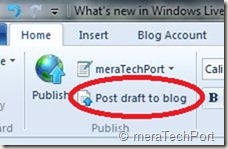
Post draft to blog button on the ribbon-

As many of the Writer users requested this feature, the Writer provides it. As the users said they post a draft to their blog and then directly go to the web to actually publish the post from there. So now they can do this easily.
WLEnew9


Much better theme detection -

As WordPress has changed over the years Writer has not kept up with the theme changes.  Live Writer is back on par and can accurately detect all current themes from WordPress including their new WP 3.0 theme Twenty Ten.  The theme detection changes are not exclusively for WordPress.  Writer will now work a lot better with the new custom Blogger themes also and should work better for really any blog server you use.  WYSIWYG is much better in Blogger now.Though Writer still cannot detect themes for blogs marked as private on servers such as WordPress.

Also has theme related options on ribbon.

WLEnew10


Updated spelling dictionaries-

It now have the same ones that are included with Office 2010.  Live Writer will have updates for all languages that it is released in.  It also has an updated autocorrect list that matches the English list in Office 2010.

Photo Album improvements- Faster uploads of Photo Albums.

More keyboard shortcuts-

There are more keyboard shortcuts which should soon appear as help topic on the web.


So, overall there’s an improvement in the quality of the software and over 75% of reported bugs have been fixed. As I have started using it, I can feel the improvements. One of them being the Face detection in Photo Gallery which has improved a lot, all of the products load faster, nice splash screen animation etc. And the improvements are an ongoing process and Essentials keeps improving, looking into users feedback.

And apart from English, Spanish, French, Dutch, Portuguese, Japanese, and Simplified Chinese, you can also now get the beta in Russian or German. So get the Windows Live Essentials 2011 beta refresh today and give it a try. Windows Live Essentials beta refresh requires Windows 7 or Windows Vista.

(Source: Inside Windows Live, Aaron's Live Writer Blog )


Thursday, May 13, 2010

New Version of Windows Live Wave 3 available – Minor updates

Yesterday I got this tweet from Windows Live Writer Team -

New version of Wave 3 Windows Live Writer. No new features but higher quality. Upgrade today!Wed May 12 07:30:54 via web

Windows Live Writer
WLWriter


And so decided to upgrade it, but when I tried from within Windows Live Writer, Help > Check for updates , It said ‘You are running the latest ver…”

So I went to http://download.live.com/  and from there upgraded Windows Live Wave 3 . It not only upgraded the Writer but all Windows Live Apps - Messenger, Movie Maker, Mail , Photo Gallery, Writer.

Before the upgrade I had this version -

WLWriterWwave3Befupdt


And after upgrading -

WLWriterWwave3AFTupdt


So the Windows Live Writer, Messenger, Mail, Movie Maker, Photo Gallery all upgraded to Build 14.0.8117.416 And as the tweet said – No new features but higher quality.

I think this is for all the Apps and not only for Writer as I haven’t noticed any new features in other apps also.

UPDATE: (13May2010, 6:50AM) : And here’s the official word about this update- Minor update to Essentials released today

Today we released an optional update for Wave 3 of the Windows Live Essentials suite in all 48 languages. This is a minor release that updates Windows Live Messenger, Mail, Family Safety, and Sync. You can install it from http://download.live.com, or through Microsoft Update as an optional update. While this is our last planned update for Wave 3, we will continue to support this release for the foreseeable future as it will be the last version that supports Windows XP.

This is a minor release with a small set of targeted bug fixes and minor changes. Even though most users will not run into the issues we addressed, we felt they were important to fix. This update also contains a small set of changes to ensure that Essentials supports new advances coming in Wave 4.

Rest assured, we’re continuing to work hard on Wave 4 and are in the final stretches. This update is a first and important step in that direction.


Friday, October 02, 2009

Creating Time-Lapse Videos with Windows Live Movie Maker

Do you want to make a time-lapse video that will show an event happening in a long time and you will time-lapse to show it in a short duration. For example the following video shows Jade building an airplane from Lego’s which will take long time but you want to time-lapse and show the complete process in a jiffy.


http://www.youtube.com/watch?v=mIzEKFjtwIg

Another example of such time-lapse video is posted here. There are lots of instances you can think of, for Time-Lapsing an event.

Now let us make such a video with Windows Live Movie Maker. First, fix the camera on a tripod. Making use of tripod will give you better uniform level photos of the event. Now keep on taking snaps after some interval of the event you want to time-lapse manually or with software that came with your camera. Take lots and lots of picture to get a better time-lapse effect. Here, a small tip- Try taking photos using laptop Web-Cam instead of regular camera and take pictures after regular interval automatically using some software like AvaCam or Microsoft Powertoy for XP- Webcam Timershot (this may work only with Windows XP). Such apps will help you to take photos automatically after a certain interval of time and save them.

Now after getting lots and lots of pictures, load them into Windows Live Movie Maker. After loading them select all pictures (by right clicking > Select All) and set the Duration to a low value such as 0.3 sec.

WLMMtimelapsez

That’s all and save them and run the movie to see the time-lapse effect.

Thanks to Windows Live Team Blog post for this tip -The “grown up” side of Windows Live Movie Maker where you can also read some more Movie maker related tips.

If you are not having Windows Live Movie Maker, you can get it from here . And its FREE !

Friday, August 28, 2009

Microsoft Answers- now for Windows Live

MSans1 If you have any queries related to Windows Live and needs help or just want to help others by solving Windows Live related queries, you now have recently launched Microsoft Answers for Windows Live  Here you can ask your doubts and also get involved in the community answering others queries. 

At present its having following categories -

Family Safety

Photo Gallery, Movie Maker, & FrameIt

Sync & Devices

Events & Toolbar

This forum is launched initially in English and later it will expand into other languages and also more Windows Live categories. Microsoft Answers will expand further in the days to come. http://answers.microsoft.com/en-us/windowslive/default.aspx


MSans2


It is a great place for Windows Live Essentials users to offer tips and advice, get their queries answered, collaborate together to improve the experience of Windows Live and be a part of the community. Here you will get your queries answered from other community members , MVPs and from Experts from Microsoft.


MSans3

BTW have you tried the Cool new Windows Live Movie Maker? If not check it out how easy it is to make your own Movies with all the transition effects, titles etc , Get Windows Live Essentials from here : http://download.live.com/
