Showing posts with label Social Networks. Show all posts

Sunday, September 25, 2011

Project Waterloo – Facebook game from Microsoft Research

MSRProWaterlooProject Waterloo is the first game project from Microsoft Research played on Facebook.

“The game is played by two players; each has 100 troops at their disposal and needs to allocate those troops among five battle fields. Once both players have allocated their troops, the winner is determined by finding which of the two players has won more battles. A battle is won by having allocated more troops to it than the opponent.

The game is complex from a game-theoretic perspective, involves randomized strategies, and can be approached by reasoning about the opponent's reasoning. We have also found it to be fun, engaging, and slightly addictive. It is thus a great test case for studying actual strategic behavior of people on Facebook.”

waterloo_img

The client side of the game is CSS and JavaScript and the server is running an ASP.NET MVC 3 application (hosted on Azure) with a SQL Azure database back end.

Check out this Facebook game app at http://apps.facebook.com/msrwaterloo

Saturday, September 10, 2011

MSDN Forum Assistant– Search forum topics directly from your desktop

MSDNForumAsst3The MSDN Forum Assistant is a Windows Gadget which allows you to search forum topics directly from you desktop. There is no longer the need to login every time you visit the MSDN Forums. Among other features, the MSDN Forum Assistant also keeps you afresh with the latest FAQs and hot topics.

MSDNForumAsst1

Various optionsMSDNForumAsst2z


Click on the link http://msdn.microsoft.com/en-sg/gg650455 for more details and to download the latest MSDN Forum Assistant, and start searching with ease today.

Gallery Link: http://gallery.live.com/liveItemDetail.aspx?li=822a3787-89e8-4c6d-8fc4-a413437d86e9

Tuesday, May 24, 2011

Bing and Facebook Ads– Sushi and Chromeo

Bing and Facebook: Sushi

Trust Your Friends: Restaurant Decision

Bing and Facebook: Sushi


Another Ad is -

Bing and Facebook: Chromeo

Trust Your Friends: Music Decision

Bing and Facebook: Chromeo

Saturday, December 11, 2010

Twitter 2010: Year in Review (Celebrity Edition)

In 2010, Twitter grew by more than 100 million registered accounts. Here's a look at some of the people who joined the Twitterverse this year.

twitter2010


Check out http://yearinreview.twitter.com/whosnew/   to know  Who's New On Twitter 2010 (Celebrity Edition)

Thursday, November 25, 2010

Skydiver Really ! New WP7 Ad

Check out this cool Windows Phone 7 Ad !

A skydiver snaps a pic on his Windows Phone 7 ( Samsung Focus ) and then uploads it to Facebook before deploying his parachute! Skydiver, Really !  It's time for a phone to save us from our phone.

Skydiver Really ! WP7 Ad !

Tuesday, November 16, 2010

Twitter Local trends launched in India and other countries

At last India and few other countries gets the twitter trends feature. So it’ll be any popular local topic being discussed will  get highlighted as a Trending Topic in real time.  Twitter is expanding local trends to include 13 new countries and 6 new cities.

Countries: Argentina, Australia, Chile, France, Germany, India, Indonesia, Italy, Netherlands, Singapore, Spain, Turkey, Venezuela.

Cities: Detroit, Miami, Minneapolis, Rio De Janeiro, Sydney, Toronto

More cities and countries to come. Hope to see Indian cities gets included in next update.

twtInd1z

Also twitter is introducing Tweet translations in the details pane to give people more access to what people are talking about around the world. At present will be limited to very small percentage of users and will be rolling out to everyone over the coming weeks. Its making use of Google Translate.

Saturday, July 31, 2010

Pivot your twitterverse with TweetPivot

Tweet Pivot combines Twitter data with Microsoft Live Lab's Pivot Silverlight plugin to give you the ability to view your Twitter life in a completely new way.

At the moment you can pivot (up to) the first 1000 friends or followers of any user that hasn't protected their Tweets.

Try it -  http://tweetpivot.com/   Here’s what I see for my twitter friends

tweetpivot1


Or you can arrange them in graph view -

tweetpivot3


And you can sort them in many ways – say you want to sort them by location as Redmond , here’s what I see -


tweetpivot2


Try it now and Enjoy !! http://tweetpivot.com/ 

Here’s a small introductory video about TweetPivot -


TweetPivot Introduction


(Hattip- SteveC )


Thursday, July 22, 2010

Facebook reaches 500 m subscribers ! Rahman & Deepika kickstart ‘Facebook Stories’ in India

facebook Stories


Social network Facebook has reached an important milestone- it registered its 500 millionth subscriber. There are 12 million Facebook users here in India. Each month, people in India upload more than 53 million photos, while mobile usage has increased ninefold in the past year.  


Facebook today launched Facebook Stories, an initiative dedicated to showcasing the connections made and stories shared by the 500 million people who are actively using the service every day.  Facebook Stories was announced by Mark Zuckerberg in a video addressed to all Facebook users worldwide.


To inaugurate Facebook Stories in India, award-winning producer A. R. Rahman shared his personal story about how Facebook has enabled him to connect with his fans. 

“Facebook has really made it so easy for artists to connect with their fans – making them part of our daily lives,”

To me, that’s one of the best ways I can show my fans how grateful I am for their support.”  

wrote Rahman.


Blockbuster actress Deepika Padukone also shared the impact Facebook has made on her life. 

“In the networking world Facebook literally provides a FACE to one’s identity in the world wide web,” she wrote.  “It gives me semblance of being grounded by allowing me to be constantly in touch with my friends and family and people whom I love and cherish!”   


To share your own story, go to, http://stories.facebook.com/ login with your Facebook credentials. BTW Facebook Stories is making use of Bing.


Wednesday, April 28, 2010

Share your Photosynths on Facebook

The Photosynth team has announced a new and often requested feature : sharing your synths on facebook. So the Photosynth has joined the social Web. Now every synth viewing page has a "share to Facebook" button.

photosynthfacebook


photosynthfacebook1


For more details please check - Strut your synths on Facebook


Tuesday, April 20, 2010

New Silverlight 4 Client for facebook

Last week, Silverlight 4 was released. Along with its release, the beautiful Silverlight Client for Facebook has also been updated for Silverlight 4 . If you are using the older version, you’ll have to uninstall it first then install this.


SL4facebook1

This application brings together the many compelling platform capabilities of Silverlight 4 into a rich out-of-browser application in the familiar context of Facebook.  Enjoy the photos, feeds, events, friends’ walls, and inbox mail from your Facebook account in a visually stunning and user-friendly environment.

Note: This is a Silverlight 4 developer preview application.  When Silverlight 4 is finally released you may be required to uninstall and re-install the plugin.

Silverlight Features demonstrated:

  • Out-of-browser support
  • Hosting HTML content interactively
  • Local Device access (webcam)
  • Rich-Text control
  • Embedding alternative media content
  • Desktop notifications
  • COM integration (with Microsoft Outlook®) on the Windows platform
  • Right-click
  • Drag-n-drop
  • Window control
  • Animations

The above stated info taken from the ‘About’ button which also provides option to send feedback

So from the above given links, install Silverlight 4 first, then if you are using older ver. of the facebook Client, uninstall it and then install this updated ver. of Silverlight 4 Client for facebook.


Wednesday, March 31, 2010

Silverlight based Seesmic social networking platform for Windows Phone 7, Windows and Mac demo

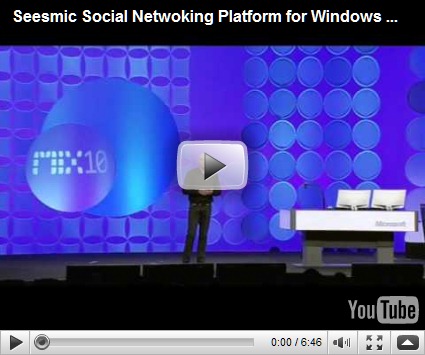
At the MIX10 Keynote, Loic the founder of Seesmic gave a cool demo of the cross platform capabilities of Silverlight based Seesmic Social Networking platform. He demos Seesmic Desktop based on Silverlight which runs entirely on plugins. Main social network services like twitter, facebook, linkedin were running as plugins on that platform. Further he demos how bingmaps was integrated in the tweet timeline itself.

First it was built for Windows and they were so impressed with Silverlight 4 that they ported it for Mac. And it was easy as the code was reused.

Next he demos the First Real twitter Client on Windows Phone 7 Series – Seesmic for Windows Phone . And the majority of the code was same as that for the desktop.

Check out this cool video of the same -


Sunday, December 20, 2009

Access Microsoft Forums with newsreader using Forums NNTP Bridge

If you are one of those who likes to be participating in various Online Microsoft Forums like MSDN, TechNet, Answers etc then here’s a nice way to interact with Microsoft Forums using NNTP readers connecting them via Microsoft Forums NNTP Bridge from your desktop. If you do not like to connect different Microsoft Forums using web interface then this is the best method where you will have access to hundreds of Microsoft Forums from your NNTP Newsreader. This is very convenient where you can read and write posts offline from your desktop.

This can be done by using Microsoft Forums NNTP Bridge Beta December release which is made available on Connect. Only registered Connect members can get it from here. From the link one can also find out more about the bridge.(Update: direct connect link: https://connect.microsoft.com/site/sitehome.aspx?SiteID=927 )

“The NNTP Bridge Beta is a small client application that exists alongside your newsreader that allows you read/write access to popular Microsoft forums such as the Answers, MSDN and TechNet forums. It’s designed to allow you to download current forum messages into the newsreader of your choice, respond in an offline scenario if you so choose, and upload responses.”

Now let us see how to use our NNTP reader to access Microsoft Forums-

To use the bridge, users need a current forums profile which the Users of Microsoft Forum will already have and ensure you have selected “Use NNTP Bridge” in the forums setting page. So just sign-in into any of the Microsoft Forums, click on My settings-

Forum1

and check the “Use NNTP Bridge” in the settings page.

Forum2

And then click on Submit to save the changes.

Now from the Connect link download the December bits of Microsoft Forums NNTP Bridge beta. Unzip and run setup.exe , Accept the license agreement and follow the instructions to complete the setup.

NNTPbrdg1z

Now once its installed, you’ll find a shortcut under Microsoft Community Tools to run this application. Run it.

NNTPbrdg2a

Click on Start to run the NNTP Bridge.

NNTPbrdg2z

It will prompt you for Windows Live ID Credentials, sign-in with your LiveID with which you used to sign-in to the Microsoft Forums.

NNTPbrdg4z

if you click on settings tab you can see them already filled up.

NNTPbrdg3z

Now once you sign-in, the server is running

NNTPbrdg6z

Minimize it .

Now we will configure our Newsreader. I am using Windows Live Mail for this -

Click on the Newsgroups to open it

NNTPbrdgLM0

Click on ‘Add newsgroup account’ to add a new group and follow the instructions -

NNTPbrdgLM0a

Enter your name , click Next

NNTPbrdgLM2

When it asks for your NNTP server name give 127.0.0.1 and port as 119 if required, click Next

NNTPbrdgLM3

It will start the process of connecting to server

NNTPbrdgLM4

After some time , it will ask you to view the list of available newsgroups, click yes

NNTPbrdgLM5z

It will start downloading all the lists available, this may take some time as it downloads more than 2000 list names of Microsoft Forums in all languages

NNTPbrdgLM6az

So now you can see the complete list of Microsoft Forums available

NNTPbrdgLM7z

From this you can subscribe to the Forums , you are interested in, from Answers, TechNet, MSDN ….by selecting and subscribing
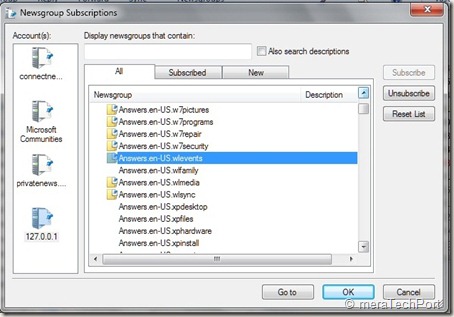
NNTPbrdgLM8z

Once done you can synchronize, read , post to the Forum .

NNTPbrdgLM10z

That’s all, so whenever you want to access Microsoft Forums using Newsreader , start the NNTP Bridge first.

Some Q & A -

Q: Which NNTP clients does the Microsoft Forums NNTP Bridge Client Beta support?

A: Our priority and effort for support will be the following clients in Windows 7 OS:

Microsoft Outlook Express
Microsoft Windows Mail
Microsoft Windows Live Mail

Q: Which languages are supported in this release of the Microsoft Forums NNTP Bridge Client Beta?

A: The NNTP Bridge Beta supports posting in the same languages supported by the Microsoft forums: English, Spanish, French, German, Italian, Russian, Czech, Japanese, Traditional Chinese, Simplified Chinese, Korean, Portuguese-Brazilian.

Q: Which newsreaders have been specifically tested for use with the Microsoft Forums NNTP Bridge Client Beta?

A: The NNTP Bridge Beta has been designed to work with any newsreader. It’s been specifically tested for use with Outlook Express, Windows Mail, and Windows Live Mail.

Previous users of the bridge should ensure they have done the following when updating to the most current version.

· Uninstall previous beta installations

· After installing the most current update, re subscribe to all of the previously subscribed groups

This December NNTP Bridge Beta Update dramatically improved stability and robustness of the connection. As you know its still work in progress so there may be some issues about which you can provide feedback.

So you should also go through the User guide, FAQ and ReadMe at the Connect site for additional information.

Saturday, July 04, 2009

Union Budget Live with Silverlight- Real-time chat with TV anchors

4696929 This year’s Union Budget will be different. We all have been watching the budget speech on TV or reading about it,but this year’s Budget will be streamed Live using Microsoft Silverlight* , so that you can watch it on your PC. Users will get live coverage of both ET Now and Times Now as well as on-demand videos, live news feeds, special updates and will also be able to interact with Facebook friends--all from a single show window. And with Facebook Connect and Live Stream Box, they will be able to take part in real-time conversations with their favorite TV anchors. (Cartoon courtesy: Economic Times)


bud2 The event will be hosted at http://budgetlive.economictimes.com  You can also get minute-by-minute update and live news feeds if you are interested in specific parts of the budget. Powered by Microsoft’s Silverlight, users will get to watch a high quality video stream on the web- like TV, only significantly better.

(* Download Silverlight from http://www.microsoft.com/silverlight/resources/install.aspx)

  bud1

Tuesday, March 25, 2008

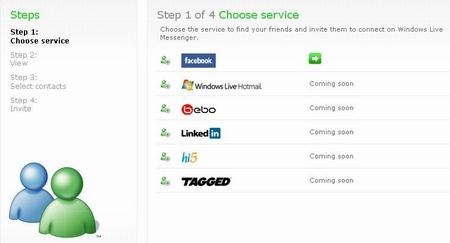
Microsoft partners with Facebook, Bebo, Hi5,Tagged and LinkedIn on data portability

SnWLContacts


Microsoft has partnered with some of the world’s top social networks on contact data portability. Announcing this John Richards, Director of Windows Live Platform said :

"Starting today, we will be working with Facebook, Bebo, Hi5, Tagged and LinkedIn to exchange functionally-similar Contacts APIs, allowing us to create a safe, secure two-way street for users to move their relationships between our respective services. Along with these collaborations, Microsoft is introducing a new website at www.invite2messenger.net that people can visit to invite their friends from our partner social networks to join their Windows Live Messenger contact list."

The collaborations with Facebook, Bebo, Hi5, LinkedIn and Tagged will make it easier, safer, and more secure for people to have access to their contacts and relationships from more places on the web. These networks will be adopting the Windows Live Contacts API instead of “screen-scraping.”  Starting today, you can visit www.facebook.com and www.bebo.com to find your friends using the Windows Live Contacts API.  Hi5, Tagged and LinkedIn will be live in the coming months.

With these collaborations and the new website at www.invite2messenger.net that lets people invite their social network friends to join their Windows Live Messenger contact list, we’ve essentially now created a two-way street for people to share their information. (NOTE: It may take a couple of hours for the site to become available due to DNS propagation.)

Update: Now that site is available, here's a screenshot .

NSfacbooksi

Check the full details here.

Also check this announcement on Angus Blog.