Tuesday, January 20, 2009

Obamamobile:Barack Obama's Presidential car

Check out this cutaway illustration of the new Cadillac One, the armoured limousine which has been custom built to be Barack Obama's Presidential car.

cadillac-one_01 (click on the photo to enlarge)

It can withstand rocket impacts and it's perfectly sealed against biochemical attacks

Petrol Tank :Armour plated and foam filled which prevents it from exploding even in case of direct hit

Doors: Eight inches thick,weight of a cabin door of Boeing 757.

Check out other astonishing fact features from the above cutaway illustration.

(Source:Gizmodo)

Silverlight and Photosynth at inauguration swearing-in ceremony of Barack Obama

The Presidential Inaugural Committee (PIC) has selected the Microsoft Silverlight technology to enable live and on-demand video streaming of the official inauguration swearing-in ceremony on the PIC Web site at http://www.pic2009.org.

obamapic

You can find how Silverlight will be used by PIC here.


CNN photosynth


The Moment:

Photosynth is partnering with CNN to gather thousands of photographs to create an immersive experience of the moment when President Obama takes the Oath of Office.

Well placed CNN photographers will capture lots of detailed shots for this synth, and if

you’re there you can help make this an even more amazing experience by adding your perspective with your digital camera or camera phone.

Check out CNN’s page dedicated to this collaboration: http://cnn.com/themoment.

How it Will Work

“We’ll take your photos from every angle, combine them with CNN’s professional shots, and produce what we hope will be an amazing experience that will be shown live on CNN…..”

How to Participate

When you make a Photosynth on your own, you shoot tens or hundreds of photos from different positions. Since we hope to have thousands of people participating, we’re asking to just capture the view from one position.

If you have a…

Camera Phone. Take one photo of the moment when the President Elect raises his hand to take the Oath, and email it as soon as you can  to cnnmoment@live.com. Don’t worry if he’s too small to see clearly in your photo. As long as you get the Capitol building in your shot it will synth in and help reconstruct the environment.

Digital Camera. Take three photos (wide-angle, mid-zoom, full-zoom) of the President Elect while he is being sworn in. As soon as you can get to an Internet connection, email them to us at cnnmoment@live.com. Make sure your email message is less than 10MB in size. Break it into a couple of messages if your three photos combine to more than 10MB.

We’d love to give you credit in the synth, so include your name in the email if you’d like it to appear in the list of contributors.
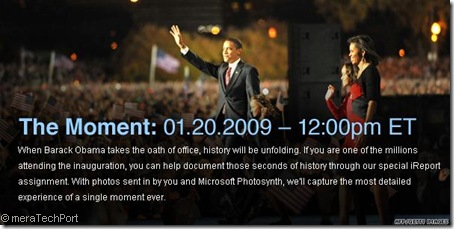
obamamoment


UPDATE from Photosynth Blog:

If you’ll be somewhere around the capitol, capture a Photosynth of where you are and upload it to Photosynth.com. When viewing your synth page, click the icon to Geotag your synth (Mark it on the map). We’ll be watching for inauguration synths and will be collecting the best on a special inauguration map. (Letting me know you created an inauguration synth will help us find all the good ones for the map: darius.monsef@microsoft.com)

If you’ll be anywhere else in the world, capture a synth of where you are and include your television when the oath is on the TV… there is a chance the television could become a portal directly into the main inauguration synth we’re creating. This portal idea is something we’ve talked about before and some of our users have even experimented with: Synth in Synth: Germany – Sydney. Some updates in the future to the Photosynth site will make it easier for these kinds of portals to be shared and explored. Create your synth and upload it to Photosynth.com. When viewing your synth page, click the icon to Geotag your synth (Mark it on the map).

Geotagging Your Synths

In order for us to locate your synth on our special inauguration map, or on any of our Live Search Maps we need you to geotag your synths.  You can do this when viewing your synth pages.  There is a globe icon below your synth title on the right side of the page.  Click that icon and place your synth on the map by finding your location and then clicking where you want the synth geotagged.  There is a save button at the bottom of that map popup.

P.S. This is a great resource for shooting good synths: Photosynth Photography Guide: Tips and Tricks

(Source:Capturing Inauguration Celebrations: D.C. Area & Worldwide)

For more details check Photosynth Blog.

Capturing Inauguration Celebrations: D.C. Area & Worldwide

Tracking the Pre-Inauguration Photosynth Buzz

Photosynthing the Inauguration of the 44th President of the United States

CNN.com’s The Moment

Wednesday, January 14, 2009

Copyright Symbol as Watermark in Windows Live Writer

This post is just a small tip. As someone asked me- how do I put the Copyright Symbol, that ‘c’ in a circle – ©, on the photos I publish in my blog posts. Like the one shown below - 

IMG_0736cr

Here’s how its done -

Insert a picture and while selecting it, go to ‘Advanced’ tab in the Taskpane on right of your Windows Live Writer. (If its not visible, Press F9 or ‘View’ menu > Select ‘Taskpane’).In the ‘Advanced’ tab, you have ‘© Watermark…’ option under Actions. Click on it to get this window -

wm2

Enter whatever text you want and for © symbol, Press Alt+0169, that is keeping the Alt key pressed, type 0169 from the numeric keypad. You will get the copyright symbol.

And select what ever Font, size and the Watermark position on the picture. Just to emphasize, I have put the watermark symbol in the center of the picture shown at top.

And one more thing, you don’t have to do this for every picture. Just save these settings in taskpane, picture tab > save settings as default. And next time when you insert the picture, watermark will be put automatically.

Tuesday, January 13, 2009

Windows Online Gallery- Get themes, wallpapers, gadgets for Windows 7

Microsoft launched http://windows.microsoft.com/ today in several locations, including the UK at http://windows.microsoft.com/en-GB/Windows7/Home  where you can find everything about Windows 7 and also can get lots of Fun stuff for Windows 7.W7US

You can get these Fun Extras which includes:

  • Lots of  themes (desktop background plus glass color, sounds, icons, and more to help you personalize your computer with one click),

W7themes

  • Desktop backgrounds, formerly called wallpaper,

W7bkgz

  •  Sideshow gadgets

W7SSgadz

  •  Desktop gadgets

W7Dgadz

These are all Free. There are beta themes for the UK, US, Japan, and Germany, and also some “region neutral” themes and images.

You can also access the themes from within Windows 7, click on the “Get more themes online” link in your Windows 7 Personalization control panel

Control Panel > Appearance and Personalization> Personalisation

This is just the start and is focusing on Windows 7  Beta, more content will be added in the days to come. So enjoy with these freebies and personalise your Windows.

Try these Freebies now : http://windows.microsoft.com/

(source:The blog of Rob Margel)

Monday, January 12, 2009

Windows Live What’s New Sidebar Gadget

In the new Windows Live, one of the best things is the ‘What’s New’ available at Home.Live.com, where you can get the latest updates from Windows Live and other web activities of your network. This is available when you sign-in to your Home.Live.com. Just now I came to know from Angus Logan’s Blog about Windows Live What’s New Sidebar gadget for Windows Vista. Using this gadget one can get all the ‘What’s New’ feed on your desktop. You can receive real-time updates on what your friends are doing, when your friends uploaded new Photos, posted comments, posted new blog posts, what your friend has twittered and many many more web activities across multiple social networks right from your desktop.

Get the Windows Live ‘What’s New’ Sidebar gadget (Beta) from the Windows Live gallery now ! Just download and install it to get it into your Vista Sidebar.

Wnewgadget1z Wnewgadget2z

Once you sign-in with your Live ID -

Wnewgadget4z Wnewgadget3z


And if you Undock it from Sidebar, you can view full post

Wnewgadget5z

Scroll delay can be set from the options, looks nice when the updates gets scrolled. Also you can go back/forward with the buttons provided. At top it still says Windows Live Beta, so this was created when  Windows Live was in Beta, So expect to remove the Beta tag in the next ver. of the gadget which itself is in beta. The major portion of the work in preparing this gadget was done by summer interns from 2008, informs Dare Obasanjo.

Now talking of New Windows Live, If you haven’t yet checked the new Windows Live’s Home.live.com, check it now.

WLHome

The Best thing about ‘What’s New’ feed is the level of control to manage these updates:

WLHome2

WLHome3

Saturday, January 10, 2009

Live Mesh gets the Crunchies 2008 Awards for Best Technology Innovation/Achievement

Live Mesh gets the award for Best Technology Innovation/Achievement. Just got to know about it from anguslogan Tweet. He has also posted the details at his blog.

DSC_0007_thumbRay Ozzie and David Treadwell accepted the award on behalf of the Live Mesh team.

In this category Nominees were : Facebook Connect | Google Friend Connect | Google Chrome | Windows Live Mesh | Swype | Yahoo! BOSS

The Crunchies are an annual competition co-hosted by GigaOm, VentureBeat, Silicon Alley Insider, and TechCrunch which culminates in an award the most compelling startup, internet and technology innovations.

If you aren’t a Live Mesh user – what are you waiting for? Try it out for Windows, Windows Mobile & Mac.

(Source: Angus Logan’s Blog)

Google gets a new favicon

While checking Gmail beta today , i noticed that it has a new favicon. Later I checked Google site which also showed the new favicon. So Google gets a new favicon again.

gmailfavicon

Just few months back it has changed its favicon, now another change. This favicon has been adopted from one of the contestant’s submission for the contest.

Friday, January 02, 2009

Ultimate Windows Tweaker featured in PCWorld

Ultimate Windows Tweaker, a Tweak UI Utility for tweaking and optimizing Windows Vista written by my friend Ramesh Kumar, and distributed by Anand’s WinVistaClub has been featured in this month’s edition of PCWorld(India) . And PCWorld has also provided this on its DVD.

IMG_0831

IMG_0832

Ultimate Windows Tweaker is a Tweak UI Utility for tweaking and optimizing Windows Vista, 32-bit & 64-bit. It can simply be downloaded and used as a portable application to customize your Windows Vista to meet your requirements. With judicious tweaking, It can make your system faster, more stable, and more secure with just a few mouse clicks. The tweaker detects whether you have IE 7 or IE 8 installed and accordingly offers you the relevant tweaks only.

The utility has a simple easy-to-use user interface, with the tweaks being classified in separate heads based of their functionality. Most tweaks are hidden inside Vista, and what this tweaker does is to try and put the useful one’s in one place. It has over 130 tweaks, but is yet, just a 370 KB .exe file, which does not require an install.

For more details about Ultimate Tweaker and download link, pl. check: Ultimate Windows Tweaker - Tweak UI for Windows Vista.

tweaker

Thursday, January 01, 2009

Advisory: 30gb Zune issues -- official update

There have been reports of Zune30 freezing. There’s no need of concern as this issue will remedy itself over the next 24 hours as the time flips to January 1st. And its isolated ONLY to Zune 30 GB device. This happened due to a bug in the internal clock driver causing the 30GB device to improperly handle the last day of a leap year.The Zune service and all Zune flash models, Zune 80, 120 are UNAFFECTED.

Here’s the Complete Official update about the same from the Zune team:

Early this morning we were alerted by our customers that there was a widespread issue affecting our 2006 model Zune 30GB devices (a large number of which are still actively being used).  The technical team jumped on the problem immediately and isolated the issue: a bug in the internal clock driver related to the way the device handles a leap year. 

The issue should be resolved over the next 24 hours as the time change moves to January 1, 2009.   We expect the internal clock on the Zune 30GB devices will automatically reset tomorrow (noon, GMT). By tomorrow you should allow the battery to fully run out of power before the unit can restart successfully then simply ensure that your device is recharged, then turn it back on.  If you’re a Zune Pass subscriber, you may need to sync your device with your PC to refresh the rights to the subscription content you have downloaded to your device. 

Customers can continue to stay informed via the support page on zune.net (zune.net/support).

We know this has been a big inconvenience to our customers and we are sorry for that, and want to thank them for their patience. 

Q:  Why is this issue isolated to the Zune 30 device?

It is a bug in a driver for a part that is only used in the Zune 30 device.

Q:  What fixes or patches are you putting in place to resolve this situation? 

This situation should remedy itself over the next 24 hours as the time flips to January 1st.

Q:  What’s the timeline on a fix?

The issue Zune 30GB customers are experiencing today will self resolve as time changes to January 1.

Q:  Why did this occur at precisely 12:01 a.m. on December 31, 2008? 

There is a bug in the internal clock driver causing the 30GB device to improperly handle the last day of a leap year.

Q:  What is Zune doing to fix this issue? 

The issue should resolve itself.

Q:  Are you sure that this won’t happen to all 80, 120 or other flash devices? 

This issue is related to a part that is only used in Zune 30 devices.

Q:  How many 30GB Zune devices are affected? How many Zune 30GB devices were sold? 

All 30GB devices are potentially affected.

Q:  Will you update the firmware before the next leap year (2012)?

Yes.

(Source: Zune Insider)