Showing posts with label Windows Live ID. Show all posts

Wednesday, November 03, 2010

Guidance - Which Windows Live ID to use for Windows Phone 7 ?

You might be having multiple Live IDs but confused which one to use setting up your Windows Phone 7 ?

WLiveIDWP7

This video helps you determine which Live ID to use for Windows Phone 7. It’s a Guidance On Selecting the Right Windows Live ID for your Windows Phone 7.

Get Microsoft Silverlight

If the video is not showing for you, check this link .

Tuesday, March 25, 2008

Microsoft partners with Facebook, Bebo, Hi5,Tagged and LinkedIn on data portability

SnWLContacts


Microsoft has partnered with some of the world’s top social networks on contact data portability. Announcing this John Richards, Director of Windows Live Platform said :

"Starting today, we will be working with Facebook, Bebo, Hi5, Tagged and LinkedIn to exchange functionally-similar Contacts APIs, allowing us to create a safe, secure two-way street for users to move their relationships between our respective services. Along with these collaborations, Microsoft is introducing a new website at www.invite2messenger.net that people can visit to invite their friends from our partner social networks to join their Windows Live Messenger contact list."

The collaborations with Facebook, Bebo, Hi5, LinkedIn and Tagged will make it easier, safer, and more secure for people to have access to their contacts and relationships from more places on the web. These networks will be adopting the Windows Live Contacts API instead of “screen-scraping.”  Starting today, you can visit www.facebook.com and www.bebo.com to find your friends using the Windows Live Contacts API.  Hi5, Tagged and LinkedIn will be live in the coming months.

With these collaborations and the new website at www.invite2messenger.net that lets people invite their social network friends to join their Windows Live Messenger contact list, we’ve essentially now created a two-way street for people to share their information. (NOTE: It may take a couple of hours for the site to become available due to DNS propagation.)

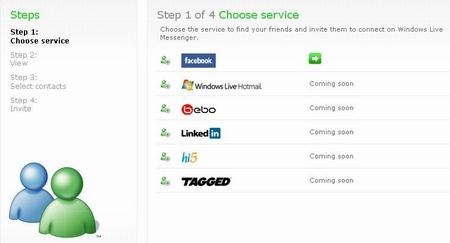
Update: Now that site is available, here's a screenshot .

NSfacbooksi

Check the full details here.

Also check this announcement on Angus Blog.

Friday, November 30, 2007

Get your @live.xx addresses for India, Philippines and Spain

Some days back registration for @live.xx was opened up but @live.in was not there for people of India.

Now, if you are living in India can can get @live.in
In addition to India getting @live.in,
people of Philippines can now get @live.com.ph e-mail addresses,
and people of Spain can get @hotmail.es addresses.

Just go here to get these Windows Live IDs.
These are in addition to hotmail.com addresses already available in these regions.

I already got mine, hurry up and get the mail IDs of your choice.
(source:livewire)

Tuesday, November 06, 2007

@live.xxx available publicly today?

LiveSino reported, the @Live.xxx Windows Live IDs will be soon available for public to create such accounts. But Microsoft has not officially confirmed this news. The scale of the rollout beyond the US and China is unknown right now.
Earlier many were able to obtain @live.xxx accounts from a hack, which was patched up. Since getting such accounts is eagerly waited, keep an eye , that will be soon opened up for public.
According to LiveSino, it'll be opened up at 14:00:00 Tuesday November 6, 2007 in US/Pacific, that converts to 03:30:00 Wednesday November 7, 2007 in Asia/Calcutta or 22:00:00 Tuesday November 6, 2007 in GMT.
And LiveSino has given registering site for China region as http://get.live.cn
So keep an eye on
http://get.live.com or http://get.live.in
Or regular mail.live.com or check here, if a new site gets launched.

Thanks LiveSide

Tuesday, October 09, 2007

Get @merawindows.com email IDs

Few days back I had posted about getting @vista.aero Windows Live IDs, Get @vista.aero Windows Live IDs, an offer from Bink.nu.

Now merawindows, Microsoft Windows Community for India, is offering @merawindows.com Windows Live IDs. Check out this and get a @merawindows.com mail IDs powered by Windows Live.


Also I have posted articles , how to configure and access such custom domain accounts powered by Windows Live using : Adding @vista.aero account in Windows Live Mail
This article tells you about how to access custom domain such as @merawindows.com accounts in Windows Live Mail.
Configuring Outlook 2007 using Outlook Connector
While, this article shows how to get such accounts in Outlook2007.

Saturday, September 01, 2007

Adding Information Card in Windows Live ID

Now there’s a new way to sign-in to your Windows Live ID.

Windows Live ID has added Beta support for Information Cards with Windows CardSpace. It’s a new way to sign in more securely and conveniently into websites. Now you don’t need passwords to sign-in, thus reducing the risk of phishing attacks and keyloggers. You just have to send your Information Card to Live ID to identify you and get signed into Hotmail, Windows Live Spaces or any other site that accepts Windows Live ID. This is what was announced at the Windows Live ID team blog.

If you are using Vista, you are ready to use CardSpace. If you want to use it in Windows XP or Windows 2003, then you’ll need IE7.0 and .NET3.0 else you will see this errors:

or this error

Now let us see how to add an Information Card to your Live ID account step by step:

Just follow this link to get started.

As said earlier this reduces phishing attacks by using certificates to verify the identity of websites and which you can see this here as address bar in IE7 turns green.

Sign in with your password.

After that, it’ll again ask for password to verify it to add Information Card to your account. So again type your password.

Now Windows CardSpace will open and you can review the site information as its Owned and operated by Microsoft and verified by VeriSign.

Click on “Choose a card to send” which will open up this

Now click on “Add a card” and Send to get the type of card as per its use as Personal card or Managed card with its description as shown

I have chosen Personal card as Windows Live ID currently supports it. You have to enter whatever details you want to provide and a photograph to associate with it, if you want to.

You can preview the card before sending it and it also shows Recent card History to know where it has been used.

And after sending it you’ll get this informing us that you have successfully updated Information card for your account.

Click on finish to complete the sign in process.

Now you have associated an Information card to your account. Now close the browser and let us try to use this. So let us check our Windows Live Hotmail which requires a Windows Live ID.

So when you go to its login page you will have an option to sign in using password or Information Card.
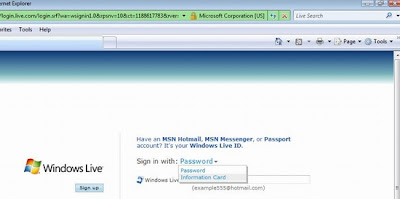
Choose Information card and sign in.

You’ll get a Windows CardSpace window to choose the card,

you select the card which you had created earlier and there you are Successfully logged in checking your mail.

There’s a Windows Live ID Web Authentication SDK for Developers also, which allows sites which wants to integrate with the Windows Live services and platform.