Showing posts with label Windows Live Messenger. Show all posts

Monday, February 18, 2013

Microsoft extends the Messenger to Skype transition start date to Apr 8th

Earlier Microsoft had set the existing Messenger service retirement date as 15th March 2013. Now the Messenger Team has again sent mails to its users about upgrading its customers from Messenger to Skype. And now the date has been stated as April 8th 2013

MessengerToSkype

So starting April 8th, upgrading customers from Messenger to Skype begins. This extension from March 15th to April 8th , 2013 is done to provide more time for customers to make transition.

Here’s what the Messenger and Skype Teams mail said -

Messnegr to Skype Mail

Hello,
Starting April 8th, we will begin upgrading customers from Messenger to Skype. The process will take a few weeks to complete. April 8th is the first day you may be required to upgrade. This is a bit later than the March 15th date we previously mentioned to some of you as we wanted to give you more time to make the transition.
To keep chatting with your Messenger contacts, simply upgrade to the latest version of Skype using the instructions below and sign in using a Microsoft account
(this is the same ID you use to sign into Messenger). Once signed in, your contacts will already be there. You'll be able to instant message and make video calls with them just like before, and start discovering new ways of staying in touch, including Skype on your mobile or tablet.
Upgrade now

Yours sincerely,

The Messenger and Skype Teams

Friday, November 05, 2010

Video chat from TV with your Messenger friend on PC or Mac with Video Kinect

After playing games on your recently released Kinect you should check out this cool feature also. It’s the Video Kinect .

Video Kinect allows people to video chat with their friends, using the Kinect camera, on their TV. Of course you can chat with your friends on Xbox Live who also have a Kinect, but the really interesting part is that you can also chat with anyone who has a computer with a webcam, using Windows Live Messenger2011.

“All you have to do is link your Xbox Live Gamertag to the Windows Live ID that you use for Messenger, sign in on the console and you’re good to go. Video Kinect is accessible through the Kinect Hub in the Xbox Dashboard, so just wave your hand and swipe through to find it and launch, then hover over any of your friends to start a video chat. When looking through your contacts on Kinect, your Messenger friends show up just like your Xbox Live friends do. When you start the chat with one of them, they will see a Messenger notification on their PC, asking if they want to start a video chat with you.”

Video chatting from your PC or Mac with someone who’s using Video Kinect on Xbox LIVE gives you the same full-screen experience as when you chat with someone on a PC.

To see how Video Kinect and Windows Live Messenger work together, check out this video

Video Kinect and Windows Live Messenger Demo


For more detail please check the Source:

Video Kinect brings Messenger video chat to the Xbox 360

Stay in touch with Video Kinect on Xbox and Windows Live Messenger

Sunday, October 31, 2010

A new site, new demo videos for Windows Live Messenger 2011

WLM2011

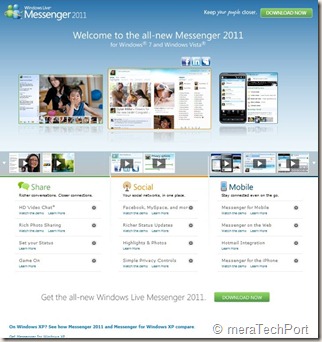
A new cool site design , nice looks and lots of demo videos for Windows Live Messenger 2011 for Windows 7 and Windows Vista.


WLM2011site1

Check the site -  http://www.microsoft.com/windows/windowslive/see-it-in-action/messenger2011demo/ 


WLM2011site


Also check the comparison chart  -

See how Messenger 2011 and Messenger for Windows XP compare.

XPWin7cmpremsngr

Saturday, September 25, 2010

Messenger Mob

Microsofties are busy in the Microsoft campus, but  had a little fun in a recent employee video contest. Watch the winning video, "Messenger Mob," created by  Tony East..

Messenger Mob


Check out the new Messenger beta: http://beta.live.com

Tuesday, September 14, 2010

Microsoft’s New LifeCam Studio with 1080p HD widescreen sensor

09-13lifecamstudio_front_sm


Microsoft today set a new standard in webcams with LifeCam Studio, featuring sharp high-definition (HD) video with a true 1080p sensor. It’s the perfect complement to Windows Live Messenger 2011, which will offer HD video calling in a 16:9 widescreen format.

  • Superior sharpness and image quality in video calls.
  • great video in virtually any lighting condition
  • A 360-degree view range -no need to pick up an entire laptop and turn it around
  • tripod thread - perfect for recording long video captures from different angles
  • elongated hood to stop harsh light from hitting the sensor and washing out colors
  • TrueColor Technology
  • ClearFrame Technology

For more details please check  -

 LifeCam Studio – the closest to being there 

Microsoft Unveils New LifeCam With Stunning 1080p HD Sensor: Closest Thing to Being There in Person 


Also check the demo of the same  where Daniel from the hardware group walks us through some of the other new features.

First Look at Lifecam Studio

lifecamstch9


Also this Life style video to illustrate LifeCam Studio features.

Get Microsoft Silverlight

The LifeCam Studio will be available in October retailing for $99.95.

Thursday, August 19, 2010

[FIX] ‘No Internet Connection…’ Error during installation of Windows Live Essentials Beta Refresh

Yesterday an update to Windows Live Essentials 2011 beta was released. And while installing some faced problem where they were getting the error message “No Internet Connection…” and the installation failed even though they were connected to net. It was happening even using the Full offline installer.

Soon Windows Live Team swung into action and said -

“The problem you're running into is that the Windows Live Installer not only installs the language you selected, but also tries to install the Windows Live language resources that match your OS language (this avoids language switching problems later when using Windows Live client applications).  Unfortunately, the Windows Live Beta Refresh only ships in nine languages (much more coming for the final release) and when the installer tries to find these additional language resources, they are unavailable and hence the error you are seeing.  This error will occur in both the online web-version (wlsetup-web.exe) and the off-line version (wlsetup-all.exe). 

This will not be a problem in the final release as all languages will be available, but we're investigating workarounds such as temporarily changing your OS language settings and will post info here once a workaround has been confirmed to be effective.”

So one has to temporarily change their OS language to English and install.


Today they have fixed it and they have posted this -


“A fix for the "no internet connection" error you encountered has been released.  Please retry and reply if you continue to see errors in your installation experience.

Root cause is that we added functionality to the Windows Live Installer to also install language resources matching the Windows OS language and mistakenly included references to languages that are not available until the final Windows Live release.  Users installing on an OS language other than one of the nine languages released for Windows Live would have encountered this failure (English is just another language and not a unique cause of this error). 

We apologize for the negative experience and inconvenience and appreciate you using Windows Live and for providing feedback.  From this, we are updating our release tools to detect and avoid this problem in the future and investigating changing our error messages to be more helpful.”


Wednesday, August 18, 2010

What’s new in Windows Live Essentials 2011 beta refresh

Microsoft released an update to  Windows Live Essentials 2011 beta .  Its being called as Windows Live Essentials 2011 beta refresh, some are also calling it as Beta2. Acting on the beta feedback and usage of millions of users, the Live team has come up with many improvements across Messenger, Photo Gallery, Movie Maker, Writer, Mail, and Family Safety.

Let us check some of the many improvements -

Messenger -

A quicker Messenger - The time it takes to sign in, and to refresh contacts and social feeds, as well as animation speed, are all faster than in previous versions of Messenger.

More efficient video chat - Messenger video chat uses 30% fewer CPU resources by offloading work to the GPU.

Facebook chat in Messenger – Messenger now connects Messenger’s ~300 million customers (who are already connected to Yahoo! Messenger and Office Communicator) to Facebook’s ~500 million customers with Facebook chat . With the new Facebook chat integration, one can chat with all the Facebook friends.

msngrFB2z


WLMfb4z


WLMfb7z

Also check step by step article on enabling Facebook Chat feature– “How to chat with your Facebook friends from Windows Live Messenger


Movie Maker-

Flickr video publishing - You can now publish videos directly from Movie Maker or Photo Gallery to Flickr too. Also notice the new logo for the SkyDrive.

WLEnew

Larger movie uploads - Movie Maker will upload higher resolution movies to SkyDrive (480x640 vs. the previous 320x480).

WLEnew1

Higher bit-rate movies - Movie Maker now supports higher quality (bit-rate) content.

Snapshot - With the new Snapshot feature in Movie Maker, you can select a single frame from a video as it appears in the preview window and add it to your movie. This allows you to quickly grab an image that you want to keep or perhaps use for your movie’s intro or closing.

WLEnew2


Mail -

Better handling of Gmail – Mail now automatically handles Gmail’s spam and trash folders properly.

Photo Album improvements- Faster Photo albums uploads. Better indication as to where you can add additional photos to your album.  Live Mail also has some UI to set of a Photo Album expires after 90 days or not.

WLEnew11

WLEnew12


Family Safety -

Faster web filtering - Family Safety web filtering is 35% faster than in the previous version.

Photo Gallery -

Better facial recognition - Photo Gallery facial recognition is improved significantly and works more quickly.

Quick previews and improved tree view - Added preview capabilities to the “Find” tab in the ribbon. So before you apply a filter (date, rating, people tags), you can hover over one of those filters and see the results instantly.

 

WLEnew4


WLEnew5


WLEnew6


Writer -

Better spell-checking -

Writer has significantly improved the quality of its spell-checking.

Better integration with Office -

Writer is much better at retaining all formatting when you copy and paste from Word and other Microsoft Office programs. With Office there is a lot of CSS on the clipboard that will not be needed in the blog post.  If it was pasted it would really bloat the post.  Now Writer has a good compromise of pasting what you need to keep the formatting.  Bullets/numbering, heading styles, etc. all should paste better when copying from Office into Writer.

Jumplists -

Now Live Writer has jumplists on Windows 7.  Right click on the application icon in the task bar and you will see jump list entries for recent drafts and recent posts.

WLEnew7


Open Drafts and Open recent Posts on the application menu-

WLEnew8

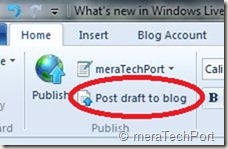
Post draft to blog button on the ribbon-

As many of the Writer users requested this feature, the Writer provides it. As the users said they post a draft to their blog and then directly go to the web to actually publish the post from there. So now they can do this easily.
WLEnew9


Much better theme detection -

As WordPress has changed over the years Writer has not kept up with the theme changes.  Live Writer is back on par and can accurately detect all current themes from WordPress including their new WP 3.0 theme Twenty Ten.  The theme detection changes are not exclusively for WordPress.  Writer will now work a lot better with the new custom Blogger themes also and should work better for really any blog server you use.  WYSIWYG is much better in Blogger now.Though Writer still cannot detect themes for blogs marked as private on servers such as WordPress.

Also has theme related options on ribbon.

WLEnew10


Updated spelling dictionaries-

It now have the same ones that are included with Office 2010.  Live Writer will have updates for all languages that it is released in.  It also has an updated autocorrect list that matches the English list in Office 2010.

Photo Album improvements- Faster uploads of Photo Albums.

More keyboard shortcuts-

There are more keyboard shortcuts which should soon appear as help topic on the web.


So, overall there’s an improvement in the quality of the software and over 75% of reported bugs have been fixed. As I have started using it, I can feel the improvements. One of them being the Face detection in Photo Gallery which has improved a lot, all of the products load faster, nice splash screen animation etc. And the improvements are an ongoing process and Essentials keeps improving, looking into users feedback.

And apart from English, Spanish, French, Dutch, Portuguese, Japanese, and Simplified Chinese, you can also now get the beta in Russian or German. So get the Windows Live Essentials 2011 beta refresh today and give it a try. Windows Live Essentials beta refresh requires Windows 7 or Windows Vista.

(Source: Inside Windows Live, Aaron's Live Writer Blog )


Friday, May 21, 2010

IM and SMS from the new Hotmail wave 4 integrated chat

HMW4logo
The new Hotmail Wave 4 has fully integrated the Messenger chat into the Inbox making it more efficient. With the new Hotmail you can see your Messenger friend’s status and just click on the name to start a conversation. If you right click on the friend’s name, you can do even more like send a text message to their phone, all this without leaving your Inbox.

HMW4msngr
And if  you have 2 or more conversations going on at once,a new tab gets added to the chat window thus making it easier to keep track of.
HMW4msngr1

 HMW4msngr2
You can also move the chat window anywhere on the screen and can also detach/pop-out -
HMW4msngr5

Hotmail  header  options screenshots -
HMW4msngr3

HMW4msngr4

Check the demo video of the same -
HMvDO


The New Hotmail and Messenger in Action Videos - wave4

The New Hotmail (wave4) in action -


The New Messenger in Action -


(Source:http://www.youtube.com/user/TheMicrosoftIndia)


Thursday, May 13, 2010

New Version of Windows Live Wave 3 available – Minor updates

Yesterday I got this tweet from Windows Live Writer Team -

New version of Wave 3 Windows Live Writer. No new features but higher quality. Upgrade today!Wed May 12 07:30:54 via web

Windows Live Writer
WLWriter


And so decided to upgrade it, but when I tried from within Windows Live Writer, Help > Check for updates , It said ‘You are running the latest ver…”

So I went to http://download.live.com/  and from there upgraded Windows Live Wave 3 . It not only upgraded the Writer but all Windows Live Apps - Messenger, Movie Maker, Mail , Photo Gallery, Writer.

Before the upgrade I had this version -

WLWriterWwave3Befupdt


And after upgrading -

WLWriterWwave3AFTupdt


So the Windows Live Writer, Messenger, Mail, Movie Maker, Photo Gallery all upgraded to Build 14.0.8117.416 And as the tweet said – No new features but higher quality.

I think this is for all the Apps and not only for Writer as I haven’t noticed any new features in other apps also.

UPDATE: (13May2010, 6:50AM) : And here’s the official word about this update- Minor update to Essentials released today

Today we released an optional update for Wave 3 of the Windows Live Essentials suite in all 48 languages. This is a minor release that updates Windows Live Messenger, Mail, Family Safety, and Sync. You can install it from http://download.live.com, or through Microsoft Update as an optional update. While this is our last planned update for Wave 3, we will continue to support this release for the foreseeable future as it will be the last version that supports Windows XP.

This is a minor release with a small set of targeted bug fixes and minor changes. Even though most users will not run into the issues we addressed, we felt they were important to fix. This update also contains a small set of changes to ensure that Essentials supports new advances coming in Wave 4.

Rest assured, we’re continuing to work hard on Wave 4 and are in the final stretches. This update is a first and important step in that direction.


Friday, January 01, 2010

New Windows Live Messenger Freebies from various artists

Enjoy these unique Windows Live™ Messenger gift packs, created by some very talented artists from around the world. Each pack comes with display pics, emoticons, and a wink—choose your favorite or download them all!


WLfreebies


Get these from here, kids will love it.

  • Moody Bob
    Moody Bob by Holbrooks

    Meet Moody Bob, a very distinct, very moody guy. Let him show your friends how you’re feeling.

    Download Moody Bob

    Holbrooks is an award-winning hub for contemporary animation and digital imaging. The duo behind this provocative studio is known for explosive ideas using a variety of mixed-media animation.

  • Emotipuff
    Emotipuff by Nanospore

    In the Emotipuff gift pack, you can say hello (and more) with a cute, friendly, puffy little creature.

    Download Emotipuff

    Nanospore is a Los Angeles-based, multidisciplinary design studio. Inherently quirky, their work is visually challenging, modern, and always unique.

  • Carnival Squad
    Carnival Squad by Nathan Jurevicius

    The Carnival Squad is a group of very unique characters to pass on to your Messenger friends.

    Download Carnival Squad

    Nathan Jurevicius is a Toronto-based, internationally renowned artist. He began selling his work at the age of 6, and now his character, Scarygirl, has her own comic, toys, online game, and a movie in development.

  • Bunny Ha Ha
    Bunny Ha Ha by PUNGA

    Bunny Ha Ha brings a quirky edge and a lot of cute to sharing your day.

    Download Bunny Ha Ha


You can also get lots of other Freebies from here.

Wednesday, December 24, 2008

Holiday theme packs and emoticons from various countries for Windows Live Messenger

Check out these collection of holiday emoticons and theme pack from different countries. Try these and spread holiday joy :  

USA:

Windows Live Freebies 

1 2


Enjoy the Dynamic display picture

3


 Canada :

Windows Live Messenger Emoticons

4

5

Australia:

http://promo.meegos.com/xmas2008/

6

Brazil:

http://specials.br.msn.com/ilovemessenger/pacotes.aspx

7

Italy:

http://intrattenimento.it.msn.com/emoticon/natale08

8

(Source:LiveChronicles)