Showing posts with label MSN Toolbar. Show all posts

Wednesday, October 22, 2008

MSN Toolbar adds ‘Elections’ Button

MSN Toolbar has added the ‘Elections’ Button as US ‘08 Presidential elections dates approach. You’ll get the Elections related msnTBelbuttonTop stories, videos, separate news links related to McCain and Obama, maps & Info . All these option to follow all the Election related information and real time election day results, updated electoral maps, live polls, prediction data and more. The button gets added up automatically to the toolbar and starts gleaming to get your attention.

MSNTBElectz

If you haven’t tried the MSN Toolbar (Only for IE) yet, You can get it from here : http://www.newmsntoolbar.com/  Its a new site for MSN Toolbar. Try it now, its a different toolbar.

Thursday, September 04, 2008

Olympics Button removed from MSN Toolbar

On the occasion of Olympics, MSN Toolbar was updated with Olympics Button/tab (MSN Toolbar updated with Olympics, Stocks buttons) and now as they are over, the button was removed from the MSN Toolbar today. The update was automatic. This is very convenient as it does not involve user intervention.

msnTBNOoly

Wednesday, August 06, 2008

MSN Toolbar updated with Olympics, Stocks buttons

Yesterday I noticed that my MSN Toolbar has been updated. I noticed it as the new buttons gleamed, very cool effect. The new buttons added are Video, Olympics and Stocks. The toolbar was automatically updated.

msnTBB1

msnTBB2

Olympic button is a timely update.This button gives lots of Olympic related information starting from Medal count, News, photos, videos and game specific news.

msnTBB3

msnTBB4

This is a very nice update as Olympics are just round the corner. Here you can see various videos available , related to Olympics. (Some may get “NBC is require to restrict this video to viewers within the Unites States” due to restrictions) The video option can be seen in other buttons also , displaying videos related to that button.

The video button has lots of options

msnTBB7

Now coming to Stocks button, its also nicely designed. We can add the company whose stock we want to be displayed.

msnTBB5

We can also enable the Ticker, which  will show the Ticker in the Stocks button.

msnTBB6

I would say these are good additions, if you haven’t yet installed MSN toolbar, try it out and check System Requirements from here. Its definitely a different kind of toolbar.

Sunday, July 06, 2008

MSN Toolbar gets Weather Button, Themes

Those using MSN Toolbar must have noticed the new addition; Yes, now MSN Toolbar is auto updated to get weather button showing Current temperature with graphic display for Sun, Cloud etc.. This feature was very much requested and now its provided. Thanks !


msnTBW2cr


msnTBW2cr1 msnTBW3cr1

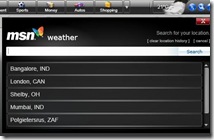
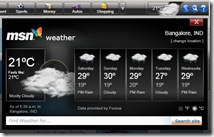
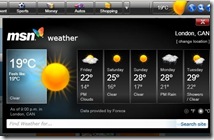
Its a nice and useful addition. On clicking the button, one gets the 5 days forecast, option to change location and a search bar to find weather for any location.
msnTBW1 msnTBW3cr

msnTBW4cr We can store number of locations.And we can clear the location history. I would have liked an option to clear selective locations instead of clearing everything.

When we are offline the weather Button just shows N/A status, which looks quite prominent and odd, as this Silverlight based Toolbar is supposed to always look nice as it does apart from that N/A status.msnTBW5NA So I would suggest to make it slide inside to hide itself when offline and Slide out when online displaying the Weather button.

Apart from getting this Weather Button update, the toolbar also auto updates with Themes according to occasions for that particular day and returns to normal look the next day. On 4th July, it was updated with American  Flag theme on America’s Independence day . And then many have got Active fireworks on their MSN Toolbar. So this may be Location based. And all this gets updated automatically. So watch out for such Theme changes on some Special Occasions. Neat!

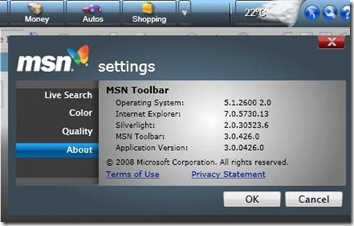
Although one should get these updates on their toolbar ver3, if not one can get the new version 3.0.426.0 from here. And since its last release it is available for few more regions based as Germany, UK, France and Italy apart from Eng (US).
msnTBW6ver

As posted in my earlier posts MSN Toolbar now also supports Silverlight2 Beta2. For more information on MSN Toolbar , please check my earlier related posts.

Thursday, June 12, 2008

New version of MSN Toolbar released

As I had posted couple of days back to watch out for a MSN toolbar update soon, and here it is, a new version of MSN Toolbar is available. There’s no major change. Just as was expected the withdrawn Live search options of Books, academic sites , classifieds have been removed. And along with it, some more search options present in earlier version of toolbar such as Feeds, QnA, xRank are also absent. In future one may see more options added up. This toolbar also works with Silverlight2 Beta2. A minor version change from 3.0.270.0 to 3.0.315.0 is noted.

MSNTBnew

msnTBsearch2

You can get the MSN Toolbar from here.

System Requirements :

  • Windows Vista; Windows XP Service Pack 2
  • Microsoft Silverlight
  • Microsoft Internet Explorer 6 or later (32-bit version only)

For more details about MSN Toolbar, please check my earlier posts:

Silverlight based MSN Toolbar released
MSN Toolbar, Firefox3 RC2 supports Silverlight2 Beta2

Sunday, June 08, 2008

MSN Toolbar, Firefox3 RC2 supports Silverlight2 Beta2

Many who had installed MSN Toolbar were complaining that it works only with Silverlight 1.0 and doesn’t work with Silverlight 2 beta1. But with the release of Silverlight2 Beta 2, MSN toolbar works. Actually there were some XAML rendering issues resulting into poor experience with the toolbar with SilverLight2 Beta1, so it was blocked by Microsoft. Now with the release of SL2 Beta2 has solved the issue and so one can try the MSN Toolbar for IE now along with Silverlight2 Beta2.

msnTBSL2

Similarly many who were trying out Firefox 3 RC2 with Silverlight2 Beta1 were facing browser crash. But now the release of Silverlight2 Beta2 works fine with the FF3 RC2 Browser.

So I would recommend to those using the Beta1 of Silverlight2 should immediately upgrade to the beta2.

For details about Silverlight2 beta2, please check  Silverlight 2 Beta 2 is available now

msnTBsearch


Talking of MSN Toolbar, I think it will soon be updated as it has 3 outdated search options which will be end soon. Live Search Books and Live Search Academic sites taken down and Windows Live Expo will discontinue service on 31 July 2008. Thus removing those options and adding any new options. So watch out for a MSN toolbar update soon.

Wednesday, May 21, 2008

Silverlight based MSN Toolbar released

A new toolbar- MSN Toolbar, based on Silverlight has been released. It was under beta test since couple of months, and I was one of the beta testers. And I can say during this period, it kept improving and is different from regular toolbars. First of all its Silverlight based written in XAML and actually is a fully programmable platform whose SDK will be released later this year. So this makes it to add snap-ins in the form of panes coded by 3rd party developers, this will make it customisable. But this can be expected later.

msnT1

Now coming to the present features :

msnT2

You can see headlines from various MSN channels without leaving the page, has Windows Live Button to stay connected. Also has Live Search Box to find whatever you are searching. Get Live Search results even when you use another search engine. Also it has a sort of 'Flip' toolbar whenever doing the search. And it again 'Flips' over for he regular toolbars. So these flips are termed as 'Panes' and these can be coded on the availability of SDK. So within one toolbar you can have many by just flipping them in the form of panes.

msnT4

msnT7

Also there's a cool effect when any Breaking News happens, the news button gleams. Check it out , its really nice.

msnT6 msnT5

You also have settings option to customise where you can have toolbar color change.

msnT3

I know there are many who does not like toolbars, but this is different and you should give it a try. At present it works on Silverlight 1.0 and does not support 2.0 beta. You can download it from http://toolbar.msn.com/

If you want to see all the features in action then check this video where Stefan Weitz gives a demo.


UPDATE(8June'08) : There were some XAML rendering issues that made for a poor experience with the toolbar with SilverLight2 Beta1, so it was blocked by MS.
Now with the release of SL2 Beta2 MSN Toolbar works with it. Check it out.