Showing posts with label Kinect. Show all posts

Tuesday, March 13, 2012

Boxing Bots: Kinect-Driven Pneumatic Boxing Robots

At the SXSW Interactive Opening Party hosted by Frog Design and Microsoft, the Coding4Fun team has unveiled their latest invention, BoxingBots!

You're controlling a 6-foot tall metal robot that's trying to punch out your opponent's 6-foot tall machine. It's Real Steel in real time.

BoxingBots combines Kinect's motion sensing technology with pneumatic robots in a 6-foot square ring. Two players face off to try to knock each other's blocks off.

Check out the video to see these massive robots in action -

Check more details and screenshots here: http://channel9.msdn.com/coding4fun/projects/boxingbots

Sunday, November 20, 2011

Xbox Companion app for Nokia Lumia– Its Not Just gaming;watch films,listen to music controlled from Lumia


logo_wp75-v_webEarlier in our posts, we had seen how to Play Kinectimals on Windows Phone, transfer it and continue playing on Xbox. So its not just gaming, Nokia Lumia phones come with some amazing features and functions. You can interact with your Xbox 360 right from your Nokia Lumia smartphone using the Xbox Companion app. You’ll be able to watch films and listen to music, all controlled by your smartphone. Upon activating the app in the Nokia Lumia phone, you can use Bing to search for any content.

The video demos an overview of the Xbox companion app which integrates Xbox Live and Windows Phone on Nokia Lumia handsets.

Coming in the next couple of months, Xbox users will be able to download the system software that updates the dashboard look and feel, as well as giving you a whole heap of new features.

(Source)

Tuesday, November 15, 2011

Play Kinectimals on Windows Phone, transfer it via Tag and continue playing on Xbox

Play with your Kinectimals cub on your Windows Phone, so allowing you to travel around with the cub in your pocket with you. But the coolest thing about this new Windows Phone game is the cross platform interaction with the Xbox 360. After playing Kinectimals on your Windows Phone, you can transfer that animal into Xbox 360. And continue playing on XBox360. There’s an option within the game that when selected displays a QR code. Pop this code in-front of the Xbox 360 Kinect and it will register your animal, transferring it to your Xbox 360 in an instant.

Kmal1

Kmal2

Check it out to see how it all works on your Windows Phone

(Source:Channel9)

Sunday, October 30, 2011

Kinect to Kill - Halloween Special from Channel 9 team


The channel 9 team is again at its spookiest best. Its ‘famous’ Halloween videos brought every year has come up this year again with a Halloween video with brilliant performance from its team. Warning: Those with weak hearts can skip this video.

It's that time of year again...when the ghost and the goblins come knocking at your door. This year we invite you to watch a story about frirendships, love, horror and of course- a crazy serial killer! Enjoy!

Starring : Dan Fernandez, Laura Foy , Paul Mestemaker, Tina, Golnaz Alibeigi (Please add those who I might not have recognized and not have included in this.)

Thursday, September 29, 2011

Boeing Marketing with Microsoft Technologies

The Boeing 737 is the best-selling airplane in aviation history. With new 737 models continually being developed for the product line, Boeing wanted to create exciting new ways of marketing the aircraft to prospective customers. It turned to Microsoft and Wire Stone, a Microsoft Gold Certified Partner, to create a tool that it calls "Boeing 737 Explained."

Based on thousands of high-resolution photographs that are stitched together to create a seamless, immersive presentation, Boeing 737 Explained provides a rich, compelling way for customers to view and understand the plane without needing to actually stand next to one. The tool runs on Windows 7 and is hosted on the Windows Azure cloud platform, using Microsoft Silverlight and Windows Touch technologies, providing users with a dynamic experience, whether viewing it with Microsoft Kinect on a cinema-size screen or Windows Phone.

“Boeing 737 Explained” Windows Azure & Silverlight Demo

Boeing Takes to the Cloud with a Solution to Market its Best-Selling Airplane

“Boeing 737 Explained” Kinect Demo

Learn more by accessing the project case study: Boeing Takes to the Cloud with a Solution to Market its Best-Selling Airplane

Sunday, September 18, 2011

Microsoft Robotics Developer Studio 4 Beta released. Supports Kinect extensively ! Download for FREE Now!!


The robotics group announced the release of the Microsoft Robotics Developer Studio 4 Beta.

rds4beta

Stathis Papaefstathiou, General Manager, Microsoft Robotics announced it today -

“It's inspiring to see the tremendous excitement with Microsoft Kinect within the robotics space signaling the energy and potential opportunities that exist in essentially transforming robots to low-cost mainstream consumer devices. This beta release is one of our early steps towards realizing our long term strategy of accelerating the consumer robotics industry. “

A Look At Robotics Developer Studio 4 Beta


This release has extensive support for the Kinect sensor hardware through the Kinect for Windows SDK allowing developers to create Kinect-enabled robots

28990-MFor the first time we define a Kinect-based hardware reference platform that can help in the delivery of an affordable and capable robot that will be able to support technologies and scenarios for the consumer audience. Most everyone can build a robot using this specification, and we are working with robotic hardware vendors that will make kits and preassembled units available. The first such kit is called EDDIE and it is available from Parallax for pre-order now. EDDIE is intended to be a turnkey solution for using RDS with this platform and our aspiration is that there will be development and sharing of technology for this hardware platform. In addition, we made sure that there is an accurate representation of a robot that is based on the hardware platform in our simulation environment. You can start developing your applications in the simulator before you decide to buy and run them on a physical robot.

The second additional feature in RDS 4 is the availability of Kinect services that support the Kinect for Windows SDK.This unlocks a whole new world around Human Robot Interaction (HRI) with the use of skeleton tracking and speech. But we are also making available the raw sensor stream for your use in building additional capabilities such as navigation algorithms.

In RDS 4 we make available for the first time the CCR programming model in Silverlight.

Please visit  Microsoft Robotics Developer Studio Web site for more details.

Friday, September 09, 2011

[video] Windows Phone interacting with Kinect

Demo showing how it is possible to use Windows Phone to interact with a Kinect-powered game. This was demoed at Mobile World Congress held earlier this year.

Source : channel 9  where you can also check about project Bunnyhop (codename KinectoPhone).

Friday, June 17, 2011

Download Kinect for Windows SDK Beta

kinectsdk

As expected in my previous blogpost Kinect SDK to be made available today ?, Kinect for Windows SDK beta is now available for download.

The SDK is available for free from Microsoft Research. The SDK includes not only drivers but also APIs, device interfaces, installer documents and resource materials. It’s another exciting milestone for a technology that has captured the imagination of millions, and has become the fastest selling computer electronics device of all time.

image

Download the SDK beta and all other details from http://research.microsoft.com/kinectsdk

Some more interesting links -


Kinect for Windows SDK Quickstarts will get you up, running and coding away from install to working with the major Kinect features !

TheQuickstarts videos includes at present -

  • Installing and Using the Kinect Sensor
  • Setting up your Development Environment
  • Camera Fundamentals
  • Working with Depth Data
  • Skeletal Tracking Fundamentals
  • Audio Fundamentals

Thursday, June 16, 2011

Kinect SDK to be made available today ?

It has been sometime when Kinect for Windows SDK beta was announced to be coming later this spring. Now Channel9 has made an announcement to join for a Special Channel 9 Live Kinect Event.

kinectsdkch9

The Channel 9 team will be broadcasting live from the Channel 9 studios for a special Kinect focused event on June 16th 2011 from 9:30AM PST.

Just head to http://channel9.msdn.com/live for a live and interactive broadcast .

As you watch live, submit your questions via Twitter with the #Ch9Live hashtag and it’ll be answered in real time.

So will there be the announcement of availability of SDK today or any time soon, so check out the LIVE broadcast.

(Source: Channel9 )

the Kinect for Windows SDK is a programming toolkit that will enable researchers and enthusiasts easy access to the capabilities offered by the Microsoft Kinect device connected to computers running Windows 7.

For more info on Kinect for Windows SDK beta please check here.

Monday, April 04, 2011

Try XBox Kinect at your Home before you buy !

I’m sure you always wanted to try the immensely popular Kinect. Don’t worry, now you can try it before you buy. Its an initiative from XBox India.

KinectTry&buy


Simply visit the stores listed below and experience the magic of the Kinect, right at home.
1. E Zone: Oberoi Mall, Mumbai
2. E Zone: Powai
3. E Zone: Koramangala Mall, Bengaluru  (Bangalore)

BTW did you know that Microsoft Kinect according to Guinness World Records is the fastest-selling consumer electronics device on record. Microsoft has sold more than 10 million Kinect since its launch on 4th Nov.

(Source: @XBox360India)

Monday, December 13, 2010

Kinect Piano, Kinect Hand , finger and Skeletal tracking

Earlier I had posted about Microsoft helps in hacking Kinect to control Windows 7 where Video of Kinect giving Windows 7 Minority Report Treatment was shown.

Now many more hacks are coming up, check out these cool Kinect hacks -

A little application providing a full minority report interface.Hand detection software, along with the piano interface. The hand detection uses PCL (Point Cloud Library) from ROS (Robotic Operating System) which was developed by the folks at willow garage.

Kinect Piano


Kinect Skeletal Tracking

Kinect Skeletal tracking

Kinect Minority Report Interface -

Kinect Minority Report Interface

Here are some demos on Kinect hand and finger tracking -


Saturday, November 20, 2010

Microsoft helps in hacking Kinect to control Windows 7

Gesture-Control-005-Small

Picture Courtesy : Wolfgang Herfurtner

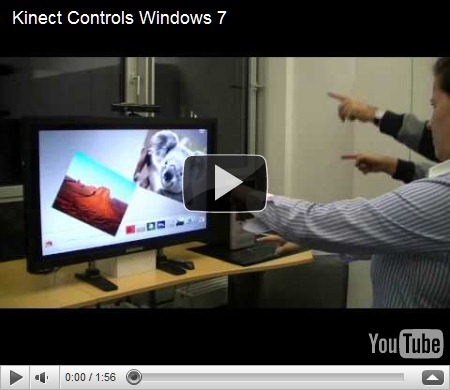
Controlling Windows 7 using Kinect is one of the coolest things Kinect can do. This was made possible by the Evoluce software team that worked hard on multitouch and gesture control solutions supported by Microsoft.


“The software is based on the latest Evoluce Multitouch Input Management driver that offer many API´s like TUIO, Flash and Java. With the multi-gesture control mode for Windows 7 a natural user interface is created that will change the way we will communicate with the PC and consumer electronics in every day life.”


Kinect Controls Windows 7

Here in the video you can see many Windows 7 programs being controlled just by hand gestures. Even two people are shown controlling separate objects.

“Multi-gesture and multi-user interaction unleashes exciting possibilities for a multitude of applications like gaming, consumer electronics, office, events, education, command and control, point of sale and medical systems. Soon you will plug in depth sensing devices like Kinect into your PC and you will start intuitive communication with your computer and other users.”

Source: Wolfgang Herfurtner  Multitouch and Gesture Computing Blog 

Also check - First Pictures of Gesture Control of Windows 7 with Depth Sensing Device

EDIT 24/11/10 -  Here’s a new Video of Kinect giving Windows 7 Minority Report Treatment

The video shows how to navigate through websites and maps, click on icons and use the on-screen keyboard.

Kinect giving Windows 7 Minority Report Treatment

Tuesday, November 16, 2010

1000000 Kinect for XBox 360 sold in 10 days

Kinect


Microsoft today announced that it has sold 1 million Kinect for Xbox 360 units worldwide in 10 days. This announcement comes a week before Black Friday, the biggest selling day of the year. Microsoft raised its worldwide sales forecast from 3 million to 5 million sensors sold by year-end and is on pace to hit 5 million by year-end.

Kinect was launched in North America on Nov. 4, followed by Europe on Nov. 10, and will land next in Asia (Nov. 18) and Japan (Nov. 20).

This demand will make it the biggest year in Xbox history.

For more details, please check the Source.

Friday, November 05, 2010

Video chat from TV with your Messenger friend on PC or Mac with Video Kinect

After playing games on your recently released Kinect you should check out this cool feature also. It’s the Video Kinect .

Video Kinect allows people to video chat with their friends, using the Kinect camera, on their TV. Of course you can chat with your friends on Xbox Live who also have a Kinect, but the really interesting part is that you can also chat with anyone who has a computer with a webcam, using Windows Live Messenger2011.

“All you have to do is link your Xbox Live Gamertag to the Windows Live ID that you use for Messenger, sign in on the console and you’re good to go. Video Kinect is accessible through the Kinect Hub in the Xbox Dashboard, so just wave your hand and swipe through to find it and launch, then hover over any of your friends to start a video chat. When looking through your contacts on Kinect, your Messenger friends show up just like your Xbox Live friends do. When you start the chat with one of them, they will see a Messenger notification on their PC, asking if they want to start a video chat with you.”

Video chatting from your PC or Mac with someone who’s using Video Kinect on Xbox LIVE gives you the same full-screen experience as when you chat with someone on a PC.

To see how Video Kinect and Windows Live Messenger work together, check out this video

Video Kinect and Windows Live Messenger Demo


For more detail please check the Source:

Video Kinect brings Messenger video chat to the Xbox 360

Stay in touch with Video Kinect on Xbox and Windows Live Messenger

Friday, October 22, 2010

You are the Controller–Kinect Ads

Microsoft launched a Kinect advertising campaign aimed to show people how the new controller-free entertainment experience can transform their living room.

“With Kinect, there is something for everyone. It transforms ordinary entertainment into an extraordinary experience. Kinect lets you control games, movies, music and more with the wave of your hand or the sound of your voice. With Kinect, you are the controller.”


For more details, please check – Microsoft Presspass

Friday, October 01, 2010

The tech behind Kinect: Major subsystems, RGB camera, Depth Sensor

Watch this video to know about some of the technology behind the Kinect such as -

  • Three major subsystems in the sensor (Optical, Audio, Motor)
  • Optical consists of depth projector and sensor
  • RGB Camera
  • Depth Sensor
  • Motor Subsystem
  • Audio Subsystem


kinect

(Source )