Showing posts with label Wallpaper. Show all posts

Wednesday, August 11, 2010

Bing Dynamic- Windows 7 ‘s first RSS-feed theme, Fresh wallpaper, updated automatically

Receive a new photo from Bing every week for three months, with this Windows 7 theme that updates automatically through an RSS feed.


bingRSS1


http://windows.microsoft.com/en-us/windows/downloads/bing-dynamic


Once you download Download  and run it , you’ll get this , subscribe to the RSS feed.

bingRSS


For the first time, it may take a little bit of time for images to appear depending on your Internet connection speed.


bingRSS2


Thursday, May 06, 2010

Visual Studio 2010 Wallpapers

Check out this non-Microsoft site, filled with beautiful Community Created Visual Studio 2010 Wallpapers -


VS1


VS2


VS3


VS4

And many many more…………

You can submit yours also

Link - http://vs2010wallpapers.com/ 

(Thanks to @shanselman for the link)


Visual Studio Theme Packs for Windows 7

Get the Visual Studio Theme Packs for Windows 7 from Microsoft Japan.


Win7VSthmpack


At present it has 3 theme packs-

  • Bridge themepack
  • Garden themepack
  • HighWay themepack

Win7VSthemepack

Download it from -  http://closeup.jp.msn.com/visualstudio2010/

(thanks to @shanselman)


Friday, April 09, 2010

‘Bing’s Best 2’ Theme Pack from Bing Team

Bing’s first Theme Pack was so popular that Bing decided to release Bing’s Best 2 Theme Pack – a new collection of desktop backgrounds for Windows 7.

“From the jagged peaks of the Andes in South America to Arizona's Vermilion Cliffs, this sequel to the popular Bing's Best theme takes your Windows 7 desktop on a trip around the world.”

Or you can get it from Personalize from your PC > Get more themes online

BingsBest2z

In this collection there are 21 images which were featured on Bing.com Homepage. (Size 19.5MB).

To get this and the earlier released “Bing’s Best” theme pack and other, go here


Monday, March 22, 2010

I Love Windows Phone (ILWP) tattoo seen at MIX10

I Love Windows Phone  (ILWP)

ILWPz

This iconic message is already very famous. And this was also seen in the form of tattoo on some speakers at MIX10.

Here Joe Belfiore is seen with the tattoo while demoing Windows Phone -

ILWPJoe

and Charlie Kindel was seen with the tattoo at back of his head !! He has now made it as his twitter avatar/DP

tatoo

If you also want to display them on your PC as wallpaper, download them from here -

‘I Love Windows Phone’ Wallpapers

ILWPthmb

Do you know any more speakers at MIX10 wearing these ILWP tattoo ?


Thursday, March 18, 2010

‘I Love Windows Phone’ Wallpapers

Download wallpaper with the message ‘I Love Windows Phone’ and ‘We Love Windows Phone’ via nice icons of Windows Phone 7 series -

ILWPthmb


WLWPthmb


Download it from -

This contains a zip file ILWP7.zip having Windows Phone Wallpapers in different sizes- 1024 X 768, 1280 X 1024, 1920 X 1200 , 1920 X 1080

Will be adding sizes on request. Now added 1920 X 1080 .

(The IHWP logo courtesy - MIX10 session by Chad Roberts, Michael Smuga, Albert Shum)


Sunday, March 14, 2010

Microsoft Translator MIX10 Wallpaper

As you know MIX2010 is to take place from Mar15-17 and everyone is enthusiastic about it and so is Microsoft Translator, one of the Sponsors.

The MIX attendees will get some awesome swag courtesy Microsoft Translator, with one of the highlights being a lovely decal for the notebook/pad/device. Everyone liked the design so much that the Translator team came up with a wallpaper out of it :

MIX10_MicrosoftTranslator_dk_1920_thumb

Yes, I too liked the design. You can download the wallpaper from here -

Dark: 1920x1080 /1440x900

May be more such wallpapers might be released in various shades as the present one says ‘Dark’

(Source: Microsoft Translator (and Bing Translator) Official Team Blog)


Sunday, February 14, 2010

Bing4Free – Bing images wallpaper Download and Changer

There are number of methods to use beautiful images from Bing as desktop backgrounds. Some of them I had mentioned earlier in this post - Bing Homepage image Tips .

Bing4Free is another bing.com Image Downloader which makes it very easy to get the Bing images and set them as Wallpaper. But it does more than that with its various options. You can schedule it to download wallpaper from Bing.com daily or even hourly. The application also act as wallpaper changer

Its available at http://bing4free.codeplex.com/

bing4free1z


bing4free3z

Here are some of the features of Bing4Free Version 1.0 (Beta) -

>> You can download wallpaper from United States, China, Japan, Germany, United Kingdom, Australia, Canada and New Zealand (you can extend it by manually adding new country locale in config file)

>> Supports automatic change of wallpaper (you can schedule or disable it)

>> You can manually change selected wallpaper by right-click on the wallpaper thumbnail

bing4free4z

For more details, source code and the app please check  http://bing4free.codeplex.com/ 

Btw Bing is working on an option to set automatically, Bing images as desktop backgrounds.


Bing to provide option to set automatically Bing Images as wallpaper

You all must have seen amazing images provided daily by bing homepage and wanted to set them as Desktop background.

Few days back, Bing Team had tweeted that its working on the option of displaying the Bing homepage images as wallpaper automatically, when asked by a Bing user.

This is what Bing tweeted – “…but we r working on it. until then, if u r on Win7, u can set bing images as ur desktop background via control panel. ^mp “

bingtweetauto1


And this is what was asked by a bing user on twitter -

bingtweetauto0

Yes, if Bing bring this feature it’ll be nice as many will use this option.

Many people have already created their own methods to do so. check this for it :  Bing Homepage image Tips

and also bing4free - wallpaper downloader + changer


Saturday, February 13, 2010

Microsoft’s Valentine Lacy Hearts theme for Windows 7

Microsoft has released Valentine Lacy Hearts themepack for Windows 7. It has 4 desktop backgrounds.

Win7val

Download it from here . Or can go to the Personalization Gallery where you can get many more goodies.

size 1.30 MB


Saturday, December 19, 2009

Avatar Theme for Windows 7

Now that the ‘Avatar’ movie has been released and everyone has been talking about it on the net, be it twitter, chat, mail, why not get the official Avatar theme for Windows 7. This theme has been available since some time in the Windows 7 Personalization Gallery site - http://windows.microsoft.com/en-US/windows/downloads/personalize If you have missed it, get it now and display it .

Avatar thmPicsz


AvaWin7

You can download from this direct link also- Avatar theme for Windows 7  (size: 10.6 MB)

Avathmz

Enjoy !!

Tuesday, January 13, 2009

Windows Online Gallery- Get themes, wallpapers, gadgets for Windows 7

Microsoft launched http://windows.microsoft.com/ today in several locations, including the UK at http://windows.microsoft.com/en-GB/Windows7/Home  where you can find everything about Windows 7 and also can get lots of Fun stuff for Windows 7.W7US

You can get these Fun Extras which includes:

  • Lots of  themes (desktop background plus glass color, sounds, icons, and more to help you personalize your computer with one click),

W7themes

  • Desktop backgrounds, formerly called wallpaper,

W7bkgz

  •  Sideshow gadgets

W7SSgadz

  •  Desktop gadgets

W7Dgadz

These are all Free. There are beta themes for the UK, US, Japan, and Germany, and also some “region neutral” themes and images.

You can also access the themes from within Windows 7, click on the “Get more themes online” link in your Windows 7 Personalization control panel

Control Panel > Appearance and Personalization> Personalisation

This is just the start and is focusing on Windows 7  Beta, more content will be added in the days to come. So enjoy with these freebies and personalise your Windows.

Try these Freebies now : http://windows.microsoft.com/

(source:The blog of Rob Margel)

Thursday, November 20, 2008

Live Mesh Wallpaper Pack

Show your support to Live Mesh by displaying the Mesh logo on your computer’s desktop, Check some of them from the pack below, 

gold

blue green red


Orb_Wallpaper_Black_624x630

Apart from those shown above, the huge pack of Live Mesh themed wallpapers offers several other different variations on the Mesh Logo and colorful background. You can get it from here.

(Source:Channel10)

Friday, September 26, 2008

Wallpapers from MSN - Best Wallpapers on Web FREE

Check out the best Wallpapers on Web that too Free from MSN, Wallpapers from MSN beta. You can choose from amazing collection of wallpapers. You can crop, rotate or resize your images, also you can add text, speech to create your own wallpapers. Set your wallpaper by time or create a slide show of images.

You can get it at : http://wallpapers.msn.com/

 MSN WP1MSN WP2

(Thanks Sunshine)

Thursday, July 10, 2008

IE-on-acid Logo Wallpaper

Few days back I had posted about IE Fan Art Gallery , where one will find various interesting photographs by IE Team.But, now I want to post about one photograph specially because I liked it very much and now I am using it as my wallpaper. Its the logo of IE with interesting codes in it, may be for the AcidTest2?  Its called ‘IE-on-acid Logo’ - designed by Harel Williams of IE Team.

Though I had also posted that photo in my earlier post but now when posted as a wallpaper, people may find it more interesting. It looks nice, check it out and put it as wallpaper now !

Get it from here: IE-on-acid Logo

IErz

Tuesday, March 25, 2008

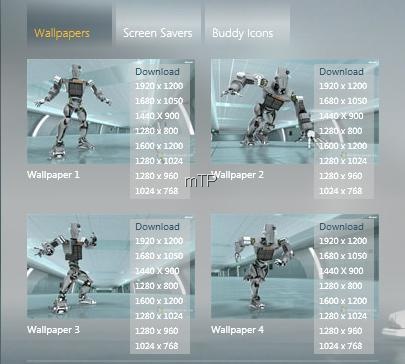
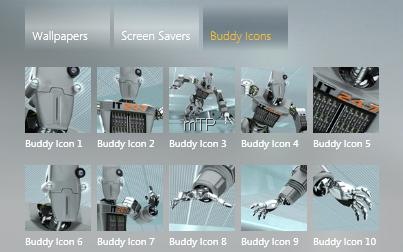
Windows Server 2008 IT 24-7 Robot Wallpapers, Screensavers and Buddy Icons


2k8meetserver

Check out Windows Server 2008 Unleashed's IT 24-7 Robot  Wallpapers in 4 Action Poses in 8 different screen resolutions.

2k8WPo

Download from here, For each screen resolution there are 4 different poses wallpaper :

1920 x 1200 = IT 24-7 Robot Pose A, B, C, D

1600 x 1200 = IT 24-7 Robot Pose A, B, C, D

1600 x 1050 = IT 24-7 Robot Pose A, B, C, D

1440 x 900 = IT 24-7 Robot Pose A, B, C, D

1280 x 1024 = IT 24-7 Robot Pose A, B, C, D

1280 x 960 = IT 24-7 Robot Pose A, B, C, D

1280 x 800 = IT 24-7 Robot Pose A, B, C, D

1024 x 768 = IT 24-7 Robot Pose A, B, C, D


Also check out the IT 24-7 Screensavers :

2k8SS

And the Buddy Icons:

2k8buddyicons

http://www.microsoft.com/windowsserver2008/en/us/serverunleashed/default.html

Here is IT 24-7 in one of the poses as shown in wallpaper

2k8WPpose1rz

Thanks Blake

Monday, December 17, 2007

Xbox JumpIn wallpaper from Microsoft

Microsoft while announcing Xbox Fun Downloads which has Wallpapers, emoticons and other goodies and it's the downloads for people who register for Xbox LIVE also provided Xbox JumpIn Wallpaper available for all.

More details at:

Xbox Fun Downloads

WPJumpInRZ

Here is the Xbox JumpIn wallpaper for all.

Download them from here:

Wallpaper_JumpIn_800x600.jpg size:579 KB

Wallpaper_JumpIn_1024x768.jpg size:978 KB

Monday, June 11, 2007

Make your own DreamScene

Those of you using Windows Vista Ultimate might have installed Windows DreamScene™ as an Ultimate extra. But not much of choices were there for these high-definition video backgrounds.
Though Windows DreamScene supports .mpeg and .wmv video file formats, but .Dream files were limited.

So here's a tool from Stardock called DeskScapes, which will allow any video or 3D animation to be converted into a .DREAM file, which can be set as background in Vista Ultimate. And its free to download. So start making your own .dream s.

Monday, May 21, 2007

Popfly Wallpapers


Make these Popfly wallpapers as your Desktop backgrounds.

Saturday, May 05, 2007

Windows Vista Wallpaper from Mike Swanson

While checking out Mike Swanson's SWF2XAML tool, I came across his macro wallpaper images. Check out the collection. Its simply stunning. And all his collections have been assembled into one place, and is available in 1920 x 1200 (16:10 aspect ratio, "widescreen") and 1600 x 1200 (4:3 aspect ratio, "standard"). If you'd like all of the images, you can download the widescreen (26.5MB) or standard (22.5MB) zip files.
If you want to use these images for other purpose, please take Mike's permission. This is what Mike has to say:"Please give a brief description about how you intend to use the image(s), a photo credit, and either a pointer to where the image is used or a physical sample of the materials that use it. If you're interested, please contact me for permission."

Thanks Mike for this wonderful collection.