Showing posts with label Windows Live Mail. Show all posts

Wednesday, December 23, 2015

Reinstall KB3093594 to fix stability issues in Windows Live Mail 2012

There are many users who still use Windows Live Mail 2012 as their Mail client. Windows Live Mail 2012 was the last Mail client, its part of the Windows Essentials 2012 suite released by Microsoft. After this version, Microsoft has stopped releasing the updates and wants users to shift to the newer Mail app that comes with Windows 8.1 and Windows 10. 

WLM2012Starting

The KB3093594 re-released:

In the second week of this month, Microsoft had alerted Windows Live Mail 2012 users that some chnages are coming to users of Microsoft accounts like Outlook, Live, Hotmail, MSN accounts that may prevent mails being delivered to Windows Live Mail 2012. And it said, in order to continue using this Mail client, you need to install this update.(Update for Windows Live Essentials Mail 2012 (KB3093594) )

But after installing this KB30393594, some Windows Live Mail 2012 users started reporting about facing stability issues. The Windows Live Mail would crash on launching it. Reacting to this, Microsoft said “We have identified the root cause and are currently working on a fix that addresses the issue for impacted users on applicable platforms.”

And then Microsoft re-released Update for Windows Live Essentials Mail 2012 (KB3093594). So users who had previously installed this update and were facing cash on launch of Windows Live Mail 2012 should download and re-install KB3093594 and the issue wil be resolved. Download it from here. So the issues listed below will be fixed by installing this re-released update.

Known issue and solution about this update
  • Issue 1: After you install this update (that was released before December 17, 2015), you may find that the program crashes soon after start.
    Solution: If you installed this update before December 17, 2015, you may have experienced a crash in the Windows Live Mail app soon after start. To fix this issue, download and reinstall the same update that's described in this article.
  • Issue 2: After you install this update that's released on December 17, 2015, you may experience mail sync issues.
    This issue occurs because of a server-side problem. Microsoft is researching this issue and will post more information in this article when the information becomes available.

Wednesday, October 12, 2011

[FIX] Cannot change the font size in Windows Live Mail after you install Internet Explorer 9

When you try to change the font size that is used for reading messages in Windows Live Mail or in Windows Mail, the font size does not change. Try this -

  • You have Windows Live Mail 2011 installed, and you have set up access to an email account to view your messages in the Inbox.
  • You install Windows Internet Explorer 9.
  • You start Windows Live Mail. Your Inbox contains HTML email messages.
  • You try to change the font size so that the messages that are displayed can be read more easily. To do this, follow these steps:
    1. On the Windows Live Mail tab, click Options and then click Mail.
    2. On the Read tab, click Fonts.
    3. In the Font size box, select Smallest, and then click OK.
    4. Click OK to close the Options dialog box.

In this scenario, the font size is not changed.

FIX -

To resolve this issue, install the most recent cumulative security update for Internet Explorer. This update was first included in security update 2586448. Today I received this in my Windows update -

IEsecupdt

or get it from Cumulative Security Update for Internet Explorer (2586448)

This article Applies to-

  • Windows Internet Explorer 9
  • Windows Live Mail
  • Windows Mail in Windows Vista

(Source:http://support.microsoft.com/kb/2601253/en-us )

Wednesday, August 18, 2010

What’s new in Windows Live Essentials 2011 beta refresh

Microsoft released an update to  Windows Live Essentials 2011 beta .  Its being called as Windows Live Essentials 2011 beta refresh, some are also calling it as Beta2. Acting on the beta feedback and usage of millions of users, the Live team has come up with many improvements across Messenger, Photo Gallery, Movie Maker, Writer, Mail, and Family Safety.

Let us check some of the many improvements -

Messenger -

A quicker Messenger - The time it takes to sign in, and to refresh contacts and social feeds, as well as animation speed, are all faster than in previous versions of Messenger.

More efficient video chat - Messenger video chat uses 30% fewer CPU resources by offloading work to the GPU.

Facebook chat in Messenger – Messenger now connects Messenger’s ~300 million customers (who are already connected to Yahoo! Messenger and Office Communicator) to Facebook’s ~500 million customers with Facebook chat . With the new Facebook chat integration, one can chat with all the Facebook friends.

msngrFB2z


WLMfb4z


WLMfb7z

Also check step by step article on enabling Facebook Chat feature– “How to chat with your Facebook friends from Windows Live Messenger


Movie Maker-

Flickr video publishing - You can now publish videos directly from Movie Maker or Photo Gallery to Flickr too. Also notice the new logo for the SkyDrive.

WLEnew

Larger movie uploads - Movie Maker will upload higher resolution movies to SkyDrive (480x640 vs. the previous 320x480).

WLEnew1

Higher bit-rate movies - Movie Maker now supports higher quality (bit-rate) content.

Snapshot - With the new Snapshot feature in Movie Maker, you can select a single frame from a video as it appears in the preview window and add it to your movie. This allows you to quickly grab an image that you want to keep or perhaps use for your movie’s intro or closing.

WLEnew2


Mail -

Better handling of Gmail – Mail now automatically handles Gmail’s spam and trash folders properly.

Photo Album improvements- Faster Photo albums uploads. Better indication as to where you can add additional photos to your album.  Live Mail also has some UI to set of a Photo Album expires after 90 days or not.

WLEnew11

WLEnew12


Family Safety -

Faster web filtering - Family Safety web filtering is 35% faster than in the previous version.

Photo Gallery -

Better facial recognition - Photo Gallery facial recognition is improved significantly and works more quickly.

Quick previews and improved tree view - Added preview capabilities to the “Find” tab in the ribbon. So before you apply a filter (date, rating, people tags), you can hover over one of those filters and see the results instantly.


WLEnew4


WLEnew5


WLEnew6


Writer -

Better spell-checking -

Writer has significantly improved the quality of its spell-checking.

Better integration with Office -

Writer is much better at retaining all formatting when you copy and paste from Word and other Microsoft Office programs. With Office there is a lot of CSS on the clipboard that will not be needed in the blog post.  If it was pasted it would really bloat the post.  Now Writer has a good compromise of pasting what you need to keep the formatting.  Bullets/numbering, heading styles, etc. all should paste better when copying from Office into Writer.

Jumplists -

Now Live Writer has jumplists on Windows 7.  Right click on the application icon in the task bar and you will see jump list entries for recent drafts and recent posts.

WLEnew7


Open Drafts and Open recent Posts on the application menu-

WLEnew8

Post draft to blog button on the ribbon-

As many of the Writer users requested this feature, the Writer provides it. As the users said they post a draft to their blog and then directly go to the web to actually publish the post from there. So now they can do this easily.

WLEnew9


Much better theme detection -

As WordPress has changed over the years Writer has not kept up with the theme changes.  Live Writer is back on par and can accurately detect all current themes from WordPress including their new WP 3.0 theme Twenty Ten.  The theme detection changes are not exclusively for WordPress.  Writer will now work a lot better with the new custom Blogger themes also and should work better for really any blog server you use.  WYSIWYG is much better in Blogger now.Though Writer still cannot detect themes for blogs marked as private on servers such as WordPress.

Also has theme related options on ribbon.

WLEnew10


Updated spelling dictionaries-

It now have the same ones that are included with Office 2010.  Live Writer will have updates for all languages that it is released in.  It also has an updated autocorrect list that matches the English list in Office 2010.

Photo Album improvements- Faster uploads of Photo Albums.

More keyboard shortcuts-

There are more keyboard shortcuts which should soon appear as help topic on the web.


So, overall there’s an improvement in the quality of the software and over 75% of reported bugs have been fixed. As I have started using it, I can feel the improvements. One of them being the Face detection in Photo Gallery which has improved a lot, all of the products load faster, nice splash screen animation etc. And the improvements are an ongoing process and Essentials keeps improving, looking into users feedback.

And apart from English, Spanish, French, Dutch, Portuguese, Japanese, and Simplified Chinese, you can also now get the beta in Russian or German. So get the Windows Live Essentials 2011 beta refresh today and give it a try. Windows Live Essentials beta refresh requires Windows 7 or Windows Vista.

(Source: Inside Windows Live, Aaron's Live Writer Blog )


Thursday, May 13, 2010

New Version of Windows Live Wave 3 available – Minor updates

Yesterday I got this tweet from Windows Live Writer Team -

New version of Wave 3 Windows Live Writer. No new features but higher quality. Upgrade today!Wed May 12 07:30:54 via web

Windows Live Writer
WLWriter


And so decided to upgrade it, but when I tried from within Windows Live Writer, Help > Check for updates , It said ‘You are running the latest ver…”

So I went to http://download.live.com/  and from there upgraded Windows Live Wave 3 . It not only upgraded the Writer but all Windows Live Apps - Messenger, Movie Maker, Mail , Photo Gallery, Writer.

Before the upgrade I had this version -

WLWriterWwave3Befupdt


And after upgrading -

WLWriterWwave3AFTupdt


So the Windows Live Writer, Messenger, Mail, Movie Maker, Photo Gallery all upgraded to Build 14.0.8117.416 And as the tweet said – No new features but higher quality.

I think this is for all the Apps and not only for Writer as I haven’t noticed any new features in other apps also.

UPDATE: (13May2010, 6:50AM) : And here’s the official word about this update- Minor update to Essentials released today

Today we released an optional update for Wave 3 of the Windows Live Essentials suite in all 48 languages. This is a minor release that updates Windows Live Messenger, Mail, Family Safety, and Sync. You can install it from http://download.live.com, or through Microsoft Update as an optional update. While this is our last planned update for Wave 3, we will continue to support this release for the foreseeable future as it will be the last version that supports Windows XP.

This is a minor release with a small set of targeted bug fixes and minor changes. Even though most users will not run into the issues we addressed, we felt they were important to fix. This update also contains a small set of changes to ensure that Essentials supports new advances coming in Wave 4.

Rest assured, we’re continuing to work hard on Wave 4 and are in the final stretches. This update is a first and important step in that direction.


Saturday, February 27, 2010

Tweet, chat, do Presentations in Hindi and other Indian languages with Microsoft Indic Language Input Tool

ILITWebpage_Title_394x112

EDIT: 09 July 2012 : The Microsoft Indic Language Input Tool has a new url -

How about sending tweets to your your friends in Hindi or in other Indian languages? And what’s more, it can be done very easily, you just have to type in English and it will be converted to a target language. This is called Transliteration. Don’t get confused with translation, it’s Transliteration. As many of us can speak multiple Indian languages but can’t write in some languages. So just type in English, it will be converted to target language script. All this is possible with Microsoft Indic language Input tool (ILIT).
Microsoft India has developed a tool which makes it very easy to enter text in various Indian languages. It can be used to enter text in any application on the PC or any page online on the web like in the browser.
You can give it a try there on the page itself.
So for this, there are 2 versions available - Web Version and Desktop Version
ver

Currently it supports 6  languages- Bengali, Hindi, Kannada, Malayalam, Tamil and Telugu. And soon many more will be added to the list.
==================================================
EDIT : As I had said in my post, soon new languages will be added, and here they are. As of today 3rd Mar 2010 , 4 more Indian languages added - Gujarati, Marathi, Oriya and Punjabi . That makes support for 10 Indian languages now.
10langz 
==================================================
Talking of Web version , its as simple as dragging it to your Favorites bar or right clicking and adding it to your favorites. It supports all major browsers - Internet Explorer, Firefox, Safari, Google Chrome, Opera. Just follow the simple instructions. Once added to the favorites bar as in IE or as bookmarks in Firefox -
webIE
So whenever you are online and want to type in Hindi , say you are in Twitter web version,and you want to tweet in Hindi, Just click on this Hindi from Favorites Bar (if you are using IE)
So you will see in the tweet text box this symbol -
MSindictoolweb2z 
And you can just start typing, and that button is toggle switch, so whenever you want to switch back to English, just click on it.
Or if you are in Bing or Google or Chatting within Gmail, follow the same procedure.
MSindictoolweb4z


MSindictoolweb6z

Now talking of Desktop version, you’ll have to install it for the language you require. Once installed, just follow the instructions given in Getting started. If you are installing it on XP , then you may be asked to insert the Windows XP installation media during this process. Windows 7 comes pre-installed with Complex language support.
Once the desktop versions for various languages installed,  you’ll see -
Win7LangBar
Once you select the language , it will show the current language
Win7LangBarIcons

All these have been neatly explained step-by-step in Getting Started page. So in whichever application you want say   MS-Word, you can start typing, 'of the applications in which Hindi is being used -
Win7App
Or in Messenger
HindiIndic2Msngrz
or in a twitter Client like Seesmic -
HindiSeesmicIndicz
Or in Windows Live Mail
HindiIndicWLMz
or you can prepare PowerPoint Presentations slides in Hindi -
pptslidehindi
For any query, please check the FAQ page.
Its really fun and easy to type in Hindi. I enjoy it very much tweeting in Hindi, give it a try now.


Sunday, December 20, 2009

Access Microsoft Forums with newsreader using Forums NNTP Bridge

If you are one of those who likes to be participating in various Online Microsoft Forums like MSDN, TechNet, Answers etc then here’s a nice way to interact with Microsoft Forums using NNTP readers connecting them via Microsoft Forums NNTP Bridge from your desktop. If you do not like to connect different Microsoft Forums using web interface then this is the best method where you will have access to hundreds of Microsoft Forums from your NNTP Newsreader. This is very convenient where you can read and write posts offline from your desktop.

This can be done by using Microsoft Forums NNTP Bridge Beta December release which is made available on Connect. Only registered Connect members can get it from here. From the link one can also find out more about the bridge.(Update: direct connect link: https://connect.microsoft.com/site/sitehome.aspx?SiteID=927 )

“The NNTP Bridge Beta is a small client application that exists alongside your newsreader that allows you read/write access to popular Microsoft forums such as the Answers, MSDN and TechNet forums. It’s designed to allow you to download current forum messages into the newsreader of your choice, respond in an offline scenario if you so choose, and upload responses.”

Now let us see how to use our NNTP reader to access Microsoft Forums-

To use the bridge, users need a current forums profile which the Users of Microsoft Forum will already have and ensure you have selected “Use NNTP Bridge” in the forums setting page. So just sign-in into any of the Microsoft Forums, click on My settings-

Forum1

and check the “Use NNTP Bridge” in the settings page.

Forum2

And then click on Submit to save the changes.

Now from the Connect link download the December bits of Microsoft Forums NNTP Bridge beta. Unzip and run setup.exe , Accept the license agreement and follow the instructions to complete the setup.

NNTPbrdg1z

Now once its installed, you’ll find a shortcut under Microsoft Community Tools to run this application. Run it.

NNTPbrdg2a

Click on Start to run the NNTP Bridge.

NNTPbrdg2z

It will prompt you for Windows Live ID Credentials, sign-in with your LiveID with which you used to sign-in to the Microsoft Forums.

NNTPbrdg4z

if you click on settings tab you can see them already filled up.

NNTPbrdg3z

Now once you sign-in, the server is running

NNTPbrdg6z

Minimize it .

Now we will configure our Newsreader. I am using Windows Live Mail for this -

Click on the Newsgroups to open it

NNTPbrdgLM0

Click on ‘Add newsgroup account’ to add a new group and follow the instructions -

NNTPbrdgLM0a

Enter your name , click Next

NNTPbrdgLM2

When it asks for your NNTP server name give 127.0.0.1 and port as 119 if required, click Next

NNTPbrdgLM3

It will start the process of connecting to server

NNTPbrdgLM4

After some time , it will ask you to view the list of available newsgroups, click yes

NNTPbrdgLM5z

It will start downloading all the lists available, this may take some time as it downloads more than 2000 list names of Microsoft Forums in all languages

NNTPbrdgLM6az

So now you can see the complete list of Microsoft Forums available

NNTPbrdgLM7z

From this you can subscribe to the Forums , you are interested in, from Answers, TechNet, MSDN ….by selecting and subscribing
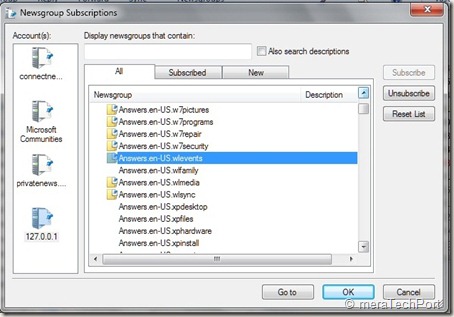
NNTPbrdgLM8z

Once done you can synchronize, read , post to the Forum .

NNTPbrdgLM10z

That’s all, so whenever you want to access Microsoft Forums using Newsreader , start the NNTP Bridge first.

Some Q & A -

Q: Which NNTP clients does the Microsoft Forums NNTP Bridge Client Beta support?

A: Our priority and effort for support will be the following clients in Windows 7 OS:

Microsoft Outlook Express
Microsoft Windows Mail
Microsoft Windows Live Mail

Q: Which languages are supported in this release of the Microsoft Forums NNTP Bridge Client Beta?

A: The NNTP Bridge Beta supports posting in the same languages supported by the Microsoft forums: English, Spanish, French, German, Italian, Russian, Czech, Japanese, Traditional Chinese, Simplified Chinese, Korean, Portuguese-Brazilian.

Q: Which newsreaders have been specifically tested for use with the Microsoft Forums NNTP Bridge Client Beta?

A: The NNTP Bridge Beta has been designed to work with any newsreader. It’s been specifically tested for use with Outlook Express, Windows Mail, and Windows Live Mail.

Previous users of the bridge should ensure they have done the following when updating to the most current version.

· Uninstall previous beta installations

· After installing the most current update, re subscribe to all of the previously subscribed groups

This December NNTP Bridge Beta Update dramatically improved stability and robustness of the connection. As you know its still work in progress so there may be some issues about which you can provide feedback.

So you should also go through the User guide, FAQ and ReadMe at the Connect site for additional information.