Showing posts with label Windows Phone 7. Show all posts

Tuesday, October 23, 2012

Nokia Lumia 510 announced – Specifications

The most affordable Lumia so far, Lumia 510 has been launched as it was announced today in India. The entry-level smartphone comes in five eye-catching colors: red, yellow, cyan, white and black.

Nokia_Lumia_510

Here’s the complete Specs -

  • Display: 4-inch WVGA 800×480 TFT, capacitive touch screen
  • Memory: 256MB RAM (4GB internal storage)
  • Camera: 5-megapixel auto-focus; video recording in VGA resolution @30fps
  • Size: 120.7 x 64.9 x 11.5mm
  • Weight: 129g
  • Connectivity: GPRS/EDGE, WLAN 802.11 b/g/n, Bluetooth 2.1 + EDR, GPS/A-GPS, micro-USB, 3.5mm audio connector (AHJ + WP Controls), Dual Transfer Mode
  • Processor: Snapdragon S1 800MHz
  • Talk time: (GSM/WCDMA) Up to 8.4 h/ 6.2 h; Standby time: (GSM/WCDMA) Up to 653 h/ 738 h
  • 1300 mAH battery
  • Powered By Windows Phone 7.5

You’ll also have instant access to the best mobile navigation and location services available today, in the form of Nokia Maps, Drive and Transport.

The Lumia 510 also comes with 7GB of free SkyDrive cloud storage, allowing you to store and access your photos & videos almost anywhere

The Nokia Lumia 510 will be available to buy starting in November in India, China, South America and Asia. It will cost approximately USD199, before any local taxes and operator subsidies.

Update: As  per @NokiaIndia tweet, Lumia 510 will be priced below Rs.11000 in India

(Source:Nokia )

Tuesday, December 20, 2011

Skydrive for iPhone and Windows Phone

Recently there were lots of updates to SkyDrive which now uses the latest HTML5 technology making it very fast and very much improved file management. Now Microsoft has come up with SkyDrive app for Windows Phone and iPhone. Since sometime, Microsoft has been providing very good apps for iOS and Android based devices also apart from for Windows Phone.

SkyDrive for iPhone: SkyDrive from Microsoft is the place to store your files so you can access them from virtually any device. With SkyDrive for the iPhone, you can now easily access, manage and share files on the go. You can also upload photos or videos from your iPhone to SkyDrive.

Features:

  • Access all of your SkyDrive content including files shared with you
  • View recently used documents
  • Upload photos or videos from your phone
  • Share a link to any file using email
  • Create folders. Delete files or folders

Available now in the App Store: http://bit.ly/v1JLYR

SkyDriveip3

SkyDriveip2

SkyDrive for Windows Phone

SkyDriveWP

SkyDrive for Windows Phone is available in the Marketplace now: http://bit.ly/w2xMQW

The SkyDrive app for Windows Phone allows you to browse and manage your SkyDrive on the go.

(Source : Inside Windows Live )

Wednesday, November 30, 2011

Nokia lights up London with an amazing 4D projection

Nokia Lumia 800 with Windows phone http://nokia.ly/uBVXxw brought deadmau5 and the world's most advanced 4D technology together and created an amazing free light show at Millbank Tower, London.

Millbank was plunged into darkness with the iconic tower acting as the canvas for a never-before-seen spectacular. Each of the 120 metre high building's 800 windows were covered with vinyl as 16 powerful projectors, stationed 300 metres away on the other side of the river, beamed 3D images onto the structure. Huge butterflies flew across the London skyline and the tower was twisted, pulsated and even fell down. Billed as the "future of live events" the spectacular show was accompanied by music from super producer deadmau5, who created exclusive remixes for the performance -- adding the 4th dimension.

Tuesday, November 15, 2011

Play Kinectimals on Windows Phone, transfer it via Tag and continue playing on Xbox

Play with your Kinectimals cub on your Windows Phone, so allowing you to travel around with the cub in your pocket with you. But the coolest thing about this new Windows Phone game is the cross platform interaction with the Xbox 360. After playing Kinectimals on your Windows Phone, you can transfer that animal into Xbox 360. And continue playing on XBox360. There’s an option within the game that when selected displays a QR code. Pop this code in-front of the Xbox 360 Kinect and it will register your animal, transferring it to your Xbox 360 in an instant.

Kmal1

Kmal2

Check it out to see how it all works on your Windows Phone

(Source:Channel9)

Monday, November 07, 2011

Windows Phone Minimum Hardware requirements changed- Cameras are optional

logo_wp75-v_web

Microsoft quietly changed Windows Phone Minimum Hardware requirements. These are the Standards as of now in the MSDN document dated Sep 23, 2011 . As it shows the Cameras are optional, even the Primary Camera. So does it mean soon we can see low priced Windows Phones coming to markets ?

Windows Phone Hardware -

Standard Hardware

  • A common set of hardware controls and buttons that include the Start, Search, and Back buttons.

  • A large WVGA (800 x 480) format display capable of rendering most web content in full-page width and displaying movies in widescreen.

  • Capacitive 4-point multi-touch screens for quick, simple control of the phone and its features.

  • Support for data connectivity using cellular networks and Wi-Fi.

  • 256 MB (or more) of RAM and 8 GB (or more) of flash storage.

  • A-GPS

  • Accelerometer

Optional Hardware

  • Compass

  • Gyro

  • Primary Camera

  • Front-facing Camera

NOTE- Additional sensors, such as proximity and light, are on the phone but are not available for developer interaction yet.

Personally I’m not in favor of removal of Cameras though there will be section of people who may not be wanting Cameras as in Organizations where Cameras are not allowed for security reasons.So a Smartphone without cameras will be a good idea.

Thursday, October 27, 2011

[videos] Nokia Lumia 800- First Hands-On video


Here are 2 videos providing sneak peek at the absolutely stunning Nokia Lumia 800 running Windows Phone 7.5


[video] Nokia Drive - Voice-guided turn-by-turn navigation in Windows Phone

One of the big announcement at Nokia World was the introduction of Nokia Drive, Nokia’s proprietary voice-guided turn-by-turn navigation tool provided with Windows Phone.

prod_nokia800map_web

It’ll complement to Windows Phone’s already built-in navigation via Bing Maps.

Wednesday, October 26, 2011

Nokia Lumia 710 and Lumia 800 Full Specs

Just sometimes back Nokia CEO Stephen Elop unveiled Nokia’s first Windows Phones, the Nokia Lumia 800 and the Nokia Lumia 710 at the NokiaWorld.

Nokia Lumia 800 Specs -

The Nokia Lumia 800 is a flagship device, bearing more than a similar resemblance to the much-lauded Nokia N9. Behind the 3.7-inch AMOLED display sits a 1.4GHz processor with hardware acceleration and a separate graphics processor. Storage is taken care of, too, with 16GB on board and a further 25GB available free on SkyDrive, Microsoft’s cloud-based storage space

Lumia810

  • Curved glass, 3.7" touchscreen, smooth one-piece body
  • Facebook, Twitter, LinkedIn, email, Chat, SMS
  • Bing, Internet Explorer 9, HTML5, Wi-Fi
  • Carl Zeiss optics, 8 MP camera, HD video
  • Weight- 142 g
  • Maximum 3G talk time - 9.5 h , Maximum 3G standby time - 335 h
  • Maximum music playback time 55 h, Maximum video playback time 7 h
  • Hardware CPU clock rate 1400 MHz
  • Hardware CPU type Qualcomm MSM8255 (WCDMA)
  • 16 GB mass memory (no slot for micro-SD cards)
  • SDRAM memory 512 MB
  • Operating System Windows Phone 7.5 Mango
  • Available in Cyan, Black, Magenta
  • Extra features: TV out,Micro SIM,Nokia Maps,Bing Maps,Flight Mode,Nokia Drive, Nokia Music,Nokia Store, 2 Microphones, Microsoft Lync, 3D Accelerometer, Proximity sensor, Magnetometer Sensor, Ambient light sensor, Nokia Contacts Transfer

The Nokia Lumia 800 will be available in France, Germany, Italy, the Netherlands, Spain and the UK in November.

It will be priced at approximately €420 before taxes and subsidies. It is also scheduled to be available in Hong Kong, India, Russia, Singapore and Taiwan before the end of the year, and in further markets in early 2012. It’s available to pre-order in select countries now via the Nokia website.

For a detailed Specifications, in action video, 3600 view and much more , please check http://www.nokia.co.uk/gb-en/products/phone/lumia800/specifications/
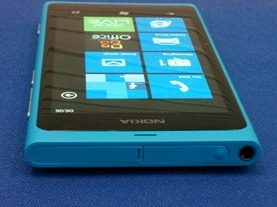
Nokia800(picture courtesy: Windows Phone blog)

Nokia-800feature

Nokia-800feature3

Nokia Lumia 710 Specs - 

The Nokia Lumia 710 is an affordable smartphone offering a new alternative to people looking for a mid-level smartphone. The Nokia Lumia 710 offers incredible value to a whole new range of smartphone buyers. With interchangeable back covers (in a choice of black, white, cyan, fuchsia and yellow) and a choice of black or white device, there’s no shortage of personalization available, particularly when you consider the vast suite of apps on offer. Nokia Lumia 710 also sports a 1.4GHz processor together with hardware acceleration and a dedicated graphics processor.

    Lumia710

  • ClearBlack display, anti-glare screen, 3.7" touchscreen
  • Swappable covers, changeable home screen colours
  • Facebook, Twitter, LinkedIn, email, Chat, SMS
  • Bing, Internet Explorer 9, HTML5, Wi-Fi
  • 5 MP camera, auto-focus, LED flash
  • Weight 126 g
  • Maximum 3G talk time 7.6 h, Maximum 3G standby time 400h
  • Maximum music playback time 38h, Maximum video playback time 6h
  • Hardware CPU type Qualcomm MSM8255 (WCDMA)
  • Hardware CPU clock rate 1400 MHz
  • 8 GB mass memory, expandable with micro-SD card up to 24 GB (max 16 GB cards)
  • SDRAM memory 512 MB
  • Operating System Windows Phone 7.5 Mango
  • Extra Features: Micro SIM,Bing Maps,Flight Mode,Nokia Drive,Nokia Music, Nokia Store, 2 Microphones,Microsoft Lync, 3D Accelerometer,Proximity sensor, Magnetometer Sensor, Ambient light sensor,,Nokia Contacts Transfer

For a detailed Specifications, in action video, 3600 view and much more , please check http://www.nokia.co.uk/gb-en/products/phone/lumia710/specifications/
The Nokia Lumia 710 will be available in Hong Kong, India, Russia, Singapore and Taiwan towards the end of the year with other markets joining early in 2012. Lumia 710 will be around €270 excl taxes.

Also on board are new signature Nokia experiences, optimized for Windows Phone. Nokia Drive turns both the new Lumia smartphones into dedicated personal navigation devices, with free turn-by-turn navigation and dedicated in-car user interfaceNokia_Lumia_710_cyan

(picture courtesy: Windows Phone blog)

Nokia-710feature2

Monday, October 10, 2011

Search with voice, audio and vision with Bing on Mango!

Check out what Bing team has done with Bing on the new Windows Mango Phone !

Bing on Windows Phone now transcends the search box. No longer limited by text, you can now search with voice, audio and vision -

  • Voice: Search without typing using the voice search functionality.
  • Music Search: Find what song is playing by letting you phone "listen" to the music. It not only shows you the name, artist, and album, but even shows you where you can hear or buy it.
  • Bing Vision: You can now use your phone’s camera to look up product information by bringing an object into view. Bing will recognize text and present the option to select words for a search, and instantly return product results if the object has a barcode. Bing Vision can also detect product information from UPC codes, QR Codes and MS Tag as well as cover art for books, CD’s, DVD’s and video games.

Some more features -

Bing Local Scout provides local search results and recommends nearby restaurants, shopping and other activities in an easy to use guide powered by Bing. The results are arranged by:

  • Highlights: Top rated and highly reviewed listings
  • Eat+Drink: Nearby restaurants
  • See+Do: Nearby attractions and activities
  • Shop: Nearby stores

Bing search results now return Windows Phone Marketplace apps that are relevant to what you’re searching for.

For an in depth look at how this works, check out Ben and Stefan’s video covering Bing on Windows Phone 7.5:

<a href="http://video.msn.com/?mkt=en-us&amp;vid=4b36edb3-28b8-4d90-8cc9-f6965bf65df0&amp;src=SLPl:embed::uuids" target="_new" title="Windows Phone 7.5: Bing(o) on Mango">Video: Windows Phone 7.5: Bing(o) on Mango</a>

(Source: Windows Phone 7.5: Bing(o) on Mango )

Wednesday, September 28, 2011

Download Official Windows Phone – Put people first Logo

Microsoft has begun the rollout of the Mango update to phones around the world. With it the online world is abuzz with this news. There were some reports of some sites using wrong logos of the Windows Phone also. Recently Microsoft has applied for patenting its ‘Put people first’ phrase that goes along with the new Windows Phone Logo.

Here’s the official Logo for the Windows Phone to be put along with your blog posts etc -

Windows Phone logo- vertical orientation

logo_wp75-v_page

Download: Web | Print

Windows Phone Logo – Horizontal

logo_wp75-h_page

Download: Web | Print

Friday, September 09, 2011

[video] Windows Phone interacting with Kinect

Demo showing how it is possible to use Windows Phone to interact with a Kinect-powered game. This was demoed at Mobile World Congress held earlier this year.

Source : channel 9  where you can also check about project Bunnyhop (codename KinectoPhone).

Saturday, September 03, 2011

Hello Windows Phone 7.5 - An in-depth demo

Check out this detailed demo of next release of Windows Phone.An in-depth demo video of Windows Phone 7.5. Though there are tons of features in this version , the video just touches some of them.

“Put people first with the next release of Windows Phone, which gives you all you need in a truly modern smartphone. Watch how new features like Groups, Threads, Local Scout and more—plus tons of new updates to existing features—make it easier to connect and share with the people who matter most.”

Up Close with Windows phone 7.5

Friday, September 02, 2011

Complete Specs of TITAN and Radar– new Windows Phones from HTC

HTC unveiled 2 new Windows Phones – TITAN and Radar that will be made available globally from October 2011.

Here are their detailed Specifications :

TITAN

With the largest screen of any Windows Phone, the HTC TITAN lets you work big and play big. Sporting a 4.7” screen and an ultra-slim 9.9mm unibody contoured design, the HTC TITAN is unlike anything you’ve ever held.

glance


Size 131.5mm x 70.7mm x 9.9mm (5.18" x 2.78" x 0.39")
Weight 160 grams (5.6 ounces) with battery
Display 4.7-inch touch screen with 480 x 800 resolution
Screen 119 mm (4.7")
CPU Processing Speed 1.5 GHz Qualcomm MSM8255

Platform

Windows® Phone OS 7.5

Storage1

Total storage:16 GB    Available storage:up to 12.63 GB
RAM:512 MB

Camera

8 megapixel camera with F2.2 lens, dual LED flash, and BSI sensor (for better low-light captures)
Front camera:
1.3 megapixel front camera
HD video recording:
720p HD video recording

Connectors

3.5 mm stereo audio jack and micro-USB 2.0 (5-pin) port

Sensors
  • Gyro Sensor
  • G-Sensor
  • Digital compass
  • Proximity sensor
  • Ambient light sensor
Internet5

3G:
Up to 14.4 Mbps download speed
Up to 5.76 Mbps upload speed
GPRS:
Up to 80 kbps downloading
EDGE:
Up to 236.8 kbps downloading
Wi-Fi®:
IEEE 802.11 b/g/n

Bluetooth®

Bluetooth® 2.1
A2DP for wireless stereo headsets
PBAP for phonebook access from the car kit
Other supported profiles: AVRCP, HFP, HSP

Social Networking

Twitter™, Facebook® and Windows Live™
Share photos on Facebook® or Windows Live™ SkyDrive

Location

Internal GPS antenna
HTC Locations
Bing™ Maps

Tethering Internet Sharing
Multimedia
  • See photos from your camera, Facebook and Windows Live™ accounts in the Pictures hub
  • Music and Videos Hub powered by Zune lets you listen to radio, download music, and more
  • SRS enhancement
  • 5.1 surround sound for video

Audio supported formats:
Playback:.m4a, .m4b, .mp3, .wma (Windows Media Audio 9)
Video supported formats:
Playback:.3gp, .3g2, .mp4, .m4v, .mbr, .wmv (Windows Media Video 9 and VC-1)
Recording:.mp4

(You can only playback a .3gp or .3g2 video if the video is an email attachment or is part of an MMS message.)

Power & Battery2

Battery type:
Rechargeable Lithium-ion battery

Capacity: 1600 mAh

Talk time:

WCDMA: Up to 410 minutes
GSM: Up to 710 minutes

Standby time3:
WCDMA: Up to 460 hours
GSM: Up to 360 hours

Network4

HSPA/WCDMA:
Europe/Asia: 850/900/2100 MHz

Quad-band GSM/GPRS/EDGE:
850/900/1800/1900 MHz

Recommended Windows System Requirements

Windows® 7, Windows Vista®, or Windows® XP
Zune® software

 
HTC TITAN- First Look
 
For more demo videos on HTC TITAN, please check the source .
 
 
Here’s the detailed specs for HTC Radar -
Radar
The HTC Radar is the intuitive phone that keeps it all on your radar and lets you get real-time close…with everything. Crafted from a single piece of metal, it offers a premium design.
 
glanceradar


Size

120.5mm x 61.5mm x 10.9mm (4.74" x 2.42" x 0.43")

Weight

137 grams (4.83 ounces) with battery

Display

    3.8-inch touch screen with 480 x 800 resolution

Screen

     96.5 mm (3.8")

CPU Processing Speed

1 GHz Qualcomm MSM8255

Storage1

Total storage:8 GB     Available storage:up to 6.54 GB
RAM:512 MB

Connectors

3.5 mm stereo audio jack and micro-USB 2.0 (5-pin) port

Sensors

G-Sensor

Proximity sensor

Ambient light sensor

Multimedia

See photos from your camera, Facebook and Windows Live™ accounts in the Pictures hub

Music and Videos Hub powered by Zune lets you listen to radio, download music, and more

SRS enhancement

5.1 surround sound for video

Audio supported formats:

Playback:.m4a, .m4b, .mp3, .wma (Windows Media Audio 9)

Video supported formats:

Playback:.3gp, .3g2, .mp4, .m4v, .mbr, .wmv (Windows Media Video 9 and VC-1)

Recording:.mp4

(You can only playback a .3gp or .3g2 video if the video is an email attachment or is part of an MMS message.)

Power & Battery2

Battery type:
Rechargeable Lithium-ion battery
Capacity:
1520 mAh

Talk time:

WCDMA: Up to 485 minutes

GSM: Up to 600 minutes

Standby time3:

WCDMA: Up to 535 hours

GSM: Up to 480 hours

Network4

HSPA/WCDMA:

Europe/Asia: 900/2100 MHz

Quad-band GSM/GPRS/EDGE:

850/900/1800/1900 MHz

Platform

Windows® Phone OS 7.5

Camera

5 megapixel camera with F2.2 lens, LED flash, and BSI sensor (for better low-light captures)

Front camera:

VGA front camera

HD video recording:

720p HD video recording

Internet5

3G:
  • Up to 14.4 Mbps download speed
  • Up to 5.76 Mbps upload speed
    GPRS:
  • Up to 80 kbps downloading
    EDGE:
  • Up to 236.8 kbps downloading
    Wi-Fi®:
  • IEEE 802.11 b/g/n
  • Bluetooth®

  • Bluetooth® 2.1
  • A2DP for wireless stereo headsets
  • PBAP for phonebook access from the car kit
  • Other supported profiles: AVRCP, HFP, HSP
  • Social Networking

  • Twitter™, Facebook® and Windows Live™
  • Share photos on Facebook® or Windows Live™ SkyDrive®
  • Location

  • Internal GPS antenna
  • HTC Locations
  • Bing™ Maps
  • Tethering

    Internet Sharing

    Recommended Windows System Requirements

    • Windows® 7, Windows Vista®, or Windows® XP
    • Zune® software
     
    HTC Radar–First Look


    For more pictures and demo videos , please check the source.

    Also check HTC unveils their new global lineup of Windows Phones

    1. The actual available internal storage may differ depending on the software configuration of your phone.
    2. Battery times (talk time, standby time, and more) are subject to network and phone usage.
    3. A Standby time specification ("specification") is an industry standard that is only intended to allow comparison of different mobile devices under the same circumstances. Power consumption in a standby state is strongly dependent on factors including but not limited to network, settings, location, movement, signal strength and cell traffic . Comparisons of different mobile devices using such a specification can therefore only be done in a controlled laboratory environment. When using any mobile device in real life circumstances for which the mobile device is intended, the standby time could be considerably lower and will be strongly dependent on the factors as mentioned above.
    4. Network bands in regions other than Europe and Asia Pacific may be different, depending on the mobile operator and your location. Please check with your mobile operator.
    5. Actual data speed is dependent on the network or Wi-Fi® signal strength.

    Note: Specifications are subject to change without prior notice

    Wednesday, June 15, 2011

    Integrate Windows Phone 7 with your WHS 2011 Server with Phone Connector Add-in

    The Release Candidate of the Windows Server Solutions Phone Connector for Windows Home Server 2011 has been announced. The purpose of this Add-in is to enable Remote Server Management tasks and relay Media Streams for WHS 2011 including:

    Alerts :

    AlertsThis is the first panorama item that the application launches after you complete the authentication steps with the server .This feature brings the Alert Viewer that you know from the server, to the phone


    Users:

    usersThe user-panorama item performs basic user management tasks, including:
    Viewing user account details
    Enable or disable a user account
    Change a user account password


    Devices:

    devicesDevices panorama item lets you:
    View server-joined computer and Mac details.
    View the backup status that every device last reported to the server.
    Start or stop a backup for any computer or the server (from the contextual menu).


    Media – Music , pictures and Video Panoramas

    musicpicvideo


    The Media panorama lets you discover and view streams of media elements that you stored on your server in the appropriate shared folders (such as Music, Video and Picture shares).

    Music

    MP3 non-Digital Rights Management-protected songs will be streamed directly from the server to your phone. Album art is also transported. Your library is searchable and can be organized in different views to help find what you want fast.

    Pictures

    With Pictures Panorama you can  :

    Discover all .png and .jpg images that are stored in the Pictures shared folder on the server. Subfolders are recognized.
    Open a picture full-screen to view it on the phone.
    Save a copy of the picture to the phone, using its original dimensions and resolution  (to be viewed later in the built-in Pictures hub of any Windows Phone 7).
    Take a picture with the phone’s camera and upload it to the server.
    Upload any picture that is stored in the Pictures hub of the phone to the server.

    Videos

    The “Videos” feature allows you to discover and view videos that are stored on your server in the Videos shared folder.


    Also there’s Live Tile Support

    livetile

    If you pin the application to the home screen of your Windows Phone 7, you will be able to see a variety of at-a-glance information without launching into the application. An opt-in using the settings menu is required.

    The Windows Phone 7 application requires both a server sided add-in to be installed on the WHS 2011 Server, as well as Windows 7 Phone application downloadable via marketplace.

    For further information, and access to the downloads to start testing today, please visit http://connect.microsoft.com/windowshomeserver. Please note this is a release candidate and as such is for testing purposes only.

    (Source)

    Friday, June 10, 2011

    Free E-book - Windows Phone 7 Guide for Android Application Developers

    If you have been developing Android applications and are interested in building your applications for Windows Phone 7, this guide is for you. This guide will help Android developers to easily learn Windows Phone and port their app to Microsoft’s phone platform.

    AndroidWP7


    This guide includes chapters -

    • Chapter 1: Introducing Windows Phone 7 Platform to Android Application Developers
    • Chapter 2: User Interface Guidelines
    • Chapter 3: The Developer and Designer Tools
    • Chapter 4: C# programming
    • Chapter 5: A Comparison of Application Life Cycles in Windows Phone 7 and Android
    • Chapter 6: Storing Data and Preferences
    • Chapter 7: XML Parsing in Windows Phone 7 and Android


    Download Chapters 1-7 (~4Mb):  DOCXPDF


    In addition, use the  Android to Windows Phone API mapping tool to find your way around when you discover the Windows Phone platform.

    Source

    Also check -Leveraging your Android development expertise to build Windows Phone applications

    If you are an iPhone App developer - Earlier I had also posted Windows Phone 7 Guide for iPhone Apps Developers

    Saturday, May 28, 2011

    Windows Phone Mango features Walkthrough

    Windows Phone Mango was grabbed by WindowsPhoneUK from one of the teams at the London press conference to shoot a walkthrough of some of the great new features that are coming to Windows Phone Mango -

    Windows Phone Mango Walkthrough

    http://youtu.be/EG4k7CLuuXY

    Thursday, May 26, 2011

    A new web based Windows Phone Marketplace coming later this year to India & other countries with Mango

    A Web-based Windows Phone Marketplace will be coming later this year with the public availability of Mango. This was blogged by Todd Brix -
    Senior Director, Windows Phone Marketplace.

    web_marketplace


    The Web version of Marketplace will launch with the new OS later this year and give customers another vehicle for discovering your great apps and games. And as a Windows Phone developer, you get all of the added visibility with no extra work.  Just as on the phone, customers will be able to browse the full catalog, view screenshots, read application details and reviews and choose from all of the supported languages for that app. This offers customers another way to more thoroughly and confidently browse your apps from the comfort of their PC’s web browser. With the Web version of Marketplace, we will also have more placement areas in which to provide featured apps with extra visibility and merchandising possibilities.


    Apart from those details, here’s some more info – This marketplace will be expanded from 16 at present to 35 markets where Marketplace will be operational that includes India, Japan, Korea, Brazil . So more developers, more consumers. (Source: Matt Bencke – GM Developer Ecosystems on Channel9 )

    So watch out for Web Windows Phone Marketplace along with Public Mango updates.

    UPDATE : Here’s a list of countries where with Mango, Windows Phone Marketplace will expand from 16 to 35 countries where both app submission and app purchase will be supported locally -

    Today

    Adding with Mango

    Australia, Austria, Belgium, Canada, France, Germany, Hong Kong, Ireland, Italy, Mexico, New Zealand, Singapore, Spain, Switzerland, UK, USA

    Brazil, Chile, Colombia, Czech Republic, Denmark, Finland, Greece, Hungary, India, Japan, Korea (South), Netherlands, Norway, Poland, Portugal, Russia, South Africa, Sweden, Taiwan

    “In addition, Windows Phone Marketplace now supports app submission in China, Israel and Luxembourg. For those countries that are not yet locally supported by Marketplace, we continue to expand the Global Publisher Program we announced in early March. Today, developers in 69 Middle Eastern and African countries can submit applications via Yalla Apps. App Port supports 13 countries in East Asia. APPA Market is available to developers in 19 central European countries. And both Device7 and MTel service China.”

    For more details please check

     Windows Phone Marketplace on the Web for Mango

    Developer News: Beta Mango Tools Available Today

    Beta Mango tools in ISO format

    mango

    The new Windows Phone Developer Tools 7.1 Beta , Mango can be used to develop Applications for both 7.0 and 7.1 version of Windows Phone OS releases.

    You can download this release in .iso format for offline installation.  (717 MB)

    Else if you want web installer and for more details please check here.

    The Windows Phone Developer Tools includes the following-

    • Microsoft Windows Phone Developer Tools 7.1 (Beta)
  • Windows Phone Emulator (Beta)
  • Silverlight 4 SDK and DRT
  • Microsoft XNA Game Studio 4.0 Referesh Windows Phone Extensions
  • Microsoft Expression Blend SDK Preview for Windows Phone 7.1
  • WCF Data Services Client for Window Phone 7.1
  • Tuesday, May 17, 2011

    Sync media files between Mac and WP7,Zune HD with Windows Phone 7 Connector beta for Mac

    Windows Phone 7 Connector for Mac is a simple, easy-to-use program for Macs that you can use to:

    • Sync music, movies, TV shows, and podcasts from your existing Apple iTunes library to your Windows Phone or Zune HD*
    • Sync pictures and videos from your existing Apple iPhoto library to your Windows Phone or Zune HD
    • Retrieve pictures and videos taken on your Windows Phone and automatically import them into your existing iPhoto library
    • Browse and preview media items stored on your Windows Phone or Zune HD
    • Download and install operating system updates for your Windows Phone

    GetOpenContent

    This software is not part of the Zune experience. In order to enjoy the Zune experience on Mac, you will need to install a Windows OS (XP or higher). Zune delivers music and video entertainment across Windows Phone 7, Xbox Live and Windows PC’s.

    *Only unprotected (non-DRM) media files can be synced between your Mac and your Windows Phone or Zune HD.

    The Windows Phone 7 Connector for Mac 1.0 is now available via the Mac App Store

    For more details go here.