Showing posts with label Open Source. Show all posts

Tuesday, May 14, 2019

PowerToys coming back as opensource with Windows 10 support

If you are one of those who have used Windows 95, then you must be familiar with the very popular PowerToys set of tools. The PowerToys project was originally launched for Windows 95. It had a set of very useful utilities to make Windows 95 ‘s user work efficiently. Most famous was TweakUI, which would tweak Windows 95 with an easy interface instead of digging into Registry. Many Windows 95 users had the opinion that what PowerToys had brought should have been in Windows 95 to begin with. With a size of just 205 KB to download and with over a dozen enhancements, it was very popular.
Inspired by Windows 95 era PowerToys project, these are being brought again as opensource and with Windows 10 support. So this reboot will provide Windows 10 power users with ways to squeeze more efficiency out of Windows 10 shell and customize it.
The first preview of these utilities and corresponding source code will be released in Summer 2019.
Now as an opensource, 2 utilities are being worked out first:
  • Maximize to new desktop widget - The MTND widget shows a pop-up button when a user hovers over the maximize / restore button on any window. Clicking it creates a new desktop, sends the app to that desktop and maximizes the app on the new desktop.
  • Windows key shortcut guide - The shortcut guide appears when a user holds the Windows key down for more than one second and shows the available shortcuts for the current state of the desktop.
This opensource project welcomes contributions and suggestions.
For more details, please check GitHub

Friday, April 19, 2019

Chromium open-source project based Microsoft Edge builds released

As announced by Microsoft in December last year that it’ll become a significant contributor to the Chromium project, by making Microsoft Edge Chromium based. Recently Microsoft shipped the first Dev and Canary channel builds of the next version of Microsoft Edge, based on the Chromium open-source project.
Since few years, Microsoft has significantly increased its participation in the open source software (OSS) community, becoming one of the world’s largest supporters of OSS projects. And release of Chromium based Microsoft Edge on the desktop to create better web compatibility for customers and less fragmentation of the web for all web developers is one more big step.
Microsoft announced its First Canary and Developer builds are ready for download on Windows 10 PCs. Canary builds are preview builds that will be updated daily, while Developer builds are preview builds that will be updated weekly. Beta builds will come online in the future. Support for Mac and all supported versions of Windows will also come over time.
get these builds from the Microsoft Edge Insider site.

Microsoft Edge Insider builds refers to both Microsoft Edge Canary and Microsoft Edge Dev.
If you are interested in these builds and have downloaded, also refer to this for any errors you might get. 
Microsoft Edge Insider builds: Troubleshoot install and updates

Monday, October 18, 2010

Creating multilingual content on Wikipedia using WikiBhasha beta from Microsoft Research

Wikibhashabeta

What is the WikiBhasha beta?

The WikiBhasha beta is a tool that helps a community of users in creating multilingual content on Wikipedia. It enables a contributor to Wikipedia to search/source content from other Wikipedia articles, translate/correct the sourced content, and organize the sourced content and new information to either compose new articles or to enhance existing articles in multilingual Wikipedias. Content created by the contributors are submitted back to the appropriate Wikipedias. The WikiBhasha beta stays on Wikipedia through the entire content creation process, integrating discovery, linguistic and collaborative features transparently, in an intuitive user interface (UI). Contributors have the flexibility on the quantum of content to work on, and on whether to work on existing content or new content.

WikiBhasha beta is a powerful multilingual content creator. It has an easy to use, intuitive user interface, and enables easy and quick translation of articles from English to more than 30 other languages that are supported by Microsoft’s Machine Translation system and Microsoft’s Collaborative Translation Framework.

The WikiBhasha beta is a browser based application that is invoked on Wikipedia articles. It features an intuitive and simple UI layer that stays on the target language Wikipedia for the entire content creation process. This UI layer integrates content discovery, linguistic and collaborative services, focusing the user primarily on content creation in the target Wikipedia. A simple 3-step process guides the user in the content discovery and sourcing from English Wikipedia articles, composing target language Wikipedia article and, finally, publication in target Wikipedia. While a typical session may be to enhance a target language Wikipedia article, new articles may also be created following similar process.


WikiBhasha currently works on Internet Explorer 7.0 & 8.0 on Windows XP, Windows Vista & Windows 7 and Firefox: 3.5 or above on Windows or Linux Fedora 11/12.

Check the video for a quick introduction to WikiBhasha beta -

WikiBhasha Beta from Microsoft Research


Installing WikiBhasha beta as a Bookmarklet -

You can install WikiBhasha beta as a bookmarklet in your browser by following the instructions below:
(By adding WikiBhasha as a bookmarklet, you irrevocably agree to the "Privacy Statement" and "Terms of Use” whereby some startup code goes into the bookmarklet of your browser and Microsoft takes no responsibility for malicious behavior.)

In Internet Explorer
Make sure the Favorites Bar is visible in Internet Explorer. If it is not visible, on the View menu, point to Toolbars and then click Favorites Bar.
1. Right-click WikiBhasha (Beta) link* and click Add to Favorites. (* Please check http://www.wikibhasha.org/wikibhasha/install.htm  for the link)
2. On the Add to Favorites window, in the Create in list, select Favorites Bar.
3. Click Add. The Internet Explorer Favorites Bar now has a new WikiBhasha beta bookmarklet.wikibhashaIEFF
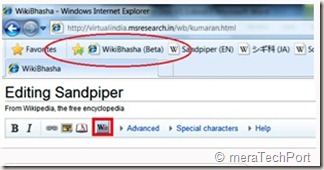
WikiBhasha beta bookmark as seen in Internet Explorer

In Firefox
Make sure the Bookmarks Toolbar is visible in Firefox. If it is not visible, on the View menu, point to Toolbars and then click Bookmarks Toolbar.
1. Right-click on WikiBhasha (Beta) link* and click Bookmark This Link. (* Please check http://www.wikibhasha.org/wikibhasha/install.htm  for the link)
2. On the New Bookmark window, in the Folder list, select Bookmarks Toolbar.
3. Click Save. The Firefox Bookmarks toolbar now has a new WikiBhasha beta bookmark.

wikibhashaIEFF

Installing WikiBhasha beta as a Wikipedia Gadget -

WikiBhasha beta is available as a user script if you already have Wikipedia login credentials. However, note that you need to install the user-gadget in each of the language Wikipedia’s that you may be interested in.

  1. Log in to Wikipedia. (You need to create an account on Wikipedia if you do not already have one.)
  2. In every language Wikipedia that you are interested in:
    • Visit my preferences, and click on the Appearance tab.
    • Edit your default skin file (such as, “Monobook.js” or “Vector.js” file) to add the following:
importScriptURI('http://en.wikipedia.org/w/index.php?title=User:WikiBhasha.MSR/WikiBhasha.js&action=raw&ctype=text/js');


3. Please save your changes and reload your page to see the script added to your profile. You should see WikiBhasha in the left side as a menu item, and on Edit page as a button (as below):
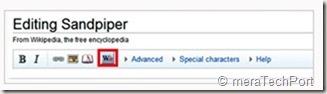

wikibhashawidget1


wikibhashawidget2


Download the WikiBhasha beta User Guide from here.


Take WikiBhasha beta for a test drive by clicking on the install link below.


Install - Click here to install WikiBhasha beta


For FAQs, installation instruction details, user guide, discussion, feedback, suggestions etc please check -


http://www.wikibhasha.org/index.htm


(H/T to Hardik )


EDIT: Also check Enhancing Multilingual Content in Wikipedia


“Wikipedia has become one of the world’s largest and perhaps most powerful information repositories. But it is heavily English-centric.


Making Wikipedia more multilingual inspired a Microsoft Research India team to develop a tool called WikiBhasha, which was launched Oct. 18. WikiBhasha—“Wiki,” signifying its community-oriented approach; “Bhasha,” a Sanskrit word meaning “language”—features a content-creation platform that combines linguistic services, such as machine translation, with a Wikipedia-friendly content editor. Everyday users in countries around the world, as well as language enthusiasts, can use WikiBhasha to adapt English-language Wikipedia articles for local languages. Along the way, they can create new local content to expand the article they have translated.


WikiBhasha users also can create new articles from scratch. And in time, the tool could help convert articles in languages other than English into local languages.”

Monday, September 27, 2010

A Few Perspectives on OpenOffice.org

Several customers share their experiences with OpenOffice.org and why they came back to Microsoft Office -


Get Microsoft Silverlight

Thursday, May 15, 2008

Video.Show - Creating your own YouTube-style site

Video.Show is a reference-quality blueprint for implementing a user-generated video content site. It provides everything you need to create a website for uploading, encoding, cataloguing, publishing and commenting on videos, using Silverlight, Expression Encoder and Silverlight Streaming by Windows Live.

Setting up your own video community website can be a real headache. There's a lot to worry about: disk space, bandwidth, video formats and encoding...

Video.Show does all of the hard work for you. The key is Silverlight technology paired up with Silverlight Streaming's free, world class content hosting. Video.Show provides Silverlight video controls, Silverlight Streaming hosting integration, leveraging Expression Encoder's ability to handle most popular video formats so you can be uploading videos within minutes.

Few months back Tim Sneath had announced about the final version of Video.Show, a ready-to-run solution for hosting video content on the web! Following is the part of the announcement he made:

You might be interested in Video.Show if:

  • Your company or school wants to distribute e-learning or educational content over the web for internal or external access;
  • You're creating the next YouTube-style site and you want somewhere to start;
  • You want to share home movies with your family and friends via your own personal site, rather than uploading them to somewhere public like YouTube or MSN Soapbox;
  • You're running a conference or event and you want to make the materials available for anyone else to watch;
  • You're a hosting provider and you want to offer your customers a way to store and share videos;
  • You simply want to learn how to build a great AJAX web site experience with Microsoft technologies.

Getting started with Video.Show is easy: all you need is a machine with Visual Studio 2008, SQL Server 2005 Express and Expression Encoder; the software is built to guide you through a few simple configuration steps (setting an admin password and obtaining a Silverlight Streaming key), and then you're up and running

He also gives one of his favorite real-world practical implementations of Video.Show example as filmsforlearning.org, a UK-based education site for students and teachers.Since the release of Video.Show there have been many thousands of downloads.

videoshowexrz

For more details check the codeplex link and Tims Sneath Blog post.

Also check this link for demonstrating the experience for a user without Silverlight installed.

Video.Show is a Microsoft Software-plus-Services Blueprint. Software-plus-Services Blueprints are a series of open source frameworks and workflow-based guidance packages designed to provide an architectural bridge and reduce the friction you experience building real-world Software-plus-Services applications. The source code can be downloaded from codeplex.

Monday, August 06, 2007

Open Source at Microsoft

Microsoft unveiled a new web property that will articulate the next step in Microsoft’s open source (OSS) strategy. It will provide transparency into Microsoft’s balanced perspective on OSS and host evidence about Microsoft, the OSS community and the interaction between the two. The new site will be located at http://www.microsoft.com/opensource/

CodePlex is the Microsoft open source project hosting Web site and will continue to be a resource for developers and consumers of open source projects. Port 25 is the public portal for the Open Source Software Lab at Microsoft, and will continue to be a resource for technical insights, blogs, and how-to information for the use of Microsoft and open source technologies together

This site is intended to provide information about Microsoft and open source in one place, serving as a gateway for information about open source engagements and activities across Microsoft.