As some of you must have already tried the new Windows Live Products installed with its Unified installer, and about which I had already posted
here.
So for those who haven't yet tried the new installer, can check out the screenshots here first before installing.
From the link as given in earlier post - Test drive the new Windows Live suite
http://get.live.com/wl/all
you'll get this page.
From here when you press the 'Get Windows Live' button, you'll get the Install Page for the Windows Live Suite, where you'll have the choice to select among the Windows Live - Mail, Messenger,Photo Gallery,Writer,Toolbar or One Care family Safety Products you want to install. And also choice for various settings as Choosing your default browser search, helping improve the product.
So accordingly choose the products before you launch the installer. Now press Install. It'll download a 1.72MB Unified Installer, and run this installer.
If you are having any older version of some Windows Live products, they'll be removed and will be upgraded to latest version during installation. So when you press 'Accept', it'll again give you the option of choosing making MSN Home the Home Page and helping improving the product, which we had already done in previous steps. So I think this as an extra step, which can be removed.
After pressing the Install button, it'll start the process first by removing/upgrading the older versions. So don't worry about your Mails, settings etc,as these will remain intact as it'll upgrade the Old Live products.
So now in the next steps, we can see the Unified Installer progresses as it checks for installed products.
Here again you'll get the chance to include sign-in assistant, toolbar, which can be added to installation.
As each of the product download, one can see the progress stats. It'll start installing the already downloaded, as others are still downloading. So you'll get progressively getting things installed at the same time you are downloading other applications. So its an efficient way of installing suite of applications.
And once any of the applications installed, you can start it right from installer itself.

It took 20 min. for me to get installed with all the Live products available in the Live Suite. This was on Windows XP SP2. So get the New Unified Installer and give it a try and start enjoying the new set of Live Products, which have amazing features and are much improved from their previous version.
I'll be posting about New features in each of these Live products soon.
UPDATE :I came across a very nice post from Long Zheng,
The cookie magic behind Windows Live Suite installer who explained about how this installer works.
"
One more look at the HTML and specifically the Javascript reveals the secret, cookies. By clicking “Install”, the Javascript generated a unique cookie for me under the name of “wlxp” that contained sets of globally unique identifiers (GUID) which I now know are the references to the particular applications I selected.
document.cookie="wlxp=p="+finalList.join(",").toLowerCase()+"&t="+t+";expires="+d;
Just to make sure, I even ran Process Monitor on the process to check out its file system requests."
Even though I had already known about the cookies, it still shocked me a little to see it actually query my file system first to find any cookies for “live.com”, then start accessing those cookies to find the relevant information. Same applies for Firefox, which I was using at the time. In fact, it’s even more complicated for Firefox because it first has to find my profiles, then shift through megabytes of cookies in the single repository to find the “live.com” one.
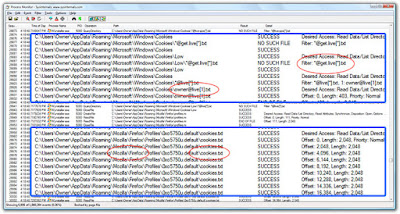
Whilst this might seem like a lot of work just to check what I want to install, I think it’s a neat idea with a lot of indirect potential. A few that popped into my mind quickly included:
Third party applications or bundles - assuming the installer simply downloads from the Microsoft server anything matching the supplied GUIDs, you could easily deliver additional applications or service beyond those by Microsoft without bundling them into the installer
Universal installer - this installer will require less if any maintenance since it can be suited to download any application, any version, any bundle by simply changing GUIDs in the browser
Special promotions - imagine if you have accessed a promotional website which offered Live Messenger freebies, by simply adding a code to the cookie, only you will be given access to download these exclusive freebies"
And also if you’re wondering what happens if you don’t have the cookies or have cookies disabled, then you’ll simply be offered a different installation experience where you select which products you’d like to install "
Nice Explanation ! Thanks Long Zheng. Check the above link for more details.
 Microsoft is banking on its Windows Live Cloud Services to push the demand for web related services, and eventually monetise the concept by ad-funding it. Samir Saraiya, head - business development at Microsoft India told DNA Money, “We want to make the services in the Cloud as best of breed products, having them talk to each other and other non-Microsoft products.”


