Showing posts with label Windows Mobile. Show all posts

Saturday, May 15, 2010

Your Windows stuff goes where you go – Windows Phone Ads

Here are some ‘Your Windows stuff goes where you go ‘ Windows Phone Ads -


Hanging out whenever

On your Windows Phone, staying connected with your life outside the boardroom is easy. Your Windows stuff goes where you go.


Only me and you, baby

On your Windows Phone, take the things you love about your PC with you. Your Windows stuff goes where you go.


Never lose track again

On your Windows Phone, you'll never lose track of what's important. Your Windows stuff goes where you go.


Tuesday, December 09, 2008

Enjoy Windows Live Wave3 on Mobile

Now you can experience the Windows Live Wave3 on your Mobile too, mobile.live.com  is your new mobile home designed for your phone.

To check it on your PC, just go to mobile.live.com  where it has an emulator to show how it looks exactly on your phone.

mobilelivew3

Click on the Emulator options like People, Mail, Photos etc to experience it.

Some of the featured mobile services are:

moblive1

moblive2

Check mobile.live.com  for many more Mobile services. Many more services to come on SMS function enhancements soon.

Wednesday, October 01, 2008

MSN India WAP Portal has a new look

The MSN WAP Portal now has a new design. So take your MSN with you, visit http://m.msnindia.com from your GPRS phone.

Click here to check out the live MSN Mobile site on your PC.

Get Driving Directions Map Weather for your location and lots more, check the site for more details.

LSmob1 LSmob2r


To get MSN Mobile Site on your phone:

  • Go to the Phone Menu
  • Select Web Browser
  • Enter http://msnmobile.in in the address box and start surfing
  • If in doubt, refer your phone's instruction manual or visit your service provider's gallery.
Note: You need a GPRS enabled SIM on a GPRS compatible cellphone to view the MSN Mobile Site on your phone. Please contact your service provider's customer care executive for information on getting GPRS connection.
To get MSN Mobile site on your Windows Mobile Device:
  • Select 'Start '
  • Select 'Internet Explorer'
  • In the address bar type http://msnmobile.in and select enter.
  • Press enter (green arrow next to address bar or enter key on your keypad)
  • To set this as your default home page.
    • click on 'Menu'
    • select 'Tools'
    • select 'Options'
    • select 'Use Current'
    • select 'OK'
Note: You need a GPRS enabled SIM on your windows mobile device to access the MSN WAP Site. Please contact your service provider's customer care executive for information on acquiring GPRS.

Check http://specials.msn.co.in/sp03/mobilesms/index.asp for more details.

Wednesday, September 24, 2008

Exclusive – Feature packed Samsung Omnia Windows Mobile India Launch tomorrow

SAMSUNG i900 ( OMNIA) – the coolest, feature packed phone powered by Windows Mobile 6.1 will be launched in India tomorrow.(25th Sep.'08) Let us list some of its features -

  • Powered by Windows Mobile 6.1 Professional
  • Microsoft Office suite - access, read and edit word documents, excel worksheets, power point decks
  • e-mail on the go with Outlook.
  • get Push E-mail - getting your email on the go without a corporate server or a blackberry equivalent service
  • Windows Live pre-installed
  • 100% touch phone
  • brings the browsing experience alive with the new Internet Explorer in Windows Mobile 6.1. The browser which intuitively changes from landscape to portrait depending simply on how you are holding or using the phone! (accelerometer). Full fledged browser can play flash files and has Intelligent Zoom In and Out
  • easily move or drag and drop icons across the screen using just your finger
  • switch on a movie on the bright widescreen or play some cool music. 3.2” TFT display, WQVGA,
  • Video support for Divx, Xvid, MP4, WMV, H.263, H.264
  • Audio support for MP3, AAc, AAC+, WMA, OGG, AMR
  • FM Radio
  • 5 MP camera.
  • 16 GB memory
  • Bluetooth 2.0, USB 2.0, WiFi, Embedded GPS.
  • Large Onscreen QERTY keyboard
  • Sleek phone wrapped in metal case

Its not just another phone, but something special. For more details please check http://omnia.samsungmobile.com

This is a an exclusive on Samsung i900 which will be launched in India tomorrow.omnia2romnia3r

Friday, May 30, 2008

Portable Translator

mtbottranslogo If you are carrying a Smartphone, you already have a Translator with you. You all must be knowing about the Messenger Bot released earlier which not only does the translation for you but it can also talk. Using that feature with your Smartphone, you can utilise the Messenger Bot feature for translation. If you have a Smartphone with Messenger Mobile, the experience is much better, and you can even use the Text-to-Speech feature (bot*say) to play audio back.

Make use of it on your Beijing Olympics Visit.

Check out the video demo.

For more details check Portable translator ???

Tuesday, May 13, 2008

Windows Live Services on Blackberry

WLcr Microsoft and Research In Motion (RIM) today announced an agreement to provide Microsoft Windows Live services on BlackBerry smartphones. Blackberry users will now be able to access Windows Live Hotmail and Windows Live Messenger on their devices.

Windows Live Hotmail for BlackBerry will allow customers to do the following:

• Use BlackBerry “push” technology for automatic message delivery and message synchronization so customers’ online account is up to date with actions taken on their BlackBerry smartphone.
• Use a dedicated inbox for Windows Live Hotmail messages, which are automatically delivered to the smartphone. Customers can also choose to receive their Windows Live Hotmail messages, along with messages from other e-mail accounts, within a single inbox on their BlackBerry smartphone.
• Display HTML e-mail with the ability to view graphics, Web links and contact photos in e-mails.

Windows Live Messenger for BlackBerry will allow customers to do the following:

• Send instant messages and join group chats
• Set status and see the presence of friends and colleagues within Windows Live Messenger or their contact cards
• Customize status messages
• Save conversations
• Showcase their Display Picture (Avatar)
• Send and receive pictures and files
• Use more than 60 emoticons

Windows Live services for BlackBerry smartphones are expected to be available beginning this summer with support for multiple languages.

Check the press release  for more details.

Earlier, last year Microsoft had announced a similar deal with Nokia:

Nokia and Microsoft to Deliver Windows Live Services to Millions of Mobile Customers

Monday, February 11, 2008

Microsoft Releases New Version of Its Windows Live Mobile Developer Program

"Today at Mobile World Congress 2008, Microsoft Corp. announced that it is releasing a new version of its Windows Live Mobile Developer Program, enabling developers to create mobile versions of its popular Windows Live services that can be built for virtually any mobile phone independent of phone operating system. Microsoft also announced Windows Live @mobile, a new program that allows operators to adopt and deploy Windows Live services. These two initiatives will enable Microsoft’s developer community to deliver compelling Windows Live services and provide flexibility to access the Windows Live platform to innovate on top of those services. In addition, mobile operators can connect their customers to Windows Live, one of the largest communications and sharing networks in the world, create additional revenue opportunities and enhance the customer experience"

"These latest updates to the Windows Live Mobile Developer Program include new features to Microsoft’s Mobile Services Protocol and a new software development kit (SDK), enabling developers to create mobile versions of Windows Live Hotmail, Windows Live Messenger and Windows Live Spaces that can work on any phone operating system. These updates give developers the capability to create applications with an exceptional user experience and more advanced functionality, all built on a WS*-compliant protocol..."

Windows Live @mobile
Microsoft is also announcing the availability of Windows Live @mobile, a program that enables mobile operators to deploy a set of standard Microsoft mobile services such as Windows Live for Mobile and MSN Mobile to their customers quickly and efficiently. These standard deals support different business models, providing operators with several choices, including subscriptions, transactions or advertising so they fit with their existing business or new business ideas. Operators can choose to deploy browser-based services that work on nearly any phone with a data plan or with any of the certified third-party clients developed by Microsoft partners.

Currently, @mobile is available in 46 countries and is expanding to additional markets in the next year. Additional information on both Windows Live @mobile and the Windows Live Mobile Developer Program can be found at http://msnmobile.members.winisp.net.
More details at : Microsoft PressPass

Thursday, January 03, 2008

Windows Mobile Messaging TCO Tool

Here's a nice tool which will quantify the total cost of ownership - cost of deploying and support, between Windows Mobile and other environments such as RIM Blackberry.

The Windows Mobile Messaging TCO Tool is an Online tool developed by Alinean, Inc. based on the detailed study done by Wipro Technologies.

This tool allows you to customise your organisation profile where you just have to select various options and the mobile platforms to be compared,

and it will provide the comparison chart with break ups of various costs involved. And the current analysis can be saved and a pdf analysis report can also be generated.


Try this tool to find out how the TCO of the Windows Mobile platform is much lower than that of an equivalent RIM BlackBerry platform over a three-year period.

Click below to try the tool

The report of the detailed Study done by Wipro can be found at :
http://www.microsoft.com/windowsmobile/business/strategy/tco.mspx
or the direct link for the doc.

Windows Mobile Messaging TCO tool is available at:
https://roianalyst.alinean.com/calculators/microsoft/mobile_tco

I had posted about similar Online tool developed by Alinean Windows Vista ROI Calculator
(source:Jason Langridge's WebLog - MR Mobile!)

Tuesday, December 18, 2007

Several Windows Mobile 6.0 Devices demoed

wm0


Here's a cool video from 10, where Mobile Specialists, Jason Langridge from Mobility Device Team showcases some of the new cool devices that Windows Mobile has to offer.


The Window Mobile Devices he demos are:


  • HTC S710 - 3G Dual Slider
  • Samsung i620 - Cool HSDPA Phone with hideaway QWERTY
  • T-Mobile Shadow - with the NEO interface
  • AT&T Pantech Duo - a great feat of engineering getting a sliding 12 key and QWERTY keyboard in one device
  • Palm Treo 500v - showcasing the Vodafone TPP UI
  • HTC TyTN II - the GPS and 3G, a lifesaver travelling around.
  • HTC TouchDual - with the 12 key phone keypad.

wm1 wm3

WM5 wm6


Not only that , he also shows the Live Search and the newly added feature of Speech support to the Live Search.

And in the end he demos the application provided with Windows Mobile 6, which makes the Windows Mobile device, a data modem for your laptop thus connecting laptop to the internet.

Check it out !! Direct video link.

In fact all videos on 10 also provide a Zune version, I have put the Zune version on my Zune and its fantastic watching on it.

UPDATE: Now that Channel10 has gone Silverlight , I am embedding the video here. Enjoy !


Windows Mobile 6.0 Devices for your Shopping List

Thursday, November 15, 2007

iPhone and Windows Mobile powered Smartphone talking ;)

iPhone and Windows Mobile powered Smartphone talking to each other ;)


(source: MVP discuss mail)

Also check this new website of Windows mobile


Tuesday, October 23, 2007

Create a Windows Live ID from your phone

As LiveSide reports,

The service is going live as we speak, it can be accessed via your mobile phone from

This was announced at CTIA in San Francisco this week.

But why is this important? Phil Holden from Windows Mobile says:

"As we look at our customers today its clear that almost all of the folks that use our services on the mobile phone first started to use them on a PC, be that messenger, hotmail, spaces etc. As they started to rely on the services they started to use them on the mobile phone. They can sign-in using the same account, with the same contact store and it just worked on the mobile phone like it should,For countries where the PC is the primary computing device that's great, however for folks that don't have access to a PC everyday, often going days without a visit to an Internet Cafe they were out of luck. Not much point in creating an email account when you could only get to it once every week, stick with sms as your primary way to chat with your friends."

Yes how true it is for
countries like China, India, Brazil where for many people, I would say may be majority of them, primary computing device is the mobile phone. Its their First Computing Device. Many of such people have not laid their hands literally on a PC, but have a mobile. So how do they create a Mail ID? So for such people its really a great step. Now they have the ability to sign-up for a new Live ID from their mobile phones.

Its a simple three step process as can be seen from Phil Holden from Windows Mobile

Tuesday, October 16, 2007

New Live Search for Windows Mobile with voice input


Live Search for Windows Mobile is the best way to find key local information when you’re on the go. Whether you’re traveling for business, shopping around town, or planning your night out, you can quickly find businesses and restaurants by just speaking, get turn by turn driving directions, and view it all on interactive maps.
Choose your Devices:
For Windows Mobile Devices
For BlackBerries
For Any Mobile Phone

Local information and navigation
  • Find local businesses and restaurants, and click to call them
  • Get turn by turn driving directions
  • Explore interactive maps with satellite imagery
  • View current traffic information and find cheap gas1 stations
  • See movie showtimes by theaters
Web search from any phone with Internet access
  • Search the full Web
  • Find the latest news items
  • Search images and photos
  • Get instant answers for weather, stocks, maps, etc
Easy to use, and optimized for your phone
  • Choose the customized version that’s best for your phone
  • Speak your questions—no need to type1
  • Browse business listings by categories2
For details pl. see: http://www.livesearchmobile.com/
http://www.livesearchmobile.com/windows_mobile.htm

Get Live Search Now !
Any mobile Phone
Just type m.live.com into your phone’s browser3.
Windows Mobile or BlackBerry
To download local search, mapping, and navigation go to wls.live.com

Microsoft Corp. today announced the final updates to the fall release of its Live Search service, introducing a broad array of new services and features to its local and mobile search offerings. The new features and enhancements are designed to make it easier for people to find what they need at home or on the go through significant innovations in mapping, imagery and driving directions as well as new services to make the mobile search experience easy and powerful.


Mobile Enhancements

Live Search for Windows Mobile with voice input. The updated Live Search for Windows Mobile® 5.0 and 6.0 will be available for download for free on Tuesday, Oct. 16, and now includes voice input (beta version), gas prices, and hours of operation for businesses. The service can also use Global Positioning System (GPS) data on GPS-enabled phones to provide location-aware local search for customers.

Live Search 411. Jointly developed with Tellme Networks Inc., acquired by Microsoft earlier this year, a new toll-free number will be available for anyone using any kind of phone to access the power of Live Search. Users can simply dial (800) CALL-411 (800-225-5411) and say the city and state, then ask for the business or business category to hear a list of options. Users say, “Connect me,” to instantly connect to the business. Cell phone users can ask for a text message with a link to a map of the business.*

Live Search for use with BlackBerry® Devices. Live Search designed for use with BlackBerry devices is in beta and will be available for download for free on Tuesday, Oct. 16. It is a new offering designed for use on BlackBerry OS 4.0.2 or later phones, and customers with GPS-enabled phones can use location awareness to enhance their searches.


Continue at source:Microsoft Releases New Search Services for Internet and Mobile Customers.

Thursday, September 27, 2007

Microsoft Office Mobile 6.1- Supports Office 2007 File formats

Office Mobile 6.1* is an upgrade to Office Mobile applications on Windows Mobile. The new upgrade supports the Office 2007 file formats.
To allow Windows Mobile users to work with Office documents created in the Open XML formats, Microsoft has developed an upgrade for Word Mobile, Excel Mobile, and PowerPoint Mobile applications. This upgrade to the Office Mobile applications allows viewing and editing of Word documents and Excel workbooks and viewing of PowerPoint slideshows created by using Microsoft Office 2007.

Other improvements include:

• Enhanced viewing experience for charts in Excel Mobile.
• Ability to view SmartArt in PowerPoint Mobile.
• Ability to view and extract files from compressed (.zip) folders.

*UPDATE: It seems, at present the download link has been taken off by Microsoft.

Wednesday, September 12, 2007

OutSync-Sync Facebook Photos with Outlook on Windows Mobile

"OutSync is a free Windows application that syncs photos of your Facebook friends with matching contacts in Microsoft Outlook. It allows you to select which contacts are updated. So you can update all contacts at once or just a few at a time. OutSync is for Windows Mobile users. OutSync is compatible with Windows XP, Vista and Server 2003. It requires Outlook 2003 or 2007. Updated contacts are automatically synced with Windows Mobile devices by Exchange server or ActiveSync. Thus new and fun photos appear during calls and other places where contacts are used."
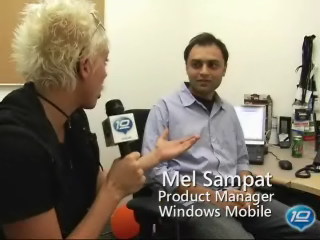
Its written by Mel Sampat of Windows Mobile team.
Also check out this cool video "Sync your Facebook contacts with Outlook (and Windows Mobile)" on 10 to find out other feature and demo of OutSync.Setup
Requirements:
Microsoft Outlook 2003 or 2007
.NET Framework v3.0 (required for Windows XP or earlier)

Step by Step
Download and install OutSync.msi.
Launch OutSync from the Start Menu. Initial startup may take 1-2 minutes, please be patient.
Login to Facebook from within OutSync and wait until contacts are matched.
[Optional] Uncheck contacts you don't want to sync.
Press the Sync button to update selected Outlook contacts from Facebook.

Tips and Tricks
Hover your mouse over a contact to view their Facebook status.
Double-click a name in the "Matched Contacts" list to open their Outlook contact card.
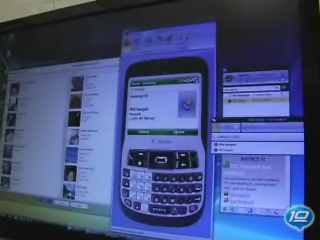
Download it from here or from the given link at the top.