Showing posts with label Windows Server 2008. Show all posts

Monday, July 12, 2010

Download Windows 7 SP1 Beta and Windows Server 2008 R2 SP1 Beta

clip_image001_thumb[3]


“Windows 7 and Windows Server 2008 R2 SP1 Beta helps keep your PCs and servers on the latest support level, provides ongoing improvements to the Windows Operating System (OS), by including previous updates delivered over Windows Update as well as continuing incremental updates to the Windows 7 and Windows Server 2008 R2 platforms based on customer and partner feedback, and is easy for organizations to deploy a single set of updates.”


In order to download and install the Windows 7 and Windows Server 2008 R2 SP1 Beta you must currently have a Release to Manufacturing (RTM) version of Windows 7 and Windows Server 2008 R2 already installed.


Please Note: This early release of Windows 7 and Windows Server 2008 R2 SP1 Beta is not available for home users. The SP1 Beta does not provide new end-user features, and installation is not supported by Microsoft.


You can register and download it from http://technet.microsoft.com/hi-in/evalcenter/ff183870.aspx


It is available as -

32-bit (x86) Edition using Windows Update


64-bit (x64) Edition using Windows Update


1.2GB ISO file with standalone update (The download is a unified ISO including 32 bit SP1 Update for Windows 7 and the 64 bit update for both Windows 7 and Windows Server 2008 R2.)


For Documentation related to Hotfixes, security updates, notable changes, FAQs , please check -

Hotfixes, Security Updates included in Windows 7 Service Pack 1 Beta and other related links


Wednesday, February 24, 2010

[Fix] Windows 7 update to support SD cards that are larger than 32 GB

Main Consider the following scenario:

  • You connect a Secure Digital (SD) card that is larger than 32 GB to a computer that is running Windows 7 or Windows Server 2008 R2.
  • You try to format the SD card, or try to check its properties.

In this scenario, the capacity of the SD card is reported incorrectly.

This issue occurs because the capacity of SD cards that are larger than 32 GB is calculated incorrectly in Windows 7 and in Windows Server 2008 R2.
Information about the capacity of SD cards is provided by the Card Specific Data (CSD) register. If the capacity of an SD card is equal to or lower than 32 GB, the "C_SIZE" (device size reserved) field in the CSD register is 12 bits long (with 10 bits high, and 2 bits low). If the capacity of an SD card is greater than 32 GB, the "C_SIZE" field in the CSD register is 22 bits long (with 6 bits high, and 16 bits low).
In Windows 7 and in Windows Server 2008 R2, the capacity of SD cards that are equal to or lower than 32 GB is calculated correctly. However, for SD cards that are larger than 32 GB, the high bits are shifted incorrectly by 6 bits instead of 16 bits. Therefore, the capacity is calculated incorrectly.

Here’s the Fix for it, an update for it -

Update for Windows 7 (KB976422)

Install this update to support Secure Digital (SD) cards that are larger than 32 GB. After you install this item, you may have to restart your computer.

Note This issue also occurs on a computer that is running Windows Vista or Windows Server 2008, Please refer to http://support.microsoft.com/?kbid=976422


Saturday, January 16, 2010

Windows 7 logon is delayed if solid color as the desktop background is set

If you have a computer running windows 7 or Windows Server 2008 R2 and you have set a solid color as the desktop background and the Desktop Window Manager Session Manager service is running then the Welcome screen is displayed for 30 seconds during the logon process. This is a big delay considering Windows 7 Quick logon.

This issue does not occur when one or more of the following conditions are true:

  • You log on to the computer by using Remote Desktop Connection.
  • The Desktop Window Manager Session Manager service is stopped or is disabled.
  • You set an image file as the desktop background.

Workaround -

Method 1
Set an image file that has solid color as the desktop background.

Method 2
Configure the value of the DelayedDesktopSwitchTimeout registry entry. This value determines the time-out interval of a session before Windows 7 or Windows Server 2008 R2 switches between sessions.

To configure the value of the DelayedDesktopSwitchTimeout registry entry, follow these steps:

  1. Click Start, type regedit in the Search programs and files box, and then press ENTER.
  2. Locate the following registry subkey:

    HKEY_LOCAL_MACHINE\SOFTWARE\Microsoft\Windows\CurrentVersion\Policies\System

  3. Double-click the DelayedDesktopSwitchTimeout registry entry.
  4. In the Value data box, type 5, and then click OK.
  5. On the File menu, click Exit.

I also tried this and indeed my Windows 7 logon process was delayed by few sec.

For more information, Check this link  http://support.microsoft.com/kb/977346  You can also request for the Hotfix from the same link if you are uncomfortable with the workaround. Read the important guidelines before applying Hotfix. Hotfix will be included in subsequent Service pack.

Friday, June 20, 2008

Windows Search 4.0

search4 Few days back the final ver. of Windows Search 4.0 was released. You can use this search engine to index a program's content and to obtain instant results when you search in a particular program. It helps you find and preview documents, e-mail messages, music files, photos, and other items on the computer. Recently Live Mesh has updated so that Index for Desktop Search works with Live Mesh folders. You should install the Windows Search 4.0 as there are lots of improvements included, they are :

Support for indexing encrypted documents of local file systems
•    Reduced affect on Microsoft Exchange when you index e-mail in online mode, and there is no local cache (.ost)
•    Support for indexing online delegate mailboxes
•    Support for client-to-client remote query to shared indexed locations
•    Improved indexing performance
•    Faster previewer updates for Windows XP
•    Per-user Group Policy settings
•    Windows software updates for Watson errors
•    Support for the new enterprise Group Policy objects.

The Windows Search 4.0 installation process automatically upgrades Windows Desktop Search (WDS) 2.6 and later versions of WDS. If you are running a version of WDS that is earlier than WDS 2.6, use the Add or Remove Programs tool to remove the earlier version before you install Windows Search 4.0.

For more details and downloading Windows Search 4.0 for various versions of Windows, please check http://support.microsoft.com/kb/940157

Windows Search 4.0 for Windows Vista x64 Edition (KB940157)

Tuesday, March 25, 2008

Windows Server 2008 IT 24-7 Robot Wallpapers, Screensavers and Buddy Icons


2k8meetserver

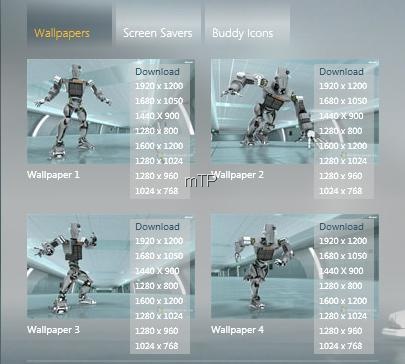
Check out Windows Server 2008 Unleashed's IT 24-7 Robot  Wallpapers in 4 Action Poses in 8 different screen resolutions.

2k8WPo

Download from here, For each screen resolution there are 4 different poses wallpaper :

1920 x 1200 = IT 24-7 Robot Pose A, B, C, D

1600 x 1200 = IT 24-7 Robot Pose A, B, C, D

1600 x 1050 = IT 24-7 Robot Pose A, B, C, D

1440 x 900 = IT 24-7 Robot Pose A, B, C, D

1280 x 1024 = IT 24-7 Robot Pose A, B, C, D

1280 x 960 = IT 24-7 Robot Pose A, B, C, D

1280 x 800 = IT 24-7 Robot Pose A, B, C, D

1024 x 768 = IT 24-7 Robot Pose A, B, C, D


Also check out the IT 24-7 Screensavers :

2k8SS

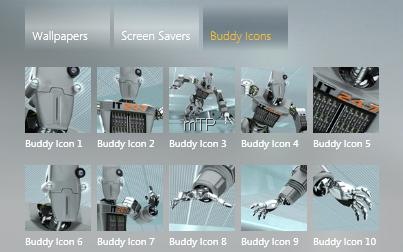
And the Buddy Icons:

2k8buddyicons

http://www.microsoft.com/windowsserver2008/en/us/serverunleashed/default.html

Here is IT 24-7 in one of the poses as shown in wallpaper

2k8WPpose1rz

Thanks Blake