Showing posts with label innovation. Show all posts

Tuesday, May 21, 2013

Sneak peek into Windows with Leap Motion

Imagine if you could do things on your computer just like you do them in real life. If natural movements replaced all those clicks and taps and drags and drops. Imagine if technology finally figured out people, instead of the other way around. That’s the Leap Motion Controller.

Do almost anything without touching anything

leapmotion

leapmotion1

Check how Leap Motion technology works seamlessly and easily with Windows. Whatever is possible in Windows 8 and Windows 7 can be done, even multi touch inputs, all this without actually touching.

“With Leap Motion technology, Windows OS is natural, easy, and fun to use. You'll navigate your desktop, browse the web, flip through photos, and do everything you do everyday in extraordinary ways —all with the wave of a hand or lift of a finger.”

More details and Pre-order from https://www.leapmotion.com/product

Thursday, December 22, 2011

Lytro - a revolution in Photography !!

Recently Lytro unveiled, the first Lytro consumer light field camera which is going to change the way Photography was defined till date.

The Lytro light field camera captures all the rays of light in a scene, providing new capabilities never before possible, such as the ability to focus a picture after it’s taken. The pocket-sized camera, which offers a powerful 8x optical zoom and f/2 lens in an iconic design, creates interactive ―living pictures that can be endlessly refocused.

Lytro cameras feature a light field sensor that collects the color, intensity, and the direction of every light ray flowing into the camera, capturing a scene in four dimensions. To process this additional information, Lytro cameras contain a light field engine that allows camera owners to refocus pictures directly on the camera.

ProductPage_Hero_Red

The Lytro camera is available in two models: 8GB ($399, 350 pictures, in Electric Blue or Graphite) and 16GB ($499, 750 pictures, in Red Hot). It is now available to order at Lytro.com and will ship in early 2012. The Lytro desktop application will be available initially for the Mac operating system;a Windows version will be available in 2012. 

Lifestyle_ElectricBlue_ThreeModels

The above video shows a Hands-on a Lytro (Courtesy CNet )

For more details please check https://www.lytro.com/

For the science Inside - https://www.lytro.com/science_inside

You can Pre-order the Camera here - https://www.lytro.com/camera

Wednesday, November 30, 2011

Nokia lights up London with an amazing 4D projection

Nokia Lumia 800 with Windows phone http://nokia.ly/uBVXxw brought deadmau5 and the world's most advanced 4D technology together and created an amazing free light show at Millbank Tower, London.

Millbank was plunged into darkness with the iconic tower acting as the canvas for a never-before-seen spectacular. Each of the 120 metre high building's 800 windows were covered with vinyl as 16 powerful projectors, stationed 300 metres away on the other side of the river, beamed 3D images onto the structure. Huge butterflies flew across the London skyline and the tower was twisted, pulsated and even fell down. Billed as the "future of live events" the spectacular show was accompanied by music from super producer deadmau5, who created exclusive remixes for the performance -- adding the 4th dimension.

Monday, November 21, 2011

Kinect Voice Search by Bing–Throw your remotes!

Check how Bing works on Kinect for Xbox 360. Who needs remotes when you are the controller.

You say it, Xbox finds it ! Dashboard update and Kinect Voice Search (available with select Xbox Live content) coming this Holiday.

(Source)

Friday, November 18, 2011

The Cotton Candy: Dual-core computer on a USB stick !

This USB stick is a dual-core computer and you can carry it around in your pocket and it connect to any screen

CottonCandy

(Image of Cotton candy prototype: http://www.fxitech.com/)

The Cotton Candy is a USB stick sized compute device allows users a single, secure point of access to all personal cloud services and apps through their favorite operating system, while delivering a consistent experience on any screen.  The device will serve as a companion to smartphones, tablets, and notebook PC and Macs, as well add smart capabilities to existing displays, TVs, set top boxes and other media that supports USB mass storage.

FXI Technologies, a hardware and software startup based in Trondheim Norway, demonstrated today the world’s first any screen, connected computing USB device.  Codenamed “Cotton Candy”, this sweet little device serves as a technology bridge between any display, the Cloud, and any input peripheral.

Technical Specifications-

  • Quad Core ARM® Mali™-400MP Graphics Processing Unit
    – Quad-core ARM Mali-400MP 720p / 1080p OpenGL ES v2.0
    – 30M Polygons, 1.2 GPixels / s
  • ARM® Cortex™-A9@1.2GHz
    – NEON extensions
    – TrustZone extensions
  • Connectivity
    Wifi 802.11 b/g/n
    Bluetooth 2.1 + EDR
  • Memory
    1GB DRAM
    Up to 64GB memory local storage (microSD)
  • Software
    – Android
    – Ubuntu
    – Virtualization client for Windows, Linux, Mac, embedded
  • Video / Audio / Media Support
    – 480p/720p/1080p decode of MPEG4-SP/H.263/H.264 AVC/MPEG-2/VC1
    – MP3, AAC, AAC+, Real Audio
    – JPG, GIF, BMP, PNG
    – Additional video, audio and image formats can be supported through 3rd party codecs
  • Connectors
    – USB 2.0 male form factor for power and connection to devices that supports USB mass storage
    – HDMI 2.1 with audio for connection to devices that does not support USB mass storage
  • Weighing only 21 grams and so energy-efficient that it can be powered from a USB port
  • Cost will be less than $200

FXI-Cotton-Candy-i2

(Image: Laptop mag)

So can we say the future version of Cotton Candy will run the ARM version of Windows 8?

Though the current prototype runs Android 2.3, Borgar told us that the ARM-based hardware can run Ubuntu Linux currently and future versions should be able to run the ARM version of Windows 8. Future versions of the device will have a USB 3 connector and faster processors.  (Check here for more details)

Also more details at FXI Technologies- http://www.fxitech.com/

Wednesday, October 05, 2011

$50 Aakash Tablet launched ($30 for Students) – Specs / comparison chart

Today the much awaited Made In India tablet was launched.Its named as Aakash (meaning Sky in Hindi). Its mainly meant for Students and will be available at subsidised rate while for masses its cost is ~$60

The Aakash has been developed by UK-based company DataWind and Indian Institute of Technology (IIT Rajasthan)

It was about an year ago the prototype was shown to the public and its cost was estimated at $35.

"Has the device lived up to the $35 price tag?" Technically, it hasn't. The HRD ministry has informed us that the manufacturing cost of the device is $37.98. The sales price of the device however is $49.98 after adding the transportation cost, warranty and other costs. The manufacturer will be able to deliver 1,00,000 units of the device to consumers at $49.98 that is approximately Rs. 2276. So the $35 claim does not hold true in real terms. “

“So, if $37.98 is the cost of the device, what will the institutes have to pay? How much is the government going to subsidize the device? The answer is 50%. An institute that wishes to make this tablet available to its student will pay Rs. 1500 or less, the ministry has informed us.”

(Source NDTV)

Complete Specs -

Name: Akaash (Not Sakshat as was originally called)
Manufacturer: Datawind
Price : Rs 2,276 (about $50)
Dimensions: 190.5x118.5x15.7mm
Screen: 7" resistive
Weighs: 350gms
Operating System: Android 2.2 (Doesn’t have Android Marketplace has Getjar instead)
Processor: 366MHz
Wi-fi enabled only
Connectivity: 2 full USB ports
Memory: 256MB RAM
Storage: 2GB Flash memory + 2GB Micro SD card (expandable to 32GB)
Battery: 2100mAh (Lasts 1.5 to 2 hours when watching HD videos & 3 hours on average use)

GPRS receiver and a SIM card slot will be provided in the lot beyond 10000 units.

When asked about this viable business opportunity -

CEO of Datawind, Suneet Singh Tuli said, it is profitable .“In fact, it is so profitable that he has decided to throw in a GPRS receiver and a SIM card slot into the device without any extra charge to the government. He will still maintain the price point of $37.98. These add-ons are not in the first lot of 10,000 units as they have already been delivered to the Ministry. But the rest of the 90,000 units will have these add ons.”

So we can see a GPRS receiver and a SIM card slot also.


Comparison Chart  (Courtesy NDTV.com)

Comparisonchart

1_052911_132900_1946

9_052911_132902_4048

You do have the option to purchase a carrying case for the device that also supports a keyboard. This will cost you an additional Rs.300 in the retail market.

For more photos please visit : NDTV.com

It will be sold as the DataWind Ubislate for Rs 2999 inclusive of taxes(~$60) from Nov.2011

ubislate

For more details, review, pics, video etc please visit these NDTV.com source links

$50 tablet: From prototype to reality

What features will the Made in India Tablet have?

GadgetGuru Video Review : The Aakash: At $50, the world's cheapest tablet

Wednesday, August 31, 2011

More HP TouchPads on the Way– HP to produce one last run of Touchpads !

HPTP

Since HP announced its TouchPads price drop as it killed WebOS , the TouchPads just disappeared from stores. And why not , these TouchPads were recently introduced for $500 and the price dropped to $99 (for 16GB model) , so who’ll not rush to buy them. So many of us were disappointed as it went Out of Stock in few Hours.

And constantly everyone was asking about TouchPad availability. Here’s the official word about it. The HP communities said:

Before I share, let me first say thank you for enthusiasm for this product. Since we announced the price drop, the number of inquiries about the product and the speed at which it disappeared from inventory has been stunning. I think it’s safe to say we were pleasantly surprised by the response.

Despite announcing an end to manufacturing webOS hardware, we have decided to produce one last run of TouchPads to meet unfulfilled demand. We don’t know exactly when these units will be available or how many we’ll get, and we can’t promise we’ll have enough for everyone. We do know that it will be at least a few weeks before you can purchase.

Some of the Updated TouchPad Availability & Pricing FAQs :

Q: When is HP getting more HP TouchPads?  One week, two weeks, a month?

A limited supply are coming and it will be a few weeks before they are available.  As we know more about how, when, and where TouchPads will be available, we will communicate that.

Q: Can you comment on whether HP had to manufacture more to meet the recent demand?

HP will be manufacturing a limited quantity of TouchPads with webOS during our fourth fiscal quarter 2011, which ends October 31.

Check out the full set of FAQs here .

BTW can anyone guess- Is HP bringing Windows 8 based Tablets in a big way by collaborating with Microsoft next year with the release of Windows 8 ?

Thursday, June 16, 2011

Google introduces Voice search, Search by Image and Instant Pages

Voice search on mobile devices has been available since long , now Google introduces Voice Search now on desktop.

It requires Google Chrome 11 or higher and a built-in or attached microphone. Just click the mic in the search bar and start talking.

It will take several days for Voice Search to be available to everyone as it start rolling out over the next week Please note Voice Search is available for US English only.

voicesearch-screenshot

The Voice Search will be useful in many scenarios, such as -

Hard-to-spell searches
Makes searching words you're not sure how to spell quicker and easier.

Longer searches
Search long queries, even really, really long queries, just by talking.

Searches that are just more fun to search out loud
Now you can ask your computer anything.

Searching without typing
Use it in the kitchen, in the garage or anytime your hands might be full.


Voice Search


Another feature being made available is Search by Image on desktop

sbyImg

Search by image on your phone was available since 2009 with Google Goggles. Now it’ll be made available on Desktops too. To search using an image, go to images.google.com and just put your picture in the search box. There are many ways to do this. You can click the camera icon in the search box and upload a photo from your computer or paste the URL of an image from the web. You can also drag and drop pictures from webpages or your computer into the search box. To search images on the web even faster with just one click, you can download the Chrome or Firefox extensions.

Search by Image
Search by Image is rolling out and will be available in most countries over the next couple of days. The Chrome and Firefox extensions are available for download now, but until Search by Image is rolled out to you, you won’t see the extension active in your browser.

Instant Pages

For searches when it can be predicted with reasonable confidence that you’ll click on the first result, Instant Pages technology will begin loading that webpage early so that by the time you click on the result, the entire webpage appears fully loaded instantly.


Instant Page

Whether you’re typing, speaking, or using an image, entering your search is only part of the process. You’re not really done searching until you have the answer you’re looking for. But waiting for webpages to load adds time to this process - the average webpage takes about five seconds to load.

With Instant Pages in Chrome, you can skip the extra seconds waiting for a page to load and get to the answers you’re looking for faster with webpages that load instantly.

(For more info please check the source Search by text, voice, or image )

Its nice to see such features being introduced as Bing emerges as Google’s strong competitor.

Saturday, May 07, 2011

Microsoft Future Home

Glimpse the technologies we may see in our homes in 5 to 10 years.

Located on Microsoft Corp.'s Redmond, Wash. campus, the Microsoft Home is a place to explore technology scenarios that could transform the way we live in next 5 to 10 years. Built as a full-scale model home in the company’s Executive Briefing Center, the Home is used to explore practical applications of cutting-edge technical trends, and exhibit futuristic prototype technologies to a variety of industry and government leaders, partners and customers.


Unfortunately The Microsoft Home is not open to the public but Channel 9 was given special permission to film a sneak-peak tour for this episode of Microsoft Campus Tours.

Steve Clayton and Flora Goldthwaite give channel9 an exclusive tour of The Microsoft Home.

The technologies illustrate how computing that works on your behalf rather than at your command could help us live healthier and more sustainable lives, manage and track a wealth of information, stay connected to the people who are important to us, make learning a fun and immersive experience, and explore the richness of the world around us.

mshome

In the Home, the physical and digital worlds come together to provide new kinds of experiences. Using sensor technology, the Home can assemble a grocery list, suggest recipes based on available items in the pantry and refrigerator, and offer step-by-step guidance.

mshm

In the teenager’s bedroom, every surface is an interactive display. The room’s design can change to match the mood, with immersive experiences, entertainment and social connections seamlessly integrated into the environment.

Ask the Home “What’s up?” and it will respond with updates, including upcoming appointment reminders, recent messages, and traffic and weather notifications. The Home also can offer assistance in the kitchen, projecting a recipe on the countertop surface and reading it aloud.

For more details check http://www.microsoft.com/presspass/presskits/mshome/Default.aspx

(source: Microsoft Campus Tours - The Microsoft Home)

Monday, December 13, 2010

Kinect Piano, Kinect Hand , finger and Skeletal tracking

Earlier I had posted about Microsoft helps in hacking Kinect to control Windows 7 where Video of Kinect giving Windows 7 Minority Report Treatment was shown.

Now many more hacks are coming up, check out these cool Kinect hacks -

A little application providing a full minority report interface.Hand detection software, along with the piano interface. The hand detection uses PCL (Point Cloud Library) from ROS (Robotic Operating System) which was developed by the folks at willow garage.

Kinect Piano


Kinect Skeletal Tracking

Kinect Skeletal tracking

Kinect Minority Report Interface -

Kinect Minority Report Interface

Here are some demos on Kinect hand and finger tracking -


Saturday, November 20, 2010

Microsoft helps in hacking Kinect to control Windows 7

Gesture-Control-005-Small

Picture Courtesy : Wolfgang Herfurtner

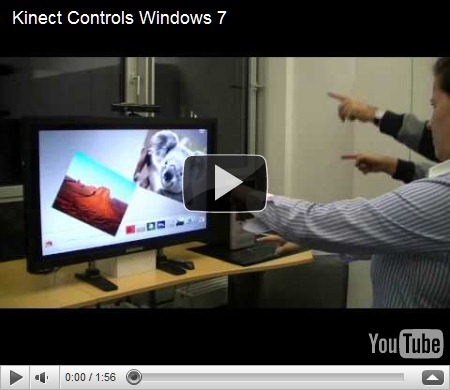
Controlling Windows 7 using Kinect is one of the coolest things Kinect can do. This was made possible by the Evoluce software team that worked hard on multitouch and gesture control solutions supported by Microsoft.


“The software is based on the latest Evoluce Multitouch Input Management driver that offer many API´s like TUIO, Flash and Java. With the multi-gesture control mode for Windows 7 a natural user interface is created that will change the way we will communicate with the PC and consumer electronics in every day life.”


Kinect Controls Windows 7

Here in the video you can see many Windows 7 programs being controlled just by hand gestures. Even two people are shown controlling separate objects.

“Multi-gesture and multi-user interaction unleashes exciting possibilities for a multitude of applications like gaming, consumer electronics, office, events, education, command and control, point of sale and medical systems. Soon you will plug in depth sensing devices like Kinect into your PC and you will start intuitive communication with your computer and other users.”

Source: Wolfgang Herfurtner  Multitouch and Gesture Computing Blog 

Also check - First Pictures of Gesture Control of Windows 7 with Depth Sensing Device

EDIT 24/11/10 -  Here’s a new Video of Kinect giving Windows 7 Minority Report Treatment

The video shows how to navigate through websites and maps, click on icons and use the on-screen keyboard.

Kinect giving Windows 7 Minority Report Treatment

Tuesday, September 28, 2010

Bing maps now as mapping option in HP Printers

If you don’t have NAV installed on your car, then one has to goto bingmaps, type in the address and then print the Directions map. Now this process has been simplified as Bing Maps will now be available as a mapping option on select HP Photosmart e-All-in-One printer. Beginning this fall, Bing Maps will be available on new HP ePrint enabled home printers worldwide, giving you access to Bing Maps’ best in class high resolution imagery for quick and easy one touch map printing… right from a printer! Read more here www.hp.com/go/InnovationSummit


1BMHP2BMHP3BMHP4BMHP


Source:    Bing Maps is coming to an HP printer near you!

Tuesday, September 21, 2010

Volkswagen Talking newspaper ad –a small step towards Microsoft’s Productivity Future Vision ?

As you flick open today’s edition of Times of India newspaper, you’ll start to hear something. It’s the Ad for the New Volkswagen Vento. They have attached a light sensor chip which starts to play the audio as soon as light falls on it.

Many scared out of their skin after hearing their newspaper talk  Smile  Anyway ,its an innovative idea for a newspaper ad.

Volkswagen could have also implemented Microsoft Tag – ‘Connecting Real Life and the Digital World ‘  to know more about it.


IMG_1729z


IMG_1730z


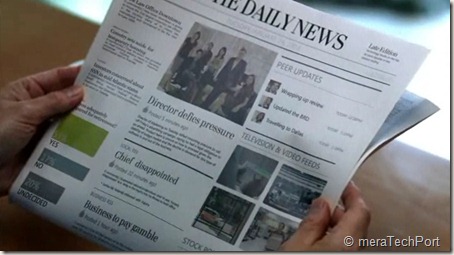
This reminds me of Microsoft’s Productivity Future Vision video where the newspaper updates with audio/video , showing the current city weather etc as you flick through the newspaper. So is this audio ad , a small step in what future has to offer?

Microsoft says -

Microsoft’s long-term productivity vision explores how we will create and share content; collaborate across teams, organizations and networks; and gain contextually relevant insights based on preferences and intent. Each scene showcases real technologies being explored by Microsoft teams and partners and others in the industry. To see current prototypes we are exploring go to www.officelabs.com.

– check the Microsoft’s Productivity Future Vision video

Get Microsoft Silverlight


toiadMSfutre

Check the video and see what the future has to offer .

Also check - The SixthSense device – that will change how we interact with the World

Sunday, August 15, 2010

In-wall USB Chargers, FM Scanners

Your Zune or your iPod needs charging and you have misplaced your charger and just for this you have to start your desktop or laptop. Imagine  how convenient it’ll be if you have In-wall USB chargers in your home/office just like any other wall power socket. But its difficult to get in-wall Chargers here in India. Else you might have to prepare wall USB Chargers with DIY kits. But no more Now !

I was pleasantly surprised when I saw a tweet from atul chitnis providing a link to in-wall USB chargers from Philips India. With good quality finish, so convenient to add them along with your regular power sockets. Such products should be well advertised, many of us do not know even if such products could be availed in India. I haven’t seen any reviews of them being published in Indian PC magazines. Thanks Atul !

What’s more, Philips India has even a in-wall FM scanner also in its product range for your kitchen or bathroom.

Here’s a direct link to Philips India catalogue for its range of Lifestyle Modular Switches. ( It’s a PDF file , size ~2MB)


USBchargercat


FMScannercat


Here are some of the snaps of the actual products, In-wall USB Chargers and FM Scanner and back of the package boxes showing their price and part no. , courtesy Atul Chitnis.


142849161usb sockets


back of the package


142849684


Back of the FM radio package


The In-wall USB Charger costs Rs. 450 (nearly $9) while FM scanner costs Rs 750 (nearly $15).

So go on and check them from Philips India dealer and hope they know about these products.


Monday, March 22, 2010

T-shirt Cannon Powered by Windows Phone

During the Scott Guthrie Keynote at MIX10 event, T-shirts (the RED ones) were given to audience in unique way. They were fired from a Cannon which was controlled by a Windows Phone App.

 CannonScott


clip_image012[25]_thumb

Check out this Fun video where a Cannon with Red T-shirt as ammunition controlled by a Windows Phone App throwing T-shirts to audience during the Scott Guthrie Keynote.He talks about  it while Dan Fernandez demos it. With some initial Network hiccups on stage, enjoy the Cannon, booming T-shirts at audience. This whole project was built by Coding4Fun team in just 2 weeks.


And what’s more the complete Project details of hardware, software  along with Source code is available at :


Thursday, March 11, 2010

New Image Composite Editor (ICE) from Microsoft Research does amazing things

For the TechFest 2010, Microsoft Research  is releasing a new version of ICE (please note it links to the MSR ICE site , which at present is having the older ver. of ICE) . The new ver is not yet made public, but soon it will be.

EDIT (190310) :The new ver of ICE is now available, Please check - http://research.microsoft.com/en-us/um/redmond/groups/ivm/ice/

Also check - ICE Is Now Synthy

Pl.note some features described in this post are because of plug-ins which may not be yet available.

ICEStructuredPanos 


newice1

“Image Composite Editor (ICE) with Multi-Image Fusion.  In the current version of ICE, it provides advanced features for panoramic stitching such as choosing the stitch’s orientation, custom projection, and selecting a 360 stitch’s mid-point, and this tool also integrates nicely as a plug-in into Windows Live Photo Gallery. Here we’ll show you some of the upcoming new features in ICE such as:

  • Structured Panoramas
  • Stitching Panoramas from Video
  • Sharp Panoramas from Blurry Videos
  • Creating Photographs from Videos
  • Multi-Image Denoising and Sharpening using Lucky Imaging ”

In the demo as we see the new ver. of Image Composite Editor (ICE) does amazing things. You’ll have to see the demo video to understand.

Wednesday, March 10, 2010

Charge your mobiles anywhere, anytime with Mechanical Chargers

ideaForge has some of the cool products under powerAlternatives range of Mobile Chargers – be it Mechanical Chargers, USB Chargers, Bike Chargers, Car chargers and the regular Wall chargers.

Among these, Mechanical Chargers seeks more attention as they offer freedom of wallsFree charging. These are hand powered mobile phone chargers.


Mechanical-Charger