Showing posts with label Office Web Apps. Show all posts

Tuesday, March 12, 2013

US college students can get 6 months of Free Office 365 and extra 20 GB of SkyDrive storage

Microsoft is offering a great offer for college students in the U.S.. College students in the U.S. can get

And all this for FREE! And if you share this offer on Facebook, can get an extra 3 months free of Office.

logo_office365logo_skydrive

To redeem the offer you can go to the link and provide your .edu email address and redeem the offer.

You and your classmates can create, collaborate and edit full Office documents from nearly anywhere. With SkyDrive, you can all make changes at the same time on the same document, in real time.

Whether you are on a PC or Mac, you can work on documents together using SkyDrive and Office.

Save your Office documents to SkyDrive and they're available to view and share from the SkyDrive app on iOS, Android, and Windows Phone.

I hope this great offer is extended to all Students across the globe and not only to U.S. Students. And if you are not a student? You can still try Office 365 Home Premium free for 1 month.

Check out the video -

Friday, September 21, 2012

SkyDrive gets Recycle Bin feature ! Excel Surveys Coming Soon !

As Microsoft has been doing constantly, it keeps improving and adding features based on users requests! The latest has been the new SkyDrive. Microsoft has been focusing on SkyDrive to make it the most versatile personal cloud storage service. One of its key audience, Students have been increasingly choosing SkyDrive. And one of the top feature requests from Students was a Recycle Bin for SkyDrive. And the request has been fulfilled and this recycle bin feature is available now on SkyDrive.com

Recycle bin

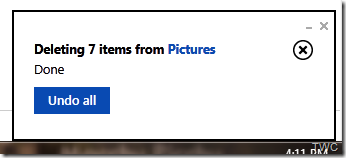
Many people, Students in particular had requested a way to recover deleted file. Though SkyDrive already keeps previous versions of Office documents automatically but the request was to recover any file deleted by accident, even by someone else, during a group project. To cater to such scenarios, recycle bin feature has been added to SkyDrive. Earlier when you deleted any file in SkyDrive, one had to acknowledge it in a warning dialog. Now when you delete files, SkyDrive informs that it has been deleted and provides ‘Undo’ action if needed. Thus making the delete action, aster and easier. And the deleted files goes to the Recycle Bin which works similar to what’s is there on the PC.

SkyDriveRecBin1


And one can access the Recycle bin from the option provided on bottom-left  of SkyDrive.

SkyDriveRecBin2

And from there you can browse your deleted items in thumbnail or details view. And can select items which can be restored to its original location.

SkyDriveRecBin3


Items in the recycle bin do not count against your SkyDrive storage limit. Deleted items are stored for at least 3 days .”If the content in your recycle bin gets large enough to exceed 10% of your storage limit (which will be pretty rare), we’ll start to delete the oldest content (after it’s been there 3 days), and will permanently remove items from the recycle bin after they have been there for 30 days (and not restored).”

Right now, the recycle bin feature is available from SkyDrive.com, and over time the recycle bin experience will make it to other SkyDrive experiences too. This feature has been rolled out and is available now.

Excel Surveys

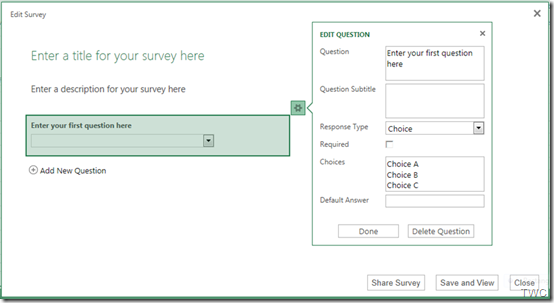
Another exciting feature that will be coming soon is the Excel Surveys. This feature too was one of the most requested feature. To create a Survey , just select “Excel survey” from the Create menu:

ExcelSurvey1

Then you’ll be taken through various steps to create the Survey with each question having several options for different types of response one wants :

ExcelSurvey2z

And when done, its just click away to share this survey with others & start collecting responses.

And unlike competing services, you can easily use the power of Excel Web App, Excel for Windows, or Excel for Mac to sort, analyze, or chart the results of your survey.

This feature will be put up soon. (Excel Survey pics courtesy Inside SkyDrive – the official SkyDrive Blog)

What do you think of these great features? Anything else you want to suggest?

Thursday, April 12, 2012

India’s AICTE chooses Microsoft for largest cloud deployment!

All India Council for Technical Education (AICTE) announced today that AICTE is deploying Microsoft Live@edu over the next three months to more than 10,000 technical colleges and institutes throughout India.The cloud deployment will expand students’ access to high-quality technical education and collaboration.

LiveatEDUcomb

The press release said -

“Live@edu is a hosted communication and collaboration service that offers email, Microsoft Office Web Apps, instant messaging and storage to AICTE’s more than 7 million students and nearly 500,000 faculty members, for a total reach of 7.5 million users — roughly double the size of the Los Angeles population — making AICTE Microsoft’s largest cloud customer ever. Live@edu is the first step in AICTE’s deployment of Microsoft cloud computing for education. AICTE also plans to deploy Microsoft Office 365 for education when it becomes available later this year, providing access to Microsoft Exchange Online email and calendar, Microsoft SharePoint Online, Microsoft Lync Online and Microsoft Office Professional as the technical infrastructure to support member colleges and institutes.”

Part of India’s Ministry of Human Resource Development, AICTE is the governing body for technical education in India, certifying and managing technical colleges and institutes in a country where the technology industry and higher education are both becoming increasingly vital to the economy.

AICTE reviewed solutions from a range of vendors, including Microsoft, IBM and Google. One of the major factors in the decision to choose Microsoft’s cloud services for education was Microsoft’s comprehensive commitment to education across all the company’s products and programmes, as well as the system’s seamless interoperation with the entire Microsoft product portfolio. The council was also impressed by Microsoft’s extensive experience in higher education and ability to deploy a system across geographically distributed locations without adding significantly to the institutions’ IT management costs or complexity.

The implementation is already underway and is being managed by Microsoft and a set of Live@edu partners. Full deployment is expected to be complete by summer 2012.

Live@edu is the leading cloud suite for education, with more than 22 million people using the service worldwide. At 7.5 million users, the AICTE deployment is the largest cloud deployment ever. Other recent Live@edu adoptions include a 700,000 cloud-based collaboration solution for the Kentucky Department of Education. The online service helps educational institutions provide email and enterprise-grade online tools to students and faculty while helping to reduce costs and simplify IT management.

Live@edu is a no-cost hosted platform for student communication and collaboration, providing industry-leading services to the global education market. Email and calendars with a 10GB inbox, 25GB of additional file storage, document sharing, instant messaging, video chat and mobile email are just part of the feature set.

Check the complete press release here.

Wednesday, February 01, 2012

Microsoft launches ‘Putting People First’ ads as users are concerned about Google’s Privacy Policy changes!

Microsoft is placing a series of ads in major newspapers offering the award winning alternatives to Google’s various services. As with the recent announcement of Google regarding Major changes to its soon to be implemented Privacy Policy, many of its users are feeling frustrated, concerned as Google is making some unpopular changes.

The changes Google announced make it harder, not easier, for people to stay in control of their own information. We take a different approach – we work to keep you safe and secure online, to give you control over your data, and to offer you the choice of saving your information on your hard drive, in the cloud, or on both.

And thus Microsoft is reminding the people about its award winning alternatives -

  • Hotmail: Join the hundreds of millions of people who enjoy not worrying about the content of their private e-mails being used to serve ads.
  • Bing: The search engine that gives you great experiences using the whole Web.
  • Office 365: The award-winning online collaboration solution for businesses who don’t want their documents and mail used to benefit advertisers.
  • Internet Explorer: The world’s most popular browser, now with Tracking Protection, offering controls over your privacy as you browse.

And to remind people, Microsoft is putting ads in the newspaper as below -

MSad

(Click on the image to get enlarged view)

(Source: Gone Google? Got Concerns? We Have Alternatives)

Here I’m providing some links for further reading -

Gmail vs Hotmail: Why Hotmail is better than Gmail

[video] How is SkyDrive better than Google Docs ?

Check out this video - Gmail Man Parody Goes Viral (VIDEO) “Your email is your business. Google makes it theirs”

Microsoft Blasts Google Chrome For 'Stealing' Your Privacy (VIDEO)

Wednesday, January 18, 2012

[video] How is SkyDrive better than Google Docs ?

skydriveOfficeIf you are a Google Docs user, try the SkyDrive and Office! They are designed for each other. I’m sure you’ll switch to SkyDrive! Check out this video to see how three students use SkyDrive and Office to work together on a great group paper.

Learn more here :

 Working Together and Sharing for School made easy !

SkyDrive and Office: 7 tips for full-powered collaboration in the cloud across PCs and Macs

Thursday, September 23, 2010

How to embed PowerPoint presentations or Excel sheets in a Blog post

Starting today, you can embed a PowerPoint presentation or Excel spreadsheet in a blog or website. With PowerPoint presentations, viewers can page through a mini version of the slides or view in full screen. For example, you might embed a PowerPoint presentation of photos from your last vacation, share slides from a lecture or talk that you enjoyed, or broadcast your knowledge of a special subject.

The following embedded PowerPoint presentation walks you through the actual steps for embedding a PowerPoint presentation or Excel file in a blog post.

EDIT : Now more related links are active -

You can also read these posts on How to embed a PowerPoint presentation on a web page and How to embed an Excel workbook on a web page for how-to steps.


You can embed Excel charts and data in a blog or website the same way. Here's an example of an embedded Body Mass Index (BMI) calculator, using the Excel Web App. Enter your own height and weight to find out your BMI:


“When you embed presentations, people can also view your presentation in full screen mode with all of your animations and transitions. And when you embed Excel spreadsheets, you can update data in Excel on the desktop, and your spreadsheet will automatically be updated on the web. You can even publish interactive PivotTables and forms “

Also check this video highlighting the new updates and also examples of embedded files .

Get Microsoft Silverlight


UPDATE:29/09/10  Added this demo video-  Embed a PowerPoint presentation on your blog

Embed a PowerPoint presentation in your blog or site


Check this

Office Web Apps reach 20 million: New features today + 7 more countries for more details

Wednesday, May 19, 2010

View, Share and Edit Office Documents from Hotmail – Cool new feature in Wave4

HMW4logo
The new version of Hotmail has come up with lots of cool features and this one is the coolest feature. The new Hotmail makes it very efficient, easy, convenient to handle Office docs.
As you create a new email, there’s an option provided ‘Office Docs’, click on it to attach any Office Document and send it.
HMDocs1z

HMDocs2z

As one receives an Office document as attachment in the new Hotmail- be it Word, Excel or PowerPoint, one can open and view it online in any popular browser – on a PC or Mac – and even if office is not installed on ones’ PC or if one has an older version. A link will be provided and one has to just open it to view. Thus a seamless integration is provided between Hotmail and the Office Web Apps.
HMDocs4z
And one more thing, if you receive any Office Document, it gets automatically listed under ‘Office docs’ folder in the Quick views.
HMDocs3QuickViewz

You can view Office documents sent to you in the new Hotmail with the same fidelity you’d get if you were viewing it using your Office Application on your PC. This means that if you’re travelling and want to be able to view that PowerPoint presentation or you’re on the road and want to read that Word document, you now get 100 percent full viewing quality even when you’re away from your PC
HMDocs5( Click on picture for enlarged view)


HMDocs5

And even you can edit it in browser itself with the Office Web Apps.
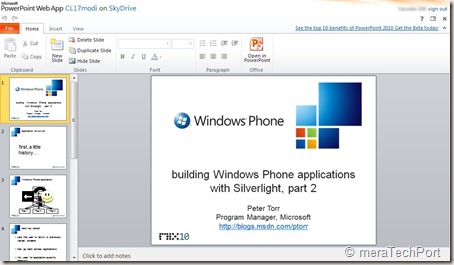
HMDocs6


HMDocs6

if you need intensive editing, you can open it in Office application on your PC. When you’re finished, any edits you made to the document on the browser will maintain formatting and any on your PC will be automatically saved back into the cloud where you can then keep the document stored privately or share it with others.
HMDocs7z


Reply with edits to an attachment
Normally, if a friend emailed you a document — like a resume — and asked you to make a few edits, you’d have to spend time downloading, saving, opening, resaving and re-attaching the document. And of course, you would need to make sure your PC had Office installed.
The new Hotmail makes this much easier by letting you edit your friend’s document and reply back — all without leaving Hotmail and even if you don’t have Office installed on your PC.
This makes it one of the coolest feature of the new Hotmail.

Share big attachments
Hotmail users can send up to 200 Office documents of up to 50 MB each — a total of 10 GB — in a single message. The people you send the documents to — regardless of whether they’re on Hotmail, Gmail, Yahoo!
Mail or otherwise — will receive links to where you’ve stored the documents in the cloud (on Windows Live SkyDrive) so that you’re not filling their inboxes. They can click on the links to view the documents in their browsers using the Office Web Apps or download the documents to their local machines — one by one or all together in a single convenient .zip file. And when you send those documents, just like with photos, a private folder is created and only the people that receive
the email will have access.

Work with others
If you’re using the new Hotmail, you can email Office documents to people on other email services (including Gmail and Yahoo! Mail) and they too can view and edit your Office documents in the cloud. Nothing is needed to view, and all they need is a Windows Live ID to edit.

Versioning
And with multiple edited versions of the same document, you can always go back to previous versions thanks to the online file management provided by Windows Live SkyDrive — another key part of transforming Hotmail and Office into a great personal productivity solution.

Collaborative editing in Real time
You can work together on a doc in real time. whatever changes being made by one can be seen instantly so one can work together in real time and stay coordinated using Messenger present within Hotmail
HMDocs8collab

Such features truly makes the new Hotmail, the most efficient email for busy people.
You can view all the above features demoed in this video -
HMvDO


Friday, May 14, 2010

Office Live Workspace account will be upgraded for free

Today I received a mail informing about the Exciting updates coming soon to Office Live Workspace. Soon it will come together with Windows Live SkyDrive to become a great way to view, create, and edit documents from virtually anywhere.

Here’s the mail screenshot -

mailss (Click for enlarge view)

When Office Live Workspace user accounts are upgraded to SkyDrive, one will get many of the same capabilities as we get today in Office Live Workspace — with some exciting new features such as the Office Web Apps.  Office Web Apps are online companions to Microsoft Word, Excel, PowerPoint, and OneNote that allow you to view and edit Office documents directly within a Web browser.

So, what you need to do to get these great new features?

“In the coming months, you’ll receive notification when your Office Live Workspace account will be upgraded, along with further details. Until then, there’s no need for you to do anything.”

Also check this blog post Your Office Live Workspace is soon upgrading to Windows Live SkyDrive  announcing the same.


Thursday, November 26, 2009

How to access Office Web Apps ?

Office Web Apps makes it so easy to create, edit and share your documents online and many of you must have already tried earlier. But there were many who didn’t had access and couldn’t try it. Now everyone can access Office Web Apps. As MS Office 2010 beta is publically  available , anyone can try office Web apps as well.

For this first download and install MS Office 2010 beta . If you haven’t tried this you should, to see various improvements to MS Office with lots of new features.

Now create a Word, Excel or PowerPoint document and save it to SkyDrive from File > Share > Save to SkyDrive, a Free 25GB  storage service on Windows Live to store your docs.

getoffwebapps1z

It will ask you to sign-in with your Windows Live ID

getoffwebapps2z

So select a folder in SkyDrive, click on ‘Save As’ type a name of your doc and save. Now your doc is save in SkyDrive.

getoffwebapps3z

Now Click File > close.

Now from your IE browser goto http://skydrive.live.com and sign-in with your Windows Live ID. Select the folder where you had saved your doc. Click on the filename and select View.

getoffwebapps4z

So when you click on View, you will be prompted to read and accept the terms of use to Join the preview program of Microsoft Office Web Apps Technical Preview /Beta. Click on Accept.

getoffwebapps5z

Now you can access Office Web Apps and can create, share, edit  your docs online though in limited way as its still in beta.

getoffwebapps7z 

getoffwebapps8z

(Click on Images to enlarge)

So try it out now, Office Web Apps has made so easy to create your Word, Excel, PowerPoint and OneNote Online.

Friday, September 18, 2009

How to access and try Microsoft Office Web Apps Tech Preview

You all must have heard about the launch of Microsoft Office Web Apps as it was announce yesterday Office comes to Windows Live – starting today . And now must be eager to try them out. If you were already in Microsoft Office 2010 Tech Preview program launched some months back then you can access the new Office Web Apps*. Else you can sign up here now.

Now if you are one of those who have earlier registered and tried Office 2010 TP then no need to wait for invitations of Office Web Apps. You can access it now and try them.

Just go to Windows Live SkyDrive http://skydrive.live.com and sign in using your Windows Live ID, the same ID with which you had registered earlier.

skydrWebApps1z

And upload a document in My Documents/ Documents or any folder if you don’t have anything in it, I have uploaded few Word Documents.

skydrWebApps2z

So as you do you will get the option ‘Join our program to create, edit, view, share Office documents online!

Click on the link and you will get this page  which tells that You’ve been selected to participate in exclusive Tech preview of the New Office Web Apps…..

skydrWebApps3z

Click on the link ‘ Start using the Office Web Apps today !’ and Accept the agreement and that’s all . Start using and trying out the New Office Web Apps.

skydrWebApps4z

And you will see the ‘New’ option which will allow you to create new documents and start working on them.

skydrWebApps5z

skydrWebApps6z

At present I’m super excited trying out PowerPoint and Excel Web Apps

skydrWebApps11z

skydrWebApps13z

skydrWebApps14z 

At present Word and OneNote are still to come for New documents, while Word Web App can only be viewed.

skydrWebApps15z

Extend your Office Experience on the Web, Work anywhere, Work together. You just need the Supporting Browser .

At present Office Web Apps are supported in the following browsers:

§ Internet Explorer 7.0

§ Internet Explorer 8.0

§ Firefox 3

§ Safari for Mac 3

So what are you waiting for, try it out now ! I’m also exploring and experiencing various Office Web Apps within my browser.

*EDIT: It seems like all are not getting access to Office Web Apps even if they had registered earlier for Office 2010 TP. As many of my friends are not able to access it. At present its just the select few and in coming days this will be increased so many more will get access. btw I can tell you that this Office Web Apps is Superb!