Showing posts with label Wave4. Show all posts

Thursday, August 19, 2010

[FIX] ‘No Internet Connection…’ Error during installation of Windows Live Essentials Beta Refresh

Yesterday an update to Windows Live Essentials 2011 beta was released. And while installing some faced problem where they were getting the error message “No Internet Connection…” and the installation failed even though they were connected to net. It was happening even using the Full offline installer.

Soon Windows Live Team swung into action and said -

“The problem you're running into is that the Windows Live Installer not only installs the language you selected, but also tries to install the Windows Live language resources that match your OS language (this avoids language switching problems later when using Windows Live client applications).  Unfortunately, the Windows Live Beta Refresh only ships in nine languages (much more coming for the final release) and when the installer tries to find these additional language resources, they are unavailable and hence the error you are seeing.  This error will occur in both the online web-version (wlsetup-web.exe) and the off-line version (wlsetup-all.exe). 

This will not be a problem in the final release as all languages will be available, but we're investigating workarounds such as temporarily changing your OS language settings and will post info here once a workaround has been confirmed to be effective.”

So one has to temporarily change their OS language to English and install.


Today they have fixed it and they have posted this -


“A fix for the "no internet connection" error you encountered has been released.  Please retry and reply if you continue to see errors in your installation experience.

Root cause is that we added functionality to the Windows Live Installer to also install language resources matching the Windows OS language and mistakenly included references to languages that are not available until the final Windows Live release.  Users installing on an OS language other than one of the nine languages released for Windows Live would have encountered this failure (English is just another language and not a unique cause of this error). 

We apologize for the negative experience and inconvenience and appreciate you using Windows Live and for providing feedback.  From this, we are updating our release tools to detect and avoid this problem in the future and investigating changing our error messages to be more helpful.”


Tuesday, August 17, 2010

New Hotmail allows forwarding messages to any other mail account for FREE- Restrictions removed

As many of you have noticed, the recently upgraded Windows Live Hotmail allows you to forward your Inbox message to any other mail account and this is available to all including free regular accounts. Earlier there were restrictions where one could forward the message only to an email address that ends with hotmail.com, msn.com , live.com or is part of Windows Live Custom Domain. And this was available only for paid accounts of Hotmail Plus.

This is what we used to see in the earlier version of regular Hotmail account -

OldHMFwd

(Click to view larger image)


Now with the New Hotmail this restriction is removed. And you get this -

newHMfwdz


To get to this option, sign-in to  your Windows Live Hotmail, Click on options > More options…  NewHMFwd1

and click on ‘Forward mail to another e-mail account’ to get the ‘Forwarding’ Window and type the mail ID to which it has to be forwarded.

NewHMFwd2

So this is great news for all Hotmail users as this option is made available for all.


Tuesday, July 06, 2010

15 Seconds Feature Videos of New Hotmail Wave4

Check out 15 seconds videos of various cool features of the New Hotmail Wave4. 

NewHotmail1

Video shows features such as -

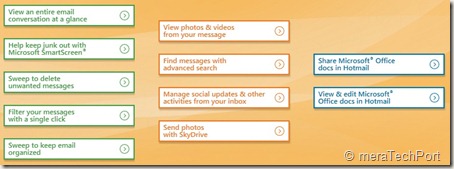
  • Sweep to keep email organized
  • View an entire email conversation at a glance
  • Sweep to delete unwanted messages
  • Filter your messages with a single click
  • Keep junk out with Microsoft SmartScreen
  • View, edit and share Microsoft Office docs in Hotmail
  • View photos and videos from your message
  • Manage social updates and other activities from your Inbox

And many more………………….


NewHotmail2


Check these 15 sec Videos Here. 


Friday, May 21, 2010

IM and SMS from the new Hotmail wave 4 integrated chat

HMW4logo
The new Hotmail Wave 4 has fully integrated the Messenger chat into the Inbox making it more efficient. With the new Hotmail you can see your Messenger friend’s status and just click on the name to start a conversation. If you right click on the friend’s name, you can do even more like send a text message to their phone, all this without leaving your Inbox.

HMW4msngr
And if  you have 2 or more conversations going on at once,a new tab gets added to the chat window thus making it easier to keep track of.
HMW4msngr1

 HMW4msngr2
You can also move the chat window anywhere on the screen and can also detach/pop-out -
HMW4msngr5

Hotmail  header  options screenshots -
HMW4msngr3

HMW4msngr4

Check the demo video of the same -
HMvDO


Innovative spam fighting technologies in the New Hotmail wave4

Hotmail's fight against spam has certainly come a long way in the last five years.

“SmartScreen is the collective name we use for a cloud-based set of technologies and algorithms that leverage machine learning and artificial intelligence to assign a “spam probability” score to each incoming message. This enables us to filter out over 98% of the spam sent to Hotmail inboxes, blocking 5.5 billion spam messages per day.  Microsoft utilizes SmartScreen across Hotmail, Microsoft Exchange, and Microsoft Forefront, bringing consumers the benefit of business-grade spam protection on Hotmail.”

In the soon to be released Hotmail Wave 4, a number of innovative new spam fighting technologies that will further reduce the amount of spam in Hotmail inbox have been added. Check out this video showing how Hotmail's latest innovations help brings the best spam fighting on the web.


“New spam-fighting innovations include:

  • More advanced IP and content filtering – Hotmail receives over 8 billion messages per day, giving us 8 billion input variables to work with and learn from. Each message we receive further informs SmartScreen’s IP filtering algorithms, making SmartScreen even “smarter.” Because Hotmail is the largest webmail service in the world, it also receives more telemetry on bad IPs than most any other service – either directly or through third parties. This gives our spam filters more opportunity to inform their artificial intelligence than pretty much any other service.
  • Spammer infrastructure detection and destruction – SmartScreen not only blocks spam, it uses “x-ray vision” to see behind the URLs contained in malicious email to the source URLs, which we can then block along with their IPs. This means spammers have to abandon their current infrastructure and pay for new places to hide out. By making it more expensive to continue their business, we are taking away their economic incentive.
  • Time-traveling filters – We can't always identify a new spammer the moment they start sending spam. But once we identify one, we can go back and clean out spam that they’ve already sent to your inbox before you ever see it. We call this a time-traveling filter, because in some sense we are able to go back in time and get rid of the spam even after it's been delivered!
  • Personalized spam filtering – One person’s junk mail is another’s desired piece of mail.  Using artificial intelligence, Hotmail personalizes spam filtering according to the individual preferences of each of the 360+ million customers who use Hotmail, reducing false positives while improving effectiveness at the same time.
  • Tagging – Hotmail tags each message you receive, whether in your inbox or in the Junk folder, to help you understand little bit more about why the message was categorized as it was. For example, if you previously marked messages from a sender as junk, we'll tell you that, or if you use a client email program with Hotmail, we'll tell you when that program has rules that result in moving a particular message to another folder. This gives you more direct control of spam management in your inbox unlike any other service.”

(Source: Inside Windows Live)


The New Hotmail and Messenger in Action Videos - wave4

The New Hotmail (wave4) in action -


The New Messenger in Action -


(Source:http://www.youtube.com/user/TheMicrosoftIndia)


Wednesday, May 19, 2010

View, Share and Edit Office Documents from Hotmail – Cool new feature in Wave4

HMW4logo
The new version of Hotmail has come up with lots of cool features and this one is the coolest feature. The new Hotmail makes it very efficient, easy, convenient to handle Office docs.
As you create a new email, there’s an option provided ‘Office Docs’, click on it to attach any Office Document and send it.
HMDocs1z

HMDocs2z

As one receives an Office document as attachment in the new Hotmail- be it Word, Excel or PowerPoint, one can open and view it online in any popular browser – on a PC or Mac – and even if office is not installed on ones’ PC or if one has an older version. A link will be provided and one has to just open it to view. Thus a seamless integration is provided between Hotmail and the Office Web Apps.
HMDocs4z
And one more thing, if you receive any Office Document, it gets automatically listed under ‘Office docs’ folder in the Quick views.
HMDocs3QuickViewz

You can view Office documents sent to you in the new Hotmail with the same fidelity you’d get if you were viewing it using your Office Application on your PC. This means that if you’re travelling and want to be able to view that PowerPoint presentation or you’re on the road and want to read that Word document, you now get 100 percent full viewing quality even when you’re away from your PC
HMDocs5( Click on picture for enlarged view)


HMDocs5

And even you can edit it in browser itself with the Office Web Apps.
HMDocs6


HMDocs6

if you need intensive editing, you can open it in Office application on your PC. When you’re finished, any edits you made to the document on the browser will maintain formatting and any on your PC will be automatically saved back into the cloud where you can then keep the document stored privately or share it with others.
HMDocs7z


Reply with edits to an attachment
Normally, if a friend emailed you a document — like a resume — and asked you to make a few edits, you’d have to spend time downloading, saving, opening, resaving and re-attaching the document. And of course, you would need to make sure your PC had Office installed.
The new Hotmail makes this much easier by letting you edit your friend’s document and reply back — all without leaving Hotmail and even if you don’t have Office installed on your PC.
This makes it one of the coolest feature of the new Hotmail.

Share big attachments
Hotmail users can send up to 200 Office documents of up to 50 MB each — a total of 10 GB — in a single message. The people you send the documents to — regardless of whether they’re on Hotmail, Gmail, Yahoo!
Mail or otherwise — will receive links to where you’ve stored the documents in the cloud (on Windows Live SkyDrive) so that you’re not filling their inboxes. They can click on the links to view the documents in their browsers using the Office Web Apps or download the documents to their local machines — one by one or all together in a single convenient .zip file. And when you send those documents, just like with photos, a private folder is created and only the people that receive
the email will have access.

Work with others
If you’re using the new Hotmail, you can email Office documents to people on other email services (including Gmail and Yahoo! Mail) and they too can view and edit your Office documents in the cloud. Nothing is needed to view, and all they need is a Windows Live ID to edit.

Versioning
And with multiple edited versions of the same document, you can always go back to previous versions thanks to the online file management provided by Windows Live SkyDrive — another key part of transforming Hotmail and Office into a great personal productivity solution.

Collaborative editing in Real time
You can work together on a doc in real time. whatever changes being made by one can be seen instantly so one can work together in real time and stay coordinated using Messenger present within Hotmail
HMDocs8collab

Such features truly makes the new Hotmail, the most efficient email for busy people.
You can view all the above features demoed in this video -
HMvDO


Hotmail Wave 4 Vs Gmail comparison Chart

HMW4logo
Vs
logo2

As you know, Microsoft has previewed today the New Hotmail with great features. The Hotmail Wave 4 provides slew of new tools and features.
Here’s a head to head comparison of some of the features between Hotmail Wave 4 and Gmail -

Hotmail Wave 4 Gmail
Lots of Storage Unlimited Expanding
Large attachment limits 50 MB 25MB
Total attachment limits per message 10 GB 25MB
Threaded Conversations Optional Always On
Integrated Web IM and SMS Messenger Chat
Mobile browse Yes Yes
Mobil sync/push Yes Yes
Forwarding Open Open
Flags or stars Yes Yes

Check the Total attachment limits per message of Hotmail Wave 4 , its 10GB compared to 25 MB of Gmail.
(Source: Hotmail Competitive Comparison Chart)


Tuesday, May 18, 2010

New themes in the New Hotmail

Apart from many cool features, the new Hotmail has also added some themes that matches with the Windows 7 themes.
HMthemesDFz

HMthemeDF2

HMthemeDF3

HMthemeDF4

HMthemeDF5
Please note that this version of Hotmail is not the final ver. and the themes may vary in the final version.


Active Views – Watch Youtube videos and other partner platform content within the new Hotmail

Hotmail has a new partner platform which will bring the content and functionality of other websites right into Inbox. Thus, it not only makes it very convenient but also saves time. This feature is called ‘Active Views’.


For example, if you get a link in your mail to a video or photo album from your friend, you can view it right within the email message itself. Hotmail recognizes the video and automatically  pulls in the description and lets you watch it right in the Hotmail. Hotmail supports this for links to many sites like YouTube, Hulu, Flickr, SmugMug, and Justin.tv.

HMActiveviewDF1z
Just click on the ‘Play video’ and it’ll start playing without you leaving the Inbox.

HMActiveviewflick1

Similarly for your online purchases, the tracking code mail can display the  real-time shipping status within Hotmail itself without going to the shipper’s web site.
HMActiveViewShip

Similarly if you receive an LinkedIn invitation. you can accept it within Hotmail.
Very convenient feature.
Check out the demo video of the Active View
HMvDO


Conversation View – What’s new in Hotmail

HMW4logo
As you know Microsoft has previewed the Next Generation of Hotmail. Here, I’ll try to take up its cool new features one by one. There are so many cool things about the New Hotmail . Let us start with Conversation View -

The New Hotmail has provided a Conversation View feature. We generally have ‘conversation’ over the email with someone or several people over an extended period of time. Like if you have sent a mail fixing an excursion with group of people, and each will be having their opinion and replying the mail. And this leave pieces of that conversation haphazardly spread throughout the inbox in individual snippets.

The new Hotmail brings all those snippets together so you can view the entire conversation in one place. You just have to Choose the option of ‘Arrange by Conversation’ , that’s all. And the Conversation History will be grouped in the same view making it easy to follow the whole conversation.

HMDFConvView

conversation_view_read
And you can switch it off as everyone does not prefer to have this. So just change it to ‘Arrange by Date’ or other option . So you can Switch the ‘Conversation View’ On or off. Also note that Gmail has conversation threading permanently on, and no way to turn it off.
Check out the Demo video of the Conversation View
HMvDO

This is one of the very cool features. Look for more cool features in my next blog post.