Showing posts with label Windows Vista. Show all posts

Tuesday, July 03, 2012

Microsoft Offers Upgrade to Windows 8 Pro for $39.99

Microsoft will be starting a great offer where one can Upgrade to Windows 8 Pro for $39.99 . “Starting at general availability, if your PC is running Windows XP, Windows Vista, or Windows 7 you will qualify to download an upgrade to Windows 8 Pro for just $39.99 in 131 markets“ . In fact you can format & do a clean install too via this Upgrade!

And then if you want you can also install Windows Media Center for free through the “add features” option within Windows 8 Pro after your upgrade.

Microsoft has simplified the upgrade experience by providing the Windows 8 upgrade assistant which will walk you through step-by-step from purchase, download to installation. You have to purchase it via Windows.com . The upgrade experience in Windows 8 will be a breeze, will be faster, a single upgrade path, and compatibility from prior versions of Windows. Provides the flexibility to download and control how you upgrade.

Microsoft in its Windows TeamBlog  blog post has provided the screenshots of basic steps involved -

The upgrade assistant will first check your PC if its ready for Windows 8 then will provide a detailed compatibility report providing anything you may want to address before or after the upgrade with outline actions to take.

upgrd1

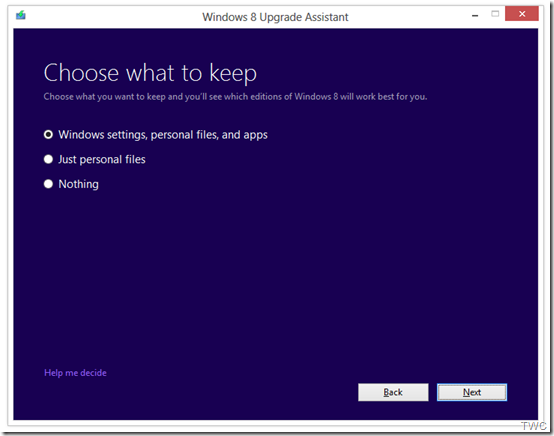
It will also inform you of any application or device compatibility issues. It will ask you what you want to keep from your current Windows installation. You will be able to upgrade from any consumer edition of Windows 7 to Windows 8 Pro.

Current Operating System

What you can keep

Windows 7

Windows settings, personal files, and apps

Windows Vista

Windows settings and personal files

Windows XP

Only personal files                             TWC

And if you want to start fresh, you can choose to bring nothing along. Or if you prefer to format your hard drive as part of your upgrade experience, you can do so as long as you boot from media and then format your hard drive from within the setup experience for installing Windows 8, not prior to it. And to add one more things for those running Windows 8 Release Preview -

“people can move from the Windows 8 Release Preview to Windows 8 Pro using the Windows 8 Upgrade Assistant and will only have the options to migrate their personal files or keep nothing at all when upgrading. People moving from the Windows 8 Release Preview will need to make sure you have an underlying license for either Windows XP, Windows Vista or Windows 7.”
upgrd2

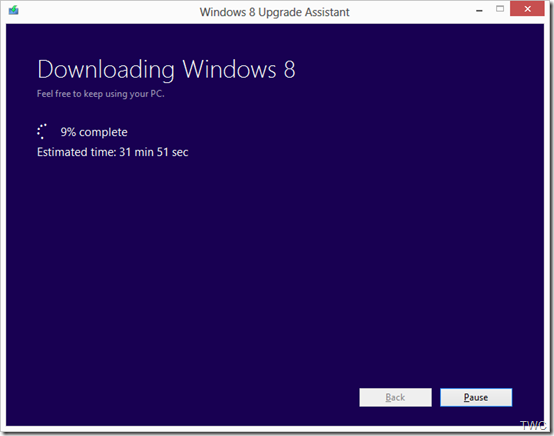
Once the Upgrade is purchased, the download begins.The Upgrade Assistant has built-in Download Manager that allows you to pause and continue your download at any time as well as a check to ensure your download completes successfully.
upgrd3

Once the download is finished, you can choose to proceed with the upgrade (“Install now”) or install later either from your desktop or by creating your own media.

upgrd4

If you choose to create your own media, you will be able to create your own bootable USB or .ISO file which can be burned onto a DVD for upgrade and backup purposes. You also have the option of purchasing a backup DVD for $15 plus shipping and handling.

upgrd5

Also a packaged DVD version of the upgrade to Windows 8 Pro will be available for $69.99 during this promotion in shops at a local stores but as said earlier online upgrade will be available in 131 markets and in 37 languages.

This upgrade will not be applicable if you are building your own PC or installing Windows 8 on a Virtual machine or a separate partition. For such scenarios there will be Windows 8 and Windows 8 Pro System Builder Products available for purchase.

This upgrade promotion for Windows 8 Pro both online and at retail will be starting at General Availability and  runs through January 31st, 2013.

As we can see Microsoft has started to share various install information so we can guess RTM is nearby and I guess Windows 8 might RTM soon in July-Aug while GA will be in Sep. Its just a guess, lets wait & see.

Wednesday, February 08, 2012

Remove Start Button from Windows 7

There have been reports that in the soon to be released version of Windows 8 ‘Consumer Preview’, there will not be any Start button. Microsoft has removed it. Unless this ver is released one cant confirm this. And we have to wait & see what’s offered instead at that place.

Anyway, if you want to just remove Start button from your Windows 7, Vista or XP, there’s a small utility which removes it. Its called Start Killer from Tordex Software. Start Killer removes the Start button from your taskbar providing additional space on taskbar. Start Killer is free to use.

startkiller1

Once you run this tool, the Start button is gone and when you exit it, the Start button reappears.

Once the Start button is removed, you can open Start Menu from Ctrl+ESC or WinKey. Start Killer places its icon on System Tray, you can exit it from there. There’s an option to remove this icon also from System Tray. In that case you can access its settings from CTRL+ALT+SHIFT+F12

Start Killer works on Windows XP/Vista/Windows 7 and it supports both 32 and 64 bit systems.

You can download it from http://www.tordex.com/startkiller/index.html

Wednesday, August 18, 2010

What’s new in Windows Live Essentials 2011 beta refresh

Microsoft released an update to  Windows Live Essentials 2011 beta .  Its being called as Windows Live Essentials 2011 beta refresh, some are also calling it as Beta2. Acting on the beta feedback and usage of millions of users, the Live team has come up with many improvements across Messenger, Photo Gallery, Movie Maker, Writer, Mail, and Family Safety.

Let us check some of the many improvements -

Messenger -

A quicker Messenger - The time it takes to sign in, and to refresh contacts and social feeds, as well as animation speed, are all faster than in previous versions of Messenger.

More efficient video chat - Messenger video chat uses 30% fewer CPU resources by offloading work to the GPU.

Facebook chat in Messenger – Messenger now connects Messenger’s ~300 million customers (who are already connected to Yahoo! Messenger and Office Communicator) to Facebook’s ~500 million customers with Facebook chat . With the new Facebook chat integration, one can chat with all the Facebook friends.

msngrFB2z


WLMfb4z


WLMfb7z

Also check step by step article on enabling Facebook Chat feature– “How to chat with your Facebook friends from Windows Live Messenger


Movie Maker-

Flickr video publishing - You can now publish videos directly from Movie Maker or Photo Gallery to Flickr too. Also notice the new logo for the SkyDrive.

WLEnew

Larger movie uploads - Movie Maker will upload higher resolution movies to SkyDrive (480x640 vs. the previous 320x480).

WLEnew1

Higher bit-rate movies - Movie Maker now supports higher quality (bit-rate) content.

Snapshot - With the new Snapshot feature in Movie Maker, you can select a single frame from a video as it appears in the preview window and add it to your movie. This allows you to quickly grab an image that you want to keep or perhaps use for your movie’s intro or closing.

WLEnew2


Mail -

Better handling of Gmail – Mail now automatically handles Gmail’s spam and trash folders properly.

Photo Album improvements- Faster Photo albums uploads. Better indication as to where you can add additional photos to your album.  Live Mail also has some UI to set of a Photo Album expires after 90 days or not.

WLEnew11

WLEnew12


Family Safety -

Faster web filtering - Family Safety web filtering is 35% faster than in the previous version.

Photo Gallery -

Better facial recognition - Photo Gallery facial recognition is improved significantly and works more quickly.

Quick previews and improved tree view - Added preview capabilities to the “Find” tab in the ribbon. So before you apply a filter (date, rating, people tags), you can hover over one of those filters and see the results instantly.


WLEnew4


WLEnew5


WLEnew6


Writer -

Better spell-checking -

Writer has significantly improved the quality of its spell-checking.

Better integration with Office -

Writer is much better at retaining all formatting when you copy and paste from Word and other Microsoft Office programs. With Office there is a lot of CSS on the clipboard that will not be needed in the blog post.  If it was pasted it would really bloat the post.  Now Writer has a good compromise of pasting what you need to keep the formatting.  Bullets/numbering, heading styles, etc. all should paste better when copying from Office into Writer.

Jumplists -

Now Live Writer has jumplists on Windows 7.  Right click on the application icon in the task bar and you will see jump list entries for recent drafts and recent posts.

WLEnew7


Open Drafts and Open recent Posts on the application menu-

WLEnew8

Post draft to blog button on the ribbon-

As many of the Writer users requested this feature, the Writer provides it. As the users said they post a draft to their blog and then directly go to the web to actually publish the post from there. So now they can do this easily.

WLEnew9


Much better theme detection -

As WordPress has changed over the years Writer has not kept up with the theme changes.  Live Writer is back on par and can accurately detect all current themes from WordPress including their new WP 3.0 theme Twenty Ten.  The theme detection changes are not exclusively for WordPress.  Writer will now work a lot better with the new custom Blogger themes also and should work better for really any blog server you use.  WYSIWYG is much better in Blogger now.Though Writer still cannot detect themes for blogs marked as private on servers such as WordPress.

Also has theme related options on ribbon.

WLEnew10


Updated spelling dictionaries-

It now have the same ones that are included with Office 2010.  Live Writer will have updates for all languages that it is released in.  It also has an updated autocorrect list that matches the English list in Office 2010.

Photo Album improvements- Faster uploads of Photo Albums.

More keyboard shortcuts-

There are more keyboard shortcuts which should soon appear as help topic on the web.


So, overall there’s an improvement in the quality of the software and over 75% of reported bugs have been fixed. As I have started using it, I can feel the improvements. One of them being the Face detection in Photo Gallery which has improved a lot, all of the products load faster, nice splash screen animation etc. And the improvements are an ongoing process and Essentials keeps improving, looking into users feedback.

And apart from English, Spanish, French, Dutch, Portuguese, Japanese, and Simplified Chinese, you can also now get the beta in Russian or German. So get the Windows Live Essentials 2011 beta refresh today and give it a try. Windows Live Essentials beta refresh requires Windows 7 or Windows Vista.

(Source: Inside Windows Live, Aaron's Live Writer Blog )


Thursday, April 01, 2010

Why Internet Explorer 9 will not run on Windows XP ?

As you know Internet Explorer9 Platform Preview for developers was announced and released during the MIX10. Also you might be knowing that its built from the ground up and it will not support Windows XP and will run on OS as Windows Vista onwards.

Many are asking why no support for Windows XP. But people forget that ever popular XP has been there since 2001. So its not as modern and modern browsers requires modern OS.

As the IE9 FAQ says :

Q.   Does Platform Preview run on Windows XP?
A.   No. Internet Explorer 9’s GPU-powered graphics take advantage of new technologies available in Windows 7 and back-ported only to Windows Vista. These technologies depend on advancements in the display driver model introduced first in Windows Vista.

Now hear it from the horse’s mouth- Dean Hachamovitch, General Manager of the Internet Explorer team answers all IE9 related queries at “Channel 9 Live at MIX10: Dean Hachamovitch on IE9”

The below video excerpt just shows the IE9 and Windows XP query ,


For the full video, where Dean along with Giorgio Sardo, Technical Evangelist for Internet Explorer (the guy who built the cool IE9 platform demo app showcasing the power of HTML5 running on a GPU) answers IE9 queries, please check - Channel 9 Live at MIX10: Dean Hachamovitch on IE9


Friday, March 12, 2010

FixWin featured on Fox8Live

FixWin is a utility for Windows 7 and Windows Vista, that repairs or fixes 50 common Windows annoyances & issues. This was developed by my MVP colleague RameshKumar for TheWindowsClub

Recently it was featured on Fox8Live.com . There is also mention of TheWindowsClub which is run by another of my MVP colleague Anand Khanse

Check the video featured on Fox8Live discussing the same -

Thursday, March 04, 2010

Official twitter channel for MS customer service to answer your Windows queries

Wintweet There are many ways in which you can get your Queries regarding Windows answered. Be it Forums, Newsgroups, via MVPs, blogs, Microsoft Support etc… But one of the easiest way for those who are online is via twitter. Yes, Microsoft Windows has an official twitter account to help you get answers to all your Windows queries. 


Twitter account says - “Official Twitter account for Microsoft Customer Service; tweeting M-F from 7:30 AM to 5:30 PM PST to help you find answers to your Windows questions!”

This was started for Support for Windows 7. But since yesterday, its going to Support Windows XP and Vista. That’s great ! And I can tell, you get prompt and quick answers , that’s my experience !


twitWinhlp


Wednesday, February 24, 2010

[Fix] Windows 7 update to support SD cards that are larger than 32 GB

Main Consider the following scenario:

  • You connect a Secure Digital (SD) card that is larger than 32 GB to a computer that is running Windows 7 or Windows Server 2008 R2.
  • You try to format the SD card, or try to check its properties.

In this scenario, the capacity of the SD card is reported incorrectly.

This issue occurs because the capacity of SD cards that are larger than 32 GB is calculated incorrectly in Windows 7 and in Windows Server 2008 R2.
Information about the capacity of SD cards is provided by the Card Specific Data (CSD) register. If the capacity of an SD card is equal to or lower than 32 GB, the "C_SIZE" (device size reserved) field in the CSD register is 12 bits long (with 10 bits high, and 2 bits low). If the capacity of an SD card is greater than 32 GB, the "C_SIZE" field in the CSD register is 22 bits long (with 6 bits high, and 16 bits low).
In Windows 7 and in Windows Server 2008 R2, the capacity of SD cards that are equal to or lower than 32 GB is calculated correctly. However, for SD cards that are larger than 32 GB, the high bits are shifted incorrectly by 6 bits instead of 16 bits. Therefore, the capacity is calculated incorrectly.

Here’s the Fix for it, an update for it -

Update for Windows 7 (KB976422)

Install this update to support Secure Digital (SD) cards that are larger than 32 GB. After you install this item, you may have to restart your computer.

Note This issue also occurs on a computer that is running Windows Vista or Windows Server 2008, Please refer to http://support.microsoft.com/?kbid=976422


Sunday, February 14, 2010

Bing4Free – Bing images wallpaper Download and Changer

There are number of methods to use beautiful images from Bing as desktop backgrounds. Some of them I had mentioned earlier in this post - Bing Homepage image Tips .

Bing4Free is another bing.com Image Downloader which makes it very easy to get the Bing images and set them as Wallpaper. But it does more than that with its various options. You can schedule it to download wallpaper from Bing.com daily or even hourly. The application also act as wallpaper changer

Its available at http://bing4free.codeplex.com/

bing4free1z


bing4free3z

Here are some of the features of Bing4Free Version 1.0 (Beta) -

>> You can download wallpaper from United States, China, Japan, Germany, United Kingdom, Australia, Canada and New Zealand (you can extend it by manually adding new country locale in config file)

>> Supports automatic change of wallpaper (you can schedule or disable it)

>> You can manually change selected wallpaper by right-click on the wallpaper thumbnail

bing4free4z

For more details, source code and the app please check  http://bing4free.codeplex.com/ 

Btw Bing is working on an option to set automatically, Bing images as desktop backgrounds.


Thursday, January 28, 2010

Free E-book: UX Guide for Windows 7 and Windows Vista

UXguide

This E-guide is about Windows User Experience Interaction Guidelines (or UX Guide) for Windows 7 and Windows Vista. These guidelines contain information on design principles, and guidelines for controls, commands, text, interaction, windows, messages, aesthetics, and the Windows environment. They help designers and developers create high-quality Windows applications with a consistent “look and feel.”

The goals for these official Windows User Experience Interaction Guidelines for Windows 7 and Windows Vista 
are to:

  • Establish a high quality and consistency baseline for all Windows-based applications
  • Answer your specific user experience questions.
  • Make your job easier!

This guide was released earlier and is updated now with following guidelines since last update:
Animations and Transitions
Setup

Download Link : Windows User Experience Interaction Guidelines

This E-book guide is in pdf format, size: 41.6 MB

Wednesday, January 06, 2010

The Original ‘GodMode’ dates back to 2007

Since a week or so there has a been a buzz, lot of talks on net, blogs, twitter about ‘GodMode’ in Windows 7. But this tip has been there since the days of Vista and has been reported on MeraWindows by RameshKumar on 28th Nov 2007. Here’s the link for the same posted on MeraWindows – [Registry Hack] VISTA - All Control Panel & Setting tasks at one place .

As you can see its been there since Vista, and of course he has not given the name ‘GodMode’. Actually you can give any name, only thing is the CLSID should be correct and same. As someone gave this the ‘Godmode’ name, maybe some avid gamer and it spread like wildfire. So a lesson – A catchy name DOES matter.

So for those who are new to this ‘GodMode’, let us see what it is-

Create a new Folder and rename it as

 GodMode.{ED7BA470-8E54-465E-825C-99712043E01C}

Actually instead of ‘GodMode’, you can give it ‘your name’, but ensure that the later string .{ED7BA470-8E54-465E-825C-99712043E01C}  should be same. That’s all, as soon as you rename it , it changes its icon -

godmodeB

And when you double click to open it ,   you can see list of almost all program tasks in it. You can click on those tasks to open it.

myGodmodez

This thing works in Windows 7 and Vista. But as some reports suggests, there might be problem with 64bit ver, so be aware of that.

And this so called ‘feature’ is not something came out of the wild. All these CLSID are present within Windows registry and only one has to carefully go through them . You can explore it by opening Registry Editor.

Just open Registry Editor by typing Regedit in Start > searchbox and opening it.

And go to  HKEY_CLASSES_ROOT\CLSID\  

and search for {ED7BA470-8E54-465E-825C-99712043E01C} and you will find it there.

Godmoderegz

So there are many such CLSIDs found there but this one is special as it does ‘All Tasks’

As you can see this ‘GodMode’ lists almost everything but not the games (Let me know if its listed as I just went through the long list, so I might have missed) , but there’s CLSID for games also present in registry

just create a folder and rename it to

Game.{ED228FDF-9EA8-4870-83b1-96b02CFE0D52}

GodMode-games

so it will change its icon and when opened will lists all games .

So its just another example of such ‘GodModes’ !

Warning: If you are not comfortable dealing with Registry, don’t do it. Any mistake while handling Registries can cause problem to Windows.

So I hope this ‘GodMode’ hype gets reduced, clearing the doubts and due credit is given to Ramesh Kumar for reporting it first in 2007 in MeraWindows Forum. Please let me know if this has been reported earlier than this. Thanks !

Tuesday, August 11, 2009

Microsoft Clubhouse Choice Award Results Announced !!

clubhouseawards Earlier I had posted about the Nominations for the Microsoft Clubhouse Choice Award and had requested all of you to vote for me as I was also nominated in one of the categories. And now its the Results Time !! Marcus- Windows Community Manger on the Community Clubhouse Spaces has posted the Winners list - Announcing the Clubhouse Choice Award Winners

I’m happy to say that I have won in my Category. Thanks to all ! Its nice to know that many of you like my blog posts and voted for me. Thanks Microsoft ! Congrats to all the Winners and all the Nominees! Here are the results-

Best Technical Direction:  Andre
Best Story:  Michael
Best Tip or Trick:  Vasudev
Outstanding Art Direction:  Technogran
Early Adopter:  Richard H.
Rising Star: Ali
Clubhouse All-Star:  Jamie

Thanks once again !!

Thursday, August 06, 2009

Windows 7 Upgrade Chart

Here’s a chart which provides at a glance view of which current version of Windows can be upgraded to which version of Windows 7. This chart was provided by Microsoft when asked by Walt Mossberg. Thanks Microsoft , thanks Walt !

Please note that, only the green box saying ‘In-place Upgrade’ will upgrade keeping all your files,settings, programs as it is been in the current Windows version.

windows7-upgrade-chart (click on the chart to get a bigger view for more details)

While the blue box of ‘Custom Install’ (clean Install) gives you the option to either completely replace your current OS or install Windows 7 on specific drive or partition you select. You can also do a custom install if you do not have any OS or if you want to do a dual/multiboot on your system.

Windows Easy Transfer and Windows 7 Upgrade advisor are useful tools that can assist the upgrade. For more details about these tools, one can check http://windows.microsoft.com/upgrade

Users of Windows XP can also check this- Step-By-Step: How To "Upgrade" from Windows XP to Windows 7 by Scott Hanselman. Where Windows XP users can migrate using these steps to Windows 7.

Tuesday, July 21, 2009

Nominations for Microsoft Clubhouse Choice Awards announced !

I am very honored and happy to say that I have been nominated for the First Microsoft Clubhouse Choice Awards. This Award has been launched in celebration of one year anniversary of the Clubhouse. Thanks to all !

clubhouseawards

The Best Clubhouse contributions in 7 categories based on ratings, views and comments have been selected.

bullets

You can click here to see the nominees and vote : (or click below) Spare couple of minutes, and vote for your favorites in each category and you will also find me as one of the nominee.

clickhere

Hurry up, Voting ends on 31st July 2009. Voting is open for all.

I have been a charter member and have been involved since beta launch of the clubhouse. My posts have been featured on Windowslive.com and also featured as ads with Hotmail. As of now number of views for my posts stands at 175152.

CHAwards1

As you know, Clubhouse  is a place where one shares stories and tips through the blog. It started with Windows Live but now have added Windows Vista and Windows 7 related posts.

For more info, official rules about the Award can be checked at Windows Community Clubhouse Spaces- Announcing the Clubhouse Choice Awards!

The blog posts from my blog LiveViews are featured in Microsoft Clubhouse.

Monday, January 12, 2009

Windows Live What’s New Sidebar Gadget

In the new Windows Live, one of the best things is the ‘What’s New’ available at Home.Live.com, where you can get the latest updates from Windows Live and other web activities of your network. This is available when you sign-in to your Home.Live.com. Just now I came to know from Angus Logan’s Blog about Windows Live What’s New Sidebar gadget for Windows Vista. Using this gadget one can get all the ‘What’s New’ feed on your desktop. You can receive real-time updates on what your friends are doing, when your friends uploaded new Photos, posted comments, posted new blog posts, what your friend has twittered and many many more web activities across multiple social networks right from your desktop.

Get the Windows Live ‘What’s New’ Sidebar gadget (Beta) from the Windows Live gallery now ! Just download and install it to get it into your Vista Sidebar.

Wnewgadget1z Wnewgadget2z

Once you sign-in with your Live ID -

Wnewgadget4z Wnewgadget3z


And if you Undock it from Sidebar, you can view full post

Wnewgadget5z

Scroll delay can be set from the options, looks nice when the updates gets scrolled. Also you can go back/forward with the buttons provided. At top it still says Windows Live Beta, so this was created when  Windows Live was in Beta, So expect to remove the Beta tag in the next ver. of the gadget which itself is in beta. The major portion of the work in preparing this gadget was done by summer interns from 2008, informs Dare Obasanjo.

Now talking of New Windows Live, If you haven’t yet checked the new Windows Live’s Home.live.com, check it now.

WLHome

The Best thing about ‘What’s New’ feed is the level of control to manage these updates:

WLHome2

WLHome3

Friday, January 02, 2009

Ultimate Windows Tweaker featured in PCWorld

Ultimate Windows Tweaker, a Tweak UI Utility for tweaking and optimizing Windows Vista written by my friend Ramesh Kumar, and distributed by Anand’s WinVistaClub has been featured in this month’s edition of PCWorld(India) . And PCWorld has also provided this on its DVD.

IMG_0831

IMG_0832

Ultimate Windows Tweaker is a Tweak UI Utility for tweaking and optimizing Windows Vista, 32-bit & 64-bit. It can simply be downloaded and used as a portable application to customize your Windows Vista to meet your requirements. With judicious tweaking, It can make your system faster, more stable, and more secure with just a few mouse clicks. The tweaker detects whether you have IE 7 or IE 8 installed and accordingly offers you the relevant tweaks only.

The utility has a simple easy-to-use user interface, with the tweaks being classified in separate heads based of their functionality. Most tweaks are hidden inside Vista, and what this tweaker does is to try and put the useful one’s in one place. It has over 130 tweaks, but is yet, just a 370 KB .exe file, which does not require an install.

For more details about Ultimate Tweaker and download link, pl. check: Ultimate Windows Tweaker - Tweak UI for Windows Vista.

tweaker