Showing posts with label Windows 7. Show all posts

Thursday, October 17, 2013

New update for Windows 7 SP1 adds option in Disk Cleanup to clean WinSxS Directory

It’s been long time since I have written Windows 7 specific article. But this cleaning up of WinSxS directory has been a long requested feature and users were trying out various methods and now that Microsoft is providing it officially, so this article. If you are one of those who are still running Windows 7 and haven’t yet moved to Windows 8, this might be useful. Last week along with many updates for Windows 7 SP1, there was one very cool update.

That update was listed as KB2852386 . This update enables you to delete outdated Windows updates by using a new option in the Disk Cleanup wizard in Windows 7 SP1.

updtlstAs many of the Windows 7 & earlier users know about the size of the WinSxS directory and always want to some how free up disk space from that directory. The WinSxS directory steadily increases in size, mainly because of the Windows Update. All previously installed versions of Windows Updates are kept in WinSxS directory even when newer version of update gets available. These are kept to allow to uninstall an update.

When a Service Pack is released, Microsoft provides with it cleanup that removes previous versions of update that gets updated by SP. But with Windows 7 SP1 which was released well over 2 years back, there hasn’t been any Service Pack, & there might not be any, Windows update files have been growing in WinSxS directory.

But this update adds a new plugin to the Disk Cleanup wizard. After you install this update, you can use the Windows Update Cleanup option to delete Windows updates that you no longer need and reduces the WinSxS directory.  This update provides some of the same functionality built into Windows 8.

NOTE:

  • The Windows Update Cleanup option is available only when the Disk Cleanup wizard detects Windows updates that you do not need on the computer.
  • To enable you to roll back to previous updates, updates are stored in the WinSxS store even after they are superseded by later updates. Therefore, after you run the Disk Cleanup wizard, you may be unable to roll back to a superseded update. If you want to roll back to a superseded update that the Disk Cleanup wizard deletes, you can manually install the update.

Please check that this update is listed as important update & may not automatically installed as its not listed as Critical Security update. You can get it from KB2852386

After installing this update run the Disk Cleanup tool

Start >All Programs > Accessories > System tools >Disk Clean Up Right click on it and Run it as Administrator

& run it selecting the operating System Drive

Just scroll through the option and you’ll see the new option

diskclnupnew

The amount of disk space you gain will differ by machine. So install this cool update and gain some disk space.

UPDATE 18 Oct 2013: After the PC restart I could see this screen… doing the clean up

dskclnuprestart

and could gain ~ 4GB from WinSxS directory.

Tuesday, May 21, 2013

Sneak peek into Windows with Leap Motion

Imagine if you could do things on your computer just like you do them in real life. If natural movements replaced all those clicks and taps and drags and drops. Imagine if technology finally figured out people, instead of the other way around. That’s the Leap Motion Controller.

Do almost anything without touching anything

leapmotion

leapmotion1

Check how Leap Motion technology works seamlessly and easily with Windows. Whatever is possible in Windows 8 and Windows 7 can be done, even multi touch inputs, all this without actually touching.

“With Leap Motion technology, Windows OS is natural, easy, and fun to use. You'll navigate your desktop, browse the web, flip through photos, and do everything you do everyday in extraordinary ways —all with the wave of a hand or lift of a finger.”

More details and Pre-order from https://www.leapmotion.com/product

Thursday, November 15, 2012

Internet Explorer 10 Release Preview for Windows 7 now available

Internet Explorer 10 was already made available on Windows 8 and now Microsoft has made available Internet Explorer 10 Release Preview for Windows 7 Service Pack1.

Now you can download Internet Explorer 10 in the language that matches your version of Windows or the English version, which works with all versions of Windows 7.

It runs on :

  • Windows 7 32-bit with Service Pack 1 (SP1) or higher

  • Windows 7 64-bit with Service Pack 1 (SP1) or higher

  • Windows Server 2008 R2 with Service Pack 1 (SP1) 64-bit

For other System Requirements check- Internet Explorer 10 Release Preview system requirements

When you install it on Windows 7, the present IE9 is removed and IE10 is installed. You can uninstall IE10 later and restore previous version of IE.

Make sure you download the right version of IE 10 according to Windows 7, 32-bit or 64-bit. If you try to install 32-bit version of IE10 on Windows 7 64-bit, you’ll get this error-

IE1032bitonWin764

After installing the right version of IE10, this is the ‘About’ screen -

IE1064onWin7About

You can check Internet Explorer 10 Release Preview: Frequently asked questions

Check what’s new here

You can download Internet Explorer 10 Release Preview for Windows 7 from here .

Tuesday, July 03, 2012

Microsoft Offers Upgrade to Windows 8 Pro for $39.99

Microsoft will be starting a great offer where one can Upgrade to Windows 8 Pro for $39.99 . “Starting at general availability, if your PC is running Windows XP, Windows Vista, or Windows 7 you will qualify to download an upgrade to Windows 8 Pro for just $39.99 in 131 markets“ . In fact you can format & do a clean install too via this Upgrade!

And then if you want you can also install Windows Media Center for free through the “add features” option within Windows 8 Pro after your upgrade.

Microsoft has simplified the upgrade experience by providing the Windows 8 upgrade assistant which will walk you through step-by-step from purchase, download to installation. You have to purchase it via Windows.com . The upgrade experience in Windows 8 will be a breeze, will be faster, a single upgrade path, and compatibility from prior versions of Windows. Provides the flexibility to download and control how you upgrade.

Microsoft in its Windows TeamBlog  blog post has provided the screenshots of basic steps involved -

The upgrade assistant will first check your PC if its ready for Windows 8 then will provide a detailed compatibility report providing anything you may want to address before or after the upgrade with outline actions to take.

upgrd1

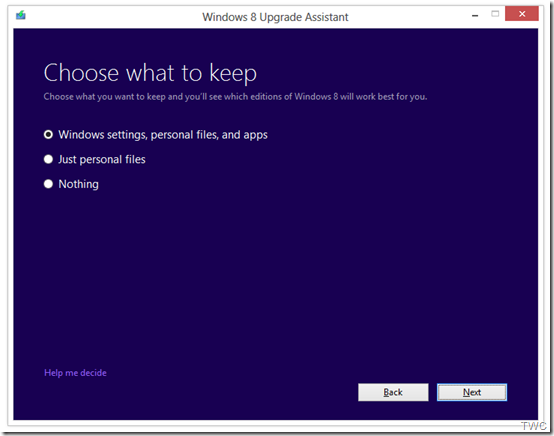
It will also inform you of any application or device compatibility issues. It will ask you what you want to keep from your current Windows installation. You will be able to upgrade from any consumer edition of Windows 7 to Windows 8 Pro.

Current Operating System

What you can keep

Windows 7

Windows settings, personal files, and apps

Windows Vista

Windows settings and personal files

Windows XP

Only personal files                             TWC

And if you want to start fresh, you can choose to bring nothing along. Or if you prefer to format your hard drive as part of your upgrade experience, you can do so as long as you boot from media and then format your hard drive from within the setup experience for installing Windows 8, not prior to it. And to add one more things for those running Windows 8 Release Preview -

“people can move from the Windows 8 Release Preview to Windows 8 Pro using the Windows 8 Upgrade Assistant and will only have the options to migrate their personal files or keep nothing at all when upgrading. People moving from the Windows 8 Release Preview will need to make sure you have an underlying license for either Windows XP, Windows Vista or Windows 7.”

upgrd2

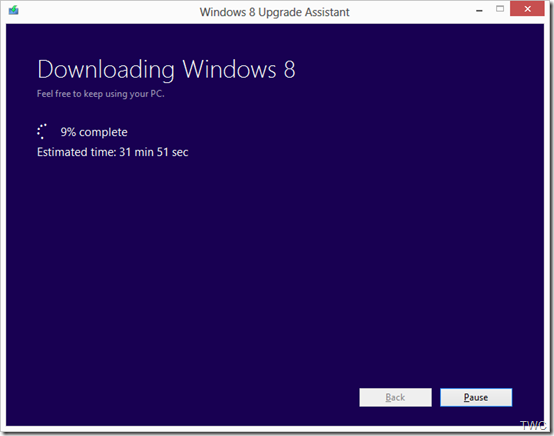
Once the Upgrade is purchased, the download begins.The Upgrade Assistant has built-in Download Manager that allows you to pause and continue your download at any time as well as a check to ensure your download completes successfully.

upgrd3

Once the download is finished, you can choose to proceed with the upgrade (“Install now”) or install later either from your desktop or by creating your own media.

upgrd4

If you choose to create your own media, you will be able to create your own bootable USB or .ISO file which can be burned onto a DVD for upgrade and backup purposes. You also have the option of purchasing a backup DVD for $15 plus shipping and handling.

upgrd5

Also a packaged DVD version of the upgrade to Windows 8 Pro will be available for $69.99 during this promotion in shops at a local stores but as said earlier online upgrade will be available in 131 markets and in 37 languages.

This upgrade will not be applicable if you are building your own PC or installing Windows 8 on a Virtual machine or a separate partition. For such scenarios there will be Windows 8 and Windows 8 Pro System Builder Products available for purchase.

This upgrade promotion for Windows 8 Pro both online and at retail will be starting at General Availability and  runs through January 31st, 2013.

As we can see Microsoft has started to share various install information so we can guess RTM is nearby and I guess Windows 8 might RTM soon in July-Aug while GA will be in Sep. Its just a guess, lets wait & see.

Wednesday, February 08, 2012

Remove Start Button from Windows 7

There have been reports that in the soon to be released version of Windows 8 ‘Consumer Preview’, there will not be any Start button. Microsoft has removed it. Unless this ver is released one cant confirm this. And we have to wait & see what’s offered instead at that place.

Anyway, if you want to just remove Start button from your Windows 7, Vista or XP, there’s a small utility which removes it. Its called Start Killer from Tordex Software. Start Killer removes the Start button from your taskbar providing additional space on taskbar. Start Killer is free to use.

startkiller1

Once you run this tool, the Start button is gone and when you exit it, the Start button reappears.

Once the Start button is removed, you can open Start Menu from Ctrl+ESC or WinKey. Start Killer places its icon on System Tray, you can exit it from there. There’s an option to remove this icon also from System Tray. In that case you can access its settings from CTRL+ALT+SHIFT+F12

Start Killer works on Windows XP/Vista/Windows 7 and it supports both 32 and 64 bit systems.

You can download it from http://www.tordex.com/startkiller/index.html

Monday, October 31, 2011

Windows Pumpkin

Windows Pumpkin for the Halloween !

WindowsPumpkin

(Source: @Windows)

Friday, October 07, 2011

PreOrder almost similar Samsung Slate that was given at //build/

Preorders are being accepted for Samsung Series 7 tablet at Microsoft Store, bit of different configuration than one provided at //build/ PC (especially sensors) but close to. More details given below-

en-US_Samsung_Series_7_Slate_CVF-00178_RM1

Samsung Series 7 Slate -  XE700T1A-A05US

Price- $1,299.00

  • DISPLAY 11.6 in SuperBright LED-backlit HD (1366 x 768)
  • PROCESSOR Intel Core i5-2467M 1.60 GHz
  • MEMORY 4 GB DDR3
  • HARD DRIVE SIZE 128 GB SSD
  • OPERATING SYSTEM Windows 7 Professional
  • PC TYPE Slate
  • OPTICAL DRIVE None
  • MEDIA DRIVE MicroSD
  • VIDEO Intel HD Graphics 3000 with shared graphics memory
  • AUDIO HD Audio Codec
  • PORTS 1 USB 2.0,Micro HDMI,Headphone output, Microphone input
  • BATTERY 4-cell lithium-polymer 5400mAh 41Wh (up to 7 hours)*
  • CAMERA 2.0 MP HD (front), 3.0 MP HD (rear)
  • WIRELESS 802.11a/b/g/n
  • BLUETOOTH Yes
  • DIMENSIONS 11.66 x 7.24 x 0.51 in (296.16 x 183.89 x 12.95 mm)
  • WEIGHT 1.98 lbs (0.89 kg)
  • COLOR Black
  • Model number: XE700T1A-A05US
    For more technical specifications, please see manufacturer's website.

The Samsung Series 7 slate gives you full PC power packed into an ultraportable device, taking mobility to a new level with a touch-focused design. This PC comes with Microsoft Signature

So I think its not provided  with the dock,the Bluetooth Keyboard to convert it into Desktop PC, and electromagnetic Digitizer. Also not with the same sensors as provided with //build/ PC.

Samsung site says- “An optional Bluetooth keyboard, docking station and mouse add further convenience and create a desktop PC experience”

The Samsung Series 7 Slate is scheduled to be available starting October 2, 2011

More similar models - http://www.samsung.com/us/news/newsRead.do?news_seq=19916

Model

XE700T1A-A01US

XE700T1A-A04US

XE700T1A-A03US

XE700T1A-A05US

Features


CPU

Intel® Core™ i5 Processor 2467M

Intel® Core™ i5 Processor 2467M

Intel® Core™ i5 Processor 2467M

Intel® Core™ i5 Processor 2467M

Operating System

Genuine Windows® 7 Home Premium (64 bit)

Genuine Windows® 7 Professional (64 bit)

Genuine Windows® 7 Home Premium (64 bit)

Genuine Windows® 7 Professional (64b)

Memory (max)

4GB DDR3 1333MHz

4GB DDR3 1333MHz

4GB DDR3 1333MHz

4GB DDR3 1333MHz

Storage (max)

64GB

64GB

128GB

128GB

Screen

11.6"

11.6"

11.6"

11.6"

Resolution

1366 x 768

1366 x 768

1366 x 768

1366 x 768

Graphics

Intel HD Graphics 3000

Intel HD Graphics 3000

Intel HD Graphics 3000

Intel HD Graphics 3000

Battery*

Up to 7 hours

Up to 7 hours

Up to 7 hours

Up to 7 hours

Wireless

802.11 b/g/n

802.11 b/g/n

802.11 b/g/n

802.11 b/g/n

Weight

2.06 lbs

2.06 lbs

2.06 lbs

2.06 lbs

MSRP

$1,099

$1,199

$1,349

$1,349

Click here for more details and Preorder > PreOrder this Samsung XE700T1A-A05US from Microsoft Stores.

Here is the Specs summary of the //Build/{PC (For more details, unboxing of //BUILD/PC check here)

samsungbld2

**Battery life varies by configuration, operating conditions, and other factors. Maximum battery capacity decreases with time and use.

(HT to http://twitter.com/buildwindows8)

Monday, October 03, 2011

Windows Live Gallery retired

If you happen to visit gallery.live.com in search of gadgets, plugins don’t get surprised with this page instead -

The Windows Live Gallery has been retired. In order to focus support on the much richer set of opportunities available for the newest version of Windows, Microsoft is no longer supporting development or uploading of new Gadgets. However, some of the most popular and highest-rated gadgets are still available on the Gadgets page of the Windows Personalization Gallery.

With Windows Developer Preview, developers can create rich app experiences where customers focus on their important tasks. Apps are at the center of the Windows Developer Preview experience and are alive with activity and vibrant content. Users immerse themselves in your full-screen app while Windows gracefully gets out of the way.

Windows Developer Preview allows you to leverage your existing skills and code assets so you can create great experiences for your customers. Gadget and web developers can now use their HTML5 and CSS3 skills to build native Windows apps. .NET Developers can use XAML, C#, and Visual Basic to build beautiful Metro-style apps. Game developers can use the power of DirectX 11.1 to build amazing, immersive gaming experiences. Driver developers benefit from increased productivity with the new, integrated Visual Studio development environment.

With Windows Developer Preview, you’re ready to imagine, build, and sell the next great app.

Hoping to see this for the better !!

(HT to TheWindowsClub )

Wednesday, September 21, 2011

Gears of War–Windows 7 Theme collection

Here are some Windows 7 Gears of War themes from Microsoft –old and new :

Gears of War 3 Launch theme

Celebrate the launch of the latest installment in the Gears of War series for Xbox 360 with this free Windows 7 theme, featuring glorious images from the savage, fantastical world of the all-new Gears of War 3.

Gears of War 3 Launch theme

Download Gears of War 3 Launch theme

Gears of War 3 Delta Squad theme

These characters are as tough as they come. Marcus Fenix, Dominic Santiago, and the other heroes of Delta Squad come to life on your Windows 7 desktop with this free theme for Gears of War 3.

Gears of War 3 Delta Squad theme

Download Gears of War 3 Delta Squad theme

Gears of War 3 theme

Prepare your desktop for battle with this free Windows 7 theme containing portraits of Marcus Fenix, Dominic Santiago and Anya Stroud from Gears of War 3.

Gears of War 3 theme

Download Gears of War 3 theme

Here are some Gears of War themes released earlier -

Gears of War 2 theme

Put Marcus Fenix and Delta Squad right on your Windows 7 desktop with these free blazing stills from the Xbox blockbuster.

Gears of War 2 theme

Download Gears of War 2 theme

Gears of War theme

Your desktop becomes a post-apocalyptic doomscape where the Delta Squad, armed with chainsaw bayonet-mounted assault rifles, battles the subterranean Locust Horde. This free theme for Windows 7 includes detailed shots of Ben Carmine, Dominic Santiago, and other Squad members from the hit Xbox and PC game, plus conceptual artwork and stills from the "Mad World" television commercials.

Gears of War theme

Download Gears of War theme

For more such cool Windows 7 themes please check http://windows.microsoft.com/en-us/windows/downloads/personalize/themes

Monday, September 19, 2011

Fruit Ninja , Nordic Landscapes - New Windows 7 Themes

Microsoft has been releasing new Windows 7 Themes from time to time. Now it has released some more including the Fruit Ninja Theme and Nordic Landscapes Theme-

Fruit Ninja theme

The curiously addictive fruit-slicing game: You've got it on your phone, you've got it for your Xbox Kinect, now get Fruit Ninja on your desktop with this free theme for Windows 7. And watch out for those bombs.

FruitNinja

Download

Nordic Landscapes theme

An icy northern light falls on ocean cliffs, mountain landscapes, alpine lakes, and other scenes of natural Nordic beauty in this free theme for Windows 7.

NordicLandscape

Download

Get more such themes from here  or  here

Saturday, July 09, 2011

Angry Birds, Age of Empires and many more New Windows 7 Themes

Here are some new Windows 7 themes from Microsoft -

For the Angry Birds fans - Angry Birds theme :

They have no wings. Their eggs have been stolen by pigs. So, yeah, they're pretty angry. Contemplate their mood at length with our free Angry Birds theme for Windows 7.

AB

Download it from here.

For the fans of Age of Empires -

The great armies of history clash in this free Windows 7 theme based on Age of Empires Online, the latest addition to the wildly popular PC game franchise.

AOE


Download AOE Windows 7 theme from here.

Kim Hana theme -

They need a home! Invite these bizarre-but-cute creatures to live on your desktop. This free Windows 7 theme from the mind of Korean artist Kim Hana is enigmatic, hypnotic, and utterly unique. Includes strumming guitar alert sounds.

KH


Download Kim Hana theme from here.

Mabinogi theme-

Based on the massively multiplayer online role-playing game (MMORPG), this free theme lights up your Windows 7 desktop with fantastical scenes of adventure and romance. Learn more about starting your fantasy life with Mabinogi.

Mabinogi

Download it from here.

Thursday, June 16, 2011

New Windows 7 Themes – Transformers 3, Castles of Europe, Paramount Pictures movies Dynamic Themes

Microsoft has again come up with some more Windows 7  themes -

Transformers 3 theme -

Celebrate the release of Michael Bay's new Paramount Pictures release Transformers 3: Dark of the Moon in 3D—starring Shia LaBeouf as Sam Witwicky—with this free theme for Windows 7.

Transformers3Theme


You can download Transformers3 themepack from here.


Castles of Europe theme -

From medieval ruins to Gothic Revival castles, this free theme for Windows 7 brings to your desktop some of Europe’s most beautiful châteaus, fortresses, and castillos. Includes architecture from Scandinavia, France, Spain, and the UK.

Castle theme

Download the Castles of Europe theme from here.

Paramount Pictures Movies dynamic theme -

Automatically receive new wallpapers from the latest Paramount Pictures movies, including Thor, True Grit, Kung Fu Panda 2, Super 8, and Transformers 3. This free Windows 7 theme updates automatically through an RSS feed.  (More info on dynamic themes.)

Paramount Dyntheme


Download this dynamic theme from here.

For more themes released earlier, please check http://windows.microsoft.com/en-us/windows/downloads/personalize/themes

Saturday, June 04, 2011

New Windows 7 Themes - Echoes of the Past, Classic Manga, Beautiful Birds

Microsoft has added some more Theme packs for Windows 7 collection as it has been doing , releasing nice themes from time to time.

They have recently released :

Echoes of the Past theme -

Time-travel back to the Age of Steam with a treasure-trove of antique images bathed in a golden Victorian light.

EchoesOfpast

Download link


Classic Manga Action theme -

Get moving with colorful action-filled Manga illustrations by Ghy Kurabayashi and Steve Sampson .

manga

Download Link.


Beautiful Birds theme - 

Let the grace and gorgeous plumage of swans, flamingoes, peacocks, and other exotic birds brighten your day with this free theme for Windows 7.

Birds

Download Link.

For more themes Please check http://windows.microsoft.com/en-us/windows/downloads/personalize/themes

Saturday, May 28, 2011

TIP : Reading PDF files in Full Screen View

Those who don’t have dedicated ebook reader device like Kindle or other device or those who don’t have books in mobi , epub formats or other mobile device formats will generally have them as PDFs. So we mainly have our e-books as PDF files and read them not only on our desktops but also on laptops and smaller screen Netbooks.

Here’s  a small tip for reading these PDFs comfortably on our PC. Let us read them in Full Screen. Open the ebook in PDF readers like Adobe Acrobat Reader or Foxit Reader. (I use Foxit because of its small footprint, lightweight and its enough for my requirements).

- For this Press F11 . Though it makes it full screen but the magnification reduces as it brings the whole page within the screen which makes it normally unreadable.

- Next press Ctrl+M , which brings ‘Zoom To’ window . Press down arrow key to change the magnification to 100 or 125%. Once its set , now the page is Full screen with 100% magnification which makes it best to read the books even on Netbooks.

- Use the Down arrow key to scroll the page, left/right arrow to jump to previous/next page.

- Using Mouse scroll wheel to scroll, right click button for Next and Left click for previous can also be more comfortable.

When the pages are in full screen mode , one cant access any other open app or Windows task bar without pressing the ESC key and thus disturbing our full screen e-book reader settings. For this Press Alt+tab to cycle through open apps and select/switch to the required app and again switch back to PDF reading using the ALt+tab  key.

Hope this small tip will make your PDFs reading more enjoyable.

Friday, May 06, 2011

FREE E-Book: Windows 7 Power Users Guide

Windows 7 Power Users Guide E-book is now completely FREE! The author of the book MVP Mike Halsey just announced it. He is also the author of Very Popular book Troubleshooting Windows 7 Inside Out from Microsoft Press.

This 180 pages Windows 7 Power User Guide has 16 chapters covers right from installation , configuring Windows 7 and many step-by-step tutorials on various tasks. The book is in full color and provides lots of screenshots.

W7PUG-Cover-free-small

From the author of Troubleshooting Windows 7 Inside Out from Microsoft Press…  A book for people who use Windows 7 at home or at work and know it can do more for them, but who don’t know how. The Windows 7 Power Users Guide contains helpful how-to’s, full colour pictures and quick tips to guide you through everything from using the Start Menu and Taskbar to backing up your documents and identifying and fixing problems

You can download the book from online book store or directly from author’s website here.

Tuesday, November 30, 2010

Why there’s no Network Activity Indicator in Windows 7 ?

If you have moved from Windows XP to Windows 7 , you might be wondering why there’s no Network Activity Indicator in Windows 7. Here’s the answer – check this small ‘But Why’ video explaining the same.

ButWhynwindicator

No Network Activity Indicator in Windows 7: But Why?


If you are missing this feature in Windows 7 and want it to see in Windows 7, there’s a utility for it, created by Igor Tolmachev.

networkactind

Network Activity Indicator for Windows 7 - displays the old 'two monitors' icon in Windows 7 that flashed blue to show network activity on the System Tray.

Earlier when it was released as XP Style indicator, I had also blogged about it. XP style Network Activity Indicator for Windows 7

Unlike the original Windows XP utility (that has individual indicators for each interface), this program indicates outgoing and incoming network packets on all available interfaces.

network-activity-indicator

You can get it from http://www.itsamples.com/network-activity-indicator.html   This utility is released as freeware.

Thursday, November 25, 2010

Holiday Lights – Official Windows 7 Themepack

Check out this new Windows 7 Themepack from Microsoft . The Windows 7 Personalization Gallery has been updated with a new themepack - Holiday Lights

Holiday Lights - Brighten your desktop with sparkling images of holiday celebration and winter wonder in this Windows 7 theme.

holidaylights


Download here.

Saturday, November 20, 2010

Microsoft helps in hacking Kinect to control Windows 7

Gesture-Control-005-Small

Picture Courtesy : Wolfgang Herfurtner

Controlling Windows 7 using Kinect is one of the coolest things Kinect can do. This was made possible by the Evoluce software team that worked hard on multitouch and gesture control solutions supported by Microsoft.


“The software is based on the latest Evoluce Multitouch Input Management driver that offer many API´s like TUIO, Flash and Java. With the multi-gesture control mode for Windows 7 a natural user interface is created that will change the way we will communicate with the PC and consumer electronics in every day life.”


Kinect Controls Windows 7

Here in the video you can see many Windows 7 programs being controlled just by hand gestures. Even two people are shown controlling separate objects.

“Multi-gesture and multi-user interaction unleashes exciting possibilities for a multitude of applications like gaming, consumer electronics, office, events, education, command and control, point of sale and medical systems. Soon you will plug in depth sensing devices like Kinect into your PC and you will start intuitive communication with your computer and other users.”

Source: Wolfgang Herfurtner  Multitouch and Gesture Computing Blog 

Also check - First Pictures of Gesture Control of Windows 7 with Depth Sensing Device

EDIT 24/11/10 -  Here’s a new Video of Kinect giving Windows 7 Minority Report Treatment

The video shows how to navigate through websites and maps, click on icons and use the on-screen keyboard.

Kinect giving Windows 7 Minority Report Treatment