Saturday, July 31, 2010

Pivot your twitterverse with TweetPivot

Tweet Pivot combines Twitter data with Microsoft Live Lab's Pivot Silverlight plugin to give you the ability to view your Twitter life in a completely new way.

At the moment you can pivot (up to) the first 1000 friends or followers of any user that hasn't protected their Tweets.

Try it -  http://tweetpivot.com/   Here’s what I see for my twitter friends

tweetpivot1


Or you can arrange them in graph view -

tweetpivot3


And you can sort them in many ways – say you want to sort them by location as Redmond , here’s what I see -


tweetpivot2


Try it now and Enjoy !! http://tweetpivot.com/ 

Here’s a small introductory video about TweetPivot -


TweetPivot Introduction


(Hattip- SteveC )


Thursday, July 29, 2010

Colors of India – New Windows 7 theme

colIndia[5] Microsoft recently released this beautiful, vibrant , colorful new theme -  ‘Colors of India’  . You can download it from -

http://download.microsoft.com/download/4/9/7/49721FA5-1937-4740-9683-0E11D9300C20/ColorsOfIndia.themepack

Download  size – 10.3 MB


colIndia2


colIndia1


UPDATE:  As many people had suggested that, it would have been nice if the places/details or some info had also been given about these pics.

You can see some info about the pic by going to ‘Desktop background’ after installing it

Just place your cursor on the individual thumbnail to see the info as tool tip.

colIndia3


The largest photo on Earth–70 billion pixels Budapest

Check this  – the largest Photo on Earth – 70 Billion Pixels. (70 gigapixels) !!

http://www.70-billion-pixels-budapest.com/index_en.html


largestphoto


Go to the above given link to view the photo, click at the bottom thumbnails to zoom into that particular image. Click on ‘Home’ at left side above slider to get back to see the entire image. Try the Aero-plane thumbnail and others to zoom in.


Some Amazing facts -

“The World Record starts with a high definition camera and and a telephoto lens with an extremely narrow field of view. Sony’s A900 25MP camera seemed an obvious choice, and Sony was pleasantly eager to provide us one. Fitted with a 400mm Minolta lens and 1,4X teleconverter, it provided a 2,4 degree horizontal FOW per frame. Our estimate was that a 60 gigapixel image (with the necessary overlaps) would require 5040 individual photographs — 24 rows with 210 frames in each, taken with a 360 degree horizontal and a 60 degree vertical FOV. Counting with 4 seconds per frame (during which the robotic head re-adjusts for the next shot), it was quite clear that the task would take a minimum of 6 hours to complete…”


“Should the final image be printed, the finished 300 DPI picture would make a poster 156 meters long and 31 meters tall. The amount of paper it would take would also cover two 10-story apartment blocks.”


“Post-processing was done on a Dell Precision T7500 Workstation with twin 4-core Xenon processors, 24GB memory and 6TB hard disk, courtesy of Microsoft Hungary. For the initial compilation we used Autopano Giga, the most complete software solution for processing high-resolution images. The task took two days to complete and resulted in a single 200 GB Autopano KRO file.”


Web display

imagepyramide_t

To display it on the web, we compiled a picture consisting of 21 individual layers, each compiled of a series of 254x254 JPGs in a so-called image pyramid. The full pyramid consists of 1.476.098 frames, of which over 1 million is situated in the deepest layer. We used the Microsoft Silverlight plugin which, with its ever-so-slight color washing, provides the best results among current technologies. More importantly, it allows users with mid-spec machines and average internet connections to experience the World Recorder panorama in its full glory.

Data storage

windows_azure_tDue to the level of projected interest and the resulting bandwidth demand, we needed a safe and stable storage solution. Windows Azure offers both in a platform based on „cloud computing”, which provides equal chance of access to all and every users from anywhere in the world. Computing and storage capacities are dynamically scalable to bandwidth demand.

Windows Azure also supports a large number of popular technologies and protocols including SOAP, REST, XML and PHP.


Also check the making of video and other interesting information in detail from that site.

Amazing !! Try to explore and zoom in to discover ! http://www.70-billion-pixels-budapest.com/


Saturday, July 24, 2010

Speech Recognition integrated into Windows Phone 7 with Microsoft TellMe

TellMe Integrates Speech Recognition in Windows Phone 7


Microsoft Tellme’s speech recognition services are deeply integrated into the upcoming release of Windows Phone 7, you can easily use your voice to simplify everyday tasks—make a call, find a business, or open an application.

In a new video demo posted here, this integration is on display, showing how you can press and hold the start key to access the voice interface. Once activated, you can direct the phone to call a friend, search for local businesses and launch applications, all using simple voice commands (“Call john,” “open app name,” etc.)

The speech recognition feature takes advantage of the largest cloud-based speech platform in the industry for near real-time recognition and enhanced accuracy.

Tellme was also recently added to the new Ford Fiesta vehicles with SYNC, as a prior web video shows on this same page. 

tellme1


(Source: Channel10 )


Friday, July 23, 2010

Bing homepage Visual Search Gallery

Couple of days back I came across a tweet from Michael Schechter, Senior Program Manager of Bing. That was very interesting, he had provided a link for Bing Homepage images searched via Bing’s Visual Search as Bing introduces its Bing homepage Visual Search gallery

http://www.bing.com/visualsearch?g=binghp


Click on the above link to get Results. Else go to  http://www.bing.com/visualsearch  and enter ‘bing homepage images’ in Search box , click on Search. And then Click on ‘Visual Search’ tab.

Bing Community has also Blogged about it.


As you know Visual Search from Bing is still in beta, it provides the search results arranged beautifully in the form of images. Already many categories of Visual Search are available. And this, Bing Home page images provides all the Bing Home Page images displayed daily on Bing.  At present it only includes images of the year 2010.


BingHPimagesz

The best thing is the kind of filters it provides. You can get to see the images filtered according to  -

Countries ,  Regional groups , Categories, Sub categories, Colors, Seasons

You can sort them by date (Oldest to newest or vice versa, or by name

Editor’s Picks and many many more.  Try it to experience it.

And you can double click on any image to get more info and also you can get Zoom in option to get a bigger image, though not the size of image we get to see daily.


BingHPimages1z


So if you have missed any image (you get to see a weeks collection on the Home Page) just do a Visual Search . Now you can go back through previous homepage images to see what you’ve missed or revisit old favorites

http://www.bing.com/visualsearch?g=binghp

If you are not getting the results, please change the location to US from the top of the Bing Home page.


Thursday, July 22, 2010

Facebook reaches 500 m subscribers ! Rahman & Deepika kickstart ‘Facebook Stories’ in India

facebook Stories


Social network Facebook has reached an important milestone- it registered its 500 millionth subscriber. There are 12 million Facebook users here in India. Each month, people in India upload more than 53 million photos, while mobile usage has increased ninefold in the past year.  


Facebook today launched Facebook Stories, an initiative dedicated to showcasing the connections made and stories shared by the 500 million people who are actively using the service every day.  Facebook Stories was announced by Mark Zuckerberg in a video addressed to all Facebook users worldwide.


To inaugurate Facebook Stories in India, award-winning producer A. R. Rahman shared his personal story about how Facebook has enabled him to connect with his fans. 

“Facebook has really made it so easy for artists to connect with their fans – making them part of our daily lives,”

To me, that’s one of the best ways I can show my fans how grateful I am for their support.”  

wrote Rahman.


Blockbuster actress Deepika Padukone also shared the impact Facebook has made on her life. 

“In the networking world Facebook literally provides a FACE to one’s identity in the world wide web,” she wrote.  “It gives me semblance of being grounded by allowing me to be constantly in touch with my friends and family and people whom I love and cherish!”   


To share your own story, go to, http://stories.facebook.com/ login with your Facebook credentials. BTW Facebook Stories is making use of Bing.


Monday, July 19, 2010

Calculate Carbon Footprint of your Computer with Joulemeter

Joulemeter from Microsoft Research is a software to estimate the power consumption of your computer. It measure the energy usage of virtual machines (VMs), servers, desktops, laptops, and even individual softwares running on a computer.

“Joulemeter estimates the energy usage of a VM, computer, or software by measuring the hardware resources (CPU, disk, memory, screen etc) being used and converting the resource usage to actual power usage based on automatically learned realistic power models.”


Joulemeter


It provides *** cubic ft of CO2 which is the carbon emission of your computer under the ‘Estimated Consumption’ stats. The software is still in alpha version.

You can download it from here.


It displays data providing information on-

Power Consumption:
BASE: The minimum power drawn by this computer when powered on.


CPU: Additional power drawn depending on CPU utilization (changes with processor workload and frequency).


Disk: Additional power drawn due to disk activity (changes with IO workload)


Monitor: Additional power drawn by the monitor (changes when monitor turned on and on laptops with LCD brightness).


Total: Total current power drawn.


Average: Average of the total power drawn over time, since installation of Joulemeter.


Power Consumption (from default model) implies that power data is estimated using generic power usage assumptions, based on typical usage for type of machine (laptop, desktop).


Power Consumption (from learned model) implies that power data is estimated using a model specific to your machine and is more accurate.

Statistics (since …) measures accumulated usage since the specified time.


Time Slept includes time when the machine was in Sleep, Hibernate, or Shutdown modes. Power usage in these modes is negligible for most machines.


Time Awake indicates the total duration for which the machine was on.


Estimated Consumption indicates the total energy used by the machine. The error in the estimate depends on the power model used. The error is low when the Power Consumption section shows “from learned model.”

Calibration- Do calibration to get more accurate power data.


Sunday, July 18, 2010

Office 2010 User Resources - product guide, getting started and more related documents

off2010


Here’s an excellent collection of Office 2010 documentation from Microsoft containing  overview, product guide, getting started, and new features of various Office 2010 products.

These documents are available in PDF, XPS, or DOCX formats.

Download the documents individually or the entire pack. The entire pack PDF format size – 39.4 MB

The pack contains documents related to -

Access 2010, Excel 2010, InfoPath 2010, Office 2010 Suite, Office Mobile 2010, Office Web Apps, OneNote 2010, Outlook 2010, PowerPoint 2010, Publisher 2010, SharePoint WorkSpace 2010, Word 2010

You can download it from here-  Office 2010 User Resources


Start using the New Rupee Symbol right now !

The growing influence of Indian economy on global market has made India  recently unveil the new Rupee Symbol. The Rupee will  join other global currencies like the US Dollar, British Pound, European Euro etc.

It looks like this -

170px-Indian_Rupee_symbol.svg


It’s a blend of Devanagari Lipi RA and Roman R. 

“Measures are already afoot to have the rupee sign declared a computer standard, meaning it could join currencies such as the pound, dollar, euro and yen on keyboards within two years.”  (source:guardian )


But if you want to start using it with your keyboard, here’s how it can be done -

Foradian Technologies has made the font for it. Just

Download the font Rupee.ttf or the new version Rupee_Foradian.ttf   (preferred )  from the above given link .

Right click and install ( using Windows 7 ) or copy the .ttf file to font folder

That’s all.

The new Rupee symbol has been mapped to the grave accent symbol – ` , or the tilde Key ~  (the key just above "tab" button in your keyboard) . Just select "Rupee" font or the Rupee_Foradian font which ever you have installed from the drop down list of your fonts and press that key . It will display the new rupee symbol.


`10000*

(*you must have the font installed to view the above posted symbol correctly)

The Symbol as used in MS Word -

RsWord


Download the Font from Foradian Technologies .

Please note that this Symbol can’t be used universally until it becomes a unicode standard , So one has to have this font (rupee.ttf or Rupee_Foradian.ttf ) on ones PC to view this. So until this gets into unicode , try this method.

Hope the Govt. of India or the concerned dept. initiates the process of getting into Unicode. Actually there’s already ‘Rs’ symbol there in the unicode, so how about replacing the old glyph with this new one , keeping the numbers same? Unicode experts will be knowing better , so it’ll take some time until this new symbol gets into Unicode.


Thursday, July 15, 2010

Facebook opens operations office in India

fblogo


Facebook today announced two key appointments to launch its operations office in Hyderabad, India, marking the company’s progress towards establishing a local team amid rapid growth in India and around the world.

Company names Kirthiga Reddy as Director of Online Operations and Manoj Varghese as Director of User Operations.


As Director of Online Operations, Kirthiga Reddy will head Facebook’s operations in India, supporting the company’s growing number of users, advertisers and developers worldwide who are capitalizing on Facebook’s global service to foster relationships with people and reach out to new customers locally and internationally.  Kirthiga and the India team will also be instrumental in developing effective relationships with government officials at the city, state, and national levels.   

Working closely with Kirthiga, Manoj Varghese, Director of User Operations, will specialize in building a world-class user support team to serve the needs of the hundreds of millions of people worldwide who actively use Facebook every day, including more than 8 million active users in India.  Both Kirthiga and Manoj will be based in Facebook’s newly opened office in Hyderabad.”

Kirthiga joins Facebook from Phoenix Technologies, where she served as Vice President and General Manager, heading Phoenix India’s team in Bangalore.


Manoj joins Facebook from Google, where he served as Director of People Operations, responsible for HR and staffing in the Japan and Asia Pacific regions.


So a very warm welcome to Facebook  for coming to India !!


Monday, July 12, 2010

Download Windows 7 SP1 Beta and Windows Server 2008 R2 SP1 Beta

clip_image001_thumb[3]


“Windows 7 and Windows Server 2008 R2 SP1 Beta helps keep your PCs and servers on the latest support level, provides ongoing improvements to the Windows Operating System (OS), by including previous updates delivered over Windows Update as well as continuing incremental updates to the Windows 7 and Windows Server 2008 R2 platforms based on customer and partner feedback, and is easy for organizations to deploy a single set of updates.”


In order to download and install the Windows 7 and Windows Server 2008 R2 SP1 Beta you must currently have a Release to Manufacturing (RTM) version of Windows 7 and Windows Server 2008 R2 already installed.


Please Note: This early release of Windows 7 and Windows Server 2008 R2 SP1 Beta is not available for home users. The SP1 Beta does not provide new end-user features, and installation is not supported by Microsoft.


You can register and download it from http://technet.microsoft.com/hi-in/evalcenter/ff183870.aspx


It is available as -

32-bit (x86) Edition using Windows Update


64-bit (x64) Edition using Windows Update


1.2GB ISO file with standalone update (The download is a unified ISO including 32 bit SP1 Update for Windows 7 and the 64 bit update for both Windows 7 and Windows Server 2008 R2.)


For Documentation related to Hotfixes, security updates, notable changes, FAQs , please check -

Hotfixes, Security Updates included in Windows 7 Service Pack 1 Beta and other related links


Hotfixes, Security Updates included in Windows 7 Service Pack 1 Beta and other related links


clip_image001


clip_image002


Check out various documentation for Windows 7 and Windows Server 2008 R2 Service Pack 1 Beta (KB976932). This includes -

  • Hotfixes and Security Updates included in Windows 7 and Windows Server 2008 R2 Service Pack 1 Beta
  • Windows 7 and Windows Server 2008 R2 SP1 Beta Notable Changes
  • Windows 7 and Windows Server 2008 R2 SP1 Beta Test Guidance


These can be downloaded from here .

Also check Windows 7 and Windows Server 2008 R2 Service Pack 1 Beta Frequently Asked Questions FAQs


Friday, July 09, 2010

Ask Mark Russinovich Anything... LIVE! Recorded Video

Check out this video where Charles Torre  of Channel 9 sat down with Mark Russinovich to answer live questions from the Tweetosphere and studio audience.

Recorded live as part of Channel 9 Live at Tech.Ed North America 2010.


ch9Mark


Ch9Live at Tech.Ed NA 2010 - Ask Mark Russinovich Anything... LIVE!


Wednesday, July 07, 2010

7 Wonders of Windows 7 website

Check out this new interactive Windows 7 website- 7 Wonders of Windows 7 - very nice way to learn about Windows 7 .

http://www.7wondersofwindows7.com/


7wonders


(Hat Tip- TheWindowsClub )


Tuesday, July 06, 2010

Blogger gets its native usage tracker

Blogger now has its own usage tracker which will provide the analytics. The dashboard now has a ‘Stats’ tab. The stats are almost real-time as one can track the usage by day, week, month, all time or Now.

One can also get number of Views a post gets, traffic sources, Pageviews by countries, by Browsers and by Operating System.

At present one can access this new feature by logging into dashboard at http://draft.blogger.com/


bloggerstats1z


bloggerstats2z


bloggerstats5z


15 Seconds Feature Videos of New Hotmail Wave4

Check out 15 seconds videos of various cool features of the New Hotmail Wave4. 

NewHotmail1

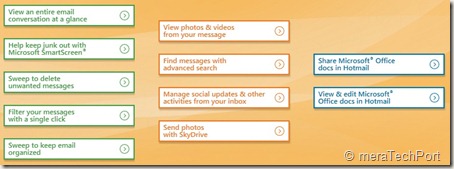
Video shows features such as -

  • Sweep to keep email organized
  • View an entire email conversation at a glance
  • Sweep to delete unwanted messages
  • Filter your messages with a single click
  • Keep junk out with Microsoft SmartScreen
  • View, edit and share Microsoft Office docs in Hotmail
  • View photos and videos from your message
  • Manage social updates and other activities from your Inbox

And many more………………….


NewHotmail2


Check these 15 sec Videos Here


Tweet