Sunday, October 31, 2010

A new site, new demo videos for Windows Live Messenger 2011

WLM2011

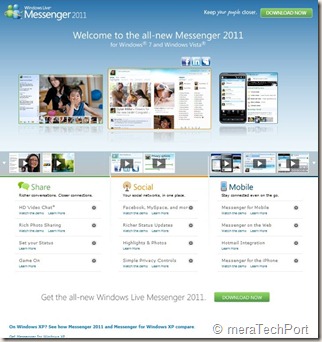
A new cool site design , nice looks and lots of demo videos for Windows Live Messenger 2011 for Windows 7 and Windows Vista.


WLM2011site1

Check the site -  http://www.microsoft.com/windows/windowslive/see-it-in-action/messenger2011demo/ 


WLM2011site


Also check the comparison chart  -

See how Messenger 2011 and Messenger for Windows XP compare.

XPWin7cmpremsngr

Free ebook from Microsoft Press: Programming Windows Phone 7 by Charles Petzold

Earlier I had blogged about Free Preview Chapters - Programming Windows Phone 7 Series (dated Mar16, 2010) and Free ebook: Programming Windows Phone 7 (Special Excerpt 2) by Charles Petzold (dated Aug2 , 2010) .

WP7charlesPetzold

Now the book is ready ! 24 chapters, about 1,000 pages ! Congratulations and thanks to Charles !

This book is a gift from the Windows Phone 7 team at Microsoft to the programming community. The book provides the basics of writing applications for Windows Phone 7 using the C# programming language with the Silverlight and XNA 2D frameworks.


You can download a PDF here (38.6 MB).

And you can download the ebook’s sample code here (5.03 MB).

(UPDATE 03/11/2010 : Now the Book is  available on Microsoft Download Center with reduced download size – 12.5MB)

Yes, Programming Windows Phone 7 is truly a free download, but for those readers who still love paper—this book will also be available (for sale) divided into two fully-indexed print editions: Microsoft Silverlight Programming for Windows Phone 7 and Microsoft XNA Framework Programming for Windows Phone 7, ready for order in December 2010.

Part I   The Basics

1   Hello, Windows Phone 7

2   Getting Oriented

3   An Introduction to Touch

4   Bitmaps, Also Known as Textures

5   Sensors and Services

6   Issues in Application Architecture

Part II Silverlight

7   XAML Power and Limitations

8   Elements and Properties

9   The Intricacies of Layout

10   The App Bar and Controls

11   Dependency Properties

12   Data Bindings

13   Vector Graphics

14   Raster Graphics

15   Animations

16   The Two Templates

17   Items Controls

18   Pivot and Panorama

Part III   XNA

19   Principles of Movement

20   Textures and Sprites

21   Dynamic Textures

22   From Gestures to Transforms

23   Touch and Play

24   Tilt and Play

For the Full detailed Table of Contents and other details , please check the source.

For other such Free Ebook offerings , please check here.

Friday, October 29, 2010

Harrison Hoffman- Product Manager,Windows Live in conversation with A&M at Microsoft Talk

scaled500


Check Episode 16 of Microsoft Talk, it’s a  Windows Live Essentials 2011 Launch Special with Harrison Hoffman in conversation with Abhishek Baxi and Manan at Microsoft Talk


Harrison Hoffman, Product Manager in the Windows Live group at Microsoft, was also the co-founder of the popular Windows Live blog – LiveSide.net . He talks about recently released Windows Live Essentials 2011 final ver. Check out the Podcast and you may walk away with cool goodies.

Tuesday, October 26, 2010

Beware! Fake Microsoft Security Essentials software on the loose

A new trojan that is disguising itself as Microsoft’s Antimalware program Microsoft Security Essentials is on the prowl. This imposter is known in the technical world of antimalware combat as “Win32/FakePAV” .


FakePAV is a rogue that displays messages that imitate Microsoft Security Essentials threat reports in order to entice the user into downloading and paying for a rogue security scanner. The rogue persistently terminates numerous processes such as Windows Registry Editor, Internet Explorer, Windows Restore and other utilities and applications.


This fake software is distributed by a tactic commonly described as a “drive-by download” and shows up as a hotfix.exe or as an mstsc.exe file. Additionally, after the fake Microsoft Security Essentials software reports it cannot clean the claimed malware infection, it offers to install additional antimalware rogues (with names such as AntiSpySafeguard, Major Defense Kit, Peak Protection, Pest Detector and Red Cross). Lastly, this fake program will try to scare you into purchasing a product.


Here’s a detailed look at FakePAV. While different FakePAV distributions have different payloads, here is how the current one imitating Microsoft Security Essentials works:

1. It modifies the system so that it runs when Windows starts

2. When you go to execute something it’s watching for, it opens the alert window claiming the program is infected and blocks it from running.

MSEfake1

3. You can expand it out for “additional details”

MSEfake2

4. If you click “Clean computer” or “Apply actions”, it simulates an attempt to clean the claimed infection

5. You’ll then get an ‘unable to clean’ alert and be instructed to click ‘Scan Online’


MSEfake3

6. Clicking this, a list of antimalware programs appears, including several fake removal tools, and you’d need to click Start Scan

7. Once the simulated scan completes, it will claim a solution was found and list products that can ‘clean’ the system (the listed products are fake removal tools).


MSEfake4

8. Clicking ‘Free install’ on one of those downloads will download its installer and start installing

MSEfake5

This software is a fake. Do not be fooled by this scam. If you have not already updated your security software please do so. Making sure your security software is up-to-date and has the latest definitions is the best way to prevent infections. 

If you believe your machine has become infected, we encourage you to use Microsoft Security Essentials to check your PC for malware and to help remove them from your system. You can also find out how to get virus-related assistance at no charge from Microsoft here: http://www.microsoft.com/protect/support/default.mspx.

For more information on this FakePAV please visit the encyclopedia entry at http://www.microsoft.com/security/portal/Threat/Encyclopedia/Entry.aspx?Name=Rogue%3aWin32%2fFakePAV. It contains a lot of information that may help answer questions about this rogue.

And remember: Microsoft does not charge for Microsoft Security Essentials. You can find the legitimate version of Microsoft Security Essentials at http://www.microsoft.com/security_essentials. Microsoft Security Essentials can be downloaded and used at no cost by users running genuine Windows.

(Source: Windows Security Blog )

Saturday, October 23, 2010

Show your excitement for the new Windows Phone with blog badges, twibbon

Windows Phone 7 is already creating lot of buzz around and everyone is excited  as its getting appreciation from many. Even in places where its launch dates are not yet announced are excited. All wants to lay their hands on Windows Phone 7. You can show your Windows Phone excitement, love with blog badges available in 3 different sizes.

WMPblogbadge

Just go to http://www.windowsphone7.com/blogbadge/  Choose a size, copy the provided code , and paste it where you would like the badge to appear in your web page or blog. Although it shows the availability date for US, I’m putting it on my blog ,as I don’t know when they will be available in India.

(Thanks to @brandonleblanc for getting corrected the code), now I can show my excitement and display the badge though in India , we will not be getting the Windows Phone so soon)

You can also be part of the buzz by adding a Twibbon to your Facebook and Twitter profile pictures. You can get the twibbon at http://twibbon.com/windowsphone

WMPtwibbon

Friday, October 22, 2010

You are the Controller–Kinect Ads

Microsoft launched a Kinect advertising campaign aimed to show people how the new controller-free entertainment experience can transform their living room.

“With Kinect, there is something for everyone. It transforms ordinary entertainment into an extraordinary experience. Kinect lets you control games, movies, music and more with the wave of your hand or the sound of your voice. With Kinect, you are the controller.”


For more details, please check – Microsoft Presspass

Thursday, October 21, 2010

Happy first anniversary, Windows 7 !!

Windows 7 turns one on Oct. 22. In the space of a year, more than 240 million licenses of Windows 7 have been sold. Windows 7 is the fastest selling operating system in history.

IMG_1341z


Here are some interesting stats -

Windows 7 at One Year


People are four times more likely to recommend Windows 7 to a colleague or friend than they were a year ago, and in its first five months, the number of IT professionals recommending Windows 7 surpassed those recommending Windows XP.


In addition, as Windows 7 marks its one-year anniversary, it:


•    Has sold more than 240 million licenses worldwide


•    Has a customer satisfaction rate of 94%*


•    Is on more than 1.2 billion Windows PCs worldwide


•    Is on 93 percent of new consumer PCs, as of September


•    Has over 17 percent of the global operating system share**


•    Has inspired nearly 90 percent of companies to upgrade or start upgrading to the new OS


•    On average, can save companies US$140 per PC per year, and a 131 percent return on investment in the first year

* Lifehacker
** Net Applications, October 1, 2010


A big Congrats to Windows 7 Team !!


For more details on Windows 7 celebration , please check - Celebrating Windows 7 at 1 Year – More than 240 Million Licenses Sold

Windows 7 Birthday Bash: ‘It’s a Year to Celebrate’

Windows Phone 7 Cloud Integration and other features reviewed at AnandTech – One of the Best massive reviews on Windows Phone 7

We here in India can just read all the reviews now being made available on Windows Phone 7 as the sale of Windows Phone 7 begins in some parts of the World. There are many massive reviews being made available at various sites. I came across one of them at Anandtech – reviewed by Anand Lal Shimpi & Brian Klug .

windowsphone7cloud


This review is one of the best I have come across, filled with tons of big, clear screenshots with all the details. They have reviewed using the HTC Surround, Samsung Focus, and LG Quantum 7.

HTCSurround-9586_575px

(Screenshots courtesy – Anandtech )

Some of the review snippets from the site -

Windows Phone 7 is a significant departure from anything Microsoft has ever done in the past, from a UI standpoint that is. In my opinion it’s more beautiful than anything else on the market today - including Apple’s iOS.


 Flipping through pages upon pages of square app icons just isn’t the most efficient way to do it. ………… When you unlock your iPhone or Android phone you’re dropped into what’s effectively your smartphone desktop. In iOS, that’s just a collection of app icons with a 4-icon dock at the bottom. Android gives you more of a modern desktop with icons and optional widgets. Windows Phone 7 effectively drops you into the first layer of a start menu - that’s your desktop.


Embarrassingly Smooth -  A more accurate codename for the UI would have to be Liquid - there’s just no other way to describe the interface other than fluid.


Check the complete massive, one of the best reviews, surely you will have to take some time to read the complete review.

The Windows Phone 7 Review at AnandTech

(Tip: Click on the ‘Print this article’ and get the complete review in one shot)

Also Read what others are saying about Windows Phone 7 in this collection of selected top news stories

Windows Phone 7 sales begins- Jourdan Templeton is the proud owner of first Windows Phone 7

The very first Windows Phone 7 handsets went on sale in New Zealand with more countries in Europe and Asia Pacific like Australia, Belgium, France, Hong Kong, Ireland, Italy, New Zealand, Singapore, Spain and the UK joining the mix tomorrow. In the U.S. its November 8th.

Congrats to Jourdan Templeton on his purchase of the first Windows Phone 7!

alt


Some of the early reviews of Windows Phone 7 are starting to come in and many have recognized the unique approach to design and integration of key Microsoft services like Bing, Xbox LIVE and Zune are great reasons to consider purchasing a new Windows Phone.

Read what others are saying about Windows Phone 7 in this collection of selected top news stories.

Windows Phone 7 apps truly extend the phone’s new design and ability to integrate and organize the things that matter. Hundreds of app and games have posted to Windows Phone Marketplace and Zune over the past few days, on pace to deliver more than 1000 by the time phones become available in the U.S. And that’s just the beginning.

(Source: The Windows Phone 7 Launch Has Started )

Wednesday, October 20, 2010

Zune Community at Microsoft Answers launched

Microsoft has just launched a new community for Zune at Microsoft Answers. Microsoft Answers is a community-based support site where you can ask and answer questions, or just browse other's answers.

Zuneanswers

With Windows Phone 7 being launched which has the Zune , the Zune Answers has a complete section for it.

Check Zune Answers community site.

Office 365 FAQs – Everything you wanted to know about Microsoft Office 365 beta

logo_Office365_hero

General

Q: What is Office 365?
A: Microsoft Office 365 delivers the power of cloud productivity to businesses of all sizes, helping to save time and money and free up valuable resources. Office 365 combines the familiar Microsoft Office desktop suite with online versions of our next-generation communications and collaboration services:Microsoft Exchange Online, Microsoft SharePoint Online, and Microsoft Lync Online. Office 365 services are easy to administer and simple to use—with the robust security, reliability, and control you need to run your business.


Q:  Why do I need Office 365?
A: In today’s competitive global market, businesses of all sizes need technology that enables flexibility and cost-effectively adds value to their organization.  Cloud-based services provide a way to meet these objectives. They deliver feature-rich productivity tools to users while helping to relieve the burden of managing and maintaining business systems—freeing up IT departments and businesses to focus on initiatives that can deliver true competitive advantage.


Q: What services and tools are included in Office 365?
A: Microsoft Office 365 includes: Exchange Online, SharePoint Online, Lync Online and the latest version of Microsoft Office Professional Plus desktop suite.


Office 365 offerings and versions

Q:  Do you have a service plan for small businesses and professionals?
A:  Yes.  Office 365 provides a set of professional web-enabled productivity tools designed specifically for smaller businesses and professionals who do not have large IT needs. That’s why we made it easy to try, simple to learn, and straightforward to use.  Designed for organizations with less than 25 people, it’s free for the first 30 days and then just $6 per user per month. Learn more here.


Q:  How will Office Live Small Business customers be impacted by Office 365?
A:  Office 365 for small businesses will replace Office Live Small Business as the premier productivity service for small businesses. The Office Live Small Business service will continue to run as it does today through at least October 2011. As a valued Office Live Small Business customer, you will be offered 3 months free of the Office 365 service should you choose to transition your account to Office 365.  Nothing will change for Office Live Small Business customers now.  Please continue to use Office Live Small Business and we will notify you based on your decision to continue usage of our service when your account is ready to be transitioned, likely in the second half of 2011.  Click HERE for more information on Office 365 and Office Live Small Business.


Q:  What are your Office 365 service plans for enterprises?
A: Office 365 for enterprises is the best solution for organizations that are looking to move to the cloud, while staying in control of their IT services. We have a variety of plans to meet the needs of businesses of all sizes and varying IT needs. Priced from $2 - $28 per month per user, each plan has the same 99.9% uptime guarantee and includes the security and support you expect from Microsoft. Learn more here.


Q: What is the Office 365 for kiosk offering?
A: Many enterprise and medium-sized organizations have employees who spend most of their time away from a computer or in many cases multiple employees sharing a single computer—sometimes called kiosk workers. Getting kiosk workers access to email and helping them stay connected to the broader organization is still important. Office 365 has several subscription plans that offer value and flexibility for companies with kiosk workers, starting at just $4 per month per user. Kiosk plans can be combined with our Office 365 for enterprises plans for greater IT control and efficiency. See Office 365 for enterprises for more information.


Q: Is there a government offering for Office 365?
A: Office 365 for enterprises works well for most federal, state and local governments.  However, we recognize that some government organizations have additional regulatory needs.  Read more about the current offering for government organizations in the United States.


BPOS customers

Q:  As a BPOS customer, what does Office 365 mean for me?
A: Office 365 is the introduction of new productivity online services and capabilities. It provides new online platform capabilities related to the introduction of the latest underlying 2010 server software into Microsoft Online Services datacenters.  Please visit the Microsoft Office 365 transition center to learn more about how Office 365 will impact BPOS customers.


Purchase information

Q:  When can I purchase Office 365?
A:  Office 365 will be available for purchase in early 2011. Enterprise customers can contact a Microsoft sales representative or Microsoft partner directly for purchase details, or click HERE for information about volume licensing.


Office 365 Beta

Q:  Why should I sign up for the Office 365 beta program?
A: Microsoft uses a limited beta release to test services with real-world users before releasing them broadly. By signing up to participate in the beta program, it is an excellent unique opportunity to get an early peek into the new service offering, and you can help us build a better product by providing feedback. Because this beta program is limited, not everyone who signs up will be able to participate.


Q: Which countries/regions are able to participate in the Office 365 beta program?
A: There are 13 countries/regions eligible to participate in the limited beta release. These countries/regions include: Canada, France, Germany, Hong Kong SAR, Ireland, Italy, Japan, Mexico, Puerto Rico, Singapore, Spain, United Kingdom, and the United States. However, we encourage all markets to stay up-to-date on Office 365 through this site, the Office 365 blog, and Facebook and Twitter


Q: What languages will be offered in the Office 365 beta release?
A:  The limited beta release will be offered in following languages: Chinese (traditional), English, French, German, Italian, Japanese, and Spanish.


Q:  What Beta programs are being offered?
A: There are two different limited betas for Office 365.  Office 365 for small businesses and professionals is ideal for organizations that have 25 or fewer employees and no IT support. Office 365 for enterprises is ideal for larger, IT-based organizations.


Q:  Does everyone who signs up get access into the beta?
A:  While we will do our best to accommodate all interested and eligible parties, we have a limited number of beta spots available.


Q:  How do I sign up for the Office 365 beta?
A: Click the 'Sign Up' button to join the list of potential beta testers. You will be asked to provide your name and a valid email address so we can contact you when there is availability in the limited beta.


Q: What happens after I sign up?
A: You will receive notification from Microsoft that you are on the list for potential Beta service testers. If a Beta spot becomes available, we will contact you and provide instructions to complete your registration for the limited Beta.


Q:  What happens if I don’t get access to the Office 365 beta?
A: If a beta spot does not become available, we will keep you up-to-date with a monthly communication on the latest news and developments from the Office 365 beta team prior to general availability.


Q: What happens at the end of the Office 365 beta?
A: The limited beta program will end 30 days after Office 365 general availability. Then participants may choose whether or not to continue with the service as a paid offering.


Technical

Q: What are the system requirements for Office 365?
A: Office 365 will have new system requirements that customers and partners should note. Those requirements are as follows:
Operating System Requirements
Windows XP SP3 with RPC over HTTP update
Windows XP Home is supported but will not support federated identity
Windows Media Center edition is supported but will not support federated identity
Windows Vista SP2
Windows 7
Mac OS X 10.4 (Tiger), 10.5 (Leopard), 10.6 (Snow Leopard)


Office Client Requirements
Office 2007 SP2 or Office 2010*
Office 2008 for Mac and Entourage 2008 Web Services Edition
.NET Framework 2.0 or later
Microsoft Lync 2010
Mac Messenger 9


Browser Requirements — Administration Center and My Company Portal
Internet Explorer 8 is required for Windows XP
Internet Explorer 7 or above for Windows Vista and Windows 7
Firefox 3.x
Safari 4.x


Browser Requirements — Outlook Web App
Internet Explorer 7 or above
Firefox 3 or higher
Safari 3 or higher on Macintosh OS X 10.5
Chrome 3 and later versions


Browser Requirements —Outlook Web App Light**
Internet Explorer 5.5+
Firefox 2+
Safari 3+
Opera


** OWA Light is designed to optimize the OWA experience for slower connections and alternative web browsers. For more information about the differences between OWA Premium and OWA Light, see TechNet: Client Features in Outlook Web Access


Q:  Office Communicator 2007 R2 is my standard currently.  How do I continue to use Communicator with Microsoft Office 365?
A: Office Communications Online is replaced by Microsoft Lync Online in Office 365. Microsoft Lync 2010 will be required with Lync Online.


Partner

Q: I am a Microsoft partner, what does Office 365 mean to me?
A: Please visit our Partner page for more information on how to get involved today.


Communications
Q:  Will Microsoft continue to update me about Office 365?   What should I expect?
A: Yes. Stay tuned to this site, the Office 365 blog, and Facebook  and Twitter.

(Source)

Tuesday, October 19, 2010

Microsoft Office 365 announced


off365

Microsoft announces Office 365, a new service that brings familiar applications, including Office desktop software and Office Web Apps, together with SharePoint, Exchange and Lync in the cloud, for the first time.

“Office 365 is more than a new brand. It’s a progressive approach to cloud applications,” said Kurt DelBene, president of the Microsoft Office Division. “We designed Office 365 to work for a business of one – or a business of one million and one.”


“Chapter one in Microsoft’s history was about putting a PC on every desktop. Chapter two was dedicated to transforming the enterprise data center. Chapter three is, without a question, devoted to bringing the power of the cloud to our customers and partners. What’s exciting is that we’re writing the story right now – and there’s so much more to come.”


What Is Office 365?

Watch Chris Capossela, Senior Vice President, Microsoft Business Division; Betsy Webb, General Manager, Microsoft Business Division; Ron Markezich, Corporate Vice President, Microsoft Online Services, and Takeshi Numoto, Corporate Vice President, Microsoft Business Division, as they reveal a few of the productivity, communication and collaboration benefits of Office 365.

Source:http://www.microsoft.com/presspass/presskits/office/videoGallery.aspx?contentID=office365_demo

Office 365 Demo -

John Betz, Director of Business Productivity Online Services at Microsoft, demos Office 365 across the PC, phone and browser.


Source: http://www.microsoft.com/presspass/presskits/office/videoGallery.aspx?contentID=office365_demo

For more details , please check -

Microsoft Office 365: The Power to Think Big and Be Small, to Be Big and Act Fast


EDIT :

http://office365.com/  site goes live at noon PDT .  If you want a sneak peek (US only) go here - http://cot.ag/cGyk6O 

Follow @office365 The Official Microsoft Office 365 Twitter handle, follow for the latest info on the next generation of cloud services!

Hands Free: Speech integration built into Windows Embedded Automotive 7

Steven Bridgeland, Senior Product Manager for Microsoft’s Windows Embedded Business, discusses the speech integration built into Windows Embedded Automotive 7.

Steven  demoes this by reading and replying to email with Microsoft TellMe Speech while driving and without taking his eyes off the road.

Get Microsoft Silverlight

International availability of Zune by location chart – Includes India also

zune

The following table displays the availability of Zune by location.

Countries outside the United States and Canada have limited versions of Zune.net.
zuneind

Just a few days back Zune software was updated to ver 4.7. And now this chart as it shows Zune software being introduced worldwide though with limited versions of Zune.net. But one has to get the Zune HD device from US or Canada. So I think this worldwide availability is being targeted for Soon to be available Windows Phone 7 devices which integrates Zune .

This KB article reviewed on October 11, 2010

For more info please check - http://support.microsoft.com/kb/952586?sd=zune

(via @NirmalTV)

EDIT: Also check India specific Zune.net site

http://www.zune.net/hi-IN/

zuneHi

Monday, October 18, 2010

Creating multilingual content on Wikipedia using WikiBhasha beta from Microsoft Research

Wikibhashabeta

What is the WikiBhasha beta?

The WikiBhasha beta is a tool that helps a community of users in creating multilingual content on Wikipedia. It enables a contributor to Wikipedia to search/source content from other Wikipedia articles, translate/correct the sourced content, and organize the sourced content and new information to either compose new articles or to enhance existing articles in multilingual Wikipedias. Content created by the contributors are submitted back to the appropriate Wikipedias. The WikiBhasha beta stays on Wikipedia through the entire content creation process, integrating discovery, linguistic and collaborative features transparently, in an intuitive user interface (UI). Contributors have the flexibility on the quantum of content to work on, and on whether to work on existing content or new content.

WikiBhasha beta is a powerful multilingual content creator. It has an easy to use, intuitive user interface, and enables easy and quick translation of articles from English to more than 30 other languages that are supported by Microsoft’s Machine Translation system and Microsoft’s Collaborative Translation Framework.

The WikiBhasha beta is a browser based application that is invoked on Wikipedia articles. It features an intuitive and simple UI layer that stays on the target language Wikipedia for the entire content creation process. This UI layer integrates content discovery, linguistic and collaborative services, focusing the user primarily on content creation in the target Wikipedia. A simple 3-step process guides the user in the content discovery and sourcing from English Wikipedia articles, composing target language Wikipedia article and, finally, publication in target Wikipedia. While a typical session may be to enhance a target language Wikipedia article, new articles may also be created following similar process.


WikiBhasha currently works on Internet Explorer 7.0 & 8.0 on Windows XP, Windows Vista & Windows 7 and Firefox: 3.5 or above on Windows or Linux Fedora 11/12.

Check the video for a quick introduction to WikiBhasha beta -

WikiBhasha Beta from Microsoft Research


Installing WikiBhasha beta as a Bookmarklet -

You can install WikiBhasha beta as a bookmarklet in your browser by following the instructions below:
(By adding WikiBhasha as a bookmarklet, you irrevocably agree to the "Privacy Statement" and "Terms of Use” whereby some startup code goes into the bookmarklet of your browser and Microsoft takes no responsibility for malicious behavior.)

In Internet Explorer
Make sure the Favorites Bar is visible in Internet Explorer. If it is not visible, on the View menu, point to Toolbars and then click Favorites Bar.
1. Right-click WikiBhasha (Beta) link* and click Add to Favorites. (* Please check http://www.wikibhasha.org/wikibhasha/install.htm  for the link)
2. On the Add to Favorites window, in the Create in list, select Favorites Bar.
3. Click Add. The Internet Explorer Favorites Bar now has a new WikiBhasha beta bookmarklet.wikibhashaIEFF

WikiBhasha beta bookmark as seen in Internet Explorer

In Firefox
Make sure the Bookmarks Toolbar is visible in Firefox. If it is not visible, on the View menu, point to Toolbars and then click Bookmarks Toolbar.
1. Right-click on WikiBhasha (Beta) link* and click Bookmark This Link. (* Please check http://www.wikibhasha.org/wikibhasha/install.htm  for the link)
2. On the New Bookmark window, in the Folder list, select Bookmarks Toolbar.
3. Click Save. The Firefox Bookmarks toolbar now has a new WikiBhasha beta bookmark.

wikibhashaIEFF

Installing WikiBhasha beta as a Wikipedia Gadget -

WikiBhasha beta is available as a user script if you already have Wikipedia login credentials. However, note that you need to install the user-gadget in each of the language Wikipedia’s that you may be interested in.

  1. Log in to Wikipedia. (You need to create an account on Wikipedia if you do not already have one.)
  2. In every language Wikipedia that you are interested in:
    • Visit my preferences, and click on the Appearance tab.
    • Edit your default skin file (such as, “Monobook.js” or “Vector.js” file) to add the following:
importScriptURI('http://en.wikipedia.org/w/index.php?title=User:WikiBhasha.MSR/WikiBhasha.js&action=raw&ctype=text/js');


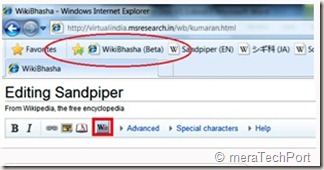
3. Please save your changes and reload your page to see the script added to your profile. You should see WikiBhasha in the left side as a menu item, and on Edit page as a button (as below):


wikibhashawidget1


wikibhashawidget2


Download the WikiBhasha beta User Guide from here.


Take WikiBhasha beta for a test drive by clicking on the install link below.


Install - Click here to install WikiBhasha beta


For FAQs, installation instruction details, user guide, discussion, feedback, suggestions etc please check -


http://www.wikibhasha.org/index.htm


(H/T to Hardik )


EDIT: Also check Enhancing Multilingual Content in Wikipedia


“Wikipedia has become one of the world’s largest and perhaps most powerful information repositories. But it is heavily English-centric.


Making Wikipedia more multilingual inspired a Microsoft Research India team to develop a tool called WikiBhasha, which was launched Oct. 18. WikiBhasha—“Wiki,” signifying its community-oriented approach; “Bhasha,” a Sanskrit word meaning “language”—features a content-creation platform that combines linguistic services, such as machine translation, with a Wikipedia-friendly content editor. Everyday users in countries around the world, as well as language enthusiasts, can use WikiBhasha to adapt English-language Wikipedia articles for local languages. Along the way, they can create new local content to expand the article they have translated.


WikiBhasha users also can create new articles from scratch. And in time, the tool could help convert articles in languages other than English into local languages.”

Get a Special Google Doodle on your Birthday !

google-birthday-doodle


A sort of Easter Egg was launched recently by Google.  If you have specified a birthday in your Google Profile , (If you haven’t, check under the Contact Info section, edit profile , add your birthday and save.)  Google will show a special doodle to you on the front page of Google on your birthday. So Google will wish you with a special Birthday Doodle .

You can cheat though for testing purpose and set your Birthday earlier!

(Source)
Thursday, October 14, 2010

Windows Phone 7: “How Do I?” Videos for developers

Check out this collection of Windows Phone 7: “How Do I?” Videos from the MSDN for the developers.


Windows Phone 7: “How Do I?” Videos


wp7howdoI

Tuesday, October 12, 2010

Currency Converter for Windows Phone 7

Lovely looking app from Rehan Saeed (http://www.blacklightmobile.com/) that has all the usual functions you'd expect from a currency converter app plus a few more. And it really draws you in with the banknote background.

Currency Converter - Windows Phone 7 App

Monday, October 11, 2010

Windows Phone 7 Devices at a Glance fact sheet

A quick overview of the nine Windows Phone 7 devices unveiled today by Microsoft CEO Steve Ballmer,  the Windows Phone 7 Devices at a Glance fact sheet, complete with images of each -

alt

Click for hi-res image

Dell Venue Pro
With a 4.1" AMOLED display coupled with a built-in portrait keyboard, The Dell Venue Pro is designed both for productivity and entertainment.
Features include:
  • 4.1" 800x480 AMOLED touchscreen with Gorilla® Glass
  • 121.6 mm x 64.4 mm x 14.9 mm
  • 191g
  • 1GB Flash ROM + 512MB DDR SDRAM. 8GB internal storage
  • Processor: Qualcomm Snapdragon QSD 8250 1 GHz
  • Battery life - Talk time: 3 hrs/Standby: 336 hrs
  • 5MP camera / 720p HD video
  • Vertical slide out qwerty
Learn More

HTC HD7

Click for hi-res image

HTC HD7
The HTC HD7 offers high-fidelity surround sound and a large 4.3" screen to provide great experiences with music, video and gaming.
Features include:
  • 4.3", 800x480 touchscreen
  • 4.8" x 2.68" x 0.44"
  • 162g
  • 512MB ROM/576MB RAM/8GB internal storage
  • Qualcomm Snapdragon QSD 8250 1 GHz
  • Battery life:
    • WCDMA - Talk time: 320 min/Standby: 320 hrs
    • GSM - Talk time: 380 min/Standby: 310 hrs
  • 5MP camera with flash
  • HD 720p video
  • Kickstand
  • Widescreen phone with Surround Sound
Learn More

HTC 7 Mozart

Click for hi-res image

HTC 7 Mozart
The HTC 7 Mozart offers high fidelity sound for a richer listening and viewing experience, along with a powerful 8MP camera with Xenon flash.
Features include:
  • 3.7", 800x480 touchscreen
  • 4.69" x 2.37" x 0.47"
  • 130g
  • 512MB ROM/576MB RAM/8GB internal storage
  • Processor: Qualcomm Snapdragon QSD 8250 1 GHz
  • Battery life:
    • WCDMA - Talk time: 330 min/Standby: 435 hrs
    • GSM - Talk time: 405 min/Standby: 360 hrs
  • 8 MP camera + Xenon flash
  • 720p HD video
  • SRS WOW HD™ sound
Learn More

HTC Surround

Click for hi-res image

HTC Surround
The HTC 7 Surround is designed to entertain with a fold out kickstand for hands-free viewing, and a slide out the speaker lets you share music and videos with friends in virtual surround sound.
Features include:
  • 3.6" touchscreen
  • 4.71" x 2.42" x 0.51"
  • 165g
  • 16GB internal storage
  • Processor: Qualcomm Snapdragon QSD 8250 1 GHz
  • Battery life:
    • WCDMA - Talk time: 250 min/Standby: 255 hrs
    • GSM - Talk time: 240 min/Standby: 255 hrs
  • 5MP camera + flash
  • 720p HD video
  • Slide out Yamaha speaker + SRS + Dolby surround sound
  • Kickstand
Learn More

HTC 7 Trophy

Click for hi-res image

HTC 7 Trophy
With the vivid 3.8" screen, HTC 7 Trophy sits comfortably in your hand and performs perfectly playing games on Xbox Live.
Features include:
  • 3.8", 800x480 touchscreen
  • 4.67" x 2.42" x 0.47"
  • 140g
  • 512MB ROM/576MB RAM/8GB internal storage
  • Processor: Qualcomm Snapdragon QSD 8250 1 GHz
  • Battery life:
    • WCDMA - Talk time: 330 min/Standby: 435 hrs
    • GSM - Talk time: 405 min/Standby: 360 hrs
  • 5MP camera / 720p HD video
Learn More

LG Optimus 7

Click for hi-res image

LG Optimus 7
Share multimedia files with other digital devices and use the augmented reality application to connect to a world of information. A voice-to-text feature allows communication without the need to type.
Features include:
  • 3.8" touchscreen
  • 125 mm x 59.8 mm x 11.5 mm
  • 157g
  • 16GB internal storage
  • Processor: Qualcomm Snapdragon QSD 8650 1 GHz
  • Battery life - Talk time: 8 hrs/Standby: 179 hrs
  • 5 mp camera / 720p HD video
  • Media Sharing (DLNA)
  • Augmented Reality
  • Speech to Text
Learn More

LG Optimus 7Q

Click for hi-res image

LG Quantum/Optimus 7Q
The LG Quantum offers a horizontal QWERTY keypad designed for productivity. The phone also includes DLNA multimedia sharing, an augmented reality application and voice recognition.
Features include:
  • 3.5", 800x480 touchscreen
  • 119.5 mm x 59.5 mm x 15.22 mm
  • 185g
  • 16GB internal storage
  • Processor: Qualcomm Snapdragon QSD 8650 1 GHz
  • Battery life - Talk time: 7 hrs/Standby: 466 hrs
  • 5MP camera / 720p HD video
  • Horizontal qwerty
  • DLNA
  • Augmented Reality
  • Speech to text
Learn More

Samsung Focus

Click for hi-res image

Samsung Focus
Thin and light, the Samsung Focus offers a 4.0" Super AMOLED display and a 5 pm camera with enhanced photo options such as panorama, smile detector, Lomo mode, Add Me, and BeautyShot.
Features include:
  • 4.0", 480x800 Super AMOLED screen
  • 4.82" x 2.53" x 0.43"
  • 110g
  • 512MB RAM/1GB Flash/8GB internal storage
  • Processor: Qualcomm Snapdragon QSD 8250 1 GHz
  • Battery life - Talk time: 3 hrs/Standby: 250 hrs
  • 5MP camera/720p HD video
Learn More

Samsung Omnia 7

Click for hi-res image

Samsung Omnia 7
With a 4.0" SUPER AMOLED display and thin, light design the Samsung Omnia 7 is great for gaming with Xbox LIVE, listening to Zune music and watching videos.
Features include:
  • 4.0", 480x800 Super AMOLED screen
  • 4.82" x 2.53" x 0.43"
  • 119g
  • 512MB RAM/1GB Flash/8GB internal storage
  • Processor: Qualcomm Snapdragon QSD 8250 1 GHz
  • Battery life - Talk time: 3 hrs/Standby: 250 hrs
  • 5MP camera/720p HD video
Learn More


(Source: Windows Phone Newsroom: Devices at a Glance)

EDIT:

Windows Phone 7 Device Lineup

Windows Phone 7 Device Lineup

Tour of the Windows Phone 7 Global Device Portfolio

Windows Phone 7 will be available in a variety of sleek form factors this holiday season, optimized to make everyday tasks faster. The company worked closely with four device partners – Dell, HTC, LG and Samsung – on hardware design to bring distinctive phones to market that take advantage of the best aspects of Windows Phone 7: a glance-and-go experience designed to bring the things smartphone users love most front and center, in fewer steps.

Windows Phone 7 is designed for both business and entertainment – it’s the only phone on the market with Office Mobile, and the only phone that delivers Xbox LIVE and streaming music via a Zune Pass.

Windows Phone 7 will ship on nine phones though 60 mobile operators in 30 countries around the world this holiday season.

Take a Tour of the Windows Phone 7 Global Device Portfolio with Steve Guggenheimer

(Source: Microsoft Shows Off Rich Variety of Windows Phone 7 Devices)

New Windows Phone 7 Ad – Pokes fun at the phone addiction awkward moments

With the launch of Windows Phone 7, Microsoft has planned advertising that pokes fun at the awkward moments our addiction to our phones can create.


For more details about the campaign strategy , please check Windows Phone 7: Ending Bad Phone Behavior With Better Phone Design

EDIT:

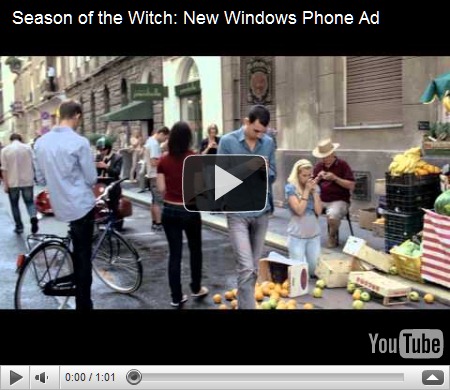
Here’s the Youtube ver of Season of the Witch: New Windows Phone Ad -

A phone to save us from our phones -

New Windows Phone 7 Ad–A phone to save us from our phones !


Windows Phone 7 teaser ad: Really? Youtube ver

Really–New Windows Phone 7 Ad

Sunday, October 10, 2010

New Windows Phone 7 videos

After some new ‘How To..’ videos on Windows Phone 7  , the Microsoft’s You tube channel on Windows Phone 7 has provided some new videos -

Get in the Game - A quick glance to the Start Screen on the new Windows Phone reminds you how fun it is to get in the game by displaying your avatar on the Games Hub Live Tile.

Get in the Game


Spell It Your Way- Expressing yourself sometimes means the dictionary has to bend a bit. The new Windows Phone makes it easy to correct misspellings, but it also gives you the option to leave a word exactly the way you spelled it.

Spell It Your Way


Auto Corrections - Everyone this side of dictionary.com occasionally needs a little help with spelling. With the new Windows Phone, the help comes courtesy of auto corrections.

Auto Corrections


Emoticons- Before emoticons, a lot of what we said in our e-mails or texts could be misunderstood. Windows Phone helps you show your smile with a dedicated emoticon keyboard.

Emoticons


Get ready for the Windows Phone 7 launch!!

Saturday, October 09, 2010

Some ‘How To…? ‘ videos on Windows Phone 7

Here are some ‘How To….’  demo video on Windows Phone 7 . Watch it as you can switch to Windows Phone 7 as soon as it arrives -

Speech-

Learn how to use Speech in Windows Phone 7 to make phone calls, search the web, and open apps.

Get Microsoft Silverlight


Personalize Start -

Learn how to personalize Start on your Windows Phone 7 to make it unmistakably yours.

Get Microsoft Silverlight


Search -

Learn about using Search on your Windows Phone 7 to find email, contacts, places, things on the web, and more.

Get Microsoft Silverlight


And this video tells us about What you can do with Windows Phone 7 -

Get Microsoft Silverlight
Tweet