Sunday, August 29, 2010

Windows Phone 7 Patterns & Practices Developer Guide community site !

pnp_logo

The Official Windows Phone 7 Patterns & Practices now available ! You can check them at - http://wp7guide.codeplex.com/ 

Periodically it will be publishing early versions of deliverable on this site, so keep checking!

WP7logo

At present it has a new guide from patterns & practice which will help you to design and build applications that target the new Windows Phone 7 platform.

Check the site  - http://wp7guide.codeplex.com/  for more details and download.


Friday, August 27, 2010

Book Review: Windows 7 – The Best of the Official Magazine

lrg


‘Windows 7 – The Best of the Official Magazine – A real-life guide to getting more done’ is a Microsoft Press Publication and can be obtained from O’REILLY.

This is one of those books, which you'll love to read from Start to finish in one go. Each page packs something interesting.You'll learn Windows 7 in a fun practical way. It relates Windows 7 with real life examples, thus you'll implement Windows 7 features practically. Step-by-step instructions, full color illustrations will make learning lots of fun, easy and fast. Everything has been explained in a very easy to understand way.

This book is created by the editors, authors, and reviewers at the only Windows magazine approved by Microsoft.

It has 4 Sections – Get started, Explore,Do More and Appendix

Get Started section introduces to you with Windows 7.

Explore section further takes you into Windows 7 journey in detail but in a very easy way, each chapter with full of color screenshots and practical examples.

And after learning various features and really start working Windows 7 to your advantage, it makes you to Do More section. This section is very interesting as it covers chapters with imaginative projects like -

  • Watch TV on you cell phone.
  • Use your PC to control TV
  • GO high-definition with Windows 7
  • Make you own cell phone ringtones
  • Get fit using your PC
  • Find your family history
  • Create a paperless home
  • How to get the best grade
  • Host the ultimate party
  • Create a killer resume
  • Childproof your Home office …………and many more such topics all explained in relation to Windows 7. It’ll teach you how Windows 7 will help in the office and Home.

Appendix will help you to choose the Right version of Windows 7, compares various editions,help you in Installation, Using Windows Easy Transfer and also tells you how to keep your PC as good as new.

It’s a book fully packed with screenshots, practical examples in full color thus making it very easy to understand. This book is recommended for Beginner to Intermediate Level.

Its been rightly said-

“It’s the the ultimate visual guide to the fun, practical, and creative things you can do right now with Windows 7!”

You can get this book from O’REILLY , Amazon


Friday, August 20, 2010

Xbox LIVE and Windows Phone 7

Check out previews of the new games coming with Xbox LIVE on Windows Phone 7. Always be in the game with Xbox LIVE on your Windows Phone 7.


Xbox Live and Windows Phone 7


Microsoft Research Street Slide View

Street Slide is a novel browsing interface for street-level imagery that combines the best aspects of the immersive nature of "bubbles" with the overview provided by multi-perspective strip panoramas, figures to attract significant interest, in large part because of the ingenious way in which Microsoft Researchers tackle problems with current street-side imagery on the web.


Street Slide View


What is Software + Services?

Microsoft’s progressive shift toward Software-plus-Services is reshaping and transforming existing offerings—and informing the roadmap for the future. Take a look ahead at what a future of connected software and services could bring to the world. Applications and services that once stood apart become far more valuable when taken together. Business moves faster, ideas flow more freely and people grow more deeply connected.


Cloud Computing: Software plus Services


Thursday, August 19, 2010

[FIX] ‘No Internet Connection…’ Error during installation of Windows Live Essentials Beta Refresh

Yesterday an update to Windows Live Essentials 2011 beta was released. And while installing some faced problem where they were getting the error message “No Internet Connection…” and the installation failed even though they were connected to net. It was happening even using the Full offline installer.

Soon Windows Live Team swung into action and said -

“The problem you're running into is that the Windows Live Installer not only installs the language you selected, but also tries to install the Windows Live language resources that match your OS language (this avoids language switching problems later when using Windows Live client applications).  Unfortunately, the Windows Live Beta Refresh only ships in nine languages (much more coming for the final release) and when the installer tries to find these additional language resources, they are unavailable and hence the error you are seeing.  This error will occur in both the online web-version (wlsetup-web.exe) and the off-line version (wlsetup-all.exe). 

This will not be a problem in the final release as all languages will be available, but we're investigating workarounds such as temporarily changing your OS language settings and will post info here once a workaround has been confirmed to be effective.”

So one has to temporarily change their OS language to English and install.


Today they have fixed it and they have posted this -


“A fix for the "no internet connection" error you encountered has been released.  Please retry and reply if you continue to see errors in your installation experience.

Root cause is that we added functionality to the Windows Live Installer to also install language resources matching the Windows OS language and mistakenly included references to languages that are not available until the final Windows Live release.  Users installing on an OS language other than one of the nine languages released for Windows Live would have encountered this failure (English is just another language and not a unique cause of this error). 

We apologize for the negative experience and inconvenience and appreciate you using Windows Live and for providing feedback.  From this, we are updating our release tools to detect and avoid this problem in the future and investigating changing our error messages to be more helpful.”


Wednesday, August 18, 2010

What’s new in Windows Live Essentials 2011 beta refresh

Microsoft released an update to  Windows Live Essentials 2011 beta .  Its being called as Windows Live Essentials 2011 beta refresh, some are also calling it as Beta2. Acting on the beta feedback and usage of millions of users, the Live team has come up with many improvements across Messenger, Photo Gallery, Movie Maker, Writer, Mail, and Family Safety.

Let us check some of the many improvements -

Messenger -

A quicker Messenger - The time it takes to sign in, and to refresh contacts and social feeds, as well as animation speed, are all faster than in previous versions of Messenger.

More efficient video chat - Messenger video chat uses 30% fewer CPU resources by offloading work to the GPU.

Facebook chat in Messenger – Messenger now connects Messenger’s ~300 million customers (who are already connected to Yahoo! Messenger and Office Communicator) to Facebook’s ~500 million customers with Facebook chat . With the new Facebook chat integration, one can chat with all the Facebook friends.

msngrFB2z


WLMfb4z


WLMfb7z

Also check step by step article on enabling Facebook Chat feature– “How to chat with your Facebook friends from Windows Live Messenger


Movie Maker-

Flickr video publishing - You can now publish videos directly from Movie Maker or Photo Gallery to Flickr too. Also notice the new logo for the SkyDrive.

WLEnew

Larger movie uploads - Movie Maker will upload higher resolution movies to SkyDrive (480x640 vs. the previous 320x480).

WLEnew1

Higher bit-rate movies - Movie Maker now supports higher quality (bit-rate) content.

Snapshot - With the new Snapshot feature in Movie Maker, you can select a single frame from a video as it appears in the preview window and add it to your movie. This allows you to quickly grab an image that you want to keep or perhaps use for your movie’s intro or closing.

WLEnew2


Mail -

Better handling of Gmail – Mail now automatically handles Gmail’s spam and trash folders properly.

Photo Album improvements- Faster Photo albums uploads. Better indication as to where you can add additional photos to your album.  Live Mail also has some UI to set of a Photo Album expires after 90 days or not.

WLEnew11

WLEnew12


Family Safety -

Faster web filtering - Family Safety web filtering is 35% faster than in the previous version.

Photo Gallery -

Better facial recognition - Photo Gallery facial recognition is improved significantly and works more quickly.

Quick previews and improved tree view - Added preview capabilities to the “Find” tab in the ribbon. So before you apply a filter (date, rating, people tags), you can hover over one of those filters and see the results instantly.

 

WLEnew4


WLEnew5


WLEnew6


Writer -

Better spell-checking -

Writer has significantly improved the quality of its spell-checking.

Better integration with Office -

Writer is much better at retaining all formatting when you copy and paste from Word and other Microsoft Office programs. With Office there is a lot of CSS on the clipboard that will not be needed in the blog post.  If it was pasted it would really bloat the post.  Now Writer has a good compromise of pasting what you need to keep the formatting.  Bullets/numbering, heading styles, etc. all should paste better when copying from Office into Writer.

Jumplists -

Now Live Writer has jumplists on Windows 7.  Right click on the application icon in the task bar and you will see jump list entries for recent drafts and recent posts.

WLEnew7


Open Drafts and Open recent Posts on the application menu-

WLEnew8

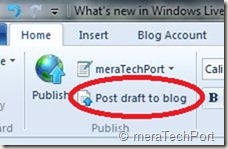
Post draft to blog button on the ribbon-

As many of the Writer users requested this feature, the Writer provides it. As the users said they post a draft to their blog and then directly go to the web to actually publish the post from there. So now they can do this easily.
WLEnew9


Much better theme detection -

As WordPress has changed over the years Writer has not kept up with the theme changes.  Live Writer is back on par and can accurately detect all current themes from WordPress including their new WP 3.0 theme Twenty Ten.  The theme detection changes are not exclusively for WordPress.  Writer will now work a lot better with the new custom Blogger themes also and should work better for really any blog server you use.  WYSIWYG is much better in Blogger now.Though Writer still cannot detect themes for blogs marked as private on servers such as WordPress.

Also has theme related options on ribbon.

WLEnew10


Updated spelling dictionaries-

It now have the same ones that are included with Office 2010.  Live Writer will have updates for all languages that it is released in.  It also has an updated autocorrect list that matches the English list in Office 2010.

Photo Album improvements- Faster uploads of Photo Albums.

More keyboard shortcuts-

There are more keyboard shortcuts which should soon appear as help topic on the web.


So, overall there’s an improvement in the quality of the software and over 75% of reported bugs have been fixed. As I have started using it, I can feel the improvements. One of them being the Face detection in Photo Gallery which has improved a lot, all of the products load faster, nice splash screen animation etc. And the improvements are an ongoing process and Essentials keeps improving, looking into users feedback.

And apart from English, Spanish, French, Dutch, Portuguese, Japanese, and Simplified Chinese, you can also now get the beta in Russian or German. So get the Windows Live Essentials 2011 beta refresh today and give it a try. Windows Live Essentials beta refresh requires Windows 7 or Windows Vista.

(Source: Inside Windows Live, Aaron's Live Writer Blog )


Tuesday, August 17, 2010

New Hotmail allows forwarding messages to any other mail account for FREE- Restrictions removed

As many of you have noticed, the recently upgraded Windows Live Hotmail allows you to forward your Inbox message to any other mail account and this is available to all including free regular accounts. Earlier there were restrictions where one could forward the message only to an email address that ends with hotmail.com, msn.com , live.com or is part of Windows Live Custom Domain. And this was available only for paid accounts of Hotmail Plus.

This is what we used to see in the earlier version of regular Hotmail account -

OldHMFwd

(Click to view larger image)


Now with the New Hotmail this restriction is removed. And you get this -

newHMfwdz


To get to this option, sign-in to  your Windows Live Hotmail, Click on options > More options…  NewHMFwd1

and click on ‘Forward mail to another e-mail account’ to get the ‘Forwarding’ Window and type the mail ID to which it has to be forwarded.

NewHMFwd2

So this is great news for all Hotmail users as this option is made available for all.


Sunday, August 15, 2010

In-wall USB Chargers, FM Scanners

Your Zune or your iPod needs charging and you have misplaced your charger and just for this you have to start your desktop or laptop. Imagine  how convenient it’ll be if you have In-wall USB chargers in your home/office just like any other wall power socket. But its difficult to get in-wall Chargers here in India. Else you might have to prepare wall USB Chargers with DIY kits. But no more Now !

I was pleasantly surprised when I saw a tweet from atul chitnis providing a link to in-wall USB chargers from Philips India. With good quality finish, so convenient to add them along with your regular power sockets. Such products should be well advertised, many of us do not know even if such products could be availed in India. I haven’t seen any reviews of them being published in Indian PC magazines. Thanks Atul !

What’s more, Philips India has even a in-wall FM scanner also in its product range for your kitchen or bathroom.

Here’s a direct link to Philips India catalogue for its range of Lifestyle Modular Switches. ( It’s a PDF file , size ~2MB)


USBchargercat


FMScannercat


Here are some of the snaps of the actual products, In-wall USB Chargers and FM Scanner and back of the package boxes showing their price and part no. , courtesy Atul Chitnis.


142849161usb sockets


back of the package


142849684


Back of the FM radio package


The In-wall USB Charger costs Rs. 450 (nearly $9) while FM scanner costs Rs 750 (nearly $15).

So go on and check them from Philips India dealer and hope they know about these products.


Saturday, August 14, 2010

Microsoft Mathematics Add-In for Word and OneNote

With the Microsoft Mathematics Add-in for Word and OneNote, you can perform mathematical calculations and plot graphs in your Word documents and OneNote notebooks.  It makes it easy to plot graphs in 2D and 3D, calculate numerical results, solve equations or inequalities, and simplify algebraic expressions. The add-in also provides an extensive collection of mathematical symbols and structures to display clearly formatted mathematical expressions. You can also quickly insert commonly used expressions and math structures by using the Equation gallery.


mathematica1


The Microsoft Mathematics Add-in can help you with the following tasks:


• Compute standard mathematical functions, such as roots and logarithms

• Compute trigonometric functions, such as sine and cosine

• Find derivatives and integrals, limits, and sums and products of series

• Perform matrix operations, such as inverses, addition, and multiplication

• Perform operations on complex numbers

• Plot 2-D graphs in Cartesian and polar coordinates

• Plot 3-D graphs in Cartesian, cylindrical, and spherical coordinates

• Solve equations and inequalities

• Calculate statistical functions, such as mode and variance, on lists of numbers

• Factor polynomials or integers

• Simplify or expand algebraic expressions

mathematica2


Get Microsoft Silverlight


This add-in works with Microsoft Word 2010, Microsoft OneNote 2010 and Microsoft Office Word 2007.

EDIT: Added this video. (04Oct10)  With the free Microsoft Mathematics Add-In for Word and OneNote, you can calculate any mathematical expression or equation and then plot a graph. In this short video, Jennifer Bost shows you how using Microsoft Word 2010.

Get Microsoft Silverlight

For more details check the download link. You can download the add-in from here .

Wednesday, August 11, 2010

Bing Dynamic- Windows 7 ‘s first RSS-feed theme, Fresh wallpaper, updated automatically

Receive a new photo from Bing every week for three months, with this Windows 7 theme that updates automatically through an RSS feed.


bingRSS1


http://windows.microsoft.com/en-us/windows/downloads/bing-dynamic


Once you download Download  and run it , you’ll get this , subscribe to the RSS feed.

bingRSS


For the first time, it may take a little bit of time for images to appear depending on your Internet connection speed.


bingRSS2


Monday, August 02, 2010

Free ebook: Programming Windows Phone 7 (Special Excerpt 2) by Charles Petzold

Here’s a second draft preview ebook of Charles Petzold’s upcoming Programming Windows Phone 7! The first preview ebook contained six chapters. This one contains eleven chapters (and 265 pages):

WP7Petzold2

Part I   The Basics

Chapter 1   Hello, Windows Phone 7

Chapter 2   Getting Oriented

Chapter 3   An Introduction to Touch

Chapter 4   Bitmaps, Also Known as Textures

Chapter 5   Sensors and Services

Chapter 6   Issues in Application Architecture

Part II   Silverlight

Chapter 7   XAML Power and Limitations

Chapter 8   Elements and Properties

Part III   XNA

Chapter 20   Principles of Movement

Chapter 21   Textures and Sprites

Chapter 22   Touch and Play

Download the PDF here. Download the XPS here. And download the sample code here.

(Source:  Microsoft Press Blog )

(I had earlier blogged about the first preview ebook here)
