Friday, July 31, 2009

Windows 7 Beta Testers to get a FREE copy of Windows 7 Ultimate !!

prodWin7yellow_hero This is Wonderful News !!  Members of the invitation-only Windows 7 Technical Beta Program that is to say, Windows 7 Beta Testers will be eligible for a free, final copy of Windows 7 Ultimate !!

The details are posted on the Connect Newsgroup by Paul Donnelly of Microsoft, so the members can have a look.

All current members of our English technical and international mini-beta programs are eligible and it will be a Windows 7 Ultimate Edition for ones personal use Only.

More details will be posted in days to come on Microsoft Connect. Being one of the Beta Testers, I surely will be looking forward to it.

Thanks a lot to Microsoft, all at Windows 7 Team for bringing the Best Windows OS till date and providing a Complimentary Copy to all Testers!!

(Source:Showing Our Thanks to Windows 7 Beta Testers…)

Monday, July 27, 2009

Background Removal – Image editing tool in Word2010

There are many new features provided in Microsoft Office 2010, one of them in Word 2010 is an image editing tool-its the Background removal tool for photos. As the name suggests it removes the background from the photo. I can say, it does the job so easily and accurately. Such a tool is not provided even in many photo editing apps. This tool has been created in conjunction with Microsoft research. Let us see how its done-

Insert a picture from Insert > Picture, keeping the picture selected, choose the ‘Background Removal’ tool

O2010Inspic1az

As you choose this tool, it highlights in purple color, all the elements which are background. You can adjust the handles to include more of foreground elements you want.

O2010Inspic1cz

Also you can fine mark it to include or exclude portions you want. And that’s all, once done close the tool and the background is removed like magic ! See the results for yourself!

O2010Inspic1dz

And after this you can apply any artistic effects available and it will be applied only to the Foreground picture. Also one crop the portion wanted using crop tool.

Here’s one more example-

IMG_1085

And after applying Background Removal tool -

Of2010Akh2z(Thanks to Akhilesh- my cousin, for this photo)

Its a wonderful photo editing tool indeed which does its job so easily. I would suggest Microsoft to provide this tool in Windows Live Photo Gallery also. One more thing, how about providing an option where the background  portion in purple highlighted can be reversed with foreground. So in one click, we can just reverse the selection. Or an option to save the removed background portion. Sometimes that is also useful.

Will post about some other fabulous tools provided in Microsoft Office 2010 in my blog posts.

What’s New in Office 2010 videos

logo_microsoft_office2010 Do you want to know What’s New in Microsoft office 2010 ? Want to know the fabulous new features in Word 2010, Excel 2010, Outlook 2010, Office Mobile 2010 and other Office 2010 applications? Then check out this video series which provides you with small videos from experts demoing some of the new features -

whatsnewinO2010

These are the official videos from Microsoft ShowCase from where you can embed, share and download these videos.

You can get all the videos here – What’s New in Microsoft Office 2010 Videos from Microsoft Showcase.

The same videos can also be viewed at official Microsoft Office 2010 site which provides all the information needed.

http://www.microsoft.com/office/2010/

off2010site

If you haven’t yet tried Office 2010, you can get it for free, Get MS Office 2010 Technical Preview here by signing up -

Sign up to be considered for the Technical Preview Program

Thursday, July 23, 2009

Windows 7 RTM sign-off Video

Check out this video what happens backstage – Windows 7 RTM sign-off. This video is created by Roger, Test Manager on Windows Live, using Windows Live Movie Maker (soon to be released).

Thanks Paul Donnelly (MS) for the (link) !

Windows 7 Officially RTM’d - Congrats !

Windows7logo Yes , it has been Officially announced- Windows 7 has RTM’d ! Congratulation to Windows 7 team who have come out with the best Windows OS till date. The final build number is 6.1.7600.16385.090713-1255 .  (via Geek In Disguise)

Now let us see when can you get your hands on Windows 7 RTM , it will depend who you are. If you are a -

- Partners & OEMs: ISV (Independent software vendor) and IHV (Independent hardware vendor) Partners will be able to download Windows 7 RTM from Microsoft Connect or MSDN on August 6th.

Microsoft Partner Program Gold/Certified Members will be able to download Windows 7 RTM in English through the Microsoft Partner Network (MPN) Portal on August 16th. By October 1st, the remaining languages will become available to download.

OEMs will receive Windows 7 RTM software images beginning approximately 2 days after its officially RTM’d, as a little time is required to release and distribute these images

- Business Customers: If you are a Volume License (VL) customer with an existing Software Assurance (SA) license you will be able to download Windows 7 RTM in English starting August 7th.

- IT Professionals: IT Professionals with TechNet Subscriptions will be able to download Windows 7 RTM in English on August 6th and remaining languages by October 1st.

- Developers: Developers with MSDN Subscriptions will be able to download Windows 7 RTM in English on August 6th and remaining languages by October 1st.

- For Consumers: Windows 7 will be in retail stores and shipping on new PCs starting October 22nd. If you pre-ordered Windows 7, it should be delivered sometime around the October 22nd.

(For full details pl. check Official Windows Blog - When will you get Windows 7 RTM?  and Windows 7 Has Been Released to Manufacturing )

Tuesday, July 21, 2009

Nominations for Microsoft Clubhouse Choice Awards announced !

I am very honored and happy to say that I have been nominated for the First Microsoft Clubhouse Choice Awards. This Award has been launched in celebration of one year anniversary of the Clubhouse. Thanks to all !

clubhouseawards

The Best Clubhouse contributions in 7 categories based on ratings, views and comments have been selected.

bullets

You can click here to see the nominees and vote : (or click below) Spare couple of minutes, and vote for your favorites in each category and you will also find me as one of the nominee.

clickhere

Hurry up, Voting ends on 31st July 2009. Voting is open for all.

I have been a charter member and have been involved since beta launch of the clubhouse. My posts have been featured on Windowslive.com and also featured as ads with Hotmail. As of now number of views for my posts stands at 175152.

CHAwards1

As you know, Clubhouse  is a place where one shares stories and tips through the blog. It started with Windows Live but now have added Windows Vista and Windows 7 related posts.

For more info, official rules about the Award can be checked at Windows Community Clubhouse Spaces- Announcing the Clubhouse Choice Awards!

The blog posts from my blog LiveViews are featured in Microsoft Clubhouse.

Monday, July 20, 2009

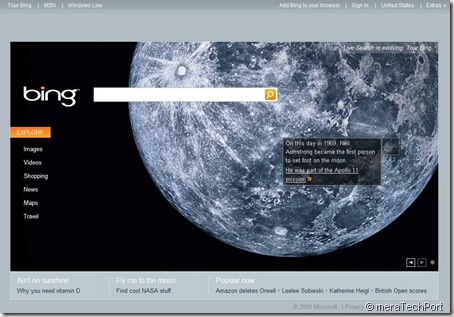
Bing goes to the Moon

On the occasion of 40th anniversary of Neil Armstrong becoming first person to set foot on the Moon, Bing has this stunning Home Page today:

http://www.bing.com/?mkt=en-US

bing200709Moon

Checking the hotspots on the page, you will be able to discover amazing things about it, Check it now, its just for today. (Of course you can use the view previous photo feature also if you miss it today)

These are the links of the Hotspots of this Bing Moon Homepage -

See photos of the men and machines who made history on this day in 1969.Apollo 11 Moon Mission »


Michael Collins piloted the Command Module while Buzz Aldrin and Neil Armstrong explored the surface. Watch and learn more about the Apollo 11 »


Scientists recently received transmissions of a sophisticated extraterrestrial TV talk show.We have met the Aliens and they are us »    (you may have to set safesearch filter to off, for getting search results)

On this day in 1969, Neil Armstrong became the first person to set foot on the moon.He was part of the Apollo 11 mission >>


Also check the current related link at bottom of page -

Fly me to the moon

Find cool NASA stuff

Saturday, July 18, 2009

Microsoft Office 2010 TP Activation Confusion

MSO2010TP There have been some confusion regarding Activation of Office 2010 Technical Preview (TP), as it has been discussed in forums and Newsgroups. Here’s the clarification which should clear this doubt.

I hope you all got Invites for Microsoft Office 2010 from Microsoft Connect to be among the first people in the world to experience  Office 2010, and have already obtained the Key and installed it. Let us start right from the installation. When you start the installation, it will ask for the Product Key.

O2010eeepc2z

After you enter the Key obtained from Connect, it will verify and if its correct, it will accept it and put a Green Tick mark. Also there’s a checked check box which says “Attempt to activate my product using the internet” . So if its checked it will Automatically activate the product if you are connected to internet.

O2010eeepc3z

As you continue with install, if you are doing a clean install that is if you don’t have any earlier ver. of Microsoft Office installed, you will get ‘Install Now’ button while if you are having earlier ver. you can Upgrade with the ‘Upgrade’ button.

So once installation is successful let us focus on Activation part, where the confusion is. If the checked box shown in above picture is checked and you are connected to  net, the product will be activated automatically. To check this, Open Word or any other Office Product, Click on Office button on top left and click on ‘Word’O2010OButton , don’t click on ‘options’ just below it.

                  O2010word

You will get either -

1. This screen -

ActivatedZ

Actually it shows 2 messages  (I have shown in 2 different colored outlines ) , One with Red Outline says ‘You have a license for this product’ ,This is for Microsoft Office Professional 2010, So your product is already activated. And below it there’s another (shown in blue outline) which says ‘You are running a trial version of’ with a button ‘Licensing Operations’. DON’T CLICK ON IT TO ACTIVATE. It also shows ‘This product will become unlicensed in …. days’ . Don’t confuse with this, this is for other product which is not related to ours. Our product is Microsoft Office Professional 2010 (Technical Preview) which is already activated as I said earlier.

If you click on click ‘Licensing Operations’ and attempt to activate the trial it fails and says your product key is invalid. Do not try to activate the trial and don’t click on ‘Licensing Operations’ .

2. Or you will get this screen-

Notactivatedz

This screen shows Microsoft Office Professional 2010 NOT ACTIVATED. So we have to activate it.

As can be seen in this, here also I have Outlined 2 different products in different colors. One says ‘ You are running a trial version of’ and has ‘Licensing Operations Button.Also shows ‘This product will become unlicensed in …days’. DONT CLICK ON THIS.

We are interested in Professional ver., which says ‘You need to activate this product’ and has a button ‘Activate Product’ , which also shows ‘This product will become unlicensed in …days’ . This is what you want to activate. Click on it to activate. It will activate,make sure you are connected to Net. And the message ‘This product will become unlicensed in …days’ will go. So your Microsoft Office Professional 2010 ver is activated.

I hope this will clear the confusion. All this confusion has been due to the Single Image source of Office Installation for 2 different products - MS Office Professional 2010 as well as MS Office Trial  ver. . We are interested in Professional ver and only this will get activated.

Even after all this , if someone is having difficulty in Activating, please provide feedback at Connect. And DO NOT INSTALL Office 2010 TP from any source other than from Connect. These may contain Malware, infected and you will have problems to Uninstall as complained by those who installed from Un-official sources.

The official ver. of Microsoft Office Professional TP is 14.0.4006.1110

O2010TPver

So install it from official sources and discover all the new wonderful features .

EDIT : As I came across this info, I’m adding this now. It will clear the doubt regarding the message shown. Though this is for Trial S/W, ‘This product will become unlicensed in …days’ , and people getting confused for MS Office Professional 2010 TP.

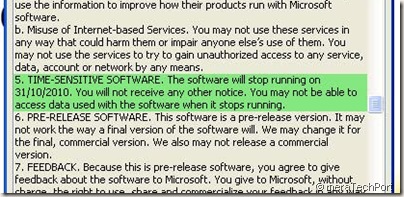
If you click on the ‘View the Microsoft Software Licensing Terms’ from your Office 2010 TP (screenshot shown above), you can clearly see this (highlighted in green) :

O2010date

O2010date

It clearly says : 5.TIME SENSITIVE SOFTWARE. The software will stop running on 31/10/2010…………. 

btw just an observation, the date format is not US, so is the S/W developed at Microsoft Indian Center or somewhere Outside US?

Friday, July 17, 2009

Mastering PowerShell :Free E-book

"Mastering PowerShell" by Dr. Tobias Weltner, Windows PowerShell MVP, is now available as a free PDF eBook. You can download this 567 pages, 3.6 MB ebook  here or read the online version.

masteringpowershell

(source: Shay Levy)

Tale of my twitter account suspension

Yesterday night, I was online and as usual was signed into my twitter account. And was also checking out mail, office2010 stuff etc.. And after sometime then I again returned to twitter tab in my browser and was shocked to see a big message saying your account has been suspended because of some strange activity. I was shocked to see that, why on earth , have I been suspended? What strange activity I was carrying?

Twitteracsuspendedz That’s how the Suspended Account looked Like .

Next thing was to go to the link provided in that message and submitted a ticket requesting to revoke the suspension. Then I received a mail informing the same from twitter and by the time I replied to that mail and went back to twitter, lo….the suspension is gone. And my account working normally. Then after some time came to know that there was some twitterglitch, which caused many accounts to be suspended and then were revoked and some were still requesting their accounts to be revoked. Luckily mine got revoked within 15 min.

That was a Strange Activity from twitter.

Anyway, if you want to follow me on twitter, you can do at @vasudevg

Thursday, July 16, 2009

Apple calls Microsoft – Asks MS to stop running ‘those’ Ads

Yesterday as I was watching Live, the proceedings of WPC09- Worldwide Partner Conference , the Speech by Kevin Turner, Microsoft's chief operating officer was the most interesting one. And I had already Live tweeted it and I knew this will be a big news. And yes, it has become the big talking point. It was about the PC Hunter Ads, Microsoft is carrying about. So lets us see what he said :

……Now let's talk about Apple. What are you going to do about those Apple ads? That was a year ago. Gosh, when I went home for the holidays, brothers, sisters, cousins -- hey, hope you don't have anything to do with marketing over there at Microsoft. What are you guys going to do about those Apple ads?

Stay tuned, stay tuned, stay tuned. Wow. Did we punch right back? The PC Hunter ads, the PC Rookie ads clearly have been winners in the marketplace.

I pulled this out of my Sunday newspaper. I have an old habit because I came from retail looking at the Sunday tabs and circulars that are in newspapers. This is straight out of my paper last Sunday. This is a comparison out of a leading electronics retailer that you can get a 13.3-inch Macbook for US$1199 from that retailer. Guess what. That same retailer, you can get the same PC with more RAM, a bigger hard drive, and almost a three-inch bigger screen for US$649. What an incredible opportunity.

And so we've been running these PC value ads. Just giving people saying, hey, what are you looking to spend? “Oh, I'm looking to spend less than $1,000.” Well we'll give you $1,000. Go in and look and see what you can buy. And they come out and they just show them. Those are completely unscripted commercials.

And you know why I know they're working? Because two weeks ago we got a call from the Apple legal department saying, hey -- this is a true story -- saying, "Hey, you need to stop running those ads, we lowered our prices." They took like $100 off or something. It was the greatest single phone call in the history that I've ever taken in business. (Applause.)

I did cartwheels down the hallway. At first I said, "Is this a joke? Who are you?" Not understanding what an opportunity. And so we're just going to keep running them and running them and running them…..

This is out of last Sunday's paper, the Apple tax. It's getting out. And when we put Windows 7 in there, which we've got coming out in October, what an incredible opportunity for us to fight back. And it feels really good to be on the offensive here. And we know we've got plenty of work to do. We don't have it all figured out. But I want you to know, ladies and gentlemen, we're doing stuff and we're in the game and continuing to take some of these hard market share opportunities head on and compete because it's a test of will, as I said.

And we're going to showcase this opportunity of Windows simplicity, choice, value, and partners. And stay tuned, because we're going to have some retail stores opened up that are opened up right next door to Apple stores this fall. Stay tuned, just stay tuned. (Applause.)…….

Another very interesting thing was about opening up of Microsoft Stores right next to Apple Stores. Very interesting !!

If you haven’t seen those ads , which I also have been posting with each new Laptop Hunter Ad being launched, here are these Ads, check them out: http://www.microsoft.com/windows/watchtheads/

The complete transcript of the Kevin Turner’s speech and others can be found here

Wednesday, July 15, 2009

Send your Name to Mars !

rover Want to go to Mars ? Well, actually its not yet possible, but you can send your names to Mars. NASA is providing an opportunity. Just fill up this form with your name, country and zip code and NASA will include your name on a microchip on the Mars Science Laboratory rover heading to Mars in 2011!

After that you can also print a certificate of your participation.

Earlier also NASA had come with such things.  Become a Martian now!

Tuesday, July 14, 2009

My Asus Eee PC 900 Netbook

This post was long due. Its about my Asus Eee PC 900 Netbook. I got it about 2 months back but was not able to blog and post its snaps as requested by many of my friends. This post was lying in my ‘Drafts’ section of Windows Live Writer and today I thought of completing it and posting lots of photos.

Actually, I along with few others received this Netbook from Windows 7 Team at Microsoft Connect- the unified portal to provide feedback about Microsoft products and services. (Details)

Well, I have been pretty impressed by Netbook’s convenient size, portability and ease of its use. Those who are using big, heavy Notebooks will enjoy Eee PC’s convenience to carry around easily. Once you see and start using it then you can understand why it has become one of the best sellers in US. Following with Asus Eee PC success, now there are many others who have brought their brands of Netbooks in the market. It has made a different segment by itself.

My Pearl White Asus Eee PC 900 Netbook is powered by Intel Celeron Mobile CPU 353 at 900 MHz, 1GB DDR2 RAM, with Flash storage instead of regular Hard disks- it has 12GB storage  (has 2 SSDs of 4GB and 8GB), 8.9” display size, 1.3 M Pixels built-in WebCam, WiFi, 10/100 Mbps Ethernet and weighs less than a kilo and came preloaded with Microsoft Windows XP Home.

IMG_0903z  

Along with the Netbook, I also received a Targus travel Adaptor – which provides worldwide plugs compatibility.

IMG_0907z

They have also provided the Restore CD which restores to factory settings and installs Windows XP home along with other Apps. as MS Works, Star office suite and some other utilities.

IMG_0915z

IMG_0916z

It has a SD/MMC card slot and 2 USB 2.0 , Monitor/Projector port and a Kensington Lock port on the right side. I have put a 16 GB SDHC card now enhancing the storage capacity.

IMG_0917z

While on the left side, it has LAN port, and another USB2.0 port and Microphone, headphone jacks.

 IMG_0934z

In the bottom it has the speakers and emergency reset.

IMG_0936z

It has 1.3 M webcam and Microphone on top of the screen.

IMG_0935z

IMG_0931z

The Keyboard keys are chicklet sized and may require some adjustment for those having big hands. For me it was comfortable. The multitouch touchpad is also very good. Multi-finger gesture operation makes it very convenient. One can do various regular operations as well use touchpad for scrolling using two fingers and also can do squeezing for Zoom-in and Zoom-out photos by default.

Talking of size, the power adapter is also very compact and small as compared to adapters of regular Notebooks.

IMG_0923z

Here are some comparative photos of Eee PC with regular Laptop.

IMG_1029z

IMG_1030z

And this one compares Eee PC with a DVD Jewel case, now you can get an idea how compact Eee PC Netbook is-IMG_0919z 

And here’s my Eee PC running Microsoft Windows XP Home-

IMG_1022z

Actually , now I have removed Windows XP and installed Windows 7 RC and it runs as smooth or even better than XP. I had to install it using USB Pen drive as Netbooks generally don’t come with built-in Optical drives. I’ll be making a detailed post on how to install Windows 7 on Eee PC Netbook soon.

They have also provided a cool sleeve for Eee PC. It snugly fits and very comfortable to carry around , just like a book.

IMG_0939z


Thanks to Microsoft Connect and Windows 7 Team !!!

Overall I’m very happy with it and now even much more powerful Netbooks have arrived in the market that runs Intel Atom processor which consumes much less power thus increasing the battery backup to as long as 8 Hrs. and this will be a huge success when it comes pre-loaded with Windows 7. So just wait and watch. The convenience of Netbook will be fully utilized when it will be powered by Windows 7. And with the numbers of Netbooks selling, I’m sure its price will also be very attractive and will become more cheaper in the days to come. And this factor will make them popular here also in India as they are already a big hit in US and Europe.

Sunday, July 12, 2009

Windows 7 to RTM during last two weeks of July - Official

Now it has been posted in Microsoft Partners Network that -

“……Windows 7 will release to manufacturing (RTM) during the last two weeks of July, with general commercial availability on October 22, 2009. So get started and test-drive Windows 7 RC today. Then show your colleagues and customers how Windows 7 can improve management……”

This was announced at Computex 2009 in Tapei. So get ready for the exact date which will be anytime in July only. Earlier there were rumors that it will be July 13th and then it said it will be delayed.

Here’s the screenshot and link : https://partner.microsoft.com/US/productssolutions/windows/wiwindows7WIn7RTM

Monday, July 06, 2009

Thank-you gift from Windows 7 Starter Team

Received today a Thank-you gift from Windows 7 Starter Team. This was provided to all the participants for their contributions and the effort to help beta test Windows 7 Starter.

Thanks to Starter Team !! Thanks Samer, Wendy, Edson and everyone at Windows 7 Starter team.

Its a Notepad and kind of sticky racket-ball game, both branded with Windows 7 logo.

IMG_1143z

Earlier I had also received Windows 7 Swag for providing ‘Best Suggestion’ during Live Chat with Windows 7 Team.

But the big one, which I had received from Windows 7 team, a couple of months back is yet to be posted about. Will blog about it soon :)

Saturday, July 04, 2009

Union Budget Live with Silverlight- Real-time chat with TV anchors

4696929 This year’s Union Budget will be different. We all have been watching the budget speech on TV or reading about it,but this year’s Budget will be streamed Live using Microsoft Silverlight* , so that you can watch it on your PC. Users will get live coverage of both ET Now and Times Now as well as on-demand videos, live news feeds, special updates and will also be able to interact with Facebook friends--all from a single show window. And with Facebook Connect and Live Stream Box, they will be able to take part in real-time conversations with their favorite TV anchors. (Cartoon courtesy: Economic Times)


bud2 The event will be hosted at http://budgetlive.economictimes.com  You can also get minute-by-minute update and live news feeds if you are interested in specific parts of the budget. Powered by Microsoft’s Silverlight, users will get to watch a high quality video stream on the web- like TV, only significantly better.

(* Download Silverlight from http://www.microsoft.com/silverlight/resources/install.aspx)

  bud1

Tweet