Tuesday, December 22, 2009

XP style Network Activity Indicator for Windows 7

I always felt that there should have been a Network Activity Indicator in Windows 7 just like it was in Windows XP where one could detect if there’s any network activity going on just by looking at the flashing icon in the System tray. I thought that was useful as one could detect if any unwanted network activity going on or to find if one is connected to net and could get a rough idea of the network. But this was replaced with static network activity indicator for Windows 7 and many of us beta testers had requested Windows 7 team for the same, but it was not provided, don’t know why – may be some said , it was kind of distraction, or to make it light.

Now Windows 7 users can have Old Windows XP style of Network Activity Indicator. IT samples has provided this free app- http://itsamples.com/network-activity-indicator.html 

Network Activity Indicator displays the old 'two monitors' icon in Windows 7 that flashed blue to show network activity on the System Tray. It works with 64-bit Windows 7 ed. as well as 32-bit (x86).

network-activity-indicator

Downloads

version: 1.1   download   (58KB, revised December 12, 2009)

version: 1.0   download   (57KB, revised November 19, 2009)    source code  (C++)

Thanks to EdBott for the tweeting about it.

MSDN Hands-on Lab “Windows 7 Multitouch” – Manual and Presentation

Last week Microsoft Switzerland ran a hands on lab titled multi touch for developers in Wallisellen. All the participants had Hands-on Experience using HP TouchSmart PC.

P1030512_thumb_3

Hands on lab manual has four labs:

  • Introduction to Windows touch
  • Multi touch support in Silverlight 3
  • Touch events in WPF 4
  • Manipulation and inertia in WPF4


image_3

One can download the manual from here. (in pdf format, size: 3.8MB)


image_6

Also at the lab the roadmap of Windows 7 touch platform related to Microsoft surface was also looked into.Can be downloaded here. (Power point presentation .pptx , size 3.49 MB)


(Source: Swiss MSDN Team Blog  And the translation can be read here, translated via Bing : Translated ver.)

Sunday, December 20, 2009

Access Microsoft Forums with newsreader using Forums NNTP Bridge

If you are one of those who likes to be participating in various Online Microsoft Forums like MSDN, TechNet, Answers etc then here’s a nice way to interact with Microsoft Forums using NNTP readers connecting them via Microsoft Forums NNTP Bridge from your desktop. If you do not like to connect different Microsoft Forums using web interface then this is the best method where you will have access to hundreds of Microsoft Forums from your NNTP Newsreader. This is very convenient where you can read and write posts offline from your desktop.

This can be done by using Microsoft Forums NNTP Bridge Beta December release which is made available on Connect. Only registered Connect members can get it from here. From the link one can also find out more about the bridge.(Update: direct connect link: https://connect.microsoft.com/site/sitehome.aspx?SiteID=927 )

“The NNTP Bridge Beta is a small client application that exists alongside your newsreader that allows you read/write access to popular Microsoft forums such as the Answers, MSDN and TechNet forums. It’s designed to allow you to download current forum messages into the newsreader of your choice, respond in an offline scenario if you so choose, and upload responses.”

Now let us see how to use our NNTP reader to access Microsoft Forums-

To use the bridge, users need a current forums profile which the Users of Microsoft Forum will already have and ensure you have selected “Use NNTP Bridge” in the forums setting page. So just sign-in into any of the Microsoft Forums, click on My settings-

Forum1

and check the “Use NNTP Bridge” in the settings page.

Forum2

And then click on Submit to save the changes.

Now from the Connect link download the December bits of Microsoft Forums NNTP Bridge beta. Unzip and run setup.exe , Accept the license agreement and follow the instructions to complete the setup.

NNTPbrdg1z

Now once its installed, you’ll find a shortcut under Microsoft Community Tools to run this application. Run it.

NNTPbrdg2a

Click on Start to run the NNTP Bridge.

NNTPbrdg2z

It will prompt you for Windows Live ID Credentials, sign-in with your LiveID with which you used to sign-in to the Microsoft Forums.

NNTPbrdg4z

if you click on settings tab you can see them already filled up.

NNTPbrdg3z

Now once you sign-in, the server is running

NNTPbrdg6z

Minimize it .

Now we will configure our Newsreader. I am using Windows Live Mail for this -

Click on the Newsgroups to open it

NNTPbrdgLM0

Click on ‘Add newsgroup account’ to add a new group and follow the instructions -

NNTPbrdgLM0a

Enter your name , click Next

NNTPbrdgLM2

When it asks for your NNTP server name give 127.0.0.1 and port as 119 if required, click Next

NNTPbrdgLM3

It will start the process of connecting to server

NNTPbrdgLM4

After some time , it will ask you to view the list of available newsgroups, click yes

NNTPbrdgLM5z

It will start downloading all the lists available, this may take some time as it downloads more than 2000 list names of Microsoft Forums in all languages

NNTPbrdgLM6az

So now you can see the complete list of Microsoft Forums available

NNTPbrdgLM7z

From this you can subscribe to the Forums , you are interested in, from Answers, TechNet, MSDN ….by selecting and subscribing
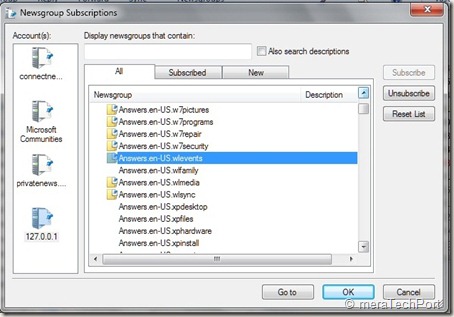
NNTPbrdgLM8z

Once done you can synchronize, read , post to the Forum .

NNTPbrdgLM10z

That’s all, so whenever you want to access Microsoft Forums using Newsreader , start the NNTP Bridge first.

Some Q & A -

Q: Which NNTP clients does the Microsoft Forums NNTP Bridge Client Beta support?

A: Our priority and effort for support will be the following clients in Windows 7 OS:

Microsoft Outlook Express
Microsoft Windows Mail
Microsoft Windows Live Mail

Q: Which languages are supported in this release of the Microsoft Forums NNTP Bridge Client Beta?

A: The NNTP Bridge Beta supports posting in the same languages supported by the Microsoft forums: English, Spanish, French, German, Italian, Russian, Czech, Japanese, Traditional Chinese, Simplified Chinese, Korean, Portuguese-Brazilian.

Q: Which newsreaders have been specifically tested for use with the Microsoft Forums NNTP Bridge Client Beta?

A: The NNTP Bridge Beta has been designed to work with any newsreader. It’s been specifically tested for use with Outlook Express, Windows Mail, and Windows Live Mail.

Previous users of the bridge should ensure they have done the following when updating to the most current version.

· Uninstall previous beta installations

· After installing the most current update, re subscribe to all of the previously subscribed groups

This December NNTP Bridge Beta Update dramatically improved stability and robustness of the connection. As you know its still work in progress so there may be some issues about which you can provide feedback.

So you should also go through the User guide, FAQ and ReadMe at the Connect site for additional information.

Saturday, December 19, 2009

Avatar Theme for Windows 7

Now that the ‘Avatar’ movie has been released and everyone has been talking about it on the net, be it twitter, chat, mail, why not get the official Avatar theme for Windows 7. This theme has been available since some time in the Windows 7 Personalization Gallery site - http://windows.microsoft.com/en-US/windows/downloads/personalize If you have missed it, get it now and display it .

Avatar thmPicsz


AvaWin7

You can download from this direct link also- Avatar theme for Windows 7  (size: 10.6 MB)

Avathmz

Enjoy !!

Wednesday, December 16, 2009

Inside Windows Live – A new official blog on engineering behind Windows Live

insidewinlive_banner

For everything related to Windows Live, there was the official Windows Live Team Blog called Windows LiveWire which used to consolidated blogging efforts for all of the different Windows Live teams into a single blog. Now another official blog called Inside Windows Live has started which will complement the Windows team Blog. This blog will be a part of The Windows Blog.

Inside Windows Live Blog will not only bring more details about what new things are coming up, but also why and how.

The new blog “will be dedicated to software engineers, web industry insiders, and to our most passionate Windows Live customers, those who want to dig a little deeper into how we build our services and how they’re used worldwide.”

The blog will start by giving the current state of Windows Live software and services, including Hotmail, Messenger, SkyDrive, and Essentials suite of client software.

The new blog hosted on The Windows blog will give better options for monitoring and gathering feedback—via comments, direct mail, and even hosted IM conversations.

Chris Jones,Corporate Vice President, Windows Live will himself will be blogging regularly along with the lead engineers on his engineering team, who will be able to give deeper insights into each of the products they work on.

This is a nice initiative and instead of getting rumors on the products on the net, one can get authentic info related to Windows Live.

Here’s the link to the new Blog- Inside Windows Live  - The engineering behind Hotmail, Messenger and Windows Live

(Source:Building Windows Live)

Friday, December 11, 2009

First Look: Microsoft Office 2010 – Free e-book

9780735693876f[1]_2 For a limited period Microsoft is offering this Free e-book - First Look: Microsoft Office 2010, by Katherine Murray. As you know Office 2010 is in beta at present, the book offers offers 14 chapters of early content.

Part I, “Envision the Possibilities,” introduces you to the changes in Office 2010 and shows you how you can make the most of the new features to fit the way you work today. Chapter 1, “Welcome to Office 2010,” gives you a play-by-play introduction to new features; Chapter 2, “Express Yourself Effectively and Efficiently,” details the great feature enhancements and visual effects throughout the applications; and Chapter 3, “Work Anywhere with Office 2010,” explores the flexibility factor by presenting a set of scenarios that enable users to complete their work no matter where their path takes them.

Part II, “Hit the Ground Running,” focuses on each of the Office 2010 applications in turn, spotlighting the key new features and showing how they relate to the whole. These chapters provide a how-to guide for many of the top features you’re likely to use right off the bat, and they offer inspiring ideas on how to get the most from your favorite applications.

Part III, “Next Steps with Office 2010,” zooms up to the big picture and provides examples to help you think through interoperability. How often do you use the various Office applications together? Customer research shows that people often don’t realize how well the applications work together as a complete system—which means they might be laboring over items they could easily incorporate from somewhere else. This part of the book provides examples for integrating the applications and explores Office 2010 security and training opportunities, as well.

You can download the e-book here (its in pdf format , size: ~10.5 MB)

Click on the above download link to open the SkyDrive page , from there click on ‘Download’.

Since this download is offered for limited period without registration, so hurry up before the offer gets over.

Source: Microsoft Press Blog.

Monday, December 07, 2009

Will Google Users Switch to Bing ? A habit that’s difficult to give up !

Though Bing has come up with cool features and continuously improving, it will now be interesting to see how people who are habituated to Google switch to bing. In a study, 15 Google users were recruited by a qualitative research firm and instructed to use Bing, exclusively, for one week. The study's sponsor, Microsoft, wasn't revealed until after participants indicated their likelihood to remain with their current search engine or switch to Bing.

And 10 out of 15 said they switched to bing. Check out this video what those people said about bing and why they switched.

Microsoft's Harry Shum had recently said : "Google is like smoking cigarettes, It’s a habit that’s going to be difficult to give up." (Microsoft exec: Quitting Google as tough as stopping smoking)

So when they give up, surely will feel refreshing to use bing. I can say its refreshing even just to see the Bing’s Home Page with amazing daily picture. You discover something daily by visiting Bing.

It will take time for Google users to switch to bing but surely people are liking it. And with bing’s features, Google is also feeling the heat and is trying out and bringing new things which was not seen much when bing was not there.

Microsoft Surface and Objects

Check out this cool demo video about Microsoft Surface -

“Microsoft Surface's vision system in Surface can see what’s going on the table-top. This allows for all manner of natural user interfaces to be employed both with everyday objects, and objects specifically crafted to work with Surface. These objects both make Surface more engaging and it can be more efficient at the same time. “

Sunday, December 06, 2009

Find your iPhone App using Bing

Bing is offering a feature where you can search for iPhone Apps in style with Bing’s visual search interface.Just go to http://www.bing.com/?setmkt=en-US . You will have to use Bing of United States as this Visual Search is not available for all countries. And click on the Visual Search from Explore. There you will find ‘Top iPhone apps’ under ‘Online Media >>’

Else you can directly click on this link - Top iPhone Apps  It may offer you to change to United States if you are not. And you will get this 3D-like grid of images of various Apps. Try it, its so nice to see those thumbnails getting arranged  in this way-

bingVSiph2

And after this you can even narrow your search by Category, Price, Top Publishers which in turn has lots of options within.

bingVSiph4z


bingVSiph5z


bingVSiph6z

Also you can Sort them by various categories -

bingiphoneApp1z

As you can see, this is such a nice way of navigating through thousands of available apps. iPhone users are even finding it to be much better than using Apple’s own iTunes.

Windows 7 Easter Eggs

I know these days Microsoft does not provide any Easter Eggs in its products as Easter Eggs or any hidden features present in an OS or other products are not legal. So one can’t expect Easter Eggs in Windows 7 also. But Easter Eggs used to add some Fun and the users just explored every nook and corner to find it. Now what I am talking of may not be any hidden feature of Windows 7 but kind of an Easter Egg and will try to explore it.

In the recent video at Channel10 - Progression of the Iconic Background ,  Larry Larsen talks to Denise Trabona to know about how the default Windows 7 background was designed. And in the end talks about the Easter Eggs. Those who have used Windows 7 Beta may be knowing about the 7 Bubbles of betta fish desktop background of Windows 7 beta.

7Eastereggs1z

Similarly there are such interesting tidbits in the Final RTM version of Windows 7 in its default theme in logon and default desktop background.So there are more such 7s to explore.

7Eastereggs3

logon

Above screenshots are of default Desktop theme and log-on screen of Windows 7 RTM.  So here you can find more of interesting 7s.

Like you can find 7 leaves on the branch, both in desktop and logon screens.

7Eastereggs2z

logonz

There are 7 light strands throughout in the desktop background. Count them.

There are 7 elements working in the 4 Quadrants.

4Q

I’m not sure how to name those elements but still you can count them as circle, tree , butterfly, grass, bird and what you call those glittery things, so make them 7 elements.

And similarly there are such 7s on logon screen, I hope readers will pick it up as I’m still trying to figure it out also correct me on the above said elements with exact names.

Here’s the Video of the same which just shows the Easter Egg part of the whole conversation.

If you want to view the complete video , you can do so at Progression of the Iconic Background

Its an interesting video. Watch it.

Saturday, December 05, 2009

Windows 7 Ultimate Commemorative Edition for Beta participants

Today I received my Boxed copy of Windows 7 Ultimate Commemorative Edition. I being a Technical Beta Tester received it from the Windows 7 Team. It was in Aug , Microsoft had decided to give a copy of Windows 7 to all Beta participants and were given a choice either to download it and get up and running quickly OR wait for a Boxed Copy after its market release on Oct 22nd. It was a limited Edition Special boxed copies, so I had decided to get this. Its a Collectors Copy of Windows 7 with a Thank You note from Steve Ballmer.

img_1342Z


img_1344Z

Actually Beta Participants got this boxed copy a month back only but due to some problem my shipment got delayed and I received it today only.

A big Thanks to Microsoft for providing this Special Edition to all Beta Participants, Thanks also to Windows 7 Team and special thanks to Wendy of the Windows Beta team. I really enjoyed testing and providing feedback on Windows 7. I feel proud being part of Windows 7 and you might have seen the ads on Windows 7 also ‘That was my idea…’ that brings more closer to Windows 7. It is the Best Windows OS.

Life at Microsoft: Episode 3

In this episode Tina shows the truth behind internal distribution lists at Microsoft, Bill Gates inbox, process of shipping Windows 7, walk down memory lane with User Access Group meetings with Vista, meets James who works incredibly long hours and  life with some of the products in Microsoft campus. Enjoy this Fun Video !


LifeatMS

View the Video here : Life at Microsoft: Episode 3

If you have missed earlier Episode, here they are:

Life at Microsoft:  Episode One

Life at Microsoft:  Episode Two

Wednesday, December 02, 2009

Windows Double Explorer for Windows 7

Windows Double Explorer manages two or more Windows Explorer in one application. Also you can add your favorite folders with drag and drop to the toolbar for quick access. It's easier to manage your disc structure. Came across this on CodePlex. You can get it from http://wde.codeplex.com/

wde035 (Click to enlarge)

Please note that its an Alpha ver. so may have some issues. I’m yet to try this, will be trying it soon.

Tuesday, December 01, 2009

The SixthSense device – that will change how we interact with the World

The SixthSense device- a wearable device that enables new interactions between the real world and the world of data. This device will surely change how we interact with the real World. This is an attempt where real World physical objects are seamlessly integrated with the digital world.

Pranav Mistry is the genius behind SixthSense. He’s a PhD student in the Fluid Interfaces Group at MIT's Media Lab. Before his studies at MIT, he worked with Microsoft as a UX researcher; he's a graduate of IIT, India.

Check out this recent lecture by him at TEDIndia, Mysore held in Nov’09 where he demos his device and explains it. The examples shown are just amazing and have immense potential in all walks of the World. This is a must watch video that will change how we interact with the physical World in future. Tom Cruise of Minority Report will be  a reality soon.

In an onstage Q&A, Mistry says he'll open-source the software behind SixthSense, to open its possibilities to all.

FORBlog


TED Talks- Pranav Mistry: The thrilling potential of SixthSense technology

Tweet