Tuesday, November 30, 2010

Why there’s no Network Activity Indicator in Windows 7 ?

If you have moved from Windows XP to Windows 7 , you might be wondering why there’s no Network Activity Indicator in Windows 7. Here’s the answer – check this small ‘But Why’ video explaining the same.

ButWhynwindicator

No Network Activity Indicator in Windows 7: But Why?


If you are missing this feature in Windows 7 and want it to see in Windows 7, there’s a utility for it, created by Igor Tolmachev.

networkactind

Network Activity Indicator for Windows 7 - displays the old 'two monitors' icon in Windows 7 that flashed blue to show network activity on the System Tray.

Earlier when it was released as XP Style indicator, I had also blogged about it. XP style Network Activity Indicator for Windows 7

Unlike the original Windows XP utility (that has individual indicators for each interface), this program indicates outgoing and incoming network packets on all available interfaces.

network-activity-indicator

You can get it from http://www.itsamples.com/network-activity-indicator.html   This utility is released as freeware.

Thursday, November 25, 2010

Holiday Lights – Official Windows 7 Themepack

Check out this new Windows 7 Themepack from Microsoft . The Windows 7 Personalization Gallery has been updated with a new themepack - Holiday Lights

Holiday Lights - Brighten your desktop with sparkling images of holiday celebration and winter wonder in this Windows 7 theme.

holidaylights


Download here.

Skydiver Really ! New WP7 Ad

Check out this cool Windows Phone 7 Ad !

A skydiver snaps a pic on his Windows Phone 7 ( Samsung Focus ) and then uploads it to Facebook before deploying his parachute! Skydiver, Really !  It's time for a phone to save us from our phone.

Skydiver Really ! WP7 Ad !

Saturday, November 20, 2010

Microsoft helps in hacking Kinect to control Windows 7

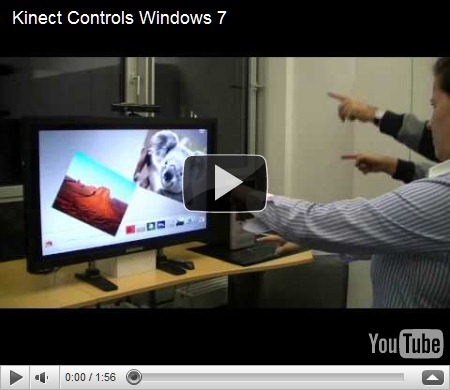
Gesture-Control-005-Small

Picture Courtesy : Wolfgang Herfurtner

Controlling Windows 7 using Kinect is one of the coolest things Kinect can do. This was made possible by the Evoluce software team that worked hard on multitouch and gesture control solutions supported by Microsoft.


“The software is based on the latest Evoluce Multitouch Input Management driver that offer many API´s like TUIO, Flash and Java. With the multi-gesture control mode for Windows 7 a natural user interface is created that will change the way we will communicate with the PC and consumer electronics in every day life.”


Kinect Controls Windows 7

Here in the video you can see many Windows 7 programs being controlled just by hand gestures. Even two people are shown controlling separate objects.

“Multi-gesture and multi-user interaction unleashes exciting possibilities for a multitude of applications like gaming, consumer electronics, office, events, education, command and control, point of sale and medical systems. Soon you will plug in depth sensing devices like Kinect into your PC and you will start intuitive communication with your computer and other users.”

Source: Wolfgang Herfurtner  Multitouch and Gesture Computing Blog 

Also check - First Pictures of Gesture Control of Windows 7 with Depth Sensing Device

EDIT 24/11/10 -  Here’s a new Video of Kinect giving Windows 7 Minority Report Treatment

The video shows how to navigate through websites and maps, click on icons and use the on-screen keyboard.

Kinect giving Windows 7 Minority Report Treatment

Wednesday, November 17, 2010

FUSE Lab’s Montage – Blending Social Media content to Create and Share a Visual Album of the web

montagelogo

montagelogo1

Montage from FUSE labs is a flexible web-based service that makes it fun and easy to create and share a visual album of the web on the topics you care about. You can design your Montage around any topic you can imagine by adding content that pulls information from a variety of sources, including RSS feeds, Twitter, Bing News, and YouTube. (EDIT: At present Montage pulls from twitter, Bing news and Images, rss feeds, YouTube and Vimeo )

montage

This is so cool ! Suppose you wanted to create a page with some topic you want. Montage does it in a jiffy using the Bing Search as it pulls news RSS feeds contents, photos, Tweets, Bing News, YouTube videos etc from the web. And the best part is you can design them to put it on a page very easily and these can be static or dynamic getting the latest which keeps on changing as the information arrives. Even you can add your content from your Blog while designing the page. And these can saved to the Montage gallery on the cloud. And this look very cool , you have to check them to get an idea.

And it also provides option to share, Retweet , embed them as a blog post etc

It reminds me a bit of Flipboard – an iPad App , which was in the news few months back but Montage looks more cooler as Montage allows us to design the contents and then can share, RT ,embed etc to further socialize it.  Give it a look.

At present its not available to all and only a select few partners have the ability to build and share Montages but anyone who wants to view a Montage can. There are lots of Montage gallery present for viewing and all these can arranged in many ways using Filters.

For example a Montage on Google TV looks like this -

montage1a


And here’s another Montage on President Obama’s visit to India-

montage2

Looks great as if reading a magazine or ready for publishing , all created easily by you. And these can be dynamic as the content change as it gets more new content so one has to check it to experience it.

Check for yourself and experience Montage - http://montage.cloudapp.net/ 

You can also follow it on Twitter @getmontage to find out when Montage is available for you to create.


EDIT: Here’s  an interesting link from FUSE labs regarding Montage -

Montage & Project Seneca: Putting Together a New Search Experience

Richard Feynman wrote a book called “The Pleasure of Finding Things Out.”

He was talking about the thrill scientists get when curiosity leads to scientific discovery. It makes me wonder what “finding things out” means in a world of social media, large data sets, and ever richer online experiences—and how we can use them to create a search experience that is magical.

Two new FUSE projects explore new ways of finding things out – new ways to experience the kind of data that flows through social networks and the web. These projects are based on three questions:

How can anyone use search as a building block to create new things?

What easy creative tools work on the desktop and on a touch device?

How can we use social networks to teach search engines what we like?

Read the full article at Montage & Project Seneca: Putting Together a New Search Experience

Really the Bing Search has taken the search using Montage to a new level ,arranging the relevant results in such a beautiful manner.


EDIT : Now the Create option is live, you can create your Montage now! Give it a try !

Tuesday, November 16, 2010

Hot Apps– New Show on WP7 Apps

Here comes the eagerly awaited, 1st episode of Hot Apps. A show from channel9 presented by Laura Foy which will feature 5 of the hottest apps each week for the Windows Phone 7 .  The first episode features -

  • Photos
  • Productivity
  • Movies
  • Music
  • FREE FUN!


HotApps


HotApps1

Check the show at Channel9

1000000 Kinect for XBox 360 sold in 10 days

Kinect


Microsoft today announced that it has sold 1 million Kinect for Xbox 360 units worldwide in 10 days. This announcement comes a week before Black Friday, the biggest selling day of the year. Microsoft raised its worldwide sales forecast from 3 million to 5 million sensors sold by year-end and is on pace to hit 5 million by year-end.

Kinect was launched in North America on Nov. 4, followed by Europe on Nov. 10, and will land next in Asia (Nov. 18) and Japan (Nov. 20).

This demand will make it the biggest year in Xbox history.

For more details, please check the Source.

Twitter Local trends launched in India and other countries

At last India and few other countries gets the twitter trends feature. So it’ll be any popular local topic being discussed will  get highlighted as a Trending Topic in real time.  Twitter is expanding local trends to include 13 new countries and 6 new cities.

Countries: Argentina, Australia, Chile, France, Germany, India, Indonesia, Italy, Netherlands, Singapore, Spain, Turkey, Venezuela.

Cities: Detroit, Miami, Minneapolis, Rio De Janeiro, Sydney, Toronto

More cities and countries to come. Hope to see Indian cities gets included in next update.

twtInd1z

Also twitter is introducing Tweet translations in the details pane to give people more access to what people are talking about around the world. At present will be limited to very small percentage of users and will be rolling out to everyone over the coming weeks. Its making use of Google Translate.

Saturday, November 13, 2010

Get added to Windows Phone mosaic

Want to add your twitter / Facebook DP  to the cool Windows Phone mosaic ?

WP7mosiac1


Tag all your tweets with #windowsphone & your profile pic will be a part of logo to commemorate the launch!

http://hashtagArt.com/windowsphone

Just tweet your message about #WindowsPhone and you’ll be added to the Windows Phone mosaic. In fact if you have already tweeted with #WindowsPhone hash tag , you may be already there. You can find that also.

Thursday, November 11, 2010

Get Recognized by Microsoft for your Forum Contribution

MSCCA1

Microsoft is soon coming out with an award program called Microsoft Community Contributor Award for recognizing those who contribute to various Microsoft Technical Forums such as MSDN, TechNet and Answers.

Microsoft is going to recognize those who contribute in such Microsoft Forums in the areas of moderation, content, translation/localization and feedback. The Award is awarded based on previous year’s contribution and the Award last for a year.

Awardees will receive a customized certificate, program logo with the award year, and a complimentary online technical resource.

More information about the Microsoft Community Contributor Award program can be found at http://www.microsoftcommunitycontributor.com

How does Microsoft select recipients of the Microsoft Community Contributor Award? 
More and more technology users are seeking ideas and solutions for enhancing their technology experience through online resources. Microsoft reviews the contributions of participants who offer their time and energy to online technical communities such as Answers, MSDN and TechNet to identify those who make notable contributions for possible recognition as a Microsoft Community Contributor. In addition, Microsoft Community Contributors can be recommended by Microsoft Most Valuable Professionals, who serve as deep technical experts and thought leaders in the community.

For more such FAQs, please check - https://www.microsoftcommunitycontributor.com/faq.aspx

Tuesday, November 09, 2010

Bing Visual Search for 1600+ Windows Phone 7 Apps is Live now !

Search quickly and easily and that too in a beautiful way 1600+ Windows Phone 7 Apps using Bing Visual Search. You can filter the result with numerous categories, subcategories and Price.

BingVisWP7apps

Bing Visual Search for Windows Phone 7 Apps

(Thanks to Charlie Kindle for the tweet)

EDIT 10/11/10: Now the Bing Visual Search Gallery has listed the Windows Phone 7 App – Just goto Bing Visual Search Gallery 

http://www.bing.com/visualsearch  then Click on ‘Online Media’ > ‘Applications’

there you see being listed with a nice icon -

wp7

Windows Phone 7 Apps


If you haven’t yet got the Windows Phone 7 , try these -

check – Bing Visual Search for Top iPhone Apps

iphone_apps-(0002)


Bing Visual Search for Top iPad Apps

ipad_apps


Search Beautifully with Bing Visual Search .

Steve Ballmer is On Twitter !

Yes Steve Ballmer is on twitter. His first tweet was on 19 Apr 09 . But it came to notice recently when he was at Kiev Polytechnic Institute and the moderator asked him When he’s going to be on twitter. Here’s the excerpt of that conversation -


MODERATOR: Here comes my favorite. I read it. Mr. Ballmer, recently I've tried to follow you on Twitter, but I couldn't find you there. When are you going to start tweeting?

STEVE BALLMER: I'm very  I have a Twitter account. I'm just very private about who I really am on Twitter. So, I'll tell you what. Somebody  who asked the question, is the person in the room, by any chance, who asked this question, anybody? OK.

That means somebody is shy. That's OK. So, what I'm going to do right now, just give me something you want me to tweet. I will tweet from KPI from my Windows Phone. Let me just bring it up here real quick. What do you want me to tweet? I love KPI, how's that?

All right. I love KPI. Now, you know how to find me on Twitter.


stevBtwitter

And that’s how the news about Steve Ballmer being on twitter came out. One can follow him at @stevebmicrosoft 


Source - And my friend manan noticed this and tweeted and blogged about it. That’s how the word spread .

Friday, November 05, 2010

Video chat from TV with your Messenger friend on PC or Mac with Video Kinect

After playing games on your recently released Kinect you should check out this cool feature also. It’s the Video Kinect .

Video Kinect allows people to video chat with their friends, using the Kinect camera, on their TV. Of course you can chat with your friends on Xbox Live who also have a Kinect, but the really interesting part is that you can also chat with anyone who has a computer with a webcam, using Windows Live Messenger2011.

“All you have to do is link your Xbox Live Gamertag to the Windows Live ID that you use for Messenger, sign in on the console and you’re good to go. Video Kinect is accessible through the Kinect Hub in the Xbox Dashboard, so just wave your hand and swipe through to find it and launch, then hover over any of your friends to start a video chat. When looking through your contacts on Kinect, your Messenger friends show up just like your Xbox Live friends do. When you start the chat with one of them, they will see a Messenger notification on their PC, asking if they want to start a video chat with you.”

Video chatting from your PC or Mac with someone who’s using Video Kinect on Xbox LIVE gives you the same full-screen experience as when you chat with someone on a PC.

To see how Video Kinect and Windows Live Messenger work together, check out this video

Video Kinect and Windows Live Messenger Demo


For more detail please check the Source:

Video Kinect brings Messenger video chat to the Xbox 360

Stay in touch with Video Kinect on Xbox and Windows Live Messenger

Wednesday, November 03, 2010

Guidance - Which Windows Live ID to use for Windows Phone 7 ?

You might be having multiple Live IDs but confused which one to use setting up your Windows Phone 7 ?

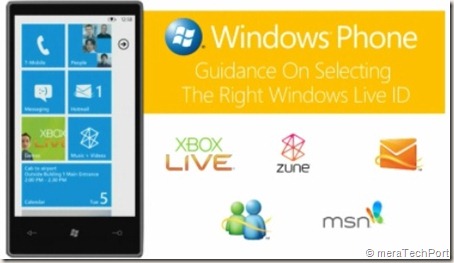
WLiveIDWP7

This video helps you determine which Live ID to use for Windows Phone 7. It’s a Guidance On Selecting the Right Windows Live ID for your Windows Phone 7.

Get Microsoft Silverlight

If the video is not showing for you, check this link .