Wednesday, November 30, 2011

New IE 10 Preview available exclusively for Windows 8

The Internet Explorer Platform Preview has been updated for Windows 8 Developer Preview.And this is only for Windows 8 DP. This IE10 preview adds even more support for HTML5 technologies, enabling richer Web applications with significantly improved performance.

One can download it from http://ie.microsoft.com/testdrive/Info/Downloads/Default.html

This is not an update to the Platform Preview of IE 10 on Windows 7 which is still at platform preview 2 (PP2). While the one released for Windows 8 is PP4.

IE10PP4

IE10’s hardware acceleration of technologies like SVG, CSS3 transforms and animations delivers faster rendering than other browsers. For the demo and more details of its highlights, please check the IE team’s blog post.

If you install this new IE10, you must test drive it at http://ie.microsoft.com/testdrive/

Nokia lights up London with an amazing 4D projection

Nokia Lumia 800 with Windows phone http://nokia.ly/uBVXxw brought deadmau5 and the world's most advanced 4D technology together and created an amazing free light show at Millbank Tower, London.

Millbank was plunged into darkness with the iconic tower acting as the canvas for a never-before-seen spectacular. Each of the 120 metre high building's 800 windows were covered with vinyl as 16 powerful projectors, stationed 300 metres away on the other side of the river, beamed 3D images onto the structure. Huge butterflies flew across the London skyline and the tower was twisted, pulsated and even fell down. Billed as the "future of live events" the spectacular show was accompanied by music from super producer deadmau5, who created exclusive remixes for the performance -- adding the 4th dimension.

Monday, November 28, 2011

New antimalware engine planned for release today !

Microsoft Malware Protection Center (MMPC) is planning to release a new antimalware engine on 28 Nov 2011. Engine Version will be in the range of 1.1.790x.0.

Affected products: Microsoft Security Essentials, Forefront Client Security, Forefront Endpoint Protection, Windows Intune Endpoint Protection.

MSEabt2811

So I think, the new Beta of Microsoft Security Essentials will be made available only after this is released. Register for New Beta of MSE.

UPDATE:01/12/2011 The new Public Beta of Microsoft Essentials is available and also the New Antimalware Engine updated to v1.1.7903.0

Friday, November 25, 2011

Google Wave Shut down date announced


Today received a mail from The Google Wave Team detailing their timeline to shut down. From Jan31, 2012 all waves will be read-only and the Wave Service will be turned off on Apr 30, 2012. Though you’ll be able to export individual waves using the existing PDF export feature until the Google Wave service is turned off. (How do I export my Waves?)

Here’s the complete text of the mail with Subject Line: Google Wave Sunsetting in 2012

Dear Wavers,

More than a year ago, we announced that Google Wave would no longer be developed as a separate product. At the time, we committed to maintaining the site at least through to the end of 2010. Today, we are sharing the specific dates for ending this maintenance period and shutting down Wave. As of January 31, 2012, all waves will be read-only, and the Wave service will be turned off on April 30,2012. You will be able to continue exporting individual waves using the existing PDF export feature until the Google Wave service is turned off. We encourage you to export any important data before April 30, 2012.

If you would like to continue using Wave, there are a number of open source projects, including Apache Wave. There is also an open source project called Walkaround that includes an experimental feature that lets you import all your Waves from Google. This feature will also work until the Wave service is turned off on April 30, 2012.

For more details, please see our help center.

Yours sincerely,

The Wave Team

Monday, November 21, 2011

Kinect Voice Search by Bing–Throw your remotes!

Check how Bing works on Kinect for Xbox 360. Who needs remotes when you are the controller.

You say it, Xbox finds it ! Dashboard update and Kinect Voice Search (available with select Xbox Live content) coming this Holiday.

(Source)

Sunday, November 20, 2011

Xbox Companion app for Nokia Lumia– Its Not Just gaming;watch films,listen to music controlled from Lumia


logo_wp75-v_webEarlier in our posts, we had seen how to Play Kinectimals on Windows Phone, transfer it and continue playing on Xbox. So its not just gaming, Nokia Lumia phones come with some amazing features and functions. You can interact with your Xbox 360 right from your Nokia Lumia smartphone using the Xbox Companion app. You’ll be able to watch films and listen to music, all controlled by your smartphone. Upon activating the app in the Nokia Lumia phone, you can use Bing to search for any content.

The video demos an overview of the Xbox companion app which integrates Xbox Live and Windows Phone on Nokia Lumia handsets.

Coming in the next couple of months, Xbox users will be able to download the system software that updates the dashboard look and feel, as well as giving you a whole heap of new features.

(Source)

Saturday, November 19, 2011

Registration opens for Next ver of Microsoft Security Essentials Beta

The Registration for the Next version of Microsoft Security Essentials Beta is now Open. If you want to try the latest in Security from Microsoft and want to help improve Security Essentials, you can register.

mse beta

The number of users who can participate in the Beta is limited, so register now! The availability will be notified once you sign up. Microsoft Security Essentials beta is expected to be made available to the general public by the end of the year.

New features in the Beta of Microsoft Security Essentials include:

  • Enhanced protection through automatic malware remediation - The Beta will clean high-impact malware infections automatically, with no required user interaction.
  • Enhanced performance - The Beta includes many performance improvements to make sure your PC performance isn’t negatively impacted.
  • Simplified UI - Simplified UI makes Microsoft Security Essentials Beta easier to use.
  • New and improved protection engine - The updated engine offers enhanced detection and cleanup capabilities.

Register at : http://go.microsoft.com/fwlink/?LinkID=233172

(Source:Microsoft Malware Protection Center)

UPDATE (30/11/11) : The Microsoft Security Essentials Beta is ready for download on the public Beta program page. if you had registered earlier, please check the link & download for beta testing.

Friday, November 18, 2011

Pre-Book your Ubislate (Aakash) tablets now !

The official site for Ubislate – the commercial version of Aakash tablet has put up another form, now for Pre-booking the Ubislate for purchase. Earlier I had posted about the Enquiry form. You can prebook at http://www.ubislate.com/prebook.html 

This is the official site http://www.akashtablet.com/ 

So once you pre-book it, they will email your booking ID for you.

The Cotton Candy: Dual-core computer on a USB stick !

This USB stick is a dual-core computer and you can carry it around in your pocket and it connect to any screen
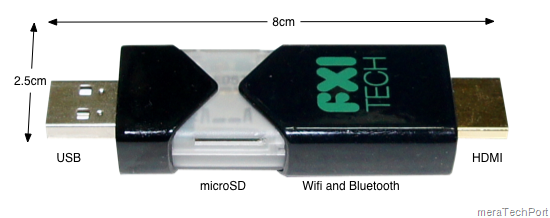
CottonCandy

(Image of Cotton candy prototype: http://www.fxitech.com/)

The Cotton Candy is a USB stick sized compute device allows users a single, secure point of access to all personal cloud services and apps through their favorite operating system, while delivering a consistent experience on any screen.  The device will serve as a companion to smartphones, tablets, and notebook PC and Macs, as well add smart capabilities to existing displays, TVs, set top boxes and other media that supports USB mass storage.

FXI Technologies, a hardware and software startup based in Trondheim Norway, demonstrated today the world’s first any screen, connected computing USB device.  Codenamed “Cotton Candy”, this sweet little device serves as a technology bridge between any display, the Cloud, and any input peripheral.

Technical Specifications-

  • Quad Core ARM® Mali™-400MP Graphics Processing Unit
    – Quad-core ARM Mali-400MP 720p / 1080p OpenGL ES v2.0
    – 30M Polygons, 1.2 GPixels / s
  • ARM® Cortex™-A9@1.2GHz
    – NEON extensions
    – TrustZone extensions
  • Connectivity
    Wifi 802.11 b/g/n
    Bluetooth 2.1 + EDR
  • Memory
    1GB DRAM
    Up to 64GB memory local storage (microSD)
  • Software
    – Android
    – Ubuntu
    – Virtualization client for Windows, Linux, Mac, embedded
  • Video / Audio / Media Support
    – 480p/720p/1080p decode of MPEG4-SP/H.263/H.264 AVC/MPEG-2/VC1
    – MP3, AAC, AAC+, Real Audio
    – JPG, GIF, BMP, PNG
    – Additional video, audio and image formats can be supported through 3rd party codecs
  • Connectors
    – USB 2.0 male form factor for power and connection to devices that supports USB mass storage
    – HDMI 2.1 with audio for connection to devices that does not support USB mass storage
  • Weighing only 21 grams and so energy-efficient that it can be powered from a USB port
  • Cost will be less than $200

FXI-Cotton-Candy-i2

(Image: Laptop mag)

So can we say the future version of Cotton Candy will run the ARM version of Windows 8?

Though the current prototype runs Android 2.3, Borgar told us that the ARM-based hardware can run Ubuntu Linux currently and future versions should be able to run the ARM version of Windows 8. Future versions of the device will have a USB 3 connector and faster processors.  (Check here for more details)

Also more details at FXI Technologies- http://www.fxitech.com/

A Visual Guide to custom ringtones for Windows Phone

Want to create a cool ringtone for your Windows phone? Check this Visual guide which will take you through the steps.

WindowPhoneRingtonez

(Click for enlarged view of pic)

Also check how-to article on custom ringtones and review of some of the new ringtone-making apps in Marketplace

(Source: Windows phone Blog)

Thursday, November 17, 2011

Next generation of Microsoft Surface is now available for pre-order through Samsung in 23 countries including India

Samsung and Microsoft announced today that the next generation of Microsoft Surface is now available for pre-order through Samsung resellers in 23 countries worldwide (Yes, India included)

Surface

Here’s the Full Specs of the Surface-

Commercial version of Aakash tablets in Market by December

We had earlier seen the Launch of the Cheapest Tablet Aakash and also how to book them . It was distributed to Students at subsidized rate of ~$30 while it was supposed to be available in Market for ~$60 (Rs.2999) . And everyone was eagerly waiting for its commercial availability.

The commercial version of Aakash is named Ubislate7 and will have some additional features as compared to present ver of Aakash which was distributed to Students at the launch.

Ubislate7 has GPRS so as to use it as a phone also, there’s option to convert your tablet to 3G , Both GPRS and Wi-Fi can be accessed at a monthly cost of only Rs 98/ 2GB. (~$2),Costs Rs.2999/- ($60)

The commercial version Ubislate7 is soon going to be launched in the market and will be available by Next month as hinted at the official blog.

To get answers to all your questions about Aakash tablet or Ubislate7, you can call at the toll free number 1800-180-2-180. You can also reach by filling the query form available on the official websites www.akashtablet.com and www.aakashtablet.com.

I don’t know what they mean by “We would soon be launching the official link for the pre-booking form”. As this was available earlier also, may be this time they might include the Price also so as to be purchased Online.

Gmail app for iOS available again

Couple of weeks back Google had introduced Gmail app for iOS and has to be recalled immediately after it was found to be buggy.Google says sorry for the mess - pulls Gmail app for iOS within hours

Now it has has been made available in the stores again. It says “We’ve fixed the bug and notifications are now working”

To try out the Gmail app today, install it from App Store on any iOS 4+ device. Those who already have the Gmail app released Nov 2 must uninstall or log out of the old app prior to installing the new app.

I had the earlier app installed , Now I have uninstalled it and now I ‘m not able to install the new App. It just hangs saying ‘Waiting…’ . It may be affecting the other apps also which are to be updated or installed from App stores as its not connecting to App stores. Having bad experience. So be careful while trying out this app.

UPDATE: Later I could install the Gmail app and its working fine. With all its bugs fixed and no error message box popping, there’s no change in interface as compared to withdrawn app. The error I mentioned while installing the new app was due to some Routing issue with the ISP and was not related to the app.

Wednesday, November 16, 2011

New Hotmail reminds you of forgotten attachments


sprite_logos_hotmail

The new Hotmail has been providing us with lots of cool features.Here’s one more. Now the Hotmail reminds you if you have forgotten to attach the attachment. Intelligent !

Check out more about this feature with screenshots here.

Tuesday, November 15, 2011

Visualization of 11/11/11 data on Twitter


Last Friday, it was November 11, 2011, 11/11/11 and many of us on twitter had tweeted this rare date occurrence mentioning in some way or the other.

“This clip is a visualization of all the Tweets mentioning 11:11 on 11.11.11. Each “1” is a location that moves with the conversation on Twitter. Their scale varies depending on the volume of Tweets posted from the location they represent. You can see the main wave move from right to left, and then a second one that occurred at 11 p.m. around the world.”

At 11:11:11 on 11/11/11 I too had tweeted about it with a pic.

111111large

(Source:Once in a lifetime)

Play Kinectimals on Windows Phone, transfer it via Tag and continue playing on Xbox

Play with your Kinectimals cub on your Windows Phone, so allowing you to travel around with the cub in your pocket with you. But the coolest thing about this new Windows Phone game is the cross platform interaction with the Xbox 360. After playing Kinectimals on your Windows Phone, you can transfer that animal into Xbox 360. And continue playing on XBox360. There’s an option within the game that when selected displays a QR code. Pop this code in-front of the Xbox 360 Kinect and it will register your animal, transferring it to your Xbox 360 in an instant.

Kmal1

Kmal2

Check it out to see how it all works on your Windows Phone

(Source:Channel9)

Sunday, November 13, 2011

Firefox with Twitter

Earlier we had seen Microsoft teaming up with Mozilla to bring Firefox with Bing, there’s Firefox with twitter also. Using this version you can Search for people and topics on Twitter, directly from the Firefox Address Bar using @ and # . Thus it takes directly to the user’s profile page or to a Twitter search result for username, hashtags respectively. Also you can search for any keyword on Twitter through the Search Bar by selecting Twitter in the drop-down.

FFtwt2z

FFtwt1

FFtwt3z

You can get Firefox with Twitter from - http://firefox.twitter.com/

Thursday, November 10, 2011

Activity, @username tabs - New features on twitter

New features of twitter - Activity and @username which have been in news since some time were added to my account today.

actusername

Mentions tab has been replaced by @username. As @username timeline includes your @mentions, it also provides Tweets marked as Favorites, the latest Retweets (of your Tweets), and your new Followers. It also have the choice of showing only the mentions.

usernametab

While the Activity tab provides Favorites, follows, retweets, and more by people you follow. So we can know what our followers are doing with their new follows etc.

acttab1

Some of you might still not be seeing these features as twitter is rolling out these new features starting with a small percentage of users. You can send feedback about these features by sending a Tweet to @feedback with the hashtag #Activity.

Follow me on twitter @vasudevg

Tuesday, November 08, 2011

Spotify Demo - Music Subscription Service coming to Windows Phone !

Hugely popular Music Subscription service Spotify coming to Windows Phone. Spotify gives you on-demand access to millions of songs. Spotify service which costs $9.99 a month, also lets you share your music on Facebook, Twitter, and Windows Messenger—and do some other cool things on Windows Phone:

  • Browse and play your friends' Spotify top tracks, artists, and playlists
  • Pin your playlists as Live Tiles to your Start screen for fast access
  • Play music in the background while running other apps or when your phone is locked
  • Pause, play, or change tracks when your phone is locked
  • Stream over WiFi or 2.5/3G - all your existing playlists are available
  • Offline playlists - play your music without an internet connection
  • On-the-fly sync - every track you add to a playlist appears on mobile and computer
  • What’s New view
  • Receive music from friends via the inbox
  • Starred tracks - tag all your favourites into a special list

Here is the Demo of Spotify on Windows Phone -

(Source: Channel9)

To get Spotify on your Windows Phone 7, just head over to the Marketplace.

UPDATE: Seems Spotify app is only in the US marketplace at present but will be available soon at other places too, so keep checking

You can signup for the first in line when it launches in your country – here

Spotifyz

Monday, November 07, 2011

32GB Touchpads at $149 only for HP webOS developers

touchpad_angle_06For a limited time HP announced the Developer Device Purchase Program for the HP TouchPad. Registered developers in the US, Canada, and Europe will be able to purchase up to two TouchPads at a discount while supplies last.

Details:
Product: 32 GB TouchPad
Price: $149.99 (USD) for US and Canada; €150 in Europe (includes VAT); £130 in the UK (includes VAT).
All sales are final.  No returns, refunds, or exchanges will be made.
Developer requests for coupons must be received by Friday, November 18th, 2011 to be considered.
Coupons are valid through November 27th, 2011 or while supplies last.
Coupons are available to registered developers only. (HP employees are not eligible.)

For more details and links, please check - https://developer.palm.com/content/resources/develop/developer_device_program.html

Windows Phone Minimum Hardware requirements changed- Cameras are optional

logo_wp75-v_web

Microsoft quietly changed Windows Phone Minimum Hardware requirements. These are the Standards as of now in the MSDN document dated Sep 23, 2011 . As it shows the Cameras are optional, even the Primary Camera. So does it mean soon we can see low priced Windows Phones coming to markets ?

Windows Phone Hardware -

Standard Hardware

  • A common set of hardware controls and buttons that include the Start, Search, and Back buttons.

  • A large WVGA (800 x 480) format display capable of rendering most web content in full-page width and displaying movies in widescreen.

  • Capacitive 4-point multi-touch screens for quick, simple control of the phone and its features.

  • Support for data connectivity using cellular networks and Wi-Fi.

  • 256 MB (or more) of RAM and 8 GB (or more) of flash storage.

  • A-GPS

  • Accelerometer

Optional Hardware

  • Compass

  • Gyro

  • Primary Camera

  • Front-facing Camera

NOTE- Additional sensors, such as proximity and light, are on the phone but are not available for developer interaction yet.

Personally I’m not in favor of removal of Cameras though there will be section of people who may not be wanting Cameras as in Organizations where Cameras are not allowed for security reasons.So a Smartphone without cameras will be a good idea.

[Tip] Enable Touch screen style side Charms on Non-touch devices in Windows 8

In many of the Windows 8 Developer Preview demos, you must have noticed how the Charms slide from the right side of the Tablets which are Touch enabled. They have been designed for Touch enabled devices in that way to make it easy for the Tablet user to use Charms. The same Charms on your Non-Touch Desktops are shown on bottom left in a different way.

CharmsLz

CharmsLz

Above screenshots show the Charms as we get on our Non-Touch enabled devices.

As I’m still using Windows 8 DP on Non Touch enabled devices and using Keyboard & mouse was wondering is there any way to get those kind of Side Charms. And yes there’s !!

There’s a Keyboard shortcut for this- just press WindowsKey+Shift+C to get side Touch Enabled device Styled side Charms on your regular desktops & Laptops. This works both in desktop mode and Metro Style Mode.

CharmsR

The above screenshot of my regular PC showing Side Charms. I would like to see the sequence of options of these Charms same for both as here as you can see they are different with Start in the middle in Side Charm or provide an option to move them within Charm.

Thanks to Jaycee13 for this excellent tip.

Friday, November 04, 2011

How to take screenshots in Amazon Kindle

As I posted my previous blogpost Amazon introduces Kindle Owners' Lending Library, which included some Kindle screenshots, someone queried how these screenshots were taken?

So this small post is about that. Many Kindle users do not know that Kindle has built-in screenshot capture capability like some Smartphones has.

The Key combination is – Hold down Alt, Shift (key that is left of Alt) and press G. That’s all. Notice that the screen will invert for a moment (that’s white becomes black & vice-versa) that confirms the screen is captured.

IMG_2456z

Now connect your kindle to your PC and as it shows up as a drive, browse to its ‘documents’ folder. In that look for screen_shot-xxxxx.gif files. And those are your screen captured files.

I haven’t tried out this with the recently released range of Kindles.

Amazon introduces Kindle Owners' Lending Library

Amazon has introduced Kindle Owners' Lending Library http://t.co/wdWsjT7K where Kindle owners can now choose from thousands of books to borrow for free as frequently as a book a month, with no due dates. But the catch is, its only for Amazon Prime members. So in one shot, Amazon is promoting Prime and Kindle. Amazon prime costs $79/year. You can get a Free one month trial from the above link.

How to borrow from Kindle Owners’ Lending Library-

From the Kindle stores, click on See All

screen_shot-31766

Kindle owners Lending Library books will be marked with ‘Prime’ badge

screen_shot-31767

Click on Borrow for Free with Prime.

screen_shot-31768

Thursday, November 03, 2011

Google says sorry for the mess - pulls Gmail app for iOS within hours

A big hype was created even before the Gmail iOS app was released and people were discussing about it. And when it was made available at Apple store yesterday and after using it , everyone was disappointed.

gmailapp

The app had a bug with notification and as soon as you launch it,you get the bug notification , how can Google have missed this? The net was buzzing all over discussing it.

IMG_0376

Even the interface was not liked by its users.

IMG_0369

IMG_0371z

And later Google apologized for it and pulled it from App stores.

gmailappsorrytweetz

Google reputation has surely taken a beating for creating such a mess of its app. Hope it comes up with a better app soon. Now Hotmail though not an app but provides a separate option for configuring its mail in iOS5 http://www.thewindowsclub.com/ios-5-upgrade-separate-hotmail-option making it very easy to setup Hotmail on iOS devices.