Sunday, December 25, 2011

Ubislate7- the upgraded ver of Aakash tablet to be renamed as Ubislate7+

The upgraded version of Aakash tablet is renamed as Ubislate7+. Earlier it was called Ubislate7. Also the Aakash which was SoldOut is being named as Ubislate7 now.ubislate7

The makers of these Tablets should plan all these earlier else confusion will be created. I think they want to completely separate the commercial version and what Students are getting at Subsidizes rates. So I think all commercial versions to be in the UbiSlate series.

Anyways those who had ordered Online the Aakash (Now Ubislate7) Tablets are getting the mails and can look for exclusive offers.

(Source)

Thursday, December 22, 2011

Lytro - a revolution in Photography !!

Recently Lytro unveiled, the first Lytro consumer light field camera which is going to change the way Photography was defined till date.

The Lytro light field camera captures all the rays of light in a scene, providing new capabilities never before possible, such as the ability to focus a picture after it’s taken. The pocket-sized camera, which offers a powerful 8x optical zoom and f/2 lens in an iconic design, creates interactive ―living pictures that can be endlessly refocused.

Lytro cameras feature a light field sensor that collects the color, intensity, and the direction of every light ray flowing into the camera, capturing a scene in four dimensions. To process this additional information, Lytro cameras contain a light field engine that allows camera owners to refocus pictures directly on the camera.

ProductPage_Hero_Red

The Lytro camera is available in two models: 8GB ($399, 350 pictures, in Electric Blue or Graphite) and 16GB ($499, 750 pictures, in Red Hot). It is now available to order at Lytro.com and will ship in early 2012. The Lytro desktop application will be available initially for the Mac operating system;a Windows version will be available in 2012. 

Lifestyle_ElectricBlue_ThreeModels

The above video shows a Hands-on a Lytro (Courtesy CNet )

For more details please check https://www.lytro.com/

For the science Inside - https://www.lytro.com/science_inside

You can Pre-order the Camera here - https://www.lytro.com/camera

Wednesday, December 21, 2011

Play a game & win ABBYY Screenshot Reader !

ABBYYscreaderAs a Christmas promotion, ABBYY is providing ABBYY Screenshot Reader – Nice, simple OCR utility. Just play a simple game and win this utility!

Apart from capturing screenshots, one of its uses is you can extract text from images using this utility. That is, you can turn your screenshots into editable texts. And its quite accurate .

Xmas game

You can click above or can go here : Christmas Game

Please note, it’s a Christmas promotion and may not be available later.

(Source:http://finereader.abbyy.com/)

Tuesday, December 20, 2011

Skydrive for iPhone and Windows Phone

Recently there were lots of updates to SkyDrive which now uses the latest HTML5 technology making it very fast and very much improved file management. Now Microsoft has come up with SkyDrive app for Windows Phone and iPhone. Since sometime, Microsoft has been providing very good apps for iOS and Android based devices also apart from for Windows Phone.

SkyDrive for iPhone: SkyDrive from Microsoft is the place to store your files so you can access them from virtually any device. With SkyDrive for the iPhone, you can now easily access, manage and share files on the go. You can also upload photos or videos from your iPhone to SkyDrive.

Features:

  • Access all of your SkyDrive content including files shared with you
  • View recently used documents
  • Upload photos or videos from your phone
  • Share a link to any file using email
  • Create folders. Delete files or folders

Available now in the App Store: http://bit.ly/v1JLYR

SkyDriveip3

SkyDriveip2

SkyDrive for Windows Phone

SkyDriveWP

SkyDrive for Windows Phone is available in the Marketplace now: http://bit.ly/w2xMQW

The SkyDrive app for Windows Phone allows you to browse and manage your SkyDrive on the go.

(Source : Inside Windows Live )

Saturday, December 17, 2011

[Tip] How to get Facebook Timeline NOW!

The Facebook Timeline is in news and many of us on the Net are talking about it. It’s a new Interface which the Facebook will soon make it Live to everyone.

If you want it to be published now, how to enable this Timeline?

1. Sign-in to your Facebook Account

2. Go to http://www.facebook.com/about/timeline 

fbtimeline1z

3. Click on ‘Get Timeline ‘ button and you’ll be taken to Timeline interface -

fbtimeline2z

Welcome to Your Timeline (7-Day Preview)

Only you can see your timeline during 7-day preview. This give you a chance to review what's here, highlight or hide whatever you want, and even add new social apps.

4. After changing whatever you want, you can Click ‘Publish Now’ or wait until your timeline goes Live on Dec. 24.

Thursday, December 15, 2011

Nokia Lumia 800 sales starts in India !

As expected the sales of Nokia Lumia 800 started in India, today, as just a few minutes back Nokia India tweeted about the same. Tennis Star Sania Mirza handed over the Nokia Lumia 800 to consumer who had pre-booked their Lumia 800s.

473081824

Sania Mirza giving away Nokia Lumia 800 to consumers who pre-booked at Ambience mall, Gurgaon. (pic courtesy @NokiaIndia)

This is the First Windows Phone from Nokia.

nokia_800_cyan_main-overview

For more details about this stunning phone, check Nokia India.

UPDATE: 16/12/11  From the blog of a person who actually was there at the Ambience Mall, Gurgaon, there were lots of #smallamazings as NokiaIndia describes. Whoever got the Nokia Lumia 800 yesterday at the inauguration sale at Ambience mall got a gift of Xbox 360 with Kinect !! That’s really Wow!! (Source: ZOMGITSCJ ) (<< This has to be confirmed as I’m also getting reports that it was a lucky draw, not all of them got the gift >>  Now confirmed by Clinton Jeff – “ It was supposed to be a lucky draw but Nokia India decided to surprise everyone and give it away to pre-orders yesterday “ )

Also the Lumia 710 went on for Sale. Also there was a  Lumia shaped cake cut….and much more

Below posted Picture Courtesy ZOMGITSCJ

nokiagrg2

NokiaGRG1

For more excellent pictures and first account view of the Inaugural Sale Please check ZOMGITSCJ

Start Here! Fundamentals of Microsoft .NET Programming

StartHerelrg

As the title suggests ‘Start Here! Microsoft .NET programming is from the ‘Start Here!’ series from Microsoft Press written by Rod Stephens. This book is for those who are starting their .NET programming journey and for those even with no prior programming experience. Be it any .NET programming language it provides the basics.

If you are a beginner without any prior programming experience or even without a Computer, you can start reading this book. It’ll provide a understanding of what computers and programs in general and .NET concepts in particular.It teaches you programming concepts with clear explanations.If you want to learn any .NET programming language and , you can read this book first. In fact this book is provided as a free Companion ebook with Start Here! series for Visual basic and Visual C#.

It covers various Chapters Starting from the Concepts of Computer hardware then goes on to explain Multiprocessing, Programming Environment, Windows Program Concepts, Controls, variables, operators. Then it covers the Concepts of Object Oriented Programming, Data Storage and .NET Libraries.

So it’s that kind of book for those who wants to clear the concepts without even having a Computer. Once this is done then one can take the next step of learning a .NET language and practice it on a computer.

More details here

Buy the book from here or here

Gmail App for iOS updated

Gmail has updated its controversial Gmail App for iOS. These are the updates -

gmailapp1 

You can set a custom signature for your mobile messages and a vacation responder, both available through the gear icon at the top of the menu view.

gmailapp2

gmailapp3

Also you can now open up a canvas and scribble a message that will be attached to your email. iPad users can give it a try.

scribbles

Another update is about change of the notification sound that it’s easier to distinguish when you've received an email.BUT I haven’t heard any Sound Notifications when a new mail arrives. Checked in General Settings also still the problem persists. Gmail Please look into it.

UPDATE 16/12/11 : Since morning I can hear the ‘Ding’ when a new Mail arrives. Seems it has been corrected.

Monday, December 12, 2011

Aakash tablet available for purchase, UbiSlate in January

Aakash Tablets has just provided an update about its availability. You can Order your Aakash tablets Online now. Its available only Online. Delivered in a week ‘s time. And its payment is via Cash on delivery.

While UbiSlate 7 - The upgraded version of Aakash can be pre-ordered. Its already got delayed as earlier it was said that by Nov-Dec, it’ll be in the Market. But now this will be made available in January.

aakash

For Ordering and Pre-booking and other details Please check http://www.akashtablet.com/

UPDATE 18/12/11 : The Aakash tablet has been SOLD OUT. So now its only UbiSlate 7 available for Pre-booking.

aakashsoldout

I think this was bound to happen as the UbiSlate (Advanced ver of Aakash) was delayed which was promised for Nov launch. The company might have thought whatever stock of Aakash is there, let it be exhausted as the first lot was given to Students. And anyhow the next lot was that of Ubislate only. So instead of loosing customers by the delay , make the 1st ver of Aakash available to public. Anyhow with overwhelming response its sold out!

And many customers indeed are waiting for Ubislate only bypassing Aakash. So those who haven’t prebooked it, can do it now  at http://www.akashtablet.com/

Microsoft OneNote for iPad now available

Today morning I noticed the Update available on iOS device and it was Microsoft OneNote. But the one thing struck me was it said – Microsoft OneNote for iPad is now available. (Pl check the Update below )

onenoteios 

Since I’m not an iPad user I haven’t checked it on iPad and didn’t knew it was not available for iPad earlier. So just head over to iTunes App Store & get OneNote for iPhone. Its FREE!**

In the iTunes stores requirement description also include to support iPad -

onenoteipadz

UPDATE : Just now I received a tweet from an iPad user Tim P  which said-

“I can't find the iPad version despite all the updates on the iPod version. They may have jumped the gun. Chances are apple approved the iPod version before the iPad. Microsoft tried to time it, but it can't be timed.”

So as of now, its not yet available on iPad. But keep checking , it might soon be updated.

Also I just added a ? to the Post Heading

UPDATE : After a bit of confusion, OneNote for iPad is available Now ! iPad users, please confirm !
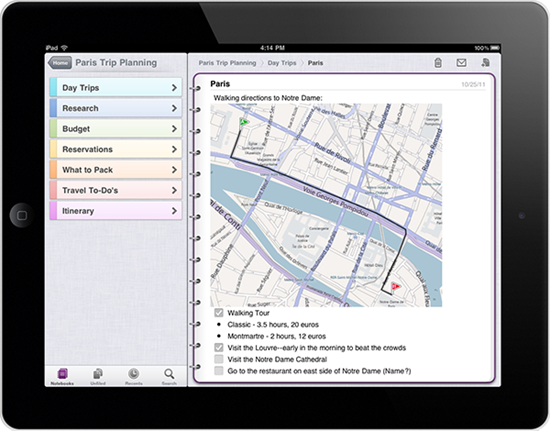
3113.on_onenote_13_ipad2

4403.onip_logo_appstore

OneNote 1.3 works on the following iOS devices:
Apple iPhone 3GS
Apple iPhone 4
Apple iPhone 4S
Apple iPad
Apple iPad 2

What’s new in this version-  OneNote for iOS builds on previous releases with the following new features in version 1.3:

Support for iPad and iPad 2
Localization into several new languages and markets
Tabbed user interface
Quick note creation in the Unfiled Notes section
Table rendering
Improved Windows Live sign-in experience
Option to sync notebooks only over a Wi-Fi connection
Integrated upgrade option

** OneNote 1.3 is free to download and use for up to 500 notes (the total of newly or previously created notes). To track your usage, tap the Settings button in the app and then tap the Upgrade button.

When you've reached the limit, you can upgrade OneNote 1.3 as follows:
$4.99 for unlimited use on your iPhone
$14.99 for unlimited use on your iPad
If you choose not to upgrade to the unlimited version, you can still view, sync, and delete any of your existing notes even after you've reached the 500 notes limit. However, you will no longer be able to edit your notes or create new ones on your iPhone or iPad. For pricing outside of the United States, please visit the iTunes App Store in your region

Starting today, OneNote for iOS available worldwide in the following markets:

Argentina, Australia, Austria, Belgium, Bolivia, Brazil, Canada, Chile, China, Colombia, Costa Rica, Cyprus, Czech Republic, Denmark, Dominican Republic, Ecuador, El Salvador, Finland, France, Germany, Greece, Guatemala, Honduras, Hong Kong, Hungary, India, Indonesia, Ireland, Italy, Jamaica, Japan, Korea, Luxembourg, Malaysia, Mexico, Netherlands, New Zealand, Nicaragua, Niger, Norway, Panama, Paraguay, Peru, Philippines, Poland, Portugal, Puerto Rico, Russia, Singapore, South Africa, Spain, Sweden, Switzerland, Trinidad and Tobago, Turkey, United Kingdom, United States, Uruguay, and Venezuela.

More details at (Source)

Sunday, December 11, 2011

[Tip] Office2010 can read out documents for you

Did you know, you can listen to your documents? Office2010 can read it out for you.

Click on the arrow next to Quick Access Toolbar (QAT) > More commands…

off2010speak

It’ll open Word Options Window, Select ‘All Commands’ and scroll down to select ‘Speak’ and click on ‘Add >>’, click OK.

off2010speak1

In Excel you have more Speak Command Options-

off2010speak3

Now Open the document you want to hear Office2010 Read it for you. Select the portion or all of text you want to hear. And click on the Speak button on QAT and listen to your document.

off2010speak2

Saturday, December 10, 2011

Publish your blog as a magazine in Google Currents

As you know Google Currents was recently introduced– A Flipboard Style Reader for  Android and iOS devices.

“Gather your RSS and media feeds, YouTube channel, social stream, and more into a mobile magazine edition beautifully presented on tablets and smartphones.“

So how about publishing your blog in magazine format which can be read using Google Currents. And this can be read offline also. If you have signed into Google Currents, you can check in Google Reader under Library listing.If its showing your Blog there or you can subscribe to your Blogs RSS feed in Google Reader and then add to Google Currents.

GCurrent1

GCurrent2

Once added,it’ll create the magazine edition and it’ll be in Library, ready for reading.

GCurrent3

GCurrent4

If you want to add any site but don’t know the feed URL, just search and when listed add them. Like here I have searched for TheWindowsClub Blog feed

GCurrent5

GCurrent6

One can configure to enhance the magazine by going to https://www.google.com/producer/  (works only in Chrome Browser ) where one can add a splash screen, icons,add sections,change the layouts for Android, iPhone, Tablets, iPads etc to customize accordingly.

GCurrent7

New Twitter provides Enhanced Profile Pages for Brands !

As you know the new version of twitter has been in talks since its release. Twitter has been providing nice features for its regular users. Now its helping Brands to add Brand values via twitter !

Twitter is introducing enhanced profile pages that help marketers create an even more compelling destination on Twitter for their brands.

Twitter is providing the Brands profile page to make an impression with a large header image for displaying their logo, tagline, and any other visuals.

“The Brands can also control the message visitors see when they first come to your profile page by promoting a Tweet to the top of your page’s timeline. This Tweet helps you highlight your most engaging and important content and better connect with your target audience. The Promoted Tweet on your profile page will appear auto-expanded so that visitors to your page can instantly see the photo or video content that you link to from your Tweet.”

This enhanced Profile page and the Promoted Tweet are both free of charge and publicly accessible for the whole world to see.

Here are some examples of various Brands Profile Pages - 

twtbing

twtcola

twtpepsi

twtdell

At present twitter has launched the new Enhanced Profile pages exclusively with 21 advertising partners and select charities and individuals.

@AmericanExpress, @BestBuy, @bing, @chevrolet, @CocaCola, @Dell, @DisneyPixar, @generalelectric, @Heineken, @HP, @intel, @JetBlue, @Kia, @McDonalds, @nikebasketball, @NYSE_Euronext, Paramount Pictures' Mission: Impossible – @GhostProtocol, @pepsi, @Staples, @subwayfreshbuzz, and @VerizonWireless.

The new Enhancement only visible in New version of Twitter. So this is what it meant when it said - Let your brand take flight.

(Source)

Using new #hashtag and @mention buttons of New Twitter

Recently Twitter did a refresh to their Tweet and Follow Buttons and now after the release of the New Twitter they have introduced - #hashtag button and @mention button.

“The new #hashtag button tells your visitors there’s an interesting conversation happening on Twitter, and lets them join in with just one click. The @mention button encourages visitors to Tweet to your account, driving public conversation directly from your website.”

So to get started and configure your own button experiences check out the new Twitter Buttons website.

buttonchoice

Select the Button you want , configure them, copy and paste the generated code

For example I have put a #Hashtag Button

And a @mention button

So its up to you, how and where to put to use these buttons. many new features are being added to the New twitter, So stay tuned !!

Friday, December 09, 2011

Keyboard Shortcuts for the New twitter

The new twitter has been rolling out to all since yesterday. Some new features like Home, Connect, Discover etc have been added. Check the new Keyboard Shortcuts with the earlier ones listed here.

kbscutsnewtwitter

The New twitter will be rolling out to all, in case if you haven’t got the new twitter. You can check up about the New twitter here.

(Source: twitter.com)

Embedding tweet option in the New twitter

Many times in your blog posts, you want to post the tweets screenshot. So instead of Screenshot which are static, how about embedding them in blog post so that the links etc within tweets are clickable. Earlier we had seen Embed tweets in your blog with Blackbird Pie tool from twitter which made use of Blackbird Pie tool from twitter.Also we talked about Blackbird Pie Twitter Plugin for Live Writer in the same post.

Now the New twitter released yesterday provides an option to embed tweet. Let us see how to get the code to embed the tweet.

“The Embedded Tweet feature allows websites to generate copy and paste-able HTML markup to render a Tweet on any third-party website. This markup presents a Tweet in an attractive (and display guidelines compliant) way, and automatically sets up Web Intents so that viewers of the Tweet may retweet, reply, favorite, and follow easily from the rendered view.”

Just click on the ‘Open’ to get the Detail view.

twitterembed

twitterembed1

Click on ‘Details’ to get ‘Embed this tweet’

twitterembed2

Click on ‘Embed this tweet’ to get the code

twitterembed3

The resulting dialog will give you some customization options, as well as embeddable markup which you should copy and paste into the page you wish to embed the Tweet into.

The copy & paste code can be rendered in the various formats-

HTML- Markup which may be copied and pasted directly into an HTML page to render the embedded Tweet.

Shortcodes- A shorthand notation for rendering the embedded Tweet on platforms which support Tweet shortcodes, such as wordpress.com

Link- The URL of the Tweet

So here I’m embedding the code (in the source section of Windows Live Writer) but as can be seen, its not properly rendering though its showing the tweet. (In IE9 its not showing the ‘Follow’ button, ‘Reply’,’Retweet’ and ‘Favorite’ links  and also the DP and its links. While its showing correctly in Firefox)

Those using WordPress blog can try the shortcode method.

More details for developers here.

Google introduces Currents - Flipboard style Reader

GoogCurrentGoogle has just introduced Currents.

“Google Currents delivers beautiful magazine-like editions to your tablet and smartphone for high speed offline reading.”

Recently Flipboard was released for iPhones and now Google launches Current which can be said similar to Flipboard.

Few screenshots-

current1current2

current3

Its available for iOS And Android.

For more details and download , check http://www.google.com/producer/currents

Tweet