Showing posts with label SkyDrive. Show all posts

Sunday, September 07, 2014

[TIP] Secure OneDrive with PIN on your Android Phone

Many OneDrive users had suggested that they want some kind of password protection for their OneDrive on Smartphones. These users wanted to prevent other people who might also be using their device to have access to the files on OneDrive who may accidentally delete or change file on OneDrive.

Now with the latest OneDrive update, this security feature has been provided. Now OneDrive users can set up a 4 digit code which has to be entered when OneDrive app is opened on phones. This setting up a PIN is a good feature addition.

But as of now this Security PIN feature has been provided only for OneDrive Android app. OneDrive team has hinted that this feature will be made available on Windows Phone and iOS platform too.

How to set up security PIN on Android:

  • After updating your OneDrive app. Open OneDrive app .
  • Go to Settings on the app bar by tapping on those 3 dots at bottom right,
  • tap on Settings to open Settings page
  • Switch ON ‘Required code to use app’
  • Enter 4 digit code , so this PIN code will be required whenever you open OneDrive app.

OneDriveAndroidPIN

So if you are an OneDrive Android user, secure OneDrive by enabling this feature.

UPDATE: As it was mentioned above, OneDrive team has now added this security feature to iOS too. Hoping it to soon see on Windows Phone too.

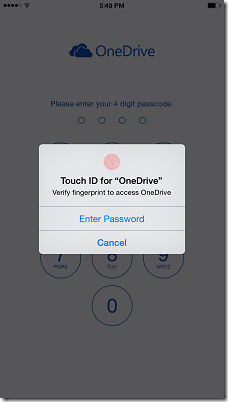
The latest OneDrive update, provides PIN code , Touch ID and sorting features for OneDrive for iOS app. Using fingerprint to sign-in feature has been added after including the brand new Touch ID API in iOS 8. So these features only available on iPhones, iPods  having iOS 8.

PINiOSOneDrive

Now waiting for OneDrive team to provided this PIN code feature on Windows Phone..

Thursday, July 24, 2014

[FIX] OneDrive is starting up… OneDrive systray icon’s wrong status in Windows 8.1

In June one of the Windows optional update ‘Update for Windows 8.1 for x64-based Systems (KB2962409)’ contained long list of fixes as seen in its details. And among the list was KB2965174 titled “OneDrive improvement update for Windows RT 8.1 and Windows 8.1: June 2014” .

optionalupdt1z

This update just mentions that it includes improvements for Microsoft OneDrive in Windows RT 8.1 and Windows 8.1 without elaborating what the improvements are. When you install it, adds various OneDive options as we can see in the OneDrive icon in the Systray – providing option to Pause Sync, troubleshooting, settings and other options.

optionalupdt2

But this update had an issue of showing the systray blue Sync icon which continues to say ‘OneDrive is starting up…’, even though OneDrive status is Up to date as can be seen here. There was no issue in actual syncing but the icon and status shown were wrong.

optionalupdt4z

Lots of OneDrive users had posted about it and Microsoft too was aware of it and was working on it and had mentioned that “Microsoft is aware of this issue and our product group is working on it. As soon as we have a fix, it will be rolled through Windows Updates….”

And with latest Windows Update released on 22nd seems to correct this issue. The update is "Update for Windows 8.1 for x64-based Systems (KB2980654) " received via Windows Update.

When you check for details about the update, its http://support.microsoft.com/kb/2980654 and it says "OneDrive reliability update for Windows 8.1 and Windows RT 8.1" . So check for this reliability update and see if its already installed or can check it from the link given above. While the update for Windows RT 8.1 can be obtained only via Windows Update.

So installing this update corrects the wrong status icon shown in systray. Please note that this update corrects only this icon issue, if you are having actual syncing issue,this update may not resolve and you might have to try the troubleshooting or some other option.

After installing this update users have reported that it has solved their Wrong status icon issue. For me too it has resolved the issue. This is the version after installing the update.

OneDrivver

Saturday, June 21, 2014

[TIP] How to Pause and trigger Sync in OneDrive for Windows 8.1

Here’s a small but useful tip for OneDrive users. OneDrive has been getting new features regularly. One of the most requested feature was more control over syncing OneDrive files in Windows 8.1. Suppose you wanted to make full use of your bandwidth but the OneDrive Syncing process was going on, so you can now pause this Sync process and provide full bandwidth to your required download and later resume the Sync.

And the latest updates to OneDrive provides this feature. This update allows you to trigger a sync or pause an in-progress sync right from the system tray. Knowledge Base article KB2965174 titled “OneDrive improvement update for Windows RT 8.1 and Windows 8.1: June 2014” gives details.

After installing the latest updates, Just click on the OneDrive Systray icon and there you have the option -

  • Sync
  • Pause Syncing

It also shows your OneDrive Status whether its uptodate or  not, and when was it updated. So if you haven’t yet noticed it, please check them and if not updated, get the latest update.

Friday, March 21, 2014

Now up to 1TB of storage on OneDrive for Business

Good news for SharePoint users : You can now increase your SharePoint OneDrive for Business quota to 1TB from the default 25GB and previous limit of 100GB.

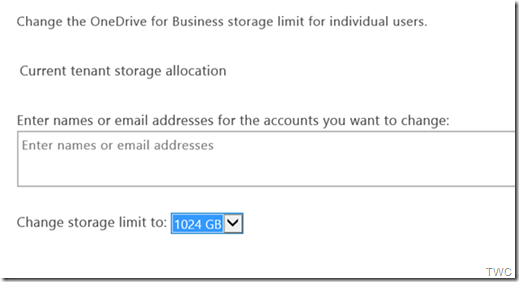
SharePointOneDrive

The way it works is you can specify which specific users you want to assign new upper quotas of 50GB, 100GB, 250GB, 500GB or 1TB quota. The catch to this is once you exceed the default quota of 25GB for a user you will be pulling storage out of your overall pooled tenant storage allocation (10GB + 500MB x total number of users) in your tenant.

The SharePoint site collection limit has also been upped from 100GB to 1TB max and the 25TB max SharePoint Online limit in a single tenant has been removed which means you can purchase as much pooled storage as needed in your tenant.

More on how to configure OneDrive for Business and site collection quotas here and here.

(Source)

Tuesday, November 12, 2013

SkyDrive on Xbox One – First look

Jeff Henshaw, Principal GPM,Xbox takes us to a quick first look at how SkyDrive works on Xbox One.

SkyDrive on Xbox One provides a seamless way to enjoy your photos and videos, or those shared with you, on the big screen. The app also takes advantage of exclusive Xbox One features: You can open photo albums from channels in the OneGuide, play music alongside your slide show with Xbox Music, and control the whole app with gestures and voice, courtesy of Kinect.


By default your Xbox One will display the photos and videos from your SkyDrive account. You can then set your photos or photos shared by friends to drive slideshows or show up as a custom channel in OneGuide, the program guide on your Xbox One (Source)

Friday, August 30, 2013

SkyDrive Photos gets Bing powered OCR

In SkyDrive Photos are the type of files that take up largest amount of space and people interact with photos the most. And this time the SkyDrive feature addition is related to photos on SkyDrive. As you must have followed, SkyDrive team updates SkyDrive with new features regularly and now it adds a feature, many users wanted from long time.

Many of us have come across a situation where you upload photos to SkyDrive and want to extract text from that photo, be it a Product label , A book title with excerpts, some ad or some similar example. When you take photos with Windows Phone (with auto upload on), it goes to your SkyDrive camera roll folder. With this new SkyDrive release an OCR tool will automatically run on your camera roll photos and its text extracted which can be viewed on SkyDrive.com

This OCR (optical character recognition) feature is provided in partnership with the Bing team. Thus your SkyDrive photos are made smarter with Bing powered OCR.

SkyDriveExtractedTxt

As you can see in the above pic, the extracted text from the photo is shown in the Properties pane.

This OCR feature is first of the several features to roll out that will make your SkyDrive photos smarter. So in the days to come you’ll see more new features. OCR feature is available in English, Portuguese, Spanish, French, and German. This feature is being rolled out and may take a day or two to for everyone to get this, so if you don’t see it on your SkyDrive yet, you should see it soon. Check SkyDrive.com if you have got it or not.

Tuesday, March 12, 2013

US college students can get 6 months of Free Office 365 and extra 20 GB of SkyDrive storage

Microsoft is offering a great offer for college students in the U.S.. College students in the U.S. can get

And all this for FREE! And if you share this offer on Facebook, can get an extra 3 months free of Office.

logo_office365logo_skydrive

To redeem the offer you can go to the link and provide your .edu email address and redeem the offer.

You and your classmates can create, collaborate and edit full Office documents from nearly anywhere. With SkyDrive, you can all make changes at the same time on the same document, in real time.

Whether you are on a PC or Mac, you can work on documents together using SkyDrive and Office.

Save your Office documents to SkyDrive and they're available to view and share from the SkyDrive app on iOS, Android, and Windows Phone.

I hope this great offer is extended to all Students across the globe and not only to U.S. Students. And if you are not a student? You can still try Office 365 Home Premium free for 1 month.

Check out the video -

Friday, January 25, 2013

SkyDrive app gets Live Tiles feature

Yes, we have been seeing that SkyDrive is getting continuously improved as new features being added regularly. SkyDrive team listens to user’s feedback and implements them too. And the latest addition in this list is SkyDrive app getting Live Tiles feature. So your SkyDrive app on Windows 8 Start Screen will keep you up-to-date displaying the recent additions to your SkyDrive with its Live Tile. SkyDrive Team announced about this today.

From today the SkyDrive app from Windows Store will start showing the notifications thus updating its Live Tile whenever you add new files to SkyDrive, whether the files are added directly to it or via other apps. So the SkyDrive Live Tile, not only be used to launch it but from now on will show you what’s going on with its at-a-glance view dynamically. It’ll show you relevant details of the new files added.

SkyDriveLiveTile01

For example, if you have added a document, you’ll see the document’s name, when it was added, and what folder it’s in.

SkyDriveLiveTile02

If you have added photos, it’ll provide a nice view of these photos as can be seen above. And like other Live Tiles, now the SkyDrive tile too comes alive being dynamic and enhances your Windows 8 Start Screen. So you make the SkyDrive Tile larger if its set to show ‘smaller’ view.

And if by any chance, you do not want it to be a Live Tile, there’s always the option to ‘Turn Live Tile Off’ . Just right click on the Tile to get this option and click on 'Turn Live Tile off' from the app bar.

SkyDriveLiveTile03

This new feature has already started rolling out and will be rolling out throughout the day and if you don’t see this on your SkyDrive tile yet, you’ll get it soon. I checked my SkyDrive and it already got this feature.

Wednesday, December 26, 2012

Windows Live Mesh to officially retire on Feb 13, 2013

Recently Microsoft had an important announcement regarding Windows Live Mesh. Windows Live Mesh which was first released in beta back in late 2008 and was used to keep files in sync and to remotely access a PC. Lot has improved since 2008 – the clout of cloud has grown, improved a lot now, is capable of storing larger and larger amounts of data.

futureofLiveMesh

As we have seen Microsoft has been working to bring the DNA of Windows Live Mesh together with SkyDrive into a single service, set of apps and developer APIs. And so SkyDrive has moved from its single website SkyDrive.com an year ago to versatile cloud storage service with a new HTML5 website and apps for Windows, Windows Phone, Android, iPhone, iPad, and now Xbox 360. And now SkyDrive is deeply integrated into devices and apps in a way that makes saving to the cloud, or using your cloud files, simple and seamless as you can experience it in Windows 8, Windows RT, Windows Phone 8, the new Office and lots of other apps and websites built on the SkyDrive APIs.

With these improvements, there are now more than 200 million people using SkyDrive and more and more people making the move everyday. At one point there were few million users using Windows Live Mesh and many of those too have made a move to SkyDrive. Now we have less than 25000 active users of Windows Live Mesh. Because of this Microsoft has announced that Windows Live Mesh will be officially retired on February 13, 2013.

And Microsoft has already starting to communicate with these Mesh users and instructing them on how to keep their files in sync and alternative options for some of the features they’re still using. Microsoft is mailing to these Mesh users.

Currently 40% of Mesh customers are actively using SkyDrive and based on the positive response and our increasing focus on improving personal cloud storage, it makes sense to merge SkyDrive and Mesh into a single product for anytime and anywhere access for files. As a result, we will retire Mesh on February 13, 2013. After this date, some Mesh functions, such as remote desktop and peer to peer sync, will no longer be available and any data on the Mesh cloud, called Mesh synced storage or SkyDrive synced storage, will be removed. The folders you synced with Mesh will stop syncing, and you will not be able to connect to your PCs remotely using Mesh

Here are some FAQs sent to Mesh users-

Why is this happening?

Over the years, customers have asked us to bring many of the benefits of SkyDrive – including mobile access and online collaboration – to Windows Live Mesh. We've also received requests for some of the features of Mesh – such as syncing and remote access—to SkyDrive. Bringing together key features of both products into SkyDrive allows us to maintain a single product and deliver all of these benefits to customers. Moving forward, a single product also allows us to quickly deliver more new features to everyone.

What features are available on SkyDrive?

  • Sync your entire SkyDrive or only select folders with your computer. With the SkyDrive desktop app for Windows or Mac, your files on SkyDrive are available online or offline – and update automatically across your computers.
  • More storage – Every SkyDrive customer automatically receives 7 GB of free SkyDrive storage, two more than Mesh. If you need more, you can purchase up to an additional 100 GB to meet your needs. Just sign in to SkyDrive.com and click Manage storage in the lower left corner.
  • Great views – SkyDrive has several features Mesh didn't include. For example, with SkyDrive you can sort files, change file views, view photo slide shows, and stream video.

What can I expect between now and the date when Windows Live Mesh is retired?

For now, Mesh will continue to work the same as always. We'll send you reminder emails as the retirement date for Mesh gets closer.

Where can I learn more?

For more information, see SkyDrive for Mesh users. You'll find details about how to make the switch to SkyDrive, as well as updates about the changes to Mesh.

Can I use SkyDrive to connect to a PC remotely and run apps on it?

No, with SkyDrive you can fetch files on a remote PC, but you can't connect to it remotely to work as if you were sitting in front of it. If you want to connect to a work PC, try Remote Desktop Connection in Windows. With Remote Desktop Connection, you can connect to PCs that are running these editions of Windows:

  • Windows 8 Pro, Windows 8 Enterprise
  • Windows 7 Professional, Windows 7 Enterprise, Windows 7 Ultimate
  • Windows Vista Business, Windows Vista Ultimate, Windows Vista Enterprise
  • Windows XP Professional

To remotely connect to a Mac or other Windows operating systems not listed above, we recommend creating a LogMeIn account. LogMeIn Pro gives you fast, easy remote computer access from your devices over the web in HD. Transfer files, print remotely, or keep machines up to date from any computer or your mobile device.

Also check SkyDrive for Mesh customers

Friday, September 21, 2012

SkyDrive gets Recycle Bin feature ! Excel Surveys Coming Soon !

As Microsoft has been doing constantly, it keeps improving and adding features based on users requests! The latest has been the new SkyDrive. Microsoft has been focusing on SkyDrive to make it the most versatile personal cloud storage service. One of its key audience, Students have been increasingly choosing SkyDrive. And one of the top feature requests from Students was a Recycle Bin for SkyDrive. And the request has been fulfilled and this recycle bin feature is available now on SkyDrive.com

Recycle bin

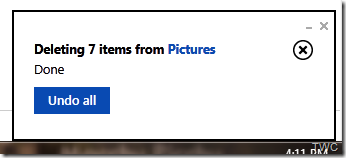
Many people, Students in particular had requested a way to recover deleted file. Though SkyDrive already keeps previous versions of Office documents automatically but the request was to recover any file deleted by accident, even by someone else, during a group project. To cater to such scenarios, recycle bin feature has been added to SkyDrive. Earlier when you deleted any file in SkyDrive, one had to acknowledge it in a warning dialog. Now when you delete files, SkyDrive informs that it has been deleted and provides ‘Undo’ action if needed. Thus making the delete action, aster and easier. And the deleted files goes to the Recycle Bin which works similar to what’s is there on the PC.

SkyDriveRecBin1


And one can access the Recycle bin from the option provided on bottom-left  of SkyDrive.

SkyDriveRecBin2

And from there you can browse your deleted items in thumbnail or details view. And can select items which can be restored to its original location.

SkyDriveRecBin3


Items in the recycle bin do not count against your SkyDrive storage limit. Deleted items are stored for at least 3 days .”If the content in your recycle bin gets large enough to exceed 10% of your storage limit (which will be pretty rare), we’ll start to delete the oldest content (after it’s been there 3 days), and will permanently remove items from the recycle bin after they have been there for 30 days (and not restored).”

Right now, the recycle bin feature is available from SkyDrive.com, and over time the recycle bin experience will make it to other SkyDrive experiences too. This feature has been rolled out and is available now.

Excel Surveys

Another exciting feature that will be coming soon is the Excel Surveys. This feature too was one of the most requested feature. To create a Survey , just select “Excel survey” from the Create menu:

ExcelSurvey1

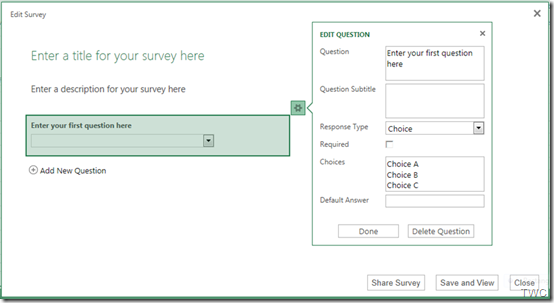
Then you’ll be taken through various steps to create the Survey with each question having several options for different types of response one wants :

ExcelSurvey2z

And when done, its just click away to share this survey with others & start collecting responses.

And unlike competing services, you can easily use the power of Excel Web App, Excel for Windows, or Excel for Mac to sort, analyze, or chart the results of your survey.

This feature will be put up soon. (Excel Survey pics courtesy Inside SkyDrive – the official SkyDrive Blog)

What do you think of these great features? Anything else you want to suggest?

Wednesday, April 25, 2012

[video] How is SkyDrive different? Introducing the new SkyDrive !

Introducing the new SkyDrive

Store any file on SkyDrive and it's available to access or share from any device - automatically. With SkyDrive, you'll never be without the documents, notes, photos and videos that matter to you

Learn more or download for Windows, Mac, iOS, WP and more: http://bit.ly/I1rPkH

Tuesday, April 24, 2012

How to upgrade existing SkyDrive account from 7 GB to 25 GB for FREE!

SkyDrive Cake

(SkyDrive cake on the epic release. Pic courtesy : http://t.co/AKx6CkA2 )

As you know preview of SkyDrive for the Windows desktop has been released. Using this you can access your SkyDrive from Windows Explorer on Windows 8, Windows 7 and Windows Vista. Thus SkyDrive has been integrated with Windows. Its available for Windows, Windows Phone, iPhone, iPad and for Mac. You can get this new app from here.

With this release of SkyDrive,  free storage limit is changing to 7 GB. As a Limited time loyalty offer existing SkyDrive users those who already have SkyDrive account, can still get their 25 GB they currently have. This is a Limited time offer and being offered only to early loyal adopters.

Let us see how to claim this free upgrade from 7GB to 25 GB for existing users. As said please note this is Limited Time offer, so do it quickly-

Sign-in to your SkyDrive account and click on ‘Manage storage’ 

SkyDriveClaimz

or directly goto https://skydrive.live.com/ManageStorage  to get this page. Click on ‘Free Upgrade’

SkyDriveClaim1z

That’s all , now your 7GB storage will be upgraded to 25 GB for FREE!

SkyDriveClaim3z

Those SkyDrive users who were using close to 7GB before the latest update, they’ve have been automatically upgraded to 25GB.

“..starting today, for a limited time, any registered SkyDrive user *who has uploaded files to SkyDrive* as of April 22nd can opt in to keep 25GB of free storage while still getting all of the benefits of the new service. (For users who are already using more than 4GB as of April 1, we’ve automatically opted you in to 25GB of free storage to avoid any issues.) “

Also received a tip from Ludwig Keck that Users who have not made any use of their SkyDrive, i.e. not uploaded anything, do not get the free 25 GB upgrade offer.

As you can see here, this account though created long time back, did not make any use of SkyDrive, so it doesn’t have the upgrade option.

SkyDrive7GBONLY

Also as you can see SkyDrive now also offers additional storage options for people who need more. SkyDrive offers affordable plans to add up to 100 GB of additional storage to SkyDrive.

Thursday, April 12, 2012

India’s AICTE chooses Microsoft for largest cloud deployment!

All India Council for Technical Education (AICTE) announced today that AICTE is deploying Microsoft Live@edu over the next three months to more than 10,000 technical colleges and institutes throughout India.The cloud deployment will expand students’ access to high-quality technical education and collaboration.

LiveatEDUcomb

The press release said -

“Live@edu is a hosted communication and collaboration service that offers email, Microsoft Office Web Apps, instant messaging and storage to AICTE’s more than 7 million students and nearly 500,000 faculty members, for a total reach of 7.5 million users — roughly double the size of the Los Angeles population — making AICTE Microsoft’s largest cloud customer ever. Live@edu is the first step in AICTE’s deployment of Microsoft cloud computing for education. AICTE also plans to deploy Microsoft Office 365 for education when it becomes available later this year, providing access to Microsoft Exchange Online email and calendar, Microsoft SharePoint Online, Microsoft Lync Online and Microsoft Office Professional as the technical infrastructure to support member colleges and institutes.”

Part of India’s Ministry of Human Resource Development, AICTE is the governing body for technical education in India, certifying and managing technical colleges and institutes in a country where the technology industry and higher education are both becoming increasingly vital to the economy.

AICTE reviewed solutions from a range of vendors, including Microsoft, IBM and Google. One of the major factors in the decision to choose Microsoft’s cloud services for education was Microsoft’s comprehensive commitment to education across all the company’s products and programmes, as well as the system’s seamless interoperation with the entire Microsoft product portfolio. The council was also impressed by Microsoft’s extensive experience in higher education and ability to deploy a system across geographically distributed locations without adding significantly to the institutions’ IT management costs or complexity.

The implementation is already underway and is being managed by Microsoft and a set of Live@edu partners. Full deployment is expected to be complete by summer 2012.

Live@edu is the leading cloud suite for education, with more than 22 million people using the service worldwide. At 7.5 million users, the AICTE deployment is the largest cloud deployment ever. Other recent Live@edu adoptions include a 700,000 cloud-based collaboration solution for the Kentucky Department of Education. The online service helps educational institutions provide email and enterprise-grade online tools to students and faculty while helping to reduce costs and simplify IT management.

Live@edu is a no-cost hosted platform for student communication and collaboration, providing industry-leading services to the global education market. Email and calendars with a 10GB inbox, 25GB of additional file storage, document sharing, instant messaging, video chat and mobile email are just part of the feature set.

Check the complete press release here.

Wednesday, January 18, 2012

[video] How is SkyDrive better than Google Docs ?

skydriveOfficeIf you are a Google Docs user, try the SkyDrive and Office! They are designed for each other. I’m sure you’ll switch to SkyDrive! Check out this video to see how three students use SkyDrive and Office to work together on a great group paper.

Learn more here :

 Working Together and Sharing for School made easy !

SkyDrive and Office: 7 tips for full-powered collaboration in the cloud across PCs and Macs

Tuesday, December 20, 2011

Skydrive for iPhone and Windows Phone

Recently there were lots of updates to SkyDrive which now uses the latest HTML5 technology making it very fast and very much improved file management. Now Microsoft has come up with SkyDrive app for Windows Phone and iPhone. Since sometime, Microsoft has been providing very good apps for iOS and Android based devices also apart from for Windows Phone.

SkyDrive for iPhone: SkyDrive from Microsoft is the place to store your files so you can access them from virtually any device. With SkyDrive for the iPhone, you can now easily access, manage and share files on the go. You can also upload photos or videos from your iPhone to SkyDrive.

Features:

  • Access all of your SkyDrive content including files shared with you
  • View recently used documents
  • Upload photos or videos from your phone
  • Share a link to any file using email
  • Create folders. Delete files or folders

Available now in the App Store: http://bit.ly/v1JLYR

SkyDriveip3

SkyDriveip2

SkyDrive for Windows Phone

SkyDriveWP

SkyDrive for Windows Phone is available in the Marketplace now: http://bit.ly/w2xMQW

The SkyDrive app for Windows Phone allows you to browse and manage your SkyDrive on the go.

(Source : Inside Windows Live )