Sunday, January 31, 2010

Yuvraj Singh launches his website

Yuvraj Singh- The Indian Cricketer has launched his website http://yuvrajsingh.co.in/ 

You can find all the Stats, photo gallery, his videos including the famous 6 sixes in an Over, wallpapers, screensavers, his Foundation – causes he supports, Yuvi stores where one can get various merchandise, Fans Forum and much more.


yuvisitez


Fans can also contact him on Facebook , twitter or mail him at yuvi@yuvrajsingh.co.in 

For more details visit his official website - http://yuvrajsingh.co.in/

Friday, January 29, 2010

Microsoft reports record revenue for Second Quarter

“Microsoft Corp. today announced record revenue of $19.02 billion for the second quarter ended Dec. 31, 2009, a 14% increase from the same period of the prior year. Operating income, net income and diluted earnings per share for the quarter were $8.51 billion, $6.66 billion and $0.74 per share, which represented increases of 43%, 60% and 57%, respectively, when compared with the prior year period….

“Exceptional demand for Windows 7 led to the positive top-line growth for the company,” said Peter Klein, chief financial officer at Microsoft. “Our continuing commitment to managing costs allowed us to drive earnings performance ahead of the revenue growth.”

Windows 7 and Windows Server 2008 R2 launched globally on October 22 as anticipated. Through the second quarter, Microsoft has sold over 60 million Windows 7 licenses making it the fastest selling operating system in history……”

01-28Numbers_lg


For more details, please check the Source – Microsoft  News Center

My 2010 Microsoft MVP award

I was really pleased and honored for renewal of my Microsoft MVP Award as I received this mail on 1st Jan 2010.

“Congratulations! We are pleased to present you with the 2010 Microsoft® MVP Award! This award is given to exceptional technical community leaders who actively share their high quality, real world expertise with others. We appreciate your outstanding contributions in Windows Live technical communities during the past year…..”

Thanks to Microsoft, my MVP Lead Abhishek Kant and the community. I’ll be continuing my work of supporting the community…..

Then later, after couple of weeks I received the MVP Award Kit for which I was waiting so that I can blog post some snaps. Here are few snaps of the same -

IMG_1549z


The Crystal trophy looks stunning with its blue tinge.


IMG_1520


IMG_1542


For more details about MVP program , please check - http://mvp.support.microsoft.com/

Thursday, January 28, 2010

Free E-book: UX Guide for Windows 7 and Windows Vista

UXguide

This E-guide is about Windows User Experience Interaction Guidelines (or UX Guide) for Windows 7 and Windows Vista. These guidelines contain information on design principles, and guidelines for controls, commands, text, interaction, windows, messages, aesthetics, and the Windows environment. They help designers and developers create high-quality Windows applications with a consistent “look and feel.”

The goals for these official Windows User Experience Interaction Guidelines for Windows 7 and Windows Vista 
are to:

  • Establish a high quality and consistency baseline for all Windows-based applications
  • Answer your specific user experience questions.
  • Make your job easier!

This guide was released earlier and is updated now with following guidelines since last update:
Animations and Transitions
Setup

Download Link : Windows User Experience Interaction Guidelines

This E-book guide is in pdf format, size: 41.6 MB

Wednesday, January 27, 2010

Now twitter trending has option to set to your location– Local Trends

Twitter is now providing option to change the trending and setting it to your location, this will be very meaningful if one has to see what’s happening near ones location> countries > cities. Still many locations are to be added including India…

twitter local trendsZ


twitter local trends1z

This can be taken to completely new level from Worldwide > countries > cities > localities . Nice feature .

The HP Slate

Phil McKinney, walks us through HP's latest innovation, the HP Slate-


HPslate

Tuesday, January 26, 2010

India sings again with launch of `Phir Mile Sur` (Full version)

‘Phir Mile Sur Mera Tumhara…’ India’s Iconic song is back …. Check the full version (16 min) here -

http://www.zoomtv.in/video-i.php?embededcode_recent=ZrcjY2MTpj0BU_Xk_rKSWIq2PPNsED7x


phirmilesur1

Source : Zoomtv

Republic Day greetings to all !! Jai Hind !!

Wednesday, January 20, 2010

How to get your twitter Account Verified ?

verify As you might have seen some of the twitter accounts have a ‘Verified Account’ badge on top-right portion of a user's profile page just above the name, location and bio like the one shown below -

BiiGtwit

This feature is being provided by twitter to prevent identity confusion, and to know which accounts are 'real' and authentic. That means twitter has been in contact with the person or entity the account is representing and verified that it is approved. This also does not mean that accounts without the 'Verified Account' badge are fake. Twitter has only verified a handful of accounts to help with cases of mistaken identity or impersonation.

One other way to identify an account that twitter has not verified is to check the official web site of the person and see if there's a link back to their Twitter profile.

Twitter has started with verifying well-known artists, athletes, actors, public officials, and public agencies. It may verify more accounts in the future, but because of the cost and time required, twitter is testing this feature with a small set of folks for the time being.

If you feel that if your account is constantly competing with parody or impersonation accounts then you can fill this feedback_form  ( http://twitter.com/account/verify_request )  to get your account verified. But the first thing you should do is to provide a link to your official website on the twitter profile page and also link this back on your website.

For businesses you can fill this feedback form for business accounts, though twitter at present is not testing this feature with businesses.

Please remember that this feature is still in beta and Twitter verifies a limited number of accounts, submitting a request does not guarantee account verification.

For more information check this : http://twitter.com/help/verified 

To see lists of Verified accounts , check the various lists at  http://twitter.com/verified

Free E-book: Installing and Configuring SharePoint 2010

This free E-book is a step by step guide showing how to install SharePoint 2010 on a virtual machine. Each step is accompanied with screenshot that will help users to better understand.

The guide lists hardware and software requirements. It has up-to-date links to download pre-requisite software. Pre-requisite software has to be installed in a particular order. Guide gives you tips on what to avoid during the installation. This is the most comprehensive compilation of SharePoint 2010 installation steps.

sharePt2010z

This is the link

http://sharepoint2007tips.com/sharepoint2010book.aspx  from where you have to fill a short form providing your E-mail to which the download link will be sent.

This 125 pages book is in pdf format , size 3.58MB .

The Author of this guide SAIFULLAH SHAFIQ is a SharePoint consultant and a SharePoint MVP.

(Source: All about SharePoint- VSPug )

Bill Gates is on twitter !!

Yes, Bill Gates is on twitter and its a verified Account – you can follow him at http://twitter.com/billgates


BiiGtwit

BiiGtwit

His 1st tweet was  : “Hello World” …….

BillG1sttweeet


http://twitter.com/BillGates/status/7957453193

Tuesday, January 19, 2010

IPL 2010 matches to be streamed Live on Youtube

iplteamslogoipl-logo youtubelogo Now with the IPL 2010 season coming near, and player auctions happening today, news is coming that BCCI will partner Google India for streaming Live all the IPL matches this season. The official announcement may take place later today.

“Cricket lovers can now watch the Indian Premier League (IPL) live on internet portal YouTube. The Board of Control for Cricket in India (BCCI) will partner with Google India to stream live matches of its domestic IPL league in the Twenty20 format.

Google’s video streaming internet portal YouTube will stream live matches of IPL-III, which begins in March. This will include 44 days of IPL, with 59 matches…”

(Source: YouTube to stream IPL-III matches live)

IPL already has an Youtube video channel. Look for everything related to IPL on its official site - http://www.iplt20.com/

Monday, January 18, 2010

Now the streets have twitter names

A refugee camp near Nablus in the West Bank is assigning street names to people with their twitter handle who pay 100 euros to charity through a Dutch humanitarian website. It has become so popular there, that many are in the waiting list.

tweetstreet

Checkout this video here “Where the streets have twitter names”

(Courtesy: Reuters)

Sunday, January 17, 2010

7Up Windows 7 themepack – Very Seveny, Very Lemony

Get the 7Up Windows 7 theme pack from Microsoft – Its very Seveny , Very Lemony

7UpWin7thm


7UpWin7thm1

It has 7 cool, crisp and refreshing backgrounds. You can download it from -

http://download.microsoft.com/download/0/7/C/07c23a6e-9b03-47de-b3dd-6293bfc6ca88/7up_Windows7.themepack

(Size – 13.7 MB)

EDIT: In fact its Microsoft India where this has been made available in Windows 7 Personalization Gallery

http://windows.microsoft.com/en-IN/windows/downloads/personalize?T1=themes

7UpMSIn

Saturday, January 16, 2010

How to save time with Windows 7

Here’s a small video where Doug Thomas shows you a few ways to work with Windows 7 that will save you time with its great little features. This video is from ‘Office Casual’ series -

How2saveTimeWin7


Office Casual: How to save time with Windows 7

Windows 7 logon is delayed if solid color as the desktop background is set

If you have a computer running windows 7 or Windows Server 2008 R2 and you have set a solid color as the desktop background and the Desktop Window Manager Session Manager service is running then the Welcome screen is displayed for 30 seconds during the logon process. This is a big delay considering Windows 7 Quick logon.

This issue does not occur when one or more of the following conditions are true:

  • You log on to the computer by using Remote Desktop Connection.
  • The Desktop Window Manager Session Manager service is stopped or is disabled.
  • You set an image file as the desktop background.

Workaround -

Method 1
Set an image file that has solid color as the desktop background.

Method 2
Configure the value of the DelayedDesktopSwitchTimeout registry entry. This value determines the time-out interval of a session before Windows 7 or Windows Server 2008 R2 switches between sessions.

To configure the value of the DelayedDesktopSwitchTimeout registry entry, follow these steps:

  1. Click Start, type regedit in the Search programs and files box, and then press ENTER.
  2. Locate the following registry subkey:

    HKEY_LOCAL_MACHINE\SOFTWARE\Microsoft\Windows\CurrentVersion\Policies\System

  3. Double-click the DelayedDesktopSwitchTimeout registry entry.
  4. In the Value data box, type 5, and then click OK.
  5. On the File menu, click Exit.

I also tried this and indeed my Windows 7 logon process was delayed by few sec.

For more information, Check this link  http://support.microsoft.com/kb/977346  You can also request for the Hotfix from the same link if you are uncomfortable with the workaround. Read the important guidelines before applying Hotfix. Hotfix will be included in subsequent Service pack.

Microsoft Store launched in India

logo-microsoft-store Microsoft Stores has been launched in India – You can visit the stores at -

http://www.microsoftstore.co.in/


MSstoreInd

You can do all your shopping for Windows 7 , various Office products, developer tools , lots of Books , XBox consoles, games, accessories, PC games and of course other accessories like Mice, keyboards, headsets etc..

Windows Phones and Computer section will soon be added. SO head over to the Microsoft Stores and have a look , what your next shopping list will be.

(Thanks @brandonleblanc)

Thursday, January 14, 2010

Priyanka Gandhi 2010 Calendar


Priyankacollage

Came across a site pressbrief.in from a news item in today’s TOI , which has  lots of materials related to Nehru and Gandhis . The site has Press releases in Hindi, English and Urdu, Photos, videos, audios, Speech text etc.The Congress related videos section has even the rare Mahtama Gandhi videos. The site also displays the latest related Newspaper cuttings.

The ‘design’ section of the Priyanka Gandhi has also provided 2010 Calendar for download featuring her month by month. But the size is not suitable for Computer background. Still if one wants one can resize it and use it as backgrounds.

There are very less such sites providing so much information about a  Political family , so I decided to blog about it. Those interested can have a look. And I think Priyanka Gandhi on Calendar might be first of its kind also.

Sunday, January 10, 2010

Bing wins Best New Startup Or Product Of 2009

Congrats to the Bing team for winning the Best New Startup Or Product Of 2009 at The Crunchies.

bingprize

You can also check the complete list from the above link.

Wednesday, January 06, 2010

The Original ‘GodMode’ dates back to 2007

Since a week or so there has a been a buzz, lot of talks on net, blogs, twitter about ‘GodMode’ in Windows 7. But this tip has been there since the days of Vista and has been reported on MeraWindows by RameshKumar on 28th Nov 2007. Here’s the link for the same posted on MeraWindows – [Registry Hack] VISTA - All Control Panel & Setting tasks at one place .

As you can see its been there since Vista, and of course he has not given the name ‘GodMode’. Actually you can give any name, only thing is the CLSID should be correct and same. As someone gave this the ‘Godmode’ name, maybe some avid gamer and it spread like wildfire. So a lesson – A catchy name DOES matter.

So for those who are new to this ‘GodMode’, let us see what it is-

Create a new Folder and rename it as

 GodMode.{ED7BA470-8E54-465E-825C-99712043E01C}

Actually instead of ‘GodMode’, you can give it ‘your name’, but ensure that the later string .{ED7BA470-8E54-465E-825C-99712043E01C}  should be same. That’s all, as soon as you rename it , it changes its icon -

godmodeB

And when you double click to open it ,   you can see list of almost all program tasks in it. You can click on those tasks to open it.

myGodmodez

This thing works in Windows 7 and Vista. But as some reports suggests, there might be problem with 64bit ver, so be aware of that.

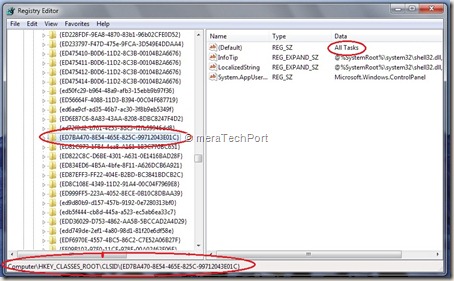
And this so called ‘feature’ is not something came out of the wild. All these CLSID are present within Windows registry and only one has to carefully go through them . You can explore it by opening Registry Editor.

Just open Registry Editor by typing Regedit in Start > searchbox and opening it.

And go to  HKEY_CLASSES_ROOT\CLSID\  

and search for {ED7BA470-8E54-465E-825C-99712043E01C} and you will find it there.
Godmoderegz

So there are many such CLSIDs found there but this one is special as it does ‘All Tasks’

As you can see this ‘GodMode’ lists almost everything but not the games (Let me know if its listed as I just went through the long list, so I might have missed) , but there’s CLSID for games also present in registry

just create a folder and rename it to

Game.{ED228FDF-9EA8-4870-83b1-96b02CFE0D52}

GodMode-games

so it will change its icon and when opened will lists all games .

So its just another example of such ‘GodModes’ !

Warning: If you are not comfortable dealing with Registry, don’t do it. Any mistake while handling Registries can cause problem to Windows.

So I hope this ‘GodMode’ hype gets reduced, clearing the doubts and due credit is given to Ramesh Kumar for reporting it first in 2007 in MeraWindows Forum. Please let me know if this has been reported earlier than this. Thanks !

Friday, January 01, 2010

New Windows Live Messenger Freebies from various artists

Enjoy these unique Windows Live™ Messenger gift packs, created by some very talented artists from around the world. Each pack comes with display pics, emoticons, and a wink—choose your favorite or download them all!


WLfreebies


Get these from here, kids will love it.

  • Moody Bob
    Moody Bob by Holbrooks

    Meet Moody Bob, a very distinct, very moody guy. Let him show your friends how you’re feeling.

    Download Moody Bob

    Holbrooks is an award-winning hub for contemporary animation and digital imaging. The duo behind this provocative studio is known for explosive ideas using a variety of mixed-media animation.

  • Emotipuff
    Emotipuff by Nanospore

    In the Emotipuff gift pack, you can say hello (and more) with a cute, friendly, puffy little creature.

    Download Emotipuff

    Nanospore is a Los Angeles-based, multidisciplinary design studio. Inherently quirky, their work is visually challenging, modern, and always unique.

  • Carnival Squad
    Carnival Squad by Nathan Jurevicius

    The Carnival Squad is a group of very unique characters to pass on to your Messenger friends.

    Download Carnival Squad

    Nathan Jurevicius is a Toronto-based, internationally renowned artist. He began selling his work at the age of 6, and now his character, Scarygirl, has her own comic, toys, online game, and a movie in development.

  • Bunny Ha Ha
    Bunny Ha Ha by PUNGA

    Bunny Ha Ha brings a quirky edge and a lot of cute to sharing your day.

    Download Bunny Ha Ha


You can also get lots of other Freebies from here.

Windows 7 Tip : Hide desktop icons

You have a stunning wallpaper / desktop background / themes displayed on your Windows 7 machine. But it gets obstructed by many desktop icons you have. But there’s an option to hide these desktop icons. This option has been there since Vista but many XP users moved to Windows 7, new to Windows 7 do not know. In fact I came across many Windows 7 users who are not aware of this.

So to hide desktop icons, just right click on your desktop > View > Uncheck ‘Show desktop icons’

WIn7dsktopicons

And if you want to hide even the Taskbar, then right click on Taskbar >Properties >On the Taskbar tab , check ‘Auto-hide’ the taskbar’

WIn7dsktopicons1

That’s all, now your desktop backgrounds, themes will be shown in full glory ! Enjoy !! And a Very Happy and Prosperous 2010 to all my blog readers !!