Showing posts with label 20H2. Show all posts

Monday, October 26, 2020

What’s new in the Windows 10 October 2020 Update

As we have seen in previous post, Windows 10 October 2020 Update (version 20H2) has started to become available to customers as a free update. Let us check its features and improvements coming with the Windows 10 October 2020 Update. Many of the features are requested features from users making experience on Windows even better. This update also contains all features and fixes included in previous cumulative updates to Windows 10, version 2004.

Microsoft Edge:  

  • This release automatically includes the new Chromium-based Microsoft Edge browser instead of the legacy version of Edge. If you already been using the new Edge browser, must have seen the new Collections feature where you can save and share content you find online. Now the Price Comparison feature too is added. Though this feature is available for limited sites at present but still very useful for comparing prices across various sites.


  •  Alt+Tab: With this handy keyboard shortcut not only can you easily access the apps you have open on your desktop, but now you can also access your open tabs in Microsoft Edge.
  •  See all the open tabs: If you’re someone who likes the convenience of pinning your favorite websites to the taskbar, you’re going to love this new feature. Now when you hover over the website icon, you’ll see all the open tabs of that site.

Start menu, taskbar & others gets refreshing updates:

  • Start menu gets a refined design. A uniform, partially transparent background to the tiles creates a beautiful stage for the redesigned app icons like Calculator, Mail and Calendar. This new design looks great both in light and dark themes. First make sure to turn on Windows dark theme and then toggle “Show accent color on the following surfaces” for “Start, taskbar, and action center” under Settings > Personalization > Color to elegantly apply your accent color to the Start frame and tiles.
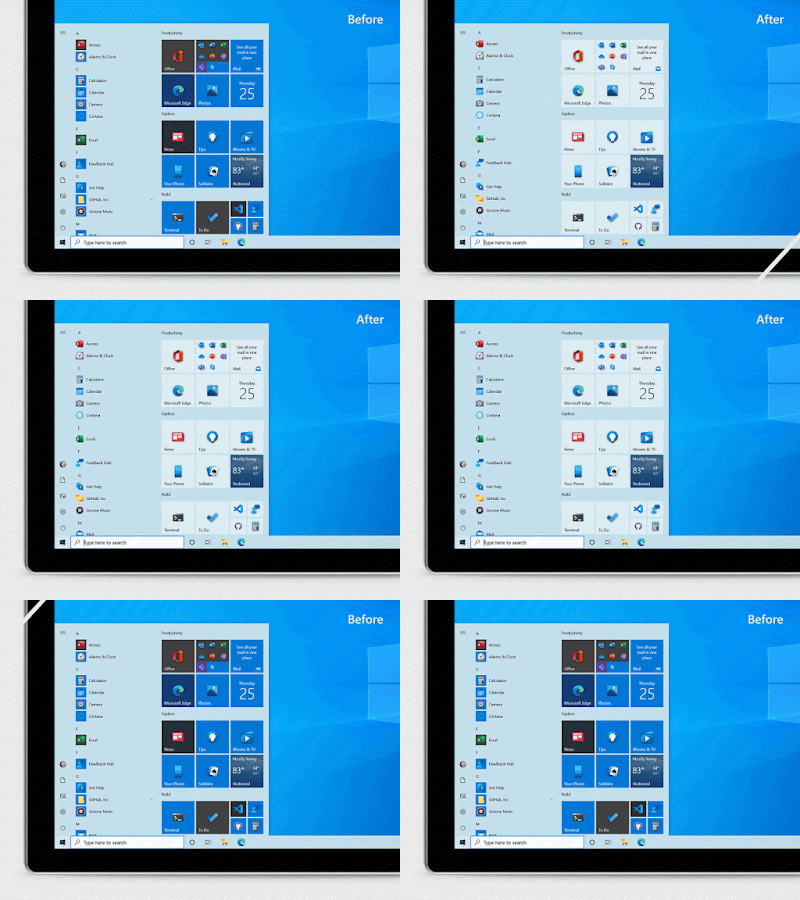
  • A taskbar specifically curated, more personalized with less clutter, more content. This is limited to new account creation or first logon scenarios.
  • Settings continues to become a more robust place to access security and device details. Now you can change the refresh rate of your display from Settings > System > Display, Advanced display settings. 
  • 2-in-1 devices now naturally switch by default to the new tablet experience without the notification toast asking you to switch into the tablet mode when you detach the keyboard.
  • New app logos at the top of notifications now make it much easier to identify who they are from. And the new “X marks the spot” lets you quickly click, close and get back at it.
For more details and information on updates for commercial and education customers, please check the source
 

Sunday, October 25, 2020

How to get the Windows 10 October 2020 Update (version 20H2)

Availability of Windows 10 October 2020 update has been announced. This was first announced in June and its first preview build was made available in Windows Insider Program. Then a preview build was released to commercial customers in August. The Windows team continued to make improvements based on the feedback it received. And now the Windows 10 October 2020 Update is announced and is available for download.

With this release and future releases, the Windows 10 release nomenclature is changing from a year and month pattern (YYMM) to a year and half-year pattern (YYH1, YYH2). 

So the Windows 10 October 2020 Update will be called Windows 10, version 20H2. Windows 10, version 20H2 will be serviced for 30 months from the release date for devices running Windows 10 Enterprise or Windows 10 Education editions.

Measured and phased approach on update availability and rollout: 

Windows 10, version 20H2 will be rolled out in a measured and phased approach. The Windows team will be taking a measured seeker-based rollout approach to the October 2020 Update.

"We are throttling availability over the coming weeks to ensure a reliable download experience, so the update may not be offered to you right away. Additionally, some devices might have a compatibility issue for which a safeguard hold is in place, so we will not offer the update until we are confident that you will have a good update experience."

 How to get the Windows 10 October 2020 Update:

Starting today (20 Oct.) the October 2020 Update is available initially for users of select devices running Windows 10, version 1903 or later who are interested in experiencing the latest feature updates and are ready to install this release on their device.  

If you would like to install the new release, open your Windows Update settings (Settings > Update & Security > Windows Update) and select Check for updates. If the update appears, and you are running Windows 10, version 1903 or later, you can simply select Download and install to get started.

Once the download is complete and the update is ready to install, You'll benotified so that you can pick the right time to finish the installation and reboot your device, ensuring that the update does not disrupt your activities. People running the May 2020 Update (ver 2004) will have a faster overall update experience because the update will install like a monthly update.

Keep in mind that you may not see the "Download and install" option on your device, as availability is being slowly throttling up over the coming weeks. In addition, your device might have a compatibility issue for which a safeguard will be applied to hold it until we are confident that you will have a good update experience.

For various features in this Update, please check my next post. 

For more info on how to get this Update, check this video

For more info for commercial customers and Windows Server version 20H2, please check this Windows Blog post.