The Release Candidate of the Windows Server Solutions Phone Connector for Windows Home Server 2011 has been announced. The purpose of this Add-in is to enable Remote Server Management tasks and relay Media Streams for WHS 2011 including:
Alerts :
 This is the first panorama item that the application launches after you complete the authentication steps with the server .This feature brings the Alert Viewer that you know from the server, to the phone
Users:
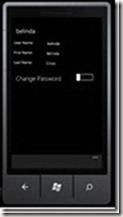 The user-panorama item performs basic user management tasks, including:
Viewing user account details
Enable or disable a user account
Change a user account password
Devices:
 Devices panorama item lets you:
View server-joined computer and Mac details.
View the backup status that every device last reported to the server.
Start or stop a backup for any computer or the server (from the contextual menu).
Media – Music , pictures and Video Panoramas


The Media panorama lets you discover and view streams of media elements that you stored on your server in the appropriate shared folders (such as Music, Video and Picture shares).
Music
MP3 non-Digital Rights Management-protected songs will be streamed directly from the server to your phone. Album art is also transported. Your library is searchable and can be organized in different views to help find what you want fast.
Pictures
With Pictures Panorama you can :
Discover all .png and .jpg images that are stored in the Pictures shared folder on the server. Subfolders are recognized.
Open a picture full-screen to view it on the phone.
Save a copy of the picture to the phone, using its original dimensions and resolution (to be viewed later in the built-in Pictures hub of any Windows Phone 7).
Take a picture with the phone’s camera and upload it to the server.
Upload any picture that is stored in the Pictures hub of the phone to the server.
Videos
The “Videos” feature allows you to discover and view videos that are stored on your server in the Videos shared folder.
Also there’s Live Tile Support

If you pin the application to the home screen of your Windows Phone 7, you will be able to see a variety of at-a-glance information without launching into the application. An opt-in using the settings menu is required.
The Windows Phone 7 application requires both a server sided add-in to be installed on the WHS 2011 Server, as well as Windows 7 Phone application downloadable via marketplace.
For further information, and access to the downloads to start testing today, please visit http://connect.microsoft.com/windowshomeserver. Please note this is a release candidate and as such is for testing purposes only.
(Source)


