Wednesday, April 28, 2010

Share your Photosynths on Facebook

The Photosynth team has announced a new and often requested feature : sharing your synths on facebook. So the Photosynth has joined the social Web. Now every synth viewing page has a "share to Facebook" button.

photosynthfacebook


photosynthfacebook1


For more details please check - Strut your synths on Facebook


Los Links and Traffic Jam – New Bing Ads

Check out some more bing ads released recently -

Los Links Episode Uno - Bing TV Commercial--

While Juan Carlos struggles with being lost in the links, a mysterious stranger with Bing takes Filomena to a hot movie.


Bing Search Overload Syndrome: Traffic Jam--

If finding answers in the real-world resulted in the same kind of unrelated and overwhelming information that most search engines provide you with, something as simple as planning your weekend would be way too much to handle. The decision engine, Bing, is here to prevent search overload syndrome and make sure that you find exactly what you're looking for.


Bing teams up with the Seattle Storm

The Storm and Bing announced last week that they have entered into a marquee partnership that will put the Microsoft decision engine's logo on the Storm's jerseys, both home white and away green, starting with the 2010 season.


When can we expect Bing’s logo displayed on any of the Indian Premier League team? Imagine Sachin Tendulkar or MS Dhoni displaying their jersey with the Bing logo. Bing are you listening ?

msdbing(A mockup photo- MS Dhoni with Bing logo)

If Bing wants to promote in India, then there’s no better way than associating with T-20 Cricket. Bing, associate with the IPL team for the 2011 season or with the Indian cricket team anytime.


Tuesday, April 27, 2010

Why Windows is called Windows ?

ButWhy

We use Windows and Word everyday but do you know why they are named so ? Word and Windows were named in 1983. Word was scheduled to be named Multitool Word.

Windows was codenamed ‘Interface Manager’ and other suggestion was Microsoft Desktop .

To know about this interesting story of how the name Word and Windows were reached, check out this latest episode of ‘But Why'?’ Its a small video -

WhyWindows

Video link - Windows is named Windows : But Why?


Sunday, April 25, 2010

Sachin Tendulkar Deep Zoom – Become a part of Sachin’s portrait

Check out the Sachin Tendulkar 'Deep Zoom', a user driven collation of images and photographs. And what’s more- You can be a part of Sachin's portrait. Just Upload your photo and once the count reaches 5000 photos, it’ll be part of Sachin’s Deep Zoom. Browse through the Deep Zoom and look for your photo.

Check the Sachin’s Deep Zoom and more details here - http://www.mumbaiindians.com/DeepZoom.aspx


SachinDZ


MIDZ

(hattip @baxiabhishek )


Windows Phone 7 – Office Hub and Emails, Events, Schedule Integration videos


WinPhone7

Check out these 2 videos of Windows Phone 7 demoing how Office Hub gives quick access to docs on SharePoint for dynamic document sharing, editing, and uploading.


And this video shows Windows Phone 7 features -  E-mail, events, and schedules Integration.


(Source : MobilityDigest )


Saturday, April 24, 2010

Engkoo – Learn English with dictionary vertical Search from Bing and Microsoft Research

Engkoo is a search engine for exploring and learning language. It is built primarily by mining translation knowledge from billions of web pages - using the Internet to catch language in motion. Currently Engkoo is built for Chinese users who are learning English; however the technology itself is language independent and can be extended in the future.


engkoo_120x120

engkoobing


engkoobingEN

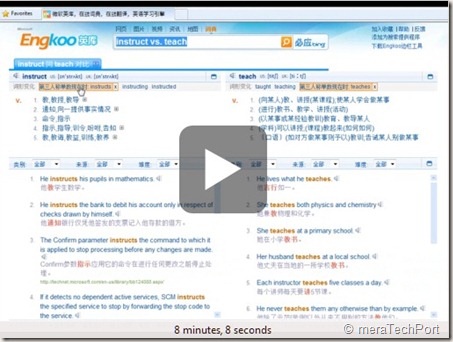
Matt Scott of Microsoft Research walks us through Engkoo: the new “dictionary” vertical search of Bing in China. What makes this English-Chinese assistance tool unique is that it unifies human translation mined from the web, machine translation, and a language learning experience, into one easy to use search and explore interface. By continuously discovering and processing high quality translation knowledge on the Internet, this technology can be used to close the ever expanding translation gap between English and Chinese.


EngkooCh9

Engkoo is a collaboration between Bing, MSN, and Microsoft Research – leveraging years of research in Natural Language Computing, Speech, Human Computer Interaction and Web Search & Mining. Because the technology is language independent, next steps include building on it for other language pairs in the future.


Watch the demo - Engkoo: English Learning Vertical Search from Bing and MS Research in China

Try it yourself:

www.engkoo.com 


See it on Bing and MSN China:

http://cn.bing.com and http://cn.msn.com


(Source : Channel9 and Microsoft Research )


Thursday, April 22, 2010

Microsoft Office 2010 is now on MSDN, TechNet

MSoffice2010

The wait is over… Office 2010 RTM can now be downloaded from MSDN, TechNet . I’m just starting to download them soon…

off2010PrMSDN

Visio 2010 and Project 2010 are also on MSDN now.


Here are the other availability dates-

Dates

Availability

22nd April Office 2010 will be made available via MSDN download
27th April Office 2010 will be made available to all Volume Licensed Customers who have Software Assurance
1st May This is when all volume license customers who don’t have software assurance can buy Office 2010
June 2010 General availability, this is when Office 2010 will be available to purchase from retail stores like Harvey Norman etc…


[FIX] - McAfee Update Causing Windows XP SP3 to Shut Down

There has been issue with a McAfee DAT file 5958- released Wednesday, April 21, 2010. Its causing stability issues on Windows XP client systems. The symptom is caused by a false-positive detection of the W32/wecorl.a virus on a core Windows file (svchost.exe). Once the file is quarantined by McAfee, the system may encounter one of the following symptoms:

· The computer shuts down when a DCOM error or a RPC error occurs

· The computer continues to run without network connectivity.

· The computer triggers a Bugcheck (Blue Screen).


McAfee DAT 5958 file is propagated to client machines that conduct automatic updates of definition files. McAfee updated the DAT file soon after the problem was identified with a new version that does not cause the problem. DAT 5958  file has been superseded by version 5959, which corrects the false positive detection. Additionally, McAfee has released an EXTRA.DAT file (Check the McAfee links given at the end) that can be used to suppress the false detection of the Svchost.exe process for customers who are running the 5958 DAT file.


Resolution

To manually repair a computer encounters this problem, follow these steps:

1.     Restart the computer in safe mode by pressing F8 before the Windows splash screen appears.

2.     Log on to the computer. Then, press CTRL+ALT+DEL, and then click Start Windows Task Manager.

3.     Select New Task (Run…) from the File menu.

4.     Type cmd.exe, and then press ENTER.

5.     Run the following command:

ren “%programfiles%\Common Files\McAfee\Engine\avvscan.dat” avvscan.old

Note This behavior removes McAfee virus definitions. Make sure that you update to the latest definitions (5959 DAT or newer) after you complete these steps to restore virus definitions.

6.     Run the following command:

copy %systemroot%\system32\dllcache\svchost.exe %systemroot%\system32\ and press ENTER

7.     Restart the computer.

Source :

Microsoft KB Article:

http://support.microsoft.com/kb/2025695


Please refer also to the following McAfee articles:

https://kc.mcafee.com/corporate/index?page=content&id=KB68780

https://kc.mcafee.com/corporate/index?page=content&id=KB51109


Windows XP Service Pack 3 (SP3) is the only operating system that is affected by this problem.


Got a Touch PC? Get the Touch Pack for Windows 7

The Microsoft Touch Pack for Windows 7 was first introduced last May as a series of 6 applications that are designed to showcase Windows Touch in Windows 7 and to help people learn touch gestures. It consists of 3 casual games, and 3 Microsoft Surface applications that have been created for Windows 7.

Until today, the Microsoft Touch Pack for Windows 7 was only available for OEMs to put on new Windows 7 PCs capable of Windows Touch. Due to feedback and requests from both partners and customers, Microsoft is releasing the Microsoft Touch Pack for Windows 7 for anyone with Windows Touch capable devices to download.


Download: Microsoft Touch Pack for Windows 7


What does Microsoft Touch Pack for Windows 7 contains ?

Microsoft Surface Globe

surface_globe

Microsoft Surface Collage

surface_collage


Microsoft Surface Lagoon

surface_lagoon


Microsoft Blackboard

MicrosoftBlackboard


Microsoft Rebound

MicrosoftRebound


Microsoft Garden Pond

MicrosoftGardenPond All above Images courtesy : The Windows Blog


This Touch Pack can not be run on PCs which are not touch enabled. They won’t even install on them.

TouchPackfailed

Will work only on touch enabled PCs or PCs with touch monitors. If you have a Windows 7 PC or a multitouch monitor that supports Windows Touch in Windows 7, the Touch Pack for Windows 7 is a good way for you to be able to truly test the multitouch capabilities of Windows 7.

For more details of these apps Please check - Introducing the Microsoft Touch Pack for Windows 7

Source: Microsoft Touch Pack for Windows 7 Now Available

Also check - 9 Touch Gestures in Windows 7 for Multi-touch Magic


Tuesday, April 20, 2010

New Silverlight 4 Client for facebook

Last week, Silverlight 4 was released. Along with its release, the beautiful Silverlight Client for Facebook has also been updated for Silverlight 4 . If you are using the older version, you’ll have to uninstall it first then install this.


SL4facebook1

This application brings together the many compelling platform capabilities of Silverlight 4 into a rich out-of-browser application in the familiar context of Facebook.  Enjoy the photos, feeds, events, friends’ walls, and inbox mail from your Facebook account in a visually stunning and user-friendly environment.

Note: This is a Silverlight 4 developer preview application.  When Silverlight 4 is finally released you may be required to uninstall and re-install the plugin.

Silverlight Features demonstrated:

  • Out-of-browser support
  • Hosting HTML content interactively
  • Local Device access (webcam)
  • Rich-Text control
  • Embedding alternative media content
  • Desktop notifications
  • COM integration (with Microsoft Outlook®) on the Windows platform
  • Right-click
  • Drag-n-drop
  • Window control
  • Animations

The above stated info taken from the ‘About’ button which also provides option to send feedback

So from the above given links, install Silverlight 4 first, then if you are using older ver. of the facebook Client, uninstall it and then install this updated ver. of Silverlight 4 Client for facebook.


Monday, April 19, 2010

Office 2010 RTM availability dates

MSoffice2010

It was announced over the weekend that Office 2010 had reached a key milestone of RTM. And everyone was eager about its availability dates. Here it is :


Dates

Availability

22nd April Office 2010 will be made available via MSDN download
27th April Office 2010 will be made available to all Volume Licensed Customers who have Software Assurance
1st May This is when all volume license customers who don’t have software assurance can buy Office 2010
June 2010 General availability, this is when Office 2010 will be available to purchase from retail stores like Harvey Norman etc…


Source: Office Backstage Blog


Friday, April 16, 2010

Free Microsoft Press ebook: Introducing Microsoft SQL Server 2008 R2

Introducing Microsoft SQL Server 2008 R2

Microsoft Press has published another free ebook:

Introducing Microsoft SQL Server 2008 R2, by Ross Mistry and Stacia Misner 

The book contains 10 chapters and 216 pages, like so:

PART I   Database Administration

CHAPTER 1   SQL Server 2008 R2 Editions and Enhancements 3
CHAPTER 2   Multi-Server Administration 21
CHAPTER 3   Data-Tier Applications 41
CHAPTER 4   High Availability and Virtualization Enhancements 63
CHAPTER 5   Consolidation and Monitoring 85

PART II   Business Intelligence Development

CHAPTER 6   Scalable Data Warehousing 109
CHAPTER 7   Master Data Services 125
CHAPTER 8   Complex Event Processing with StreamInsight 145
CHAPTER 9   Reporting Services Enhancements 165
CHAPTER 10   Self-Service Analysis with PowerPivot 189

You can download the ebook in XPS format here (17.8 MB) and in PDF format here (7.75 MB) .


For more details please check : Microsoft Press Blog

For more of such Free Ebooks , please check - http://vasudevg.blogspot.com/search/label/books


Click, click, fixed! Microsoft Fix it Online announced !

MSFixitOL7a

Microsoft Fix it Center makes getting support easier than ever because automatic troubleshooters solve the issues you have now and prevent new ones

As easy as "Click, click, fixed!"

MSFixitOL7

You can use any computer with Internet connection to get started with Fix it Center. Simply download the Fix it Center client and follow the on-screen instructions to complete the setup. You can install Fix it Center client on as many PCs you like.


MSFixitOL10


Check it out now - http://fixitcenter.support.microsoft.com/Portal


Sunday, April 11, 2010

Bing Toolbar –formerly called MSN Toolbar

The Bing toolbar provides easy access to entertainment, breaking news, videos and more. Search MSN headlines, receive MSNBC news alerts, and get the latest scores and game analysis from FOX Sports-all in your browser with the Bing toolbar.

  • Bing & decide, anytime - Make better, faster decision with Bing. With the Bing Toolbar you can search from anywhere without leaving the site you are on.
  • Surf with confidence - Be notified of threats before they become disasters. The new Safety Center helps keep you aware of your computer's level of online safety and giving you a quick visual indicator of its status.
  • Instant Hotmail access - New Windows Live integration makes it simple to sign in and preview your Hotmail, plus get notified the instant mail is received.
  • MSN Channels - View content from a variety of MSN channels directly from the Bing toolbar, regardless of what website you're currently browsing.
  • Customize Options - Choose the MSN channels you want to see, manage your Safety Center settings, and customize your Bing toolbar by changing the color scheme and the decorative theme.
  • Search History - Search faster by saving and keeping track of search terms you've entered previously.
  • Automatic Form Fill - Manage and enter your personal information quicker into online forms so that you don't have to type it over and over again.


Some screenshots of the BingBar


bingbar


bingbar4z


bingbar5z


bingbar6z
The Bing toolbar uses Microsoft Silverlight technology to provide you with access to Bing and MSN content. If you don't already have Microsoft Silverlight installed on your computer, it will be automatically installed for you-for free.

Surf with confidence using the new integrated Safety Center and customize toolbar settings and Bing options. This was earlier known by the name MSN toolbar.

  • Supported Operating Systems: Windows 7; Windows Vista; Windows XP Service Pack 2
  • Windows Internet Explorer 6 or later; Firefox 3.0 or later

You can check what you can do with Bing bar at http://www.discoverbingtoolbar.com/

You can get the toolbar from : here


Friday, April 09, 2010

‘Bing’s Best 2’ Theme Pack from Bing Team

Bing’s first Theme Pack was so popular that Bing decided to release Bing’s Best 2 Theme Pack – a new collection of desktop backgrounds for Windows 7.

“From the jagged peaks of the Andes in South America to Arizona's Vermilion Cliffs, this sequel to the popular Bing's Best theme takes your Windows 7 desktop on a trip around the world.”

Or you can get it from Personalize from your PC > Get more themes online

BingsBest2z

In this collection there are 21 images which were featured on Bing.com Homepage. (Size 19.5MB).

To get this and the earlier released “Bing’s Best” theme pack and other, go here


Thursday, April 08, 2010

The Archivist – Save and export twitter searches

archivist_lockup labsRegularTheArchivist The Archivist, a Windows application from MIX online Labs runs on your local system and allows you to archive tweets for later data-mining and analysis for a given search. The Archivist allows you to start a search and will get as many results as it can on the initial search.  If you leave The Archivist open, it will update with the latest results every 10 minutes.  You can also close The Archivist and open it later. The Archivist will save the tweets and get all the tweets it can since that search.

The Archivist will display a chart that shows the number of tweets per day for a given search, so that you can quickly assess traffic for a given search.


archvist1


archvist2 


archvist3


logo_home For more comprehensive data analysis, The Archivist lets you export Tweets to Excel. It also natively saves tweets in an XML format, which could also be parsed  for deeper data analysis.

The key aspect to The Archivist is using Twitter Search. To learn more about creating Twitter Searches, read their documentation on search operators.

The Archivist was used for digging up, analyzing some interesting stats during MIX10.

For more details , system requirements and installing The Archivist, please check - http://www.flotzam.com/archivist/


Wednesday, April 07, 2010

Glo - a Premium Online Lifestyle Destination from Microsoft launched

glo_logo_web


Today Microsoft, BermanBraun and Hachette Filipacchi Media U.S. launched Glo www.Glo.com , a new lifestyle site that focuses on fashion, beauty, lifestyle and relationships content that combines the imagery and feel of a magazine, with the appeal of a dynamic site such as WONDERWALL.


gloHPage

Visit the site www.Glo.com  to experience its unique vibrant, colorful design. I also liked its wonderful logo.

Glo utilizes a unique vertical scrolling method, a feature that is exclusive to the site as an online lifestyle destination. Glo presents its topics daily with a fresh and in-the-know perspective, filled with glossy, full-screen photo galleries, videos, and unique features

For more details check Microsoft Presspass and visit Glo


Monday, April 05, 2010

HP's Slate Device: A Full Mobile Experience

Check out the NEW! HP slate video - a full featured device, just as mobile as you are.


Read more about it here:  HP’s Slate Device Delivers a Holistic Mobile Experience


Saturday, April 03, 2010

Microsoft drops ‘Series’ from Windows Phone 7 name

It was expected, the name was too longish…. Recently announced Phones from Microsoft were named as Windows Phone 7 Series. And many of us had raised this longish name issue. And yesterday Microsoft has dropped ‘Series’ part from its name. Now its Windows Phone 7. Its already Sounding better ! Actually in many of my earlier posts, I have been tagging them already as Windows Phone 7.

Yesterday the official Windows Phone twitter channel tweeted about it


WinPho7


Its good Microsoft is taking the Windows Phone now more on the lines of the Windows OS. Even in the Hardware Spec, they have mentioned these Phones to have a ‘Start’ button etc.


Third Bing Ad on UK TV

The third of the three UK TV ads is out. Each ad features someone suffering from information overload, with Bing offered as the cure.


Here’s is the second in the series -


In my earlier post Bing launches ads in UK TV  had posted the first Ad.


Friday, April 02, 2010

Buy Office 2007 today and get Office 2010 FREE

off2k7freeoff


Check out this offer at Microsoft India store where you buy Office 2007 now, and you’ll get Office 2010 FREE* when released.

* This offer is valid till 30th Sept 2010, Terms and conditions apply .

*Office 2010 downloads will be accessible at general availability. Discs can be ordered for a fee. Eligible Office 2007 software must be purchased from Microsoft or an authorized reseller and activated between March 5, 2010 and September 30, 2010. Request your Office 2010 product by October 31, 2010 using your activated Office 2007 Product Key and dated sales receipt. You will receive an e-mail message from us letting you know when your Office 2010 product is available. One Office 2010 product per qualifying Office 2007 suite or stand-alone product purchase, limit 25 per person. See www.office.com/techg for complete details.

Check http://www.microsoftstore.co.in/

Check for availability of this offer in your country too.


Thursday, April 01, 2010

Why Internet Explorer 9 will not run on Windows XP ?

As you know Internet Explorer9 Platform Preview for developers was announced and released during the MIX10. Also you might be knowing that its built from the ground up and it will not support Windows XP and will run on OS as Windows Vista onwards.

Many are asking why no support for Windows XP. But people forget that ever popular XP has been there since 2001. So its not as modern and modern browsers requires modern OS.

As the IE9 FAQ says :

Q.   Does Platform Preview run on Windows XP?
A.   No. Internet Explorer 9’s GPU-powered graphics take advantage of new technologies available in Windows 7 and back-ported only to Windows Vista. These technologies depend on advancements in the display driver model introduced first in Windows Vista.

Now hear it from the horse’s mouth- Dean Hachamovitch, General Manager of the Internet Explorer team answers all IE9 related queries at “Channel 9 Live at MIX10: Dean Hachamovitch on IE9”

The below video excerpt just shows the IE9 and Windows XP query ,


For the full video, where Dean along with Giorgio Sardo, Technical Evangelist for Internet Explorer (the guy who built the cool IE9 platform demo app showcasing the power of HTML5 running on a GPU) answers IE9 queries, please check - Channel 9 Live at MIX10: Dean Hachamovitch on IE9


Youtube introduces Text only mode -TEXTp on April Fools day

logo_april_fools-vfl157034

Youtube today introduced a new way to experience Youtube videos- text only mode or TEXTp. This mode replaces the images in the video with a series of letters and numbers. And they have chosen 1st April , April Fools Day to introduce this. Today, even the Youtube logo is Text based.

Youtube says - “For every person who selects TEXTp and keeps it on while you watch a video, you save YouTube $1 a second, resulting in potentially billions of dollars of savings for us. So if you care about YouTube, you’ll use TEXTp today.”

Thus TEXTp saves bandwidth and money for Youtube.

You can select “TEXTp” from the pulldown menu or you can also just append &textp=fool to most video URLs to view the video in TEXTp mode.   (As its introduced on April Fools Day)

 youtubeopt4

The regular Youtube video


youtubelogotxtonly3z

Youtube video in TEXTp mode-


youtubelogotxtonly4z


Try it out, just for fun ! (I think this fun option only available on 1st April, One of the best April Fool pranks among many)


Tweet