Showing posts with label Windows 10 Insider Preview. Show all posts

Saturday, December 12, 2020

Windows Insiders gets the option to receive builds from the RS_PRERELEASE branch

In the earlier post about the Windows 10 Insider Preview Build 20246 release, we had seen starting with this build 20246, the name of the branch from which builds are released was changed to FE_RELEASE. Windows Insiders in Dev channel were getting builds from this branch.

And now Microsoft has released Windows 10 Insider Preview Build 20277 (FE_RELEASE) to Windows Insiders in the Dev Channel. Starting from this release, Windows Insiders in the Dev channel will also be getting the option to receive builds from the RS_PRERELEASE branch. These builds will be offered as an optional update in Windows Update. Insiders will have to go and choose to install the currently offered RS_PRERELEASE build. Once they do, they will continue to receive RS_PRERELEASE builds going forward.

So with the build 20277(FE_RELEASE), Microsoft  has also released Windows 10 Insider Preview Build 21277 (RS_PRERELEASE) to Windows Insiders in the Dev Channel. As said, it is offered as an optional update.

This optional experience for receiving RS_PRERELEASE builds is just temporary. Microsoft is planning to move all Insiders in the Dev Channel back to receiving builds from RS_PRERELEASE sometime after the holidays. Insiders who choose to stay put will continue to automatically get builds from the FE_RELEASE till all Insiders in the Dev channel will be moved to RS_PRERELEASE as said after the Holidays.

Please note that once an Insider chooses to install a RS_PRERELEASE build, they cannot move back to receiving FE_RELEASE builds as their device will be on a higher build number. Insiders will still have the option to roll back to a previous version for up to 10 days or until you take another build. 

(source)

Wednesday, November 25, 2020

Mail and Calendar gets new themes

The Mail and Calendar apps for Windows 10 gets fresh new themes.   

12 new themes in the Mail and Calendar apps have been added. This also includes 4 seasonal illustrations. These themes also come with a matching accent color and will bring a lively new look to the apps.

To try out the new themes, select Settings  > Personalization. (same for both Mail as well as Calendar)


Note: This feature is currently available only to Windows Insiders, but will coming soon for everybody.

Saturday, October 31, 2020

Windows 10 Insider Preview Build 20246 released

Windows 10 Insider Preview Build 20246 has been released on 29th Oct. to Windows Insiders in the Dev Channel. This post is just to highlight the change of branch from which the builds are released.

FE_RELEASE branch: Starting with this build, the name of the branch from which builds are released has changed to FE_RELEASE. As a result of the switch to the FE_RELEASE branch, some features like the updated emoji picker, redesigned touch keyboard, voice typing, theme-aware splash screens, and others have been removed temporarily.These features will be brought back to Insiders soon in the future release. Also builds from the FE_RELEASE branch are not matched to a specific Windows 10 release.

Other updates:

  • The preview experience of the Calendar app will be removed in an upcoming update and return to its classic look and feel. Windows Insiders will get a pop-up notifying them of the changes to the preview experience.
  • Automatic Linux distro installation has been added to the wsl.exe --install command! 
    Users who wish to install the Windows Subsystem for Linux quickly can just type in wsl.exe –install into the command line and then will have a fully set up WSL instance ready to go, including their Linux distro of choice.
Apart from updates, many issues have been fixed.For a complete list please check the source.

 6th Anniversary badge: For celebrating Windows Insider Program's 6th anniversary, Microsoft has released a special anniversary badge to all Windows Insiders. 

To check if you have received or not, just goto Feedback hub> achievements .

Tuesday, October 27, 2020

Windows 10 Emoji Picker gets an update (Build 20206)

Microsoft has been evolving and improving the Emoji Picker over the years. Emoji picker added more emoji, added support for many other languages, kaomoji and symbols.


Now with the release of Windows 10 Insider Preview Build 20206, emoji picker has been revamped with more new additions. 

  • Updated Design: Emoji picker gets a new acrylic background thus making it more aligned with the Fluent Design principles.
  • Emoji Search: Search has been improved by adding an inline search box in supported languages.
  • Animated GIF support: Now one can quickly add animated GIFs too.And the emoji search also supports these animated GIFs. Selection of animated GIFs will be continuously updated based on current trends and hashtags.
    NOTE: In order to insert an animated GIF when typing, the text field needs to support it. Animated GIF search requires an internet connection
  • Input and clipboard history brought together: Input and clipboard history are brought together into a single experience.One can still press WIN + V to go straight to clipboard history, but now you can also access it by switching to the “Clipboard” category after pressing WIN + [.] or WIN + [;].

 This feature is rolling out to a subset of Insiders in the Dev Channel at first and will be gradually rolled out to everyone in the Dev Channel.


Friday, April 10, 2020

Access your Linux files from File Explorer (Build 19603)

Windows users with WSL (Windows Subsystem for Linux) installed, already had the ability to access their Linux files. With Windows 10 Insider Preview Build 19603, it has been much more easier.
Build 19603 now exposes a "Linux" node in File Explorer so that you can access your installed WSL distros file system.
Now there's File Explorer integration in the WSL. Now you can access Linux files from your left-hand navigation pan in File Explorer. One can see the Linux Tux icon in the File Explorer.

Selecting the Linux icon will provide a view of all your distros and selecting those will place you in the Linux root file system for that distro.


Wednesday, January 29, 2020

Windows Calculator adds Graphing mode (Build 19546)

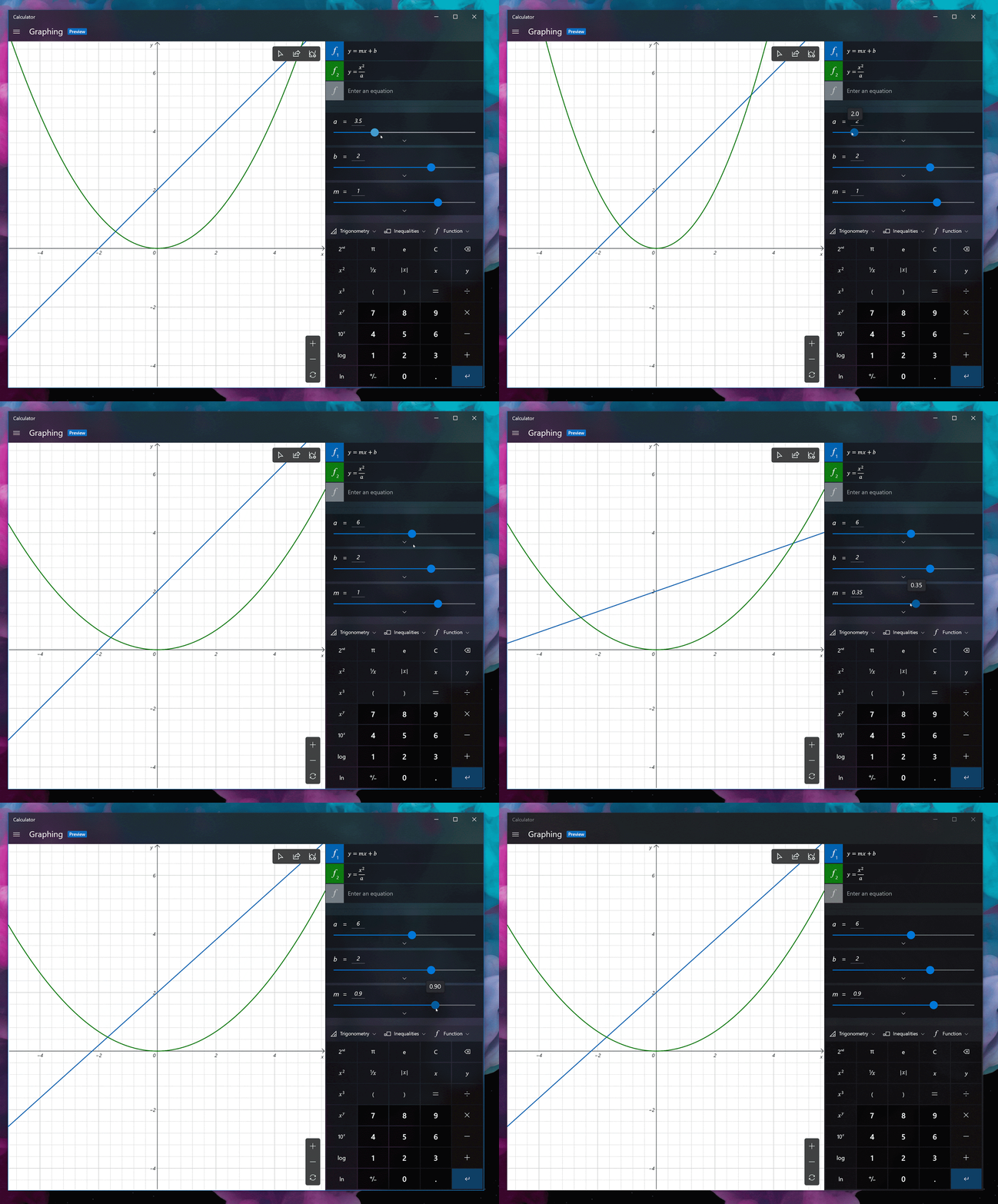
Windows 10 Insider Preview Build 19546 has introduced Graphing mode in Windows Calculator. Adding support for graphing was one of the top feature requests in Feedback Hub. Graphing capabilities is essential for students who are beginning to explore linear algebra. Graphing mode will also help students to learn mathematics by improving their conceptual understanding and attitudes towards math.


Some of the features of Graphing mode:
Plot one or more equations on the graph: One can compare plots against each other and see interactions between the lines by entering multiple equations.One can also customize the line style and graph viewing window to suit their needs.

Add equations with variables: If you enter an equation with a secondary variable (e.g., “y = mx + b”), you’ll be able to easily manipulate those variables so that you can quickly understand how changes to the equation affect the graph.


 Graph analysis: Trace plots with your mouse or keyboard to better understand the relationship between variables in the equation on the graph.

One can check the Graphing mode from the Calculator's option. Its still in Preview. You have to update to the latest version of Windows Calculator from the Microsoft Store.
Developers can check out this project on GitHub.
(Source)